
Cloned HDD - getting 'This is not a genuine copy' message - HELP

ZaphodB

New member
Power User
VIP
Local time
12:04 PM
Messages
203
Windows 7 SP1 up to date.

This OS was supplied pre-installed by the manufacturer when the pc was purchased in Jan 2015.

It is a genuine, valid and activated copy.

It is sitting on a 2TB hard disk.

Using Acronis True Image 2020, I cloned this onto a larger 5TB hard disk.

Removed old drive from system, re-booted with new larger hard disk and got the following:

Black screen. In the bottom right-hand corner

Windows 7
Build 7601
This copy of Windows is not genuine

What do I do? It is a genuine copy of Windows and has been successfully cloned before (on the same machine) from a 1TB hard disk.

Is there any way round this?

Never seen this black screen before and it appears that I can't do anything - well, I can open Task Manager but that's about all.

Please help.

Thanks in advance,

Zaph
 

My Computer My Computer

At a glance

Windows 7 Home Premium SP1 64-bit (now lookin...Core2 Duo T5750 2GHz/Core2 Duo T5800 2GHz/Cor...4Gb / 4Gb / 8GbIntel 965 Express/ATi Mob Radeon HD 3400/AMD ...
Computer type
Laptop
Computer Manufacturer/Model Number
DELL Inspiron 1525 / Sony VAIO VGN FW21L / Zoostorm 7877-0095
OS
Windows 7 Home Premium SP1 64-bit (now looking at Linux Mint!)
CPU
Core2 Duo T5750 2GHz/Core2 Duo T5800 2GHz/Core i5 3300 3.1GH
Motherboard
DELL 0U990C / "SONY Corp VAIO" (??) / GA-H61M-DS2 DVI
Memory
4Gb / 4Gb / 8Gb
Graphics Card(s)
Intel 965 Express/ATi Mob Radeon HD 3400/AMD Radeon R7 200
Hard Drives
WD 750Gb Black (WD7500BPKT) - DELL
WD 1Tb Black (WD10JPLX) - SONY
ST 2Tb Barracuda (2000DM001) - Zoostorm
Internet Speed
VM Fibre 100 Mbps
Antivirus
Kaspersky IS 2019 / Kaspersky IS 2019 / Kaspersky IS 2019
Browser
Chrome 76.0.3809 / Chrome 79.0.3945 / Chrome 76.0.3809
Put old disk back in backup activation tokens then restore to new disk 3 Tools to Backup and Restore Windows 7 and Vista OEM Activation License • Raymond.CC

Many thanks samuria.

The link is helpful but I'm not sure how it applies im ny case as the webpages refer to a clean install of Windows 7.

I have run the ABR tool and now have the OEM license (Raymond is correct when he says it doesn't match the CoA sticker on the outside of the machine) in the text file backup-key.txt and the activation certificate has been saved to the file backup-cert/xrm-ms

HOWEVER, there are 2 issues.

First is that the new drive is 5TB and as I understand it, Windows can only 'see' up to 2TB unless the HDD is using the GPT partitioning scheme (currently, mine is set to MBR).

Second, when the new HDD is installed in place of the old drive and boots, all I get is a black screen as mentioned in post #1 this thread. Nobody has told me how I can get past this to access things like USB flash drives in order to reinstall the relevant keys.

Acronis offered a choice between a partitioning the drive using MBR or the GPT option, so my first stab at sorting this out is to try and clone the drove again, this time using the GPT partitioning option and see where I get.

Would using the Advanced Tokens Manager be a better bet?

Art
 

My Computer My Computer

At a glance

Windows 7 Home Premium SP1 64-bit (now lookin...Core2 Duo T5750 2GHz/Core2 Duo T5800 2GHz/Cor...4Gb / 4Gb / 8GbIntel 965 Express/ATi Mob Radeon HD 3400/AMD ...
Computer type
Laptop
Computer Manufacturer/Model Number
DELL Inspiron 1525 / Sony VAIO VGN FW21L / Zoostorm 7877-0095
OS
Windows 7 Home Premium SP1 64-bit (now looking at Linux Mint!)
CPU
Core2 Duo T5750 2GHz/Core2 Duo T5800 2GHz/Core i5 3300 3.1GH
Motherboard
DELL 0U990C / "SONY Corp VAIO" (??) / GA-H61M-DS2 DVI
Memory
4Gb / 4Gb / 8Gb
Graphics Card(s)
Intel 965 Express/ATi Mob Radeon HD 3400/AMD Radeon R7 200
Hard Drives
WD 750Gb Black (WD7500BPKT) - DELL
WD 1Tb Black (WD10JPLX) - SONY
ST 2Tb Barracuda (2000DM001) - Zoostorm
Internet Speed
VM Fibre 100 Mbps
Antivirus
Kaspersky IS 2019 / Kaspersky IS 2019 / Kaspersky IS 2019
Browser
Chrome 76.0.3809 / Chrome 79.0.3945 / Chrome 76.0.3809
Okay - so an update.

This time - ostensibly doing exactly the same thing - the machine boots fine to the desktop with the new 5TB disk installed instead of the old 2TB disk. Indeed, I am using the 5TB disk now whilst writing this!

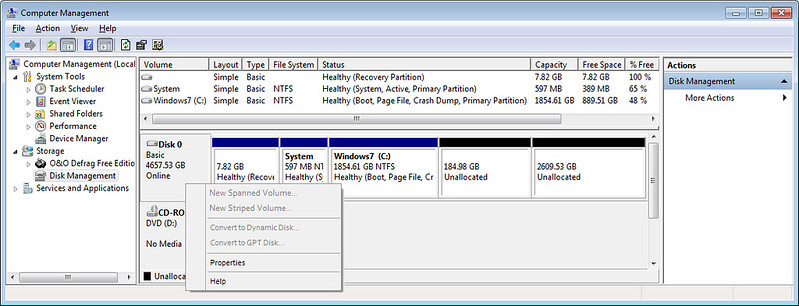
The disk partitions look as follows:


However, to access the rest of the 5TB disk, the partition scheme needs changing from MBR (which has a 2TB limitation) to GPT - yet the 'Convert to GPT' option is greyed out.

Any ideas?

I haven't yet run diskmgmt.msc as administrator, that's my next step. Trying that now.

Nope - still greyed out.

Next thing to check - whether the BIOS mode is UFEI. Trying that now.

Zaph
 

My Computer My Computer

At a glance

Windows 7 Home Premium SP1 64-bit (now lookin...Core2 Duo T5750 2GHz/Core2 Duo T5800 2GHz/Cor...4Gb / 4Gb / 8GbIntel 965 Express/ATi Mob Radeon HD 3400/AMD ...
Computer type
Laptop
Computer Manufacturer/Model Number
DELL Inspiron 1525 / Sony VAIO VGN FW21L / Zoostorm 7877-0095
OS
Windows 7 Home Premium SP1 64-bit (now looking at Linux Mint!)
CPU
Core2 Duo T5750 2GHz/Core2 Duo T5800 2GHz/Core i5 3300 3.1GH
Motherboard
DELL 0U990C / "SONY Corp VAIO" (??) / GA-H61M-DS2 DVI
Memory
4Gb / 4Gb / 8Gb
Graphics Card(s)
Intel 965 Express/ATi Mob Radeon HD 3400/AMD Radeon R7 200
Hard Drives
WD 750Gb Black (WD7500BPKT) - DELL
WD 1Tb Black (WD10JPLX) - SONY
ST 2Tb Barracuda (2000DM001) - Zoostorm
Internet Speed
VM Fibre 100 Mbps
Antivirus
Kaspersky IS 2019 / Kaspersky IS 2019 / Kaspersky IS 2019
Browser
Chrome 76.0.3809 / Chrome 79.0.3945 / Chrome 76.0.3809
I wouldnt have one massive partition if it has problems you loose the lot if you split it you have better chance
 

My Computer My Computer

At a glance

win 8 32 bit
Computer type
PC/Desktop
OS
win 8 32 bit
You will need 3rd party software. Aomei part assist can do it - needs the pro version.

Diskgenius free can do the conversion, but you will need to create the esp and msr partitions manually.

It will have to be done from outside of that installation. Either from another installation, or from winpe.

Then adjust bios. It might be your bios has a "both" setting.


AOMEI PART ASSIST PRO


HOW TO CONVERT TO GPT WITH DISKGENIUS
 

My Computers My Computers

  • At a glance

    7 X64i5 84002x8gb 3200mhz
    Computer type
    PC/Desktop
    OS
    7 X64
    CPU
    i5 8400
    Motherboard
    gigabyte b365m ds3h
    Memory
    2x8gb 3200mhz
    Hard Drives
    various
    PSU
    pure power 11 400w cm
    Case
    Coolermaster
    Cooling
    cryorig m9i
  • At a glance

    7x64g54008gb ddr4 2400
    Computer type
    PC/Desktop
    OS
    7x64
    CPU
    g5400
    Motherboard
    ga b365m ds3h
    Memory
    8gb ddr4 2400
    PSU
    xfx pro 450w
You will need 3rd party software. Aomei part assist can do it - needs the pro version.

Diskgenius free can do the conversion, but you will need to create the esp and msr partitions manually.

It will have to be done from outside of that installation. Either from another installation, or from winpe.

Then adjust bios. It might be your bios has a "both" setting.

AOMEI PART ASSIST PRO

HOW TO CONVERT TO GPT WITH DISKGENIUS

Thanks for the post SIW2 but that went straight over my head. What are the esp and msr partitions?

Winpe is a version of Windows on a bootable USB flash memory stick - right?

I don't understand what you mean by "It might be your bios has a "both" setting".

Zaph
 

My Computer My Computer

At a glance

Windows 7 Home Premium SP1 64-bit (now lookin...Core2 Duo T5750 2GHz/Core2 Duo T5800 2GHz/Cor...4Gb / 4Gb / 8GbIntel 965 Express/ATi Mob Radeon HD 3400/AMD ...
Computer type
Laptop
Computer Manufacturer/Model Number
DELL Inspiron 1525 / Sony VAIO VGN FW21L / Zoostorm 7877-0095
OS
Windows 7 Home Premium SP1 64-bit (now looking at Linux Mint!)
CPU
Core2 Duo T5750 2GHz/Core2 Duo T5800 2GHz/Core i5 3300 3.1GH
Motherboard
DELL 0U990C / "SONY Corp VAIO" (??) / GA-H61M-DS2 DVI
Memory
4Gb / 4Gb / 8Gb
Graphics Card(s)
Intel 965 Express/ATi Mob Radeon HD 3400/AMD Radeon R7 200
Hard Drives
WD 750Gb Black (WD7500BPKT) - DELL
WD 1Tb Black (WD10JPLX) - SONY
ST 2Tb Barracuda (2000DM001) - Zoostorm
Internet Speed
VM Fibre 100 Mbps
Antivirus
Kaspersky IS 2019 / Kaspersky IS 2019 / Kaspersky IS 2019
Browser
Chrome 76.0.3809 / Chrome 79.0.3945 / Chrome 76.0.3809
What are the esp and msr partitions?

The esp is the system partition needed for efi boot. The msr is a small additional partition microsoft recommends but is not required.

Winpe is a version of Windows on a bootable USB flash memory stick - right?

That's close enough.


Next thing to check - whether the BIOS mode is UFEI. Trying that now.

Zaph

It might be your bios has a "both" setting.
 

My Computers My Computers

  • At a glance

    7 X64i5 84002x8gb 3200mhz
    Computer type
    PC/Desktop
    OS
    7 X64
    CPU
    i5 8400
    Motherboard
    gigabyte b365m ds3h
    Memory
    2x8gb 3200mhz
    Hard Drives
    various
    PSU
    pure power 11 400w cm
    Case
    Coolermaster
    Cooling
    cryorig m9i
  • At a glance

    7x64g54008gb ddr4 2400
    Computer type
    PC/Desktop
    OS
    7x64
    CPU
    g5400
    Motherboard
    ga b365m ds3h
    Memory
    8gb ddr4 2400
    PSU
    xfx pro 450w
Hi SIW2

Found this explanation. Kind of what I meant - a 'slimmed down' version of Windows

Windows Preinstallation Environment (Windows PE) is a lightweight operating system used to undertake a limited set of tasks such as troubleshooting a Windows OS when it’s offline, performing recovery options, and installing a Windows OS.

Windows PE was aimed at replacing MS-DOS booting with ready-to-boot environments available instantly in CDs, flash drives, and other external storage devices.

Just looked at the lapop BIOS and it doesn't have UFEI (not surprising really as it is a 10 year old laptop).

Pretty sure the desktop BIOS does have UFEI. Will check later.

Zaph
 

My Computer My Computer

At a glance

Windows 7 Home Premium SP1 64-bit (now lookin...Core2 Duo T5750 2GHz/Core2 Duo T5800 2GHz/Cor...4Gb / 4Gb / 8GbIntel 965 Express/ATi Mob Radeon HD 3400/AMD ...
Computer type
Laptop
Computer Manufacturer/Model Number
DELL Inspiron 1525 / Sony VAIO VGN FW21L / Zoostorm 7877-0095
OS
Windows 7 Home Premium SP1 64-bit (now looking at Linux Mint!)
CPU
Core2 Duo T5750 2GHz/Core2 Duo T5800 2GHz/Core i5 3300 3.1GH
Motherboard
DELL 0U990C / "SONY Corp VAIO" (??) / GA-H61M-DS2 DVI
Memory
4Gb / 4Gb / 8Gb
Graphics Card(s)
Intel 965 Express/ATi Mob Radeon HD 3400/AMD Radeon R7 200
Hard Drives
WD 750Gb Black (WD7500BPKT) - DELL
WD 1Tb Black (WD10JPLX) - SONY
ST 2Tb Barracuda (2000DM001) - Zoostorm
Internet Speed
VM Fibre 100 Mbps
Antivirus
Kaspersky IS 2019 / Kaspersky IS 2019 / Kaspersky IS 2019
Browser
Chrome 76.0.3809 / Chrome 79.0.3945 / Chrome 76.0.3809
Hi ,

you may find a good tutorial here : Convert MBR to GPT
it applies to Win10 , but the process is the same for Win7

If you're looking for infos regarding how are booting WindowsNT6.0 (& above) on GPT drive in UEFI mode and MBR drive in legacy BIOS mode ; have a look here : Windows NT 6 boot process (warning , it's deeply technical)

You may also be aware of having a 'System Reserved' and its workarounds : What 'boot' & system volumes are ? (essential knowledge)
and how to get rid of the
'System Reserved' partion,safely (not like there : sevenforum tutorial )

there are also others tools to boot on GPT drive in Legacy BIOS mode , but these are highly experimental and may refer to what's called 'hybrid partitioning'

If you are looking for the genuine OEM tool to activate your PC : Windows 7 OEM – Applying OEM System Locked Preinstallation Activation , this works offline. You may check your ACPI tables for SLIC 2.1 with this tool FirmwareTablesView v1.01 , to be sure that you can use the OEM tool . you still have to know which Win7 was installed (HOME, PRO, ULTIMATE ..)


My Computer My Computer

At a glance

WinXP x86 Pro - Win7 Ultimate x86 / Win10 Pro...Dual Core T5500 / i7 4810MQ4GB / 24GBIntel 945ME / intel HD 4600 - NVIDIA Quadro K...
Computer type
Laptop
Computer Manufacturer/Model Number
Dell Inspiron 9400 / Precision M4800
OS
WinXP x86 Pro - Win7 Ultimate x86 / Win10 Pro x64
CPU
Dual Core T5500 / i7 4810MQ
Memory
4GB / 24GB
Graphics Card(s)
Intel 945ME / intel HD 4600 - NVIDIA Quadro K1100M
Monitor(s) Displays
Iiyama prolite 22'' - 27''
I wouldnt have one massive partition if it has problems you loose the lot if you split it you have better chance
+1! I too recommend having a separate data paritition, much less possibility of of data loss if OS craters and a restore or rebuild or reinstall is called for.
 

My Computer My Computer

At a glance

Windows 7 Professional 64-bitDesktop i5; Acers i5 & i7desktop 16GB; 1 Acer 8GB & 1 Acer 16GB
Computer type
PC/Desktop
Computer Manufacturer/Model Number
Antec desktop; Acer Aspire laptops
OS
Windows 7 Professional 64-bit
CPU
Desktop i5; Acers i5 & i7
Memory
desktop 16GB; 1 Acer 8GB & 1 Acer 16GB
Hard Drives
1TB split into 2 equal partitions [OS and data] usable by RJS
Internet Speed
AT&T DSL
Browser
FF, GChrome, msIE
Other Info
Windows 7 Firewall, Emsisoft AM/AV, MSE [scan-only], SpywareBlaster, Ruiware/BillP combine
Hi ,

you may find a good tutorial here : Convert MBR to GPT
it applies to Win10 , but the process is the same for Win7

If you're looking for infos regarding how are booting WindowsNT6.0 (& above) on GPT drive in UEFI mode and MBR drive in legacy BIOS mode ; have a look here : Windows NT 6 boot process (warning , it's deeply technical)

You may also be aware of having a 'System Reserved' and its workarounds : What 'boot' & system volumes are ? (essential knowledge)
and how to get rid of the
'System Reserved' partion,safely (not like there : sevenforum tutorial )

there are also others tools to boot on GPT drive in Legacy BIOS mode , but these are highly experimental and may refer to what's called 'hybrid partitioning'

If you are looking for the genuine OEM tool to activate your PC : Windows 7 OEM – Applying OEM System Locked Preinstallation Activation , this works offline. You may check your ACPI tables for SLIC 2.1 with this tool FirmwareTablesView v1.01 , to be sure that you can use the OEM tool . you still have to know which Win7 was installed (HOME, PRO, ULTIMATE ..)

That's fantastic info - many thanks.

I have run a tool (can't remember the name - somthing like APT - from raymond.cc) that has recovered the OEM licence and can be used to re-activate windows on the same machine but on a different hard disk (my scenario).

Zaph
 

My Computer My Computer

At a glance

Windows 7 Home Premium SP1 64-bit (now lookin...Core2 Duo T5750 2GHz/Core2 Duo T5800 2GHz/Cor...4Gb / 4Gb / 8GbIntel 965 Express/ATi Mob Radeon HD 3400/AMD ...
Computer type
Laptop
Computer Manufacturer/Model Number
DELL Inspiron 1525 / Sony VAIO VGN FW21L / Zoostorm 7877-0095
OS
Windows 7 Home Premium SP1 64-bit (now looking at Linux Mint!)
CPU
Core2 Duo T5750 2GHz/Core2 Duo T5800 2GHz/Core i5 3300 3.1GH
Motherboard
DELL 0U990C / "SONY Corp VAIO" (??) / GA-H61M-DS2 DVI
Memory
4Gb / 4Gb / 8Gb
Graphics Card(s)
Intel 965 Express/ATi Mob Radeon HD 3400/AMD Radeon R7 200
Hard Drives
WD 750Gb Black (WD7500BPKT) - DELL
WD 1Tb Black (WD10JPLX) - SONY
ST 2Tb Barracuda (2000DM001) - Zoostorm
Internet Speed
VM Fibre 100 Mbps
Antivirus
Kaspersky IS 2019 / Kaspersky IS 2019 / Kaspersky IS 2019
Browser
Chrome 76.0.3809 / Chrome 79.0.3945 / Chrome 76.0.3809
You're welcome

beware with advices that lead to use 'RWEverything'. This tool infects your UEFI in NvRAM.

Be sure of what really do software when they recover your product key with some software. Some had surprises :sarc: as many tools do not provide any relevant information.
 

My Computer My Computer

At a glance

WinXP x86 Pro - Win7 Ultimate x86 / Win10 Pro...Dual Core T5500 / i7 4810MQ4GB / 24GBIntel 945ME / intel HD 4600 - NVIDIA Quadro K...
Computer type
Laptop
Computer Manufacturer/Model Number
Dell Inspiron 9400 / Precision M4800
OS
WinXP x86 Pro - Win7 Ultimate x86 / Win10 Pro x64
CPU
Dual Core T5500 / i7 4810MQ
Memory
4GB / 24GB
Graphics Card(s)
Intel 945ME / intel HD 4600 - NVIDIA Quadro K1100M
Monitor(s) Displays
Iiyama prolite 22'' - 27''
Back
Top