Solved Cloned HP_Recovery partition wont boot

NeilPaisnel

New member
Local time
5:36 PM
Messages
63
OK, this time I am going to cut this really short..no explanations as to why i am doing this. I just typed a detailed post, clicked Submit New Thread..and it said i was not logged in and I lost the lots.

I want to replace the original HDD with another
I Cloned the original HDD; Cloned the 3 partitions (System/HP Recovery, HP Tools) and created a blank Win partition for HP _Recovery to restore too.

I did this by using a Win PE Live boot USB and ImageX to create wim files, then ImageX again to Apply the wim images to the new HDD.

Cant create HP recovery CD's from within Win 7..the 4530 does not ship with the Recovery creation software.


I used these instructions' here: Need help with HP recovery partition on new hard drive - Systems

Trouble is, when I get to rebooting with new HDD and hitting F11 either F11 does to appear ..or if I can get it to appear by using either EasyBCD, it then does not boot to the recovery partition.
tried Setting the partition as active
tried various bootrec repair or rebuild options.
Tried booting from Win 7 install DVD and using repair. That does not work either.

Anyone got any clues as to what to try?

Please don't say Google..that is all I have been doing for two weeks and not come up with a solution yet.
 

My Computer My Computer

At a glance

Many: XP, 7, Home & Pro, Slax, FreeNAS, OS-X ...core i58Gb
Computer type
Laptop
Computer Manufacturer/Model Number
HP 4530's Toshiba Sat Pro MacPro, MacBook Pro
OS
Many: XP, 7, Home & Pro, Slax, FreeNAS, OS-X 10.9 10.6.8
CPU
core i5
Memory
8Gb
Hard Drives
Crucial SSD
Various
What is on the recovery partition?

You need to add the bootable wim file to bcd. It is probably called boot.wim. (Might be called winre.wim )

It may be in a folder on the recov partition, "sources" folder is likely.

You can do it with easybcd, use the WINPE tab and browse to boot.wim on the recov partition.

That should give you an entry on the boot menu. When you have done that, we can have a look at assigning a scancode (e.g. f11)
 

My Computers My Computers

  • At a glance

    7 X64i5 84002x8gb 3200mhz
    Computer type
    PC/Desktop
    OS
    7 X64
    CPU
    i5 8400
    Motherboard
    gigabyte b365m ds3h
    Memory
    2x8gb 3200mhz
    Hard Drives
    various
    PSU
    pure power 11 400w cm
    Case
    Coolermaster
    Cooling
    cryorig m9i
  • At a glance

    7x64g54008gb ddr4 2400
    Computer type
    PC/Desktop
    OS
    7x64
    CPU
    g5400
    Motherboard
    ga b365m ds3h
    Memory
    8gb ddr4 2400
    PSU
    xfx pro 450w
The original HP_Recovery partition does not seem to have a wim file.
Edit: Yes it did, I had not changed Win Explorer to show Hidden & Sys files. .. Doh


I have just booted in to Win PE again, cleaned the target HDD and am using the imageX tool to restore the partitions to the target drive
I'll get back to you on exact HP_REcovery contents when restored again.
 
Last edited:

My Computer My Computer

At a glance

Many: XP, 7, Home & Pro, Slax, FreeNAS, OS-X ...core i58Gb
Computer type
Laptop
Computer Manufacturer/Model Number
HP 4530's Toshiba Sat Pro MacPro, MacBook Pro
OS
Many: XP, 7, Home & Pro, Slax, FreeNAS, OS-X 10.9 10.6.8
CPU
core i5
Memory
8Gb
Hard Drives
Crucial SSD
Various
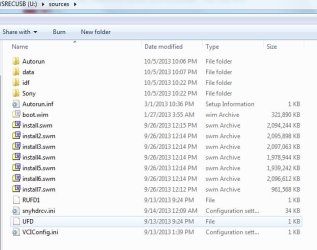
How are they doing a recovery without using a bootable wim? Maybe boot.wim is a hidden system file, or they are using the winre.wim in the hidden recovery folder - probably in C:\recovery\long_number

eg here is a pic of sony recov, there is the hidden boot.wim file. That loads into ram and extracts the image from the install.swm files.

The bcd entry needs to point at the bootable wim

sonyrecpart.jpg
 

My Computers My Computers

  • At a glance

    7 X64i5 84002x8gb 3200mhz
    Computer type
    PC/Desktop
    OS
    7 X64
    CPU
    i5 8400
    Motherboard
    gigabyte b365m ds3h
    Memory
    2x8gb 3200mhz
    Hard Drives
    various
    PSU
    pure power 11 400w cm
    Case
    Coolermaster
    Cooling
    cryorig m9i
  • At a glance

    7x64g54008gb ddr4 2400
    Computer type
    PC/Desktop
    OS
    7x64
    CPU
    g5400
    Motherboard
    ga b365m ds3h
    Memory
    8gb ddr4 2400
    PSU
    xfx pro 450w
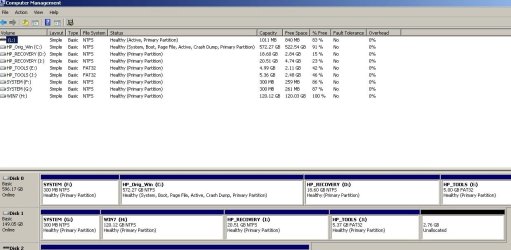
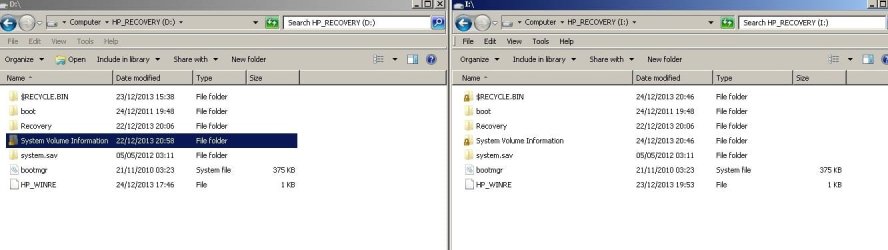
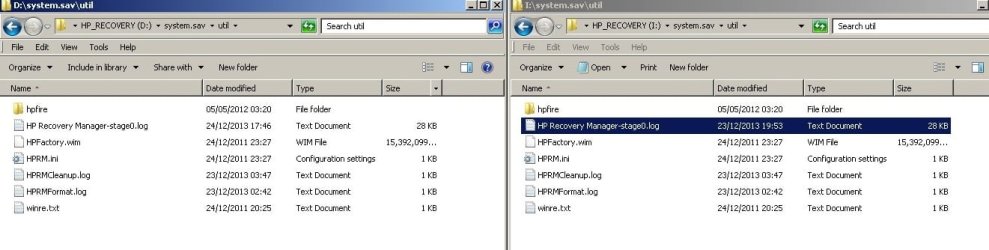
Here is a couple of screen shots.
Disk manger Disk 0 is original, Disk 2 the clone

In the explorer windows Original on LHS, clone on RHS.

I did find a hprecovery.wim file within the folder structure, and am attempting to use ImageX to recover it to the clone Windows partition..so it is another way..if it works..

ut it still does not solve the original issue of why the F11 does not work, although the recovery partition is identical
 

Attachments

  • Dsk mng.jpg
    Dsk mng.jpg
    87.1 KB · Views: 10
  • Exp1.jpg
    Exp1.jpg
    57.6 KB · Views: 12
  • Exp2.jpg
    Exp2.jpg
    62.5 KB · Views: 10

My Computer My Computer

At a glance

Many: XP, 7, Home & Pro, Slax, FreeNAS, OS-X ...core i58Gb
Computer type
Laptop
Computer Manufacturer/Model Number
HP 4530's Toshiba Sat Pro MacPro, MacBook Pro
OS
Many: XP, 7, Home & Pro, Slax, FreeNAS, OS-X 10.9 10.6.8
CPU
core i5
Memory
8Gb
Hard Drives
Crucial SSD
Various
looks like we cross posted.
..got about 3 minutes to go on the restore of the discovered wim file within the structure.
Maybe restoring that will then sort the F11 issue if future recovery required.
 

My Computer My Computer

At a glance

Many: XP, 7, Home & Pro, Slax, FreeNAS, OS-X ...core i58Gb
Computer type
Laptop
Computer Manufacturer/Model Number
HP 4530's Toshiba Sat Pro MacPro, MacBook Pro
OS
Many: XP, 7, Home & Pro, Slax, FreeNAS, OS-X 10.9 10.6.8
CPU
core i5
Memory
8Gb
Hard Drives
Crucial SSD
Various
Yes,it might. Let us know how it goes.:)
 

My Computers My Computers

  • At a glance

    7 X64i5 84002x8gb 3200mhz
    Computer type
    PC/Desktop
    OS
    7 X64
    CPU
    i5 8400
    Motherboard
    gigabyte b365m ds3h
    Memory
    2x8gb 3200mhz
    Hard Drives
    various
    PSU
    pure power 11 400w cm
    Case
    Coolermaster
    Cooling
    cryorig m9i
  • At a glance

    7x64g54008gb ddr4 2400
    Computer type
    PC/Desktop
    OS
    7x64
    CPU
    g5400
    Motherboard
    ga b365m ds3h
    Memory
    8gb ddr4 2400
    PSU
    xfx pro 450w
ImageX restored that hidden hp-recovery.wim file, but it still dos not boot from the 'new c:\"

Just booted from Win 7 install disk and that has completed a successful repair of the SystemPartitionTable'

it is now booting in to what looks very much like the initial factory first start..instaling drivers etc etc.

BUT..that still does not explain why the F11 boot did not work....but maybe once the OS is installed correctly on the C:\...F11 may then work again correctly?

May not attempt to find out until after tomorrow..I have a feeling I am supposed to be doing something tomorrow not PC related....you know..interacting with humans rather than threatening physical violence against inanimate objects.

Thanks for the help..it may not be over yet.

Oh..the reason i am transferring the original OS partitions to a smaller drive is that i want to use the original 650gb HDD in a CD caddy HDD holder. the main slot being used to house a SSD running OS-X
These 4530's machines are almost perfect for running mac OS-..with a few tonymac tweaks. but i don't want to loose the ability of going back to Win7...but don't ahve the money for any new kit at moment..not worked since August :(
 

My Computer My Computer

At a glance

Many: XP, 7, Home & Pro, Slax, FreeNAS, OS-X ...core i58Gb
Computer type
Laptop
Computer Manufacturer/Model Number
HP 4530's Toshiba Sat Pro MacPro, MacBook Pro
OS
Many: XP, 7, Home & Pro, Slax, FreeNAS, OS-X 10.9 10.6.8
CPU
core i5
Memory
8Gb
Hard Drives
Crucial SSD
Various
umminteresting..


restored and booted..but with none of the HP apps and lots of devices in Device manager not working.
 

My Computer My Computer

At a glance

Many: XP, 7, Home & Pro, Slax, FreeNAS, OS-X ...core i58Gb
Computer type
Laptop
Computer Manufacturer/Model Number
HP 4530's Toshiba Sat Pro MacPro, MacBook Pro
OS
Many: XP, 7, Home & Pro, Slax, FreeNAS, OS-X 10.9 10.6.8
CPU
core i5
Memory
8Gb
Hard Drives
Crucial SSD
Various
The first re start after the restore give a Warnng message that Windows Could not set up devices for this hardware...
Then a few mins later
Windows Could not complete the instalation. To install Windows on this computer restart the instalation...
 
Last edited:

My Computer My Computer

At a glance

Many: XP, 7, Home & Pro, Slax, FreeNAS, OS-X ...core i58Gb
Computer type
Laptop
Computer Manufacturer/Model Number
HP 4530's Toshiba Sat Pro MacPro, MacBook Pro
OS
Many: XP, 7, Home & Pro, Slax, FreeNAS, OS-X 10.9 10.6.8
CPU
core i5
Memory
8Gb
Hard Drives
Crucial SSD
Various
Is there more than one image in the HPFactory.wim?
 

My Computers My Computers

  • At a glance

    7 X64i5 84002x8gb 3200mhz
    Computer type
    PC/Desktop
    OS
    7 X64
    CPU
    i5 8400
    Motherboard
    gigabyte b365m ds3h
    Memory
    2x8gb 3200mhz
    Hard Drives
    various
    PSU
    pure power 11 400w cm
    Case
    Coolermaster
    Cooling
    cryorig m9i
  • At a glance

    7x64g54008gb ddr4 2400
    Computer type
    PC/Desktop
    OS
    7x64
    CPU
    g5400
    Motherboard
    ga b365m ds3h
    Memory
    8gb ddr4 2400
    PSU
    xfx pro 450w
Edit:

In answer to teh question..yes thee was more than one wim file ..I had used the wrong one on first attempt


It is very possible.I suppose..it could well have the Tools and system partitions in there too I suppose.


This has been ongoing since..well the beginning of the month...ImageX and wim files are new to me,..only came across them and imagex a few days ago.

Got an /apply running again now

In one operation.
Clean the HDD
Create the 4 partitions.
Restore sys
Restore HP rcovery
restore HP tools

restore the Win 7 partition from within the jsut restored HP_Recovery partition

If this does not boot..definitely going to bed.will be mid night here soon...and have ben at the keyboard since..8 or 89 this morning

will check out the man page for imagex and see what it says about peering in to the wim files to see what is in there.

thanks for the pointer
 
Last edited:

My Computer My Computer

At a glance

Many: XP, 7, Home & Pro, Slax, FreeNAS, OS-X ...core i58Gb
Computer type
Laptop
Computer Manufacturer/Model Number
HP 4530's Toshiba Sat Pro MacPro, MacBook Pro
OS
Many: XP, 7, Home & Pro, Slax, FreeNAS, OS-X 10.9 10.6.8
CPU
core i5
Memory
8Gb
Hard Drives
Crucial SSD
Various

My Computers My Computers

  • At a glance

    7 X64i5 84002x8gb 3200mhz
    Computer type
    PC/Desktop
    OS
    7 X64
    CPU
    i5 8400
    Motherboard
    gigabyte b365m ds3h
    Memory
    2x8gb 3200mhz
    Hard Drives
    various
    PSU
    pure power 11 400w cm
    Case
    Coolermaster
    Cooling
    cryorig m9i
  • At a glance

    7x64g54008gb ddr4 2400
    Computer type
    PC/Desktop
    OS
    7x64
    CPU
    g5400
    Motherboard
    ga b365m ds3h
    Memory
    8gb ddr4 2400
    PSU
    xfx pro 450w
Thanks
I'll certainly give that a try too.

After a short nights sleep, dreaming about partitions and cloning m, I had a couple of thoughts.

1). am mostly booting and imaging from a WinPE USB boot stick.
The 'Tutorial' I initially followed specified booting from Win 7 disk and getting to CMD prompt from Win7 Setup Repair option. Is this causing an issue?

2). When using imageX from the WinPE USB boot, I am using a version of imageX from Win AIK download. If I boot from Win 7 instal disk, I have been using imagex32.exe from a different standalone source, and typing the full "IMAGEX32.EXE".
So different ImageX executables. Not yet checked to see if they are different versions. If they were, could that be an issue?


3). Have been so fixated in getting F11 Recovery Boot option to work, have not yet tried the 'obvious ' solution....Create a win image of the working C:\ Win7 installation and restore that to my target drive. Not sure how IMAGEX is affected ( if at all) by partition size. The 'c:\' will be going from 580gb down to 120.


4). For F11 factory restore to work (boot) , maybe it is relying on there already being something on the c:\. volume???

Christmas Day, not sure I'll do any work on this today.

Happy Christmas to you all
 

My Computer My Computer

At a glance

Many: XP, 7, Home & Pro, Slax, FreeNAS, OS-X ...core i58Gb
Computer type
Laptop
Computer Manufacturer/Model Number
HP 4530's Toshiba Sat Pro MacPro, MacBook Pro
OS
Many: XP, 7, Home & Pro, Slax, FreeNAS, OS-X 10.9 10.6.8
CPU
core i5
Memory
8Gb
Hard Drives
Crucial SSD
Various
What is on the recovery partition?

You need to add the bootable wim file to bcd. It is probably called boot.wim. (Might be called winre.wim )

It may be in a folder on the recov partition, "sources" folder is likely.

You can do it with easybcd, use the WINPE tab and browse to boot.wim on the recov partition.

That should give you an entry on the boot menu. When you have done that, we can have a look at assigning a scancode (e.g. f11)

Well here I am again could not let it go.
Really sorry for wasting your time and not fully reading and UNDERSTANDING & DIGESTING the contents of your first post.

Yes, there was a winre.wim file down within the file structure. Despite what you said, I was thinking 'boot info...must be in root of drive'. There was a file in root labelled hpwinre with no .dot extension


Have not tackled CMD line editing of BCD, but once I had a bootable Win7 GUI from the 'partial-no drivers' install off the HPFactory.wim, I was able to run EasyBCD, add the winre.wim to the BCD.

As you stated, I had to select it from the boot list,
Running the install now

So next step is to assign the F11 scan code.

I promise I'll read your post more carefully in future, I guess I was tired and suffering 'tunnel vision'

Thanks once more.
 

My Computer My Computer

At a glance

Many: XP, 7, Home & Pro, Slax, FreeNAS, OS-X ...core i58Gb
Computer type
Laptop
Computer Manufacturer/Model Number
HP 4530's Toshiba Sat Pro MacPro, MacBook Pro
OS
Many: XP, 7, Home & Pro, Slax, FreeNAS, OS-X 10.9 10.6.8
CPU
core i5
Memory
8Gb
Hard Drives
Crucial SSD
Various
THANK YOU​

HAPPY CHRISTMAS​


IT IS DONE..WORKING, ALL GOOD EVEN F11 BOOT TO RECOVERY PARTITION

Thanks...the end of what two weeks struggle ??? Hell of a Christmas present. My mind has been pre occupied with this for weeks now.


Great.


Fingers crossed that it will work again when I try to do it on the new SSD for the 'proper install'
This has all been to prove that it can be done ..before spending money only to find that it would not work

Off to get drunk now :)
 
Last edited:

My Computer My Computer

At a glance

Many: XP, 7, Home & Pro, Slax, FreeNAS, OS-X ...core i58Gb
Computer type
Laptop
Computer Manufacturer/Model Number
HP 4530's Toshiba Sat Pro MacPro, MacBook Pro
OS
Many: XP, 7, Home & Pro, Slax, FreeNAS, OS-X 10.9 10.6.8
CPU
core i5
Memory
8Gb
Hard Drives
Crucial SSD
Various
hi, I have also same problem i cant access my partition either pressing f11 during boot up.I have Hp 4530s once i restored my os with windows recovery method unfortunately it wipes all my hdd, thanks god i saved my image in external drive for redundancy now i restored back. My question is how did you done F11 recovery that would restore your factory image? Can give more details specifically.. please help me i m not familiar advance level of repairing Thanks in advance
 

My Computer My Computer

At a glance

Windows 7 Home Premium 64bit.core i3ddr3
Computer type
Laptop
Computer Manufacturer/Model Number
hp
OS
Windows 7 Home Premium 64bit.
CPU
core i3
Memory
ddr3
Browser
ie
When you say you saved image to external drive. Which image exactly did you save?

The 4530 has 1 HDD with 4 partitions.
1, System. 300mb NTFS
2, Windows Partition,NTFS, largest available space
3, HP_Recovery NTFS. 18.6Gb. NTFS
4, HP_Tools FAT32, 5Gb


You say Windows Recovery Method wiped the entire HDD, do you mean it wiped ALL partitions or just Windows partition?

If it did wipe ALL PArtitions..then you are screwed unless you have images of them. Only option if all partitions are wiped is new disks from HP


If it ony wiped the Windows partition, and you have some form of Windows running, first check Windows Disk Management to see that you have all 4 partitions.


Download EasyBCD http://neosmart.net/EasyBCD/

Install and run it
From File menu, Load BCD
Then select : Add new entry button
In lower section, select the WinPE tab
To the right of the Path box, click the Browse button and find the winre.wim file on the HP_Recovery disk. on mine it was HP_Recovery/Recovery/WindowsRE/winre.wim
Click Add Entry

Click Edit Boot Menu Button on Left.
Check you now have two entries Win 7 and the new NST WinRE entry
Save with button at the bottom.

reboot computer.
F11 still won't work....but.


On re-boot it will give you two OS options
Win 7 and the new win restore option.
Select the second one

Windows Factory restore should now start.


Once the Full Factory restore has finished F11 will be active again.
 
Last edited:

My Computer My Computer

At a glance

Many: XP, 7, Home & Pro, Slax, FreeNAS, OS-X ...core i58Gb
Computer type
Laptop
Computer Manufacturer/Model Number
HP 4530's Toshiba Sat Pro MacPro, MacBook Pro
OS
Many: XP, 7, Home & Pro, Slax, FreeNAS, OS-X 10.9 10.6.8
CPU
core i5
Memory
8Gb
Hard Drives
Crucial SSD
Various
Gimagex is easier, does the same thing with a gui. Great free tool from John Bennett. Comes in both bit versions, so you can chuck it into winpe.

GImageX - AutoItScript


Interestingly Gimagex fails on creating the image of the HP_Recovery partition..it fails at 99% when imaging the winre.wim file image within the partition

imagex from command line works fine though
 

My Computer My Computer

At a glance

Many: XP, 7, Home & Pro, Slax, FreeNAS, OS-X ...core i58Gb
Computer type
Laptop
Computer Manufacturer/Model Number
HP 4530's Toshiba Sat Pro MacPro, MacBook Pro
OS
Many: XP, 7, Home & Pro, Slax, FreeNAS, OS-X 10.9 10.6.8
CPU
core i5
Memory
8Gb
Hard Drives
Crucial SSD
Various
Thanks Neil for your response.. With windows image backup i have restored my C drive that is "2, Windows Partition,NTFS, largest available space." with old data.But remaining HP partition is completely wiped,its good thing i have imaged HP_Recovery partition and restored back "HP_Recovery NTFS. 18.6Gb. NTFS".Now the disgusting thing is i have lost -" HP_Tools FAT32, 5Gb" i m planning to copy this drive with my friend having same model next i will proceed to your recent replied method
 

My Computer My Computer

At a glance

Windows 7 Home Premium 64bit.core i3ddr3
Computer type
Laptop
Computer Manufacturer/Model Number
hp
OS
Windows 7 Home Premium 64bit.
CPU
core i3
Memory
ddr3
Browser
ie
Back
Top