Cloning HD

bonkers72

New member
Member
VIP
Local time
3:19 PM
Messages
186
I know there are some threads out there for this but I wanted to ask certain questions. Wanted to transfer my current HD to a SSD using Aconis True Home image 2012. Have my current HD all backed up as an image on an external HD. Question I have is there is a feature in Acronis that has "clone disk". Is this the one I use? Also the bootable media feature, I need to use this feature as well? Thanks for the help.
 

My Computer

Computer type
PC/Desktop
Computer Manufacturer/Model Number
Custom build
OS
Win 7 Premium 64 Bit
CPU
2.67 gigahertz Intel Core2 Duo
Motherboard
Gigabyte EP45-UD3R
Memory
8192 Megabytes (8 gig) Crucial BallistiX
Graphics Card(s)
NVIDIA GeForce 6600
Sound Card
Intergrated Realtek High Definition Audio
Monitor(s) Displays
BenQ FP93GX
Screen Resolution
1280 x 1024
Hard Drives
WDC WD6401AALS-00L3B2 640 gig (Internal)
PSU
Corsair TX 750W
Case
Cooler Master
Cooling
Stock case fan / Intel Processor fan
Keyboard
Wireless Logitec
Mouse
Wireless Logitec 505
Internet Speed
U 9.01 / D 1.4
Antivirus
Avast!
Browser
Internet Explorer 10
Other Info
PLEXTOR DVDR PX-880SA ATA Device [Optical drive] x2
Accent Acoustics speakers w/sub.
BIOS: Award Software International, Inc. F9 04/16/2009
Bonkers, Acronis will clone your hard disk by booting from the recovery cdrom. Select the option to clone and it will work fine.
I have done it several times. I suggest that you give it a shot.

Rich
 

My Computer

Computer type
Laptop
Computer Manufacturer/Model Number
Toshiba Laptop Qosimo X870
OS
Windows 7 Pro x64 SP1
CPU
Intel Core I7
Motherboard
Toshiba Qosmio
Memory
16 Gigs
Graphics Card(s)
NVIDIA GeForce GTX 670M
Monitor(s) Displays
17.7" laptop
Screen Resolution
1600 x 900
Hard Drives
256 Gig SanDisk SSD for C
256 Gig Intel SSD for D
Internet Speed
50/25 FIOS
Antivirus
Vipre (all you can eat for 10 machines)
Browser
IE and FF
Other Info
I have dos 6.22, wfwg 3.11, win98, 2000 and xp VHD's available for testing. MS's Virtual PC works great.
Thanks for responding Rich.
Gonna need to be a little more specific :o. So I use the clone option in Acronis and go from there? The recovery CD rom? Do I need to make a bootable disk? Thanks for the patience. Any screen shots you can provide?
 

My Computer

Computer type
PC/Desktop
Computer Manufacturer/Model Number
Custom build
OS
Win 7 Premium 64 Bit
CPU
2.67 gigahertz Intel Core2 Duo
Motherboard
Gigabyte EP45-UD3R
Memory
8192 Megabytes (8 gig) Crucial BallistiX
Graphics Card(s)
NVIDIA GeForce 6600
Sound Card
Intergrated Realtek High Definition Audio
Monitor(s) Displays
BenQ FP93GX
Screen Resolution
1280 x 1024
Hard Drives
WDC WD6401AALS-00L3B2 640 gig (Internal)
PSU
Corsair TX 750W
Case
Cooler Master
Cooling
Stock case fan / Intel Processor fan
Keyboard
Wireless Logitec
Mouse
Wireless Logitec 505
Internet Speed
U 9.01 / D 1.4
Antivirus
Avast!
Browser
Internet Explorer 10
Other Info
PLEXTOR DVDR PX-880SA ATA Device [Optical drive] x2
Accent Acoustics speakers w/sub.
BIOS: Award Software International, Inc. F9 04/16/2009
Do I need to make a bootable disk
Yes, you need that recovery CD and boot the system with it. Then you navigate to the image and specify the SSD as target and off you go.
 

My Computer

Computer Manufacturer/Model Number
HP, Dell, Gateway, Toshiba - 4 laptops and 2 desktops
OS
Vista, Windows7, Mint Mate, Zorin, Windows 8
CPU
from 1.6GHz Duo to i7
Monitor(s) Displays
2x HP w2207
Hard Drives
5x HDD, 7x SSD, 12x Externals
Keyboard
with trackball - no mices
Mouse
Trackball mice
Internet Speed
DSL 6000
So looking at the Acronis program I need to to select the "create bootable media" and create a bootable CD ROM. Essentially........ is what it were doing here is taking information from my current HD and putting it on a CD Rom so we can boot my new SSD up? I don't need to install a new Win 7 OS do I ? Thanks for the help.
 

My Computer

Computer type
PC/Desktop
Computer Manufacturer/Model Number
Custom build
OS
Win 7 Premium 64 Bit
CPU
2.67 gigahertz Intel Core2 Duo
Motherboard
Gigabyte EP45-UD3R
Memory
8192 Megabytes (8 gig) Crucial BallistiX
Graphics Card(s)
NVIDIA GeForce 6600
Sound Card
Intergrated Realtek High Definition Audio
Monitor(s) Displays
BenQ FP93GX
Screen Resolution
1280 x 1024
Hard Drives
WDC WD6401AALS-00L3B2 640 gig (Internal)
PSU
Corsair TX 750W
Case
Cooler Master
Cooling
Stock case fan / Intel Processor fan
Keyboard
Wireless Logitec
Mouse
Wireless Logitec 505
Internet Speed
U 9.01 / D 1.4
Antivirus
Avast!
Browser
Internet Explorer 10
Other Info
PLEXTOR DVDR PX-880SA ATA Device [Optical drive] x2
Accent Acoustics speakers w/sub.
BIOS: Award Software International, Inc. F9 04/16/2009
I don't use Acronis, Aomei Backupper is free and excellent.

FREE Backup software for Windows 7, 8 and Server 2008 R2, 2012

The general principle with these things is to clone one drive to another, which is like directly copying one HD to another. You don't make a backup image in that scenario. Rich and whs suggest you do the operation from the bootable cd, instead of from within windows.

It is also possible to do the same thing in 2 steps. First, make an image of the source drive, second , restore that image to the other HD.

The program that does the copying ( or restoring ) is on the cd, not the contents of the HD , it wouldn't fit.
 

My Computers

System One System Two

  • Computer type
    PC/Desktop
    OS
    7 X64
    CPU
    i5 8400
    Motherboard
    gigabyte b365m ds3h
    Memory
    2x8gb 3200mhz
    Hard Drives
    various
    PSU
    pure power 11 400w cm
    Case
    Coolermaster
    Cooling
    cryorig m9i
  • Computer type
    PC/Desktop
    OS
    7x64
    CPU
    g5400
    Motherboard
    ga b365m ds3h
    Memory
    8gb ddr4 2400
    PSU
    xfx pro 450w
So looking at the Acronis program I need to to select the "create bootable media" and create a bootable CD ROM. Essentially........ is what it were doing here is taking information from my current HD and putting it on a CD Rom so we can boot my new SSD up? I don't need to install a new Win 7 OS do I ? Thanks for the help.
No, No - this bootable CD contains the Acronis recovery program - nothing from your system.

Imagine your disk breaks and you cannot boot the OS anymore. You put a new disk in and attach your external drive with the images. But how are you going to get your image on the new disk - you have no operational OS. -- That is where the CD comes in. You change the BIOS boot sequence to boot from CD and run the PC with the program on that CD. With that you can place your image on the new disk.

In your case it would be the same if your PC were a laptop with only 1 disk. Once you take the HDD out and put the SSD in, you have no running OS.
 

My Computer

Computer Manufacturer/Model Number
HP, Dell, Gateway, Toshiba - 4 laptops and 2 desktops
OS
Vista, Windows7, Mint Mate, Zorin, Windows 8
CPU
from 1.6GHz Duo to i7
Monitor(s) Displays
2x HP w2207
Hard Drives
5x HDD, 7x SSD, 12x Externals
Keyboard
with trackball - no mices
Mouse
Trackball mice
Internet Speed
DSL 6000
Image, image.......getting close to understanding this thing. Image is everything on my old HD EXCEPT the OS (Win 7)? Thanks for coaching me along:p
 

My Computer

Computer type
PC/Desktop
Computer Manufacturer/Model Number
Custom build
OS
Win 7 Premium 64 Bit
CPU
2.67 gigahertz Intel Core2 Duo
Motherboard
Gigabyte EP45-UD3R
Memory
8192 Megabytes (8 gig) Crucial BallistiX
Graphics Card(s)
NVIDIA GeForce 6600
Sound Card
Intergrated Realtek High Definition Audio
Monitor(s) Displays
BenQ FP93GX
Screen Resolution
1280 x 1024
Hard Drives
WDC WD6401AALS-00L3B2 640 gig (Internal)
PSU
Corsair TX 750W
Case
Cooler Master
Cooling
Stock case fan / Intel Processor fan
Keyboard
Wireless Logitec
Mouse
Wireless Logitec 505
Internet Speed
U 9.01 / D 1.4
Antivirus
Avast!
Browser
Internet Explorer 10
Other Info
PLEXTOR DVDR PX-880SA ATA Device [Optical drive] x2
Accent Acoustics speakers w/sub.
BIOS: Award Software International, Inc. F9 04/16/2009
Image is everything on my old HD EXCEPT the OS (Win 7)
What do you mean by that. I am afraid I do not understand your logic.
 

My Computer

Computer Manufacturer/Model Number
HP, Dell, Gateway, Toshiba - 4 laptops and 2 desktops
OS
Vista, Windows7, Mint Mate, Zorin, Windows 8
CPU
from 1.6GHz Duo to i7
Monitor(s) Displays
2x HP w2207
Hard Drives
5x HDD, 7x SSD, 12x Externals
Keyboard
with trackball - no mices
Mouse
Trackball mice
Internet Speed
DSL 6000
When backing up my current HD as an image file with Acronis to an external HD, what exactly is doing. Backing up everything on my current HD? Do I need to load a new OS on my new SSD? Sorry for the confusion.
 

My Computer

Computer type
PC/Desktop
Computer Manufacturer/Model Number
Custom build
OS
Win 7 Premium 64 Bit
CPU
2.67 gigahertz Intel Core2 Duo
Motherboard
Gigabyte EP45-UD3R
Memory
8192 Megabytes (8 gig) Crucial BallistiX
Graphics Card(s)
NVIDIA GeForce 6600
Sound Card
Intergrated Realtek High Definition Audio
Monitor(s) Displays
BenQ FP93GX
Screen Resolution
1280 x 1024
Hard Drives
WDC WD6401AALS-00L3B2 640 gig (Internal)
PSU
Corsair TX 750W
Case
Cooler Master
Cooling
Stock case fan / Intel Processor fan
Keyboard
Wireless Logitec
Mouse
Wireless Logitec 505
Internet Speed
U 9.01 / D 1.4
Antivirus
Avast!
Browser
Internet Explorer 10
Other Info
PLEXTOR DVDR PX-880SA ATA Device [Optical drive] x2
Accent Acoustics speakers w/sub.
BIOS: Award Software International, Inc. F9 04/16/2009
When you make an image of a partition with Acronis or any other imaging program, you produce an exact replica of that partition from the time the image was made. If you restore that image to the SSD, you have an identical twin of what was on the originating disk.

If that partition was the C partition, you can now run your OS from the SSD.

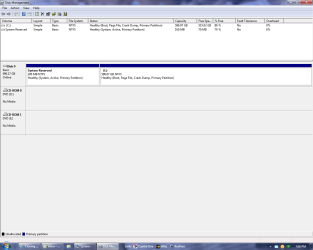
IMPORTANT: If your originating disk had also the small 100MB System Partition, you need to transfer that too to the SSD. Else your system would not boot. Check that in Disk Management.

If you could post a picture of your Disk Management, we'll be glad to check that for you.
 

My Computer

Computer Manufacturer/Model Number
HP, Dell, Gateway, Toshiba - 4 laptops and 2 desktops
OS
Vista, Windows7, Mint Mate, Zorin, Windows 8
CPU
from 1.6GHz Duo to i7
Monitor(s) Displays
2x HP w2207
Hard Drives
5x HDD, 7x SSD, 12x Externals
Keyboard
with trackball - no mices
Mouse
Trackball mice
Internet Speed
DSL 6000
Ok......here's a screen shot of my disk
 

Attachments

  • Untitled.png
    Untitled.png
    36.8 KB · Views: 4

My Computer

Computer type
PC/Desktop
Computer Manufacturer/Model Number
Custom build
OS
Win 7 Premium 64 Bit
CPU
2.67 gigahertz Intel Core2 Duo
Motherboard
Gigabyte EP45-UD3R
Memory
8192 Megabytes (8 gig) Crucial BallistiX
Graphics Card(s)
NVIDIA GeForce 6600
Sound Card
Intergrated Realtek High Definition Audio
Monitor(s) Displays
BenQ FP93GX
Screen Resolution
1280 x 1024
Hard Drives
WDC WD6401AALS-00L3B2 640 gig (Internal)
PSU
Corsair TX 750W
Case
Cooler Master
Cooling
Stock case fan / Intel Processor fan
Keyboard
Wireless Logitec
Mouse
Wireless Logitec 505
Internet Speed
U 9.01 / D 1.4
Antivirus
Avast!
Browser
Internet Explorer 10
Other Info
PLEXTOR DVDR PX-880SA ATA Device [Optical drive] x2
Accent Acoustics speakers w/sub.
BIOS: Award Software International, Inc. F9 04/16/2009
Yeah, as I suspected - you have the 100MB partition. You have to include that into the image and restore it on the SSD.
 

My Computer

Computer Manufacturer/Model Number
HP, Dell, Gateway, Toshiba - 4 laptops and 2 desktops
OS
Vista, Windows7, Mint Mate, Zorin, Windows 8
CPU
from 1.6GHz Duo to i7
Monitor(s) Displays
2x HP w2207
Hard Drives
5x HDD, 7x SSD, 12x Externals
Keyboard
with trackball - no mices
Mouse
Trackball mice
Internet Speed
DSL 6000
Good thing you mentioned that about backing up the reserve also. Just looked at my back ups. Been only backing up C: partition ONLY not the reserve. Whew!

So........once I boot up from the CD, and place my image on the new disk, Windows will boot on it's own after that correct?
 

My Computer

Computer type
PC/Desktop
Computer Manufacturer/Model Number
Custom build
OS
Win 7 Premium 64 Bit
CPU
2.67 gigahertz Intel Core2 Duo
Motherboard
Gigabyte EP45-UD3R
Memory
8192 Megabytes (8 gig) Crucial BallistiX
Graphics Card(s)
NVIDIA GeForce 6600
Sound Card
Intergrated Realtek High Definition Audio
Monitor(s) Displays
BenQ FP93GX
Screen Resolution
1280 x 1024
Hard Drives
WDC WD6401AALS-00L3B2 640 gig (Internal)
PSU
Corsair TX 750W
Case
Cooler Master
Cooling
Stock case fan / Intel Processor fan
Keyboard
Wireless Logitec
Mouse
Wireless Logitec 505
Internet Speed
U 9.01 / D 1.4
Antivirus
Avast!
Browser
Internet Explorer 10
Other Info
PLEXTOR DVDR PX-880SA ATA Device [Optical drive] x2
Accent Acoustics speakers w/sub.
BIOS: Award Software International, Inc. F9 04/16/2009
Once you placed the images on your SSD and the Acronis recovery program from the recovery CD has ended, Acronis will peobebly boot back into your current system.

Then you have to shutdown, restart and go into the BIOS (usually F2) to set the SSD as second boot device - keep the CD/DVD reader as first boot device. Now it will boot from the SSD.

However, if your PC is a laptop with only 1 disk bay, you need not change the boot order in the BIOS.
 

My Computer

Computer Manufacturer/Model Number
HP, Dell, Gateway, Toshiba - 4 laptops and 2 desktops
OS
Vista, Windows7, Mint Mate, Zorin, Windows 8
CPU
from 1.6GHz Duo to i7
Monitor(s) Displays
2x HP w2207
Hard Drives
5x HDD, 7x SSD, 12x Externals
Keyboard
with trackball - no mices
Mouse
Trackball mice
Internet Speed
DSL 6000
Ok.............I think I have enough info to make this happen. Thank you very much for the help. Won't be doing this for a few weeks yet. Wanted to PM you if it's ok when the time comes in case I run into any issues. Thanks again, Gary ;)
 

My Computer

Computer type
PC/Desktop
Computer Manufacturer/Model Number
Custom build
OS
Win 7 Premium 64 Bit
CPU
2.67 gigahertz Intel Core2 Duo
Motherboard
Gigabyte EP45-UD3R
Memory
8192 Megabytes (8 gig) Crucial BallistiX
Graphics Card(s)
NVIDIA GeForce 6600
Sound Card
Intergrated Realtek High Definition Audio
Monitor(s) Displays
BenQ FP93GX
Screen Resolution
1280 x 1024
Hard Drives
WDC WD6401AALS-00L3B2 640 gig (Internal)
PSU
Corsair TX 750W
Case
Cooler Master
Cooling
Stock case fan / Intel Processor fan
Keyboard
Wireless Logitec
Mouse
Wireless Logitec 505
Internet Speed
U 9.01 / D 1.4
Antivirus
Avast!
Browser
Internet Explorer 10
Other Info
PLEXTOR DVDR PX-880SA ATA Device [Optical drive] x2
Accent Acoustics speakers w/sub.
BIOS: Award Software International, Inc. F9 04/16/2009
No problem Gary. You can PM me any time. But you can also post here. It will pop up by me after you posted - even after a year, LOL.
 

My Computer

Computer Manufacturer/Model Number
HP, Dell, Gateway, Toshiba - 4 laptops and 2 desktops
OS
Vista, Windows7, Mint Mate, Zorin, Windows 8
CPU
from 1.6GHz Duo to i7
Monitor(s) Displays
2x HP w2207
Hard Drives
5x HDD, 7x SSD, 12x Externals
Keyboard
with trackball - no mices
Mouse
Trackball mice
Internet Speed
DSL 6000
Mr. WHS. First, congrats on the MPV status.

I know we left off last talking about cloning one HD to another. Have the new HD and ready to go. But, after thinking about this I just wonder if it's just better to just start from scratch. Load a new OS on the new hard drive and start fresh. Had this current HD for 10 yrs. What's your thoughts. Thanks for the input.
 

My Computer

Computer type
PC/Desktop
Computer Manufacturer/Model Number
Custom build
OS
Win 7 Premium 64 Bit
CPU
2.67 gigahertz Intel Core2 Duo
Motherboard
Gigabyte EP45-UD3R
Memory
8192 Megabytes (8 gig) Crucial BallistiX
Graphics Card(s)
NVIDIA GeForce 6600
Sound Card
Intergrated Realtek High Definition Audio
Monitor(s) Displays
BenQ FP93GX
Screen Resolution
1280 x 1024
Hard Drives
WDC WD6401AALS-00L3B2 640 gig (Internal)
PSU
Corsair TX 750W
Case
Cooler Master
Cooling
Stock case fan / Intel Processor fan
Keyboard
Wireless Logitec
Mouse
Wireless Logitec 505
Internet Speed
U 9.01 / D 1.4
Antivirus
Avast!
Browser
Internet Explorer 10
Other Info
PLEXTOR DVDR PX-880SA ATA Device [Optical drive] x2
Accent Acoustics speakers w/sub.
BIOS: Award Software International, Inc. F9 04/16/2009
That decision is mostly based on how much value you place on your time and your trouble-shooting skill level if the cloning or imaging has issues.

Imaging and cloning save time if successful, but are not quite as reliable as clean installs. If clean installs, program re-installation, and reconfiguring everything could be done in an hour or so, few people would bother with imaging or cloning.

The downside of cloning or imaging is the slight possibility of issues or outright failures. If it doesn't go your way, then you are faced with trouble-shooting--which might take 10 minutes or 100 hours without success. Maybe a 2 or 5 percent possibility. If you don't want to take that chance, do a clean install.

I'd lean toward clean install in your situation unless you are completely averse to re-installing apps and configuring and are willing to take the slight risk in order to probably save time. All the more so if you haven't done a clean install in several years.
 

My Computer

Computer type
PC/Desktop
Computer Manufacturer/Model Number
Ignatz Special; 4 speed manual gearbox; factory air conditioning; one of one
OS
Windows 7 Home Premium SP1, 64-bit
CPU
Intel Skylake i5-6600K, not overclocked
Motherboard
AsRock Z170M Extreme 4, micro ATX
Memory
8 GB HyperX DDR4-2666 (2 x 4 GB)
Graphics Card(s)
none; graphics are integrated on CPU
Sound Card
onboard: Realtek ALC1150; external: USB Behringer UF0-202
Monitor(s) Displays
Dell S2340M 23 inch IPS
Screen Resolution
1600 x 900
Hard Drives
System: Crucial MX100 series SSD, 128 GB;
Data: Samsung Spinpoint 103SJ, 1 TB;
Backup: WD Caviar Green WD30EZRX-00D8PB0, 3 TB
PSU
Rosewill SilentNight 500 watt fanless, semi-modular
Case
Antec Solo II
Cooling
Noctua NH-U12S; Noctua F12 intake, Noctua S12A exhaust
Keyboard
Microsoft 200 6JH-00001 USB
Mouse
Dell or Microsoft optical wired; USB
Antivirus
Microsoft Security Essentials and Malwarebytes Premium
Browser
Pale Moon
Other Info
All fans PWM; speeds at idle: CPU circa 500 rpm; intake circa 600 rpm; exhaust circa 600 rpm; CPU temps 27 idle and 47 C load in a warm room (27 C/81 F) when running Intel Extreme Tuning Utility stress test.
Mr. WHS. First, congrats on the MPV status.

I know we left off last talking about cloning one HD to another. Have the new HD and ready to go. But, after thinking about this I just wonder if it's just better to just start from scratch. Load a new OS on the new hard drive and start fresh. Had this current HD for 10 yrs. What's your thoughts. Thanks for the input.
I agree. A new installation is the best option. After so many years your current system has certainly accumulated a lot of gremlins which you may not want to transfer to the new HD.

If nothing else, you will certainly get a better performance with a new installation. The only downside is that you have to go thru a lot of updates and have to reinstall the programs and settings.

Make sure you make an image of the current system to an external device. Use the free Macrium. Then you can always recover anything from the old system that you might have forgotten. For your user files I would make an additional backup.
 

My Computer

Computer Manufacturer/Model Number
HP, Dell, Gateway, Toshiba - 4 laptops and 2 desktops
OS
Vista, Windows7, Mint Mate, Zorin, Windows 8
CPU
from 1.6GHz Duo to i7
Monitor(s) Displays
2x HP w2207
Hard Drives
5x HDD, 7x SSD, 12x Externals
Keyboard
with trackball - no mices
Mouse
Trackball mice
Internet Speed
DSL 6000
Back
Top