Cloning HDD to SSD and unable to boot, disk read error after install

Money2bills

New member
Local time
3:23 AM
Messages
17
I am attempting to upgrade my HP DM4-3099se to an SSD and improve the speed. I purchased a Samsung EVO 860 500GB SSD to replace my existing 600GB HDD.

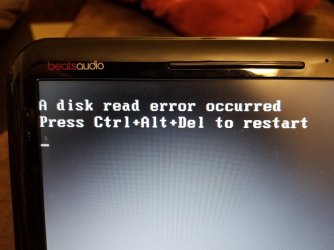
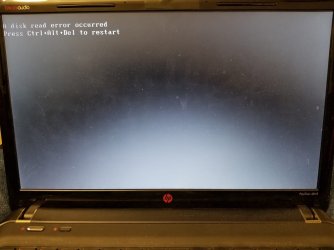
I have tried the Samsung Migration software, Aomei Backupper, and last Macrium Reflect Free. After cloning the HDD to the SSD all three times and installing the SSD into my laptop the same message would appear, "A disk read error occurred" then below that "Press Ctrl+Alt+Del to restart". I tried restarting but would just return to the same screen.

I checked the state of my HDD by running a "chkdisk /r" command and after several hours the disk was fine, no bad sectors or anything.

I have no antivirus software running to interfere with the cloning software. I cloned the drives all except for the HP_TOOLS partition. When trying to clone the HP_TOOLS partition the cloning process would fail.

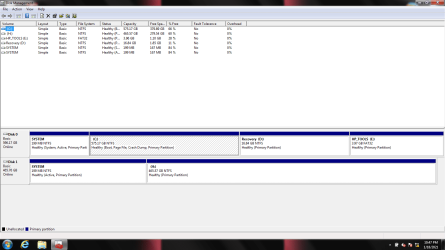
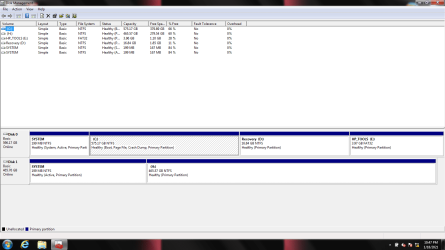
I have attached an image of the drives shown in disk management.
screen shot.png

Both disks are MBR (Master Boot Record) partition style in the properties.

I attempted to boot from the SSD prior to installation from the external enclosure and it would not do that either. I instructed the bios to boot from SSD and it would go back to HDD.

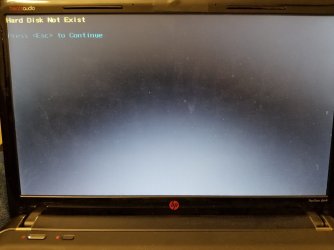
I have tested the SSD when installed in the laptop with the bios but received a "Hard Disk Test" Failed, "Boot device not found" (3F0) error. I do not understand why it works when plugged in the external enclosure but does not work when installed at all.

I have tried to use the Macrium Rescue Media but it did not fix the boot issues.

Any direction to correct this problem would be appreciated. If you require more information please just let me know what you need. Thank you
 

My Computer My Computer

At a glance

Windows 7 - Home Premium 64bit6.00 GB
Computer type
PC/Desktop
Computer Manufacturer/Model Number
HP DM4-3099se
OS
Windows 7 - Home Premium 64bit
Memory
6.00 GB
Welcome to the forum. If disk 0 is the ssd it wont boot as its not set active. Most hp in the bios is an Intel anti theft setting if thats on it will stop you cloning the disk. Try setting disk 0 to active see if that solves it if not find the setting and turn it off and try again or idealy do a clean install
 

My Computer My Computer

At a glance

win 8 32 bit
Computer type
PC/Desktop
OS
win 8 32 bit
In the image above Disk 0 is the HDD and Disk 1 is the SSD. Sorry I did not state that before. I did notice how the main Windows operating system on the C: drive on the HDD stays it is (Boot, Page File, Crash Dump, Primary Partition) but the cloned SSD shows for the H: drive only (Active, Primary Partition).

Should I change the HDD C: (Disk 0) drive to active in disk management and try cloning again?
 

My Computer My Computer

At a glance

Windows 7 - Home Premium 64bit6.00 GB
Computer type
PC/Desktop
Computer Manufacturer/Model Number
HP DM4-3099se
OS
Windows 7 - Home Premium 64bit
Memory
6.00 GB
Welcome to the Forum

The active partition on drive 0 is the first partition (System) - It is correct Don't change
The active partition on drive 1 is the second partition (H:) - It also should be the System partition
The conclusion is that it wasn't cloned.

Did you clone with the SSD attached to a SATA port or on a USB adapter?

Clone again all partitions. HP tools can be usefull.
Use Macrium reflect to clone.


Select only the main drive as source and hit clone this drive
413187d1610921658-finishing-macrium-free-cloning-help-clone-source.png


Select the SSD as target (If it's not clean, Macrium will do it)
413188d1610921658-finishing-macrium-free-cloning-help-clone-target.png


Once Source and target are selected, hit Next
413189d1610921658t-finishing-macrium-free-cloning-help-clone-target2.png


On the schedule page, don't do nothing, hit next
413190d1610921658t-finishing-macrium-free-cloning-help-clone-schedule.png


On Backup save Options, mark first square, un mark second and start hitting OK
413191d1610921658-finishing-macrium-free-cloning-help-clone-backup-options.png
 

My Computers My Computers

  • At a glance

    Windows 7 HP 64i5 6600K - 800MHz to 4200MHz4+4G GSkill DDR4 3000IG - Intel 530
    Computer type
    PC/Desktop
    Computer Manufacturer/Model Number
    custom build
    OS
    Windows 7 HP 64
    CPU
    i5 6600K - 800MHz to 4200MHz
    Motherboard
    GA-Z170-HD3P
    Memory
    4+4G GSkill DDR4 3000
    Graphics Card(s)
    IG - Intel 530
    Monitor(s) Displays
    Samsung 226BW
    Screen Resolution
    1680x1050
    Hard Drives
    (1) -1 SM951 – 128GB M.2 AHCI PCIe SSD drive for Windows 7 and Lubuntu
    (2) -1 WD SATA 3 - 1T for Data
    (3) -1 WD SATA 3 - 1T for backup
    PSU
    Thermaltake 450W TR2 gold
    Keyboard
    Old and good Chicony mechanical keyboard
    Mouse
    Logitech mX performance - 9 buttons (had to disable some)
    Internet Speed
    500Mb/s
    Browser
    Firefox 64
    Other Info
    TinyWall firewall
  • At a glance

    Windows 7 Proi7-4500U 800MHz to 3.0GHz(4+4)G DDR3 1600IG intel 4400 + NVIDIA GeForce GT 745M
    Computer type
    Laptop
    System Manufacturer/Model Number
    Asus Q550LF
    OS
    Windows 7 Pro
    CPU
    i7-4500U 800MHz to 3.0GHz
    Motherboard
    Asus Q550LF
    Memory
    (4+4)G DDR3 1600
    Graphics Card(s)
    IG intel 4400 + NVIDIA GeForce GT 745M
    Sound Card
    Realtek
    Monitor(s) Displays
    LG Display LP156WF4-SPH1
    Screen Resolution
    1920 x 1080
    Hard Drives
    BX500 120G SSD for Windows and programs +
    1T HDD for data
    Internet Speed
    500 Mb/s
    Browser
    Firefox
    Other Info
    TinyWall firewall
I attempted to follow your instructions but since my SSD is only 500GB and the source is 600GB it said insufficient space. I have to resize the C partition for it all to fit. Anything special I need to be careful of?
 

My Computer My Computer

At a glance

Windows 7 - Home Premium 64bit6.00 GB
Computer type
PC/Desktop
Computer Manufacturer/Model Number
HP DM4-3099se
OS
Windows 7 - Home Premium 64bit
Memory
6.00 GB
Shrink C: partition. You can un select the recovery partition if you have a Win 7 installation disk (if you don't I can give you a link to download from MS).
 

My Computers My Computers

  • At a glance

    Windows 7 HP 64i5 6600K - 800MHz to 4200MHz4+4G GSkill DDR4 3000IG - Intel 530
    Computer type
    PC/Desktop
    Computer Manufacturer/Model Number
    custom build
    OS
    Windows 7 HP 64
    CPU
    i5 6600K - 800MHz to 4200MHz
    Motherboard
    GA-Z170-HD3P
    Memory
    4+4G GSkill DDR4 3000
    Graphics Card(s)
    IG - Intel 530
    Monitor(s) Displays
    Samsung 226BW
    Screen Resolution
    1680x1050
    Hard Drives
    (1) -1 SM951 – 128GB M.2 AHCI PCIe SSD drive for Windows 7 and Lubuntu
    (2) -1 WD SATA 3 - 1T for Data
    (3) -1 WD SATA 3 - 1T for backup
    PSU
    Thermaltake 450W TR2 gold
    Keyboard
    Old and good Chicony mechanical keyboard
    Mouse
    Logitech mX performance - 9 buttons (had to disable some)
    Internet Speed
    500Mb/s
    Browser
    Firefox 64
    Other Info
    TinyWall firewall
  • At a glance

    Windows 7 Proi7-4500U 800MHz to 3.0GHz(4+4)G DDR3 1600IG intel 4400 + NVIDIA GeForce GT 745M
    Computer type
    Laptop
    System Manufacturer/Model Number
    Asus Q550LF
    OS
    Windows 7 Pro
    CPU
    i7-4500U 800MHz to 3.0GHz
    Motherboard
    Asus Q550LF
    Memory
    (4+4)G DDR3 1600
    Graphics Card(s)
    IG intel 4400 + NVIDIA GeForce GT 745M
    Sound Card
    Realtek
    Monitor(s) Displays
    LG Display LP156WF4-SPH1
    Screen Resolution
    1920 x 1080
    Hard Drives
    BX500 120G SSD for Windows and programs +
    1T HDD for data
    Internet Speed
    500 Mb/s
    Browser
    Firefox
    Other Info
    TinyWall firewall
Alright so I attempted to clone the whole disk again just shrinking the C: partition. Cloning process failed when it got to the HP_TOOLS partition again. See image below.

bad sector.png

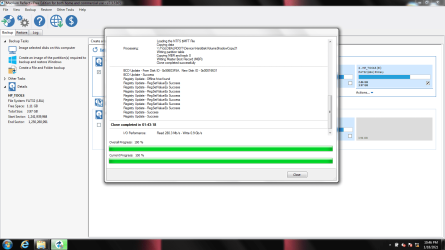
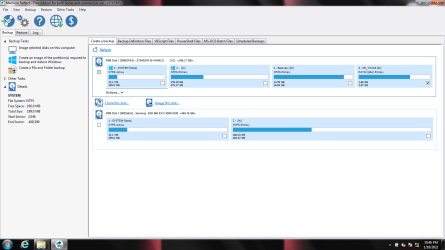
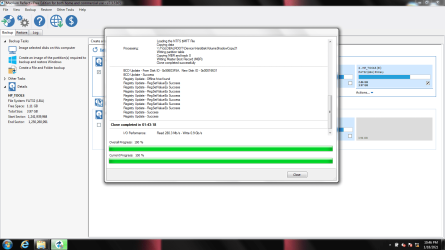
So I attempted to clone only the System and C: partition and avoid cloning the Recovery partition to save time. The cloning process was successful. I attached the final image after the cloning process and an image of the disk management after it was cloned.

clone2.png

reflect screen post clone.png

dm post clone.png

I then tried to leave the SSD in the external enclosure and boot from the SSD but it still would not after I changed the BIOS to boot from SSD. It will only boot from the HDD. I verified this by going to "My Computer" the C: drive stayed the same size and never changed. I do not know why it will not boot from the SSD still.

Any ideas why it will not boot from the SSD and how to fix it?
 
Last edited:

My Computer My Computer

At a glance

Windows 7 - Home Premium 64bit6.00 GB
Computer type
PC/Desktop
Computer Manufacturer/Model Number
HP DM4-3099se
OS
Windows 7 - Home Premium 64bit
Memory
6.00 GB
So I attempted to clone only the System and C: partition and avoid cloning the Recovery partition to save time. The cloning process was successful.

I do not know why it will not boot from the SSD

Is there any message?

I then tried to leave the SSD in the external enclosure and boot from the SSD


How is the external attached - via usb?
 

My Computers My Computers

  • At a glance

    7 X64i5 84002x8gb 3200mhz
    Computer type
    PC/Desktop
    OS
    7 X64
    CPU
    i5 8400
    Motherboard
    gigabyte b365m ds3h
    Memory
    2x8gb 3200mhz
    Hard Drives
    various
    PSU
    pure power 11 400w cm
    Case
    Coolermaster
    Cooling
    cryorig m9i
  • At a glance

    7x64g54008gb ddr4 2400
    Computer type
    PC/Desktop
    OS
    7x64
    CPU
    g5400
    Motherboard
    ga b365m ds3h
    Memory
    8gb ddr4 2400
    PSU
    xfx pro 450w
You have to put the cloned SSD on a SATA port. Windows is not allowed to boot from a USB.
Detach the HDD cables and attach to the SSD. It should boot.
 

My Computers My Computers

  • At a glance

    Windows 7 HP 64i5 6600K - 800MHz to 4200MHz4+4G GSkill DDR4 3000IG - Intel 530
    Computer type
    PC/Desktop
    Computer Manufacturer/Model Number
    custom build
    OS
    Windows 7 HP 64
    CPU
    i5 6600K - 800MHz to 4200MHz
    Motherboard
    GA-Z170-HD3P
    Memory
    4+4G GSkill DDR4 3000
    Graphics Card(s)
    IG - Intel 530
    Monitor(s) Displays
    Samsung 226BW
    Screen Resolution
    1680x1050
    Hard Drives
    (1) -1 SM951 – 128GB M.2 AHCI PCIe SSD drive for Windows 7 and Lubuntu
    (2) -1 WD SATA 3 - 1T for Data
    (3) -1 WD SATA 3 - 1T for backup
    PSU
    Thermaltake 450W TR2 gold
    Keyboard
    Old and good Chicony mechanical keyboard
    Mouse
    Logitech mX performance - 9 buttons (had to disable some)
    Internet Speed
    500Mb/s
    Browser
    Firefox 64
    Other Info
    TinyWall firewall
  • At a glance

    Windows 7 Proi7-4500U 800MHz to 3.0GHz(4+4)G DDR3 1600IG intel 4400 + NVIDIA GeForce GT 745M
    Computer type
    Laptop
    System Manufacturer/Model Number
    Asus Q550LF
    OS
    Windows 7 Pro
    CPU
    i7-4500U 800MHz to 3.0GHz
    Motherboard
    Asus Q550LF
    Memory
    (4+4)G DDR3 1600
    Graphics Card(s)
    IG intel 4400 + NVIDIA GeForce GT 745M
    Sound Card
    Realtek
    Monitor(s) Displays
    LG Display LP156WF4-SPH1
    Screen Resolution
    1920 x 1080
    Hard Drives
    BX500 120G SSD for Windows and programs +
    1T HDD for data
    Internet Speed
    500 Mb/s
    Browser
    Firefox
    Other Info
    TinyWall firewall
Thank you for the help here. I was attempting to boot the SSD via a USB. I will not try that again.

I removed the HDD and installed the SSD inside the laptop and connected via the SATA port. After that I started the laptop and I still can not boot from the SSD. Below is the image of the message I receive.

20210119_234653.jpg

20210119_235350.jpg

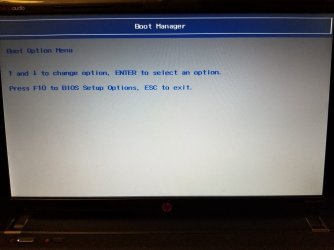
It still can not read the SSD once installed with the SATA port. I tried going to the BIOS and telling it to boot from the SSD but it does not even see it. I attached images for you to see. I also tried to perform a Hard Disk Test but it could not detect the SSD.

20210119_235436.jpg

20210119_235531.jpg

20210119_235446.jpg

20210119_235519.jpg

Please let me know if I am doing something incorrect. The HDD works just fine after I reinstall it into the laptop. Windows will boot with no problems with the HDD but once the SSD is installed it will not even detect it.

Is this a defective SSD or am I doing something wrong?
 

My Computer My Computer

At a glance

Windows 7 - Home Premium 64bit6.00 GB
Computer type
PC/Desktop
Computer Manufacturer/Model Number
HP DM4-3099se
OS
Windows 7 - Home Premium 64bit
Memory
6.00 GB

My Computers My Computers

  • At a glance

    7 X64i5 84002x8gb 3200mhz
    Computer type
    PC/Desktop
    OS
    7 X64
    CPU
    i5 8400
    Motherboard
    gigabyte b365m ds3h
    Memory
    2x8gb 3200mhz
    Hard Drives
    various
    PSU
    pure power 11 400w cm
    Case
    Coolermaster
    Cooling
    cryorig m9i
  • At a glance

    7x64g54008gb ddr4 2400
    Computer type
    PC/Desktop
    OS
    7x64
    CPU
    g5400
    Motherboard
    ga b365m ds3h
    Memory
    8gb ddr4 2400
    PSU
    xfx pro 450w
There is nothing you can do if the SSD drive isn't recognized on BIOS.

Did you cloned the System partition?
When you cloned the current drive into the SSD, did it succeed?
It may not show on BIOS as a boot able drive but is it recognized as a drive?
 

My Computers My Computers

  • At a glance

    Windows 7 HP 64i5 6600K - 800MHz to 4200MHz4+4G GSkill DDR4 3000IG - Intel 530
    Computer type
    PC/Desktop
    Computer Manufacturer/Model Number
    custom build
    OS
    Windows 7 HP 64
    CPU
    i5 6600K - 800MHz to 4200MHz
    Motherboard
    GA-Z170-HD3P
    Memory
    4+4G GSkill DDR4 3000
    Graphics Card(s)
    IG - Intel 530
    Monitor(s) Displays
    Samsung 226BW
    Screen Resolution
    1680x1050
    Hard Drives
    (1) -1 SM951 – 128GB M.2 AHCI PCIe SSD drive for Windows 7 and Lubuntu
    (2) -1 WD SATA 3 - 1T for Data
    (3) -1 WD SATA 3 - 1T for backup
    PSU
    Thermaltake 450W TR2 gold
    Keyboard
    Old and good Chicony mechanical keyboard
    Mouse
    Logitech mX performance - 9 buttons (had to disable some)
    Internet Speed
    500Mb/s
    Browser
    Firefox 64
    Other Info
    TinyWall firewall
  • At a glance

    Windows 7 Proi7-4500U 800MHz to 3.0GHz(4+4)G DDR3 1600IG intel 4400 + NVIDIA GeForce GT 745M
    Computer type
    Laptop
    System Manufacturer/Model Number
    Asus Q550LF
    OS
    Windows 7 Pro
    CPU
    i7-4500U 800MHz to 3.0GHz
    Motherboard
    Asus Q550LF
    Memory
    (4+4)G DDR3 1600
    Graphics Card(s)
    IG intel 4400 + NVIDIA GeForce GT 745M
    Sound Card
    Realtek
    Monitor(s) Displays
    LG Display LP156WF4-SPH1
    Screen Resolution
    1920 x 1080
    Hard Drives
    BX500 120G SSD for Windows and programs +
    1T HDD for data
    Internet Speed
    500 Mb/s
    Browser
    Firefox
    Other Info
    TinyWall firewall
To answer these questions:

SIW2 - I will download and try Bootice. Is this program one that I can boot into with a USB or does it need to be installed using Windows?

Megahertz07 - I did clone the System partition. The last clone I performed cloned the System Partition and the C: Partition and was 100% successful. Attached are photos post cloning and show it cloned 100%.

clone2.png

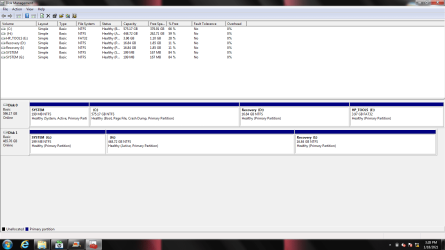
Below is an image showing the Disk Management after the cloning process. Disk 0 was the old HDD and Disk 1 is the SSD with only the System Partition and the H: Partition.

dm post clone.png

Samuria - I did check my laptop for Intel Anti-Theft Technology and could not find any software like that. I checked the program list in control panel and the menu list for the home page. If there is a different way I need to check for the Anti-Theft software please let me know. All cloning was successful according to Macrium Reflect. It just will not boot into Windows after being installed.
 

My Computer My Computer

At a glance

Windows 7 - Home Premium 64bit6.00 GB
Computer type
PC/Desktop
Computer Manufacturer/Model Number
HP DM4-3099se
OS
Windows 7 - Home Premium 64bit
Memory
6.00 GB
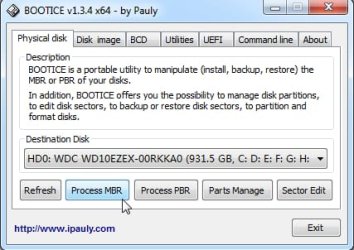
Run bootice from a working operating system. Point it at the ssd which can be attached via usb, or whatever.

Put the ssd back in the machine, making sure it seated properly.
 

My Computers My Computers

  • At a glance

    7 X64i5 84002x8gb 3200mhz
    Computer type
    PC/Desktop
    OS
    7 X64
    CPU
    i5 8400
    Motherboard
    gigabyte b365m ds3h
    Memory
    2x8gb 3200mhz
    Hard Drives
    various
    PSU
    pure power 11 400w cm
    Case
    Coolermaster
    Cooling
    cryorig m9i
  • At a glance

    7x64g54008gb ddr4 2400
    Computer type
    PC/Desktop
    OS
    7x64
    CPU
    g5400
    Motherboard
    ga b365m ds3h
    Memory
    8gb ddr4 2400
    PSU
    xfx pro 450w
SIW2: I used your advice and installed Windows NT 6 MBR and installed BootMGR Boot Record onto the SSD to the Windows Partition. I then installed the SSD into the laptop again and it did not work.

Do I need to install anything to the small SYSTEM partition or just the large Windows partition? The BootMGR Boot Record gave me the option to install to one specific partition and I did the Windows partition.

Thank You to all that have reached out and helped me. I appreciate all the help and support with this.
 

My Computer My Computer

At a glance

Windows 7 - Home Premium 64bit6.00 GB
Computer type
PC/Desktop
Computer Manufacturer/Model Number
HP DM4-3099se
OS
Windows 7 - Home Premium 64bit
Memory
6.00 GB
PBR needs to be installed to system partition

But if you installed the mbr code to the disk, and you have a partition marked active, at the least you should have a message.

If nothing is happening that suggests the problem is either with the ssd , or the laptop, or the bios settings

I assume the bios is set to boot in bios mode ( not efi) It is sometimes called "legacy" in the bios settings.
 

My Computers My Computers

  • At a glance

    7 X64i5 84002x8gb 3200mhz
    Computer type
    PC/Desktop
    OS
    7 X64
    CPU
    i5 8400
    Motherboard
    gigabyte b365m ds3h
    Memory
    2x8gb 3200mhz
    Hard Drives
    various
    PSU
    pure power 11 400w cm
    Case
    Coolermaster
    Cooling
    cryorig m9i
  • At a glance

    7x64g54008gb ddr4 2400
    Computer type
    PC/Desktop
    OS
    7x64
    CPU
    g5400
    Motherboard
    ga b365m ds3h
    Memory
    8gb ddr4 2400
    PSU
    xfx pro 450w
SIW2: I installed the BootMGR Boot Record PBR onto the System partition of the SSD and restarted the laptop. It took a long time to restart and still did not work. I installed the HDD into a Hard Drive Caddy to replace my DVD drive. After it restarted it booted into the HDD and the SSD was not recognized and when I went to Disk Management it says I needs to "Initialize Disk". I tried to select MBR but it did not work. The computer then froze, went to a blue screen and restarted.
Any advice on what to do?
 

My Computer My Computer

At a glance

Windows 7 - Home Premium 64bit6.00 GB
Computer type
PC/Desktop
Computer Manufacturer/Model Number
HP DM4-3099se
OS
Windows 7 - Home Premium 64bit
Memory
6.00 GB
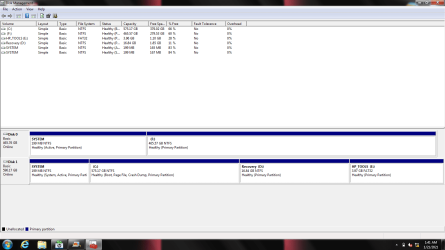
I was able to boot back up into the HDD to open Windows and view "Disk Management". I attached an image of the screen.

Disk 0 is now the SSD and Disk 1 is the HDD in the DVD caddy. Also the System Partition of the SSD shows active.

Two Drives.png

I am still unsure why it will not allow me to boot into the SSD. I still get the same page if it tries shown below and then if I restart it boots using the HHD.

20210119_234653.jpg
 

My Computer My Computer

At a glance

Windows 7 - Home Premium 64bit6.00 GB
Computer type
PC/Desktop
Computer Manufacturer/Model Number
HP DM4-3099se
OS
Windows 7 - Home Premium 64bit
Memory
6.00 GB
Did you succeed?
 

My Computers My Computers

  • At a glance

    Windows 7 HP 64i5 6600K - 800MHz to 4200MHz4+4G GSkill DDR4 3000IG - Intel 530
    Computer type
    PC/Desktop
    Computer Manufacturer/Model Number
    custom build
    OS
    Windows 7 HP 64
    CPU
    i5 6600K - 800MHz to 4200MHz
    Motherboard
    GA-Z170-HD3P
    Memory
    4+4G GSkill DDR4 3000
    Graphics Card(s)
    IG - Intel 530
    Monitor(s) Displays
    Samsung 226BW
    Screen Resolution
    1680x1050
    Hard Drives
    (1) -1 SM951 – 128GB M.2 AHCI PCIe SSD drive for Windows 7 and Lubuntu
    (2) -1 WD SATA 3 - 1T for Data
    (3) -1 WD SATA 3 - 1T for backup
    PSU
    Thermaltake 450W TR2 gold
    Keyboard
    Old and good Chicony mechanical keyboard
    Mouse
    Logitech mX performance - 9 buttons (had to disable some)
    Internet Speed
    500Mb/s
    Browser
    Firefox 64
    Other Info
    TinyWall firewall
  • At a glance

    Windows 7 Proi7-4500U 800MHz to 3.0GHz(4+4)G DDR3 1600IG intel 4400 + NVIDIA GeForce GT 745M
    Computer type
    Laptop
    System Manufacturer/Model Number
    Asus Q550LF
    OS
    Windows 7 Pro
    CPU
    i7-4500U 800MHz to 3.0GHz
    Motherboard
    Asus Q550LF
    Memory
    (4+4)G DDR3 1600
    Graphics Card(s)
    IG intel 4400 + NVIDIA GeForce GT 745M
    Sound Card
    Realtek
    Monitor(s) Displays
    LG Display LP156WF4-SPH1
    Screen Resolution
    1920 x 1080
    Hard Drives
    BX500 120G SSD for Windows and programs +
    1T HDD for data
    Internet Speed
    500 Mb/s
    Browser
    Firefox
    Other Info
    TinyWall firewall
Back
Top