Cloning HDD to SSD and unable to boot, disk read error after install

No luck so far, still will not boot into SSD. I am going to try to find and use a Windows 7 repair disk and hope it does something. Any other advice I should try?
 

My Computer My Computer

At a glance

Windows 7 - Home Premium 64bit6.00 GB
Computer type
PC/Desktop
Computer Manufacturer/Model Number
HP DM4-3099se
OS
Windows 7 - Home Premium 64bit
Memory
6.00 GB
Megahertz07 - You mentioned you have a link for the Windows 7 installation media in a prior message. Can you send me the link? I tried restarting using the Recovery USB I made for my HP laptop but it did not work. I want to try installing the Windows 7 installation software and try the repair function.
 

My Computer My Computer

At a glance

Windows 7 - Home Premium 64bit6.00 GB
Computer type
PC/Desktop
Computer Manufacturer/Model Number
HP DM4-3099se
OS
Windows 7 - Home Premium 64bit
Memory
6.00 GB

My Computers My Computers

  • At a glance

    Windows 7 HP 64i5 6600K - 800MHz to 4200MHz4+4G GSkill DDR4 3000IG - Intel 530
    Computer type
    PC/Desktop
    Computer Manufacturer/Model Number
    custom build
    OS
    Windows 7 HP 64
    CPU
    i5 6600K - 800MHz to 4200MHz
    Motherboard
    GA-Z170-HD3P
    Memory
    4+4G GSkill DDR4 3000
    Graphics Card(s)
    IG - Intel 530
    Monitor(s) Displays
    Samsung 226BW
    Screen Resolution
    1680x1050
    Hard Drives
    (1) -1 SM951 – 128GB M.2 AHCI PCIe SSD drive for Windows 7 and Lubuntu
    (2) -1 WD SATA 3 - 1T for Data
    (3) -1 WD SATA 3 - 1T for backup
    PSU
    Thermaltake 450W TR2 gold
    Keyboard
    Old and good Chicony mechanical keyboard
    Mouse
    Logitech mX performance - 9 buttons (had to disable some)
    Internet Speed
    500Mb/s
    Browser
    Firefox 64
    Other Info
    TinyWall firewall
  • At a glance

    Windows 7 Proi7-4500U 800MHz to 3.0GHz(4+4)G DDR3 1600IG intel 4400 + NVIDIA GeForce GT 745M
    Computer type
    Laptop
    System Manufacturer/Model Number
    Asus Q550LF
    OS
    Windows 7 Pro
    CPU
    i7-4500U 800MHz to 3.0GHz
    Motherboard
    Asus Q550LF
    Memory
    (4+4)G DDR3 1600
    Graphics Card(s)
    IG intel 4400 + NVIDIA GeForce GT 745M
    Sound Card
    Realtek
    Monitor(s) Displays
    LG Display LP156WF4-SPH1
    Screen Resolution
    1920 x 1080
    Hard Drives
    BX500 120G SSD for Windows and programs +
    1T HDD for data
    Internet Speed
    500 Mb/s
    Browser
    Firefox
    Other Info
    TinyWall firewall
Thank You Megahertz07!
 

My Computer My Computer

At a glance

Windows 7 - Home Premium 64bit6.00 GB
Computer type
PC/Desktop
Computer Manufacturer/Model Number
HP DM4-3099se
OS
Windows 7 - Home Premium 64bit
Memory
6.00 GB

My Computers My Computers

  • At a glance

    Windows 7 HP 64i5 6600K - 800MHz to 4200MHz4+4G GSkill DDR4 3000IG - Intel 530
    Computer type
    PC/Desktop
    Computer Manufacturer/Model Number
    custom build
    OS
    Windows 7 HP 64
    CPU
    i5 6600K - 800MHz to 4200MHz
    Motherboard
    GA-Z170-HD3P
    Memory
    4+4G GSkill DDR4 3000
    Graphics Card(s)
    IG - Intel 530
    Monitor(s) Displays
    Samsung 226BW
    Screen Resolution
    1680x1050
    Hard Drives
    (1) -1 SM951 – 128GB M.2 AHCI PCIe SSD drive for Windows 7 and Lubuntu
    (2) -1 WD SATA 3 - 1T for Data
    (3) -1 WD SATA 3 - 1T for backup
    PSU
    Thermaltake 450W TR2 gold
    Keyboard
    Old and good Chicony mechanical keyboard
    Mouse
    Logitech mX performance - 9 buttons (had to disable some)
    Internet Speed
    500Mb/s
    Browser
    Firefox 64
    Other Info
    TinyWall firewall
  • At a glance

    Windows 7 Proi7-4500U 800MHz to 3.0GHz(4+4)G DDR3 1600IG intel 4400 + NVIDIA GeForce GT 745M
    Computer type
    Laptop
    System Manufacturer/Model Number
    Asus Q550LF
    OS
    Windows 7 Pro
    CPU
    i7-4500U 800MHz to 3.0GHz
    Motherboard
    Asus Q550LF
    Memory
    (4+4)G DDR3 1600
    Graphics Card(s)
    IG intel 4400 + NVIDIA GeForce GT 745M
    Sound Card
    Realtek
    Monitor(s) Displays
    LG Display LP156WF4-SPH1
    Screen Resolution
    1920 x 1080
    Hard Drives
    BX500 120G SSD for Windows and programs +
    1T HDD for data
    Internet Speed
    500 Mb/s
    Browser
    Firefox
    Other Info
    TinyWall firewall
Before you do a Clean install, try this.
Install MiniTool Partition Wizard Free
On the SSD, with MiniTool, set the system partition as Non active and then set the second partition (H:) as active.
Replace the drive and try to boot
 

My Computers My Computers

  • At a glance

    Windows 7 HP 64i5 6600K - 800MHz to 4200MHz4+4G GSkill DDR4 3000IG - Intel 530
    Computer type
    PC/Desktop
    Computer Manufacturer/Model Number
    custom build
    OS
    Windows 7 HP 64
    CPU
    i5 6600K - 800MHz to 4200MHz
    Motherboard
    GA-Z170-HD3P
    Memory
    4+4G GSkill DDR4 3000
    Graphics Card(s)
    IG - Intel 530
    Monitor(s) Displays
    Samsung 226BW
    Screen Resolution
    1680x1050
    Hard Drives
    (1) -1 SM951 – 128GB M.2 AHCI PCIe SSD drive for Windows 7 and Lubuntu
    (2) -1 WD SATA 3 - 1T for Data
    (3) -1 WD SATA 3 - 1T for backup
    PSU
    Thermaltake 450W TR2 gold
    Keyboard
    Old and good Chicony mechanical keyboard
    Mouse
    Logitech mX performance - 9 buttons (had to disable some)
    Internet Speed
    500Mb/s
    Browser
    Firefox 64
    Other Info
    TinyWall firewall
  • At a glance

    Windows 7 Proi7-4500U 800MHz to 3.0GHz(4+4)G DDR3 1600IG intel 4400 + NVIDIA GeForce GT 745M
    Computer type
    Laptop
    System Manufacturer/Model Number
    Asus Q550LF
    OS
    Windows 7 Pro
    CPU
    i7-4500U 800MHz to 3.0GHz
    Motherboard
    Asus Q550LF
    Memory
    (4+4)G DDR3 1600
    Graphics Card(s)
    IG intel 4400 + NVIDIA GeForce GT 745M
    Sound Card
    Realtek
    Monitor(s) Displays
    LG Display LP156WF4-SPH1
    Screen Resolution
    1920 x 1080
    Hard Drives
    BX500 120G SSD for Windows and programs +
    1T HDD for data
    Internet Speed
    500 Mb/s
    Browser
    Firefox
    Other Info
    TinyWall firewall
Just an update for everyone, I tried to use the Windows repair and installation USB. It did not work for some reason. Keeps saying "unexpected I/O error" shown below.

20210123_002347.jpg

I have ordered a replacement SSD to see if I just have a junk SSD. I will report back once it arrives.

Megahertz07 - I tried the MiniTool Partition Wizard to set "System" as inactive and the second partition to active and rebooting. It did not make any change.
 

My Computer My Computer

At a glance

Windows 7 - Home Premium 64bit6.00 GB
Computer type
PC/Desktop
Computer Manufacturer/Model Number
HP DM4-3099se
OS
Windows 7 - Home Premium 64bit
Memory
6.00 GB
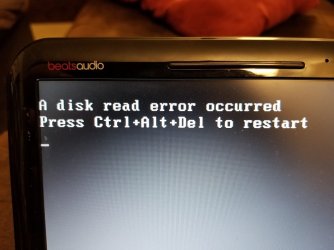
Update: New SSD arrived and I used Macrium Reflect to clone the disk and then installed the SSD. Same result as the last drive. I tried all the tricks suggested prior and also tried to do a clean install of Windows 7 which didn't work. Since that failed to work after install from the USB I tried to install Windows 10 which also failed to work. Everything I did results in the same screen "disk read error" displayed below.

20210119_234653.jpg

There has to be something preventing the removal of the HDD from the laptop disabling it to work. I am unsure what it could be. I have updated the BIOS and tried nearly everything I can think of to make this work.

Does anyone know what would prevent me from installing a new hard drive (SSD) and not allow it to work? Cant install a clone or a clean install of Windows 7 or 10.
 

My Computer My Computer

At a glance

Windows 7 - Home Premium 64bit6.00 GB
Computer type
PC/Desktop
Computer Manufacturer/Model Number
HP DM4-3099se
OS
Windows 7 - Home Premium 64bit
Memory
6.00 GB
Update: I tried something that sounded crazy to me, but it is working. I installed the SSD into the CD/DVD caddy and Windows booted up from the SSD. The HDD is not currently installed. I do not understand why the laptop will not boot with the SSD and the standard SATA plug but will work in the caddy. The SATA plug does work with the old HDD just fine but will not work when the SSD is used.

Can anyone please explain to me what may be happening? The SSD is not being used to it's full potential (speed) in the CD/DVD caddy I believe. I am also not sure if it is okay to use it this way.

Any advice or something I am missing? Thank you again for any help you can offer.
 

My Computer My Computer

At a glance

Windows 7 - Home Premium 64bit6.00 GB
Computer type
PC/Desktop
Computer Manufacturer/Model Number
HP DM4-3099se
OS
Windows 7 - Home Premium 64bit
Memory
6.00 GB

My Computers My Computers

  • At a glance

    7 X64i5 84002x8gb 3200mhz
    Computer type
    PC/Desktop
    OS
    7 X64
    CPU
    i5 8400
    Motherboard
    gigabyte b365m ds3h
    Memory
    2x8gb 3200mhz
    Hard Drives
    various
    PSU
    pure power 11 400w cm
    Case
    Coolermaster
    Cooling
    cryorig m9i
  • At a glance

    7x64g54008gb ddr4 2400
    Computer type
    PC/Desktop
    OS
    7x64
    CPU
    g5400
    Motherboard
    ga b365m ds3h
    Memory
    8gb ddr4 2400
    PSU
    xfx pro 450w
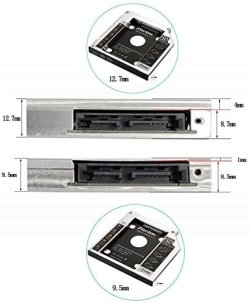
The SSD is connected by a sata connector and then connected to a smaller connector which connects to the laptop optical drive port. Below are images of the caddy and a link for the caddy.

51D1N3ZBS9L._AC_SY780_.jpg

516SWDbXfuL._AC_SY780_.jpg

"Aluminum Alloy hard drive caddy Support 2.5 Inch , 9.5MM Laptop Optical Bay - SSD Accessories - www.zheinossd.com" Aluminum Alloy hard drive caddy Support 2.5 Inch , 9.5MM Laptop Optical Bay - SSD Accessories - www.zheinossd.com

I do not understand why it works fine in the caddy. After it booted and restarted several times with no problems I removed the SSD from the caddy and installed it into the normal hard drive location and it failed again. Displaying the same "disk read error" screen.

I know the normal hard drive location and connector work since when the HDD is used it boots windows with no problems. As soon as the SSD is used it will no longer work.

Thank you for the continued help.
 

My Computer My Computer

At a glance

Windows 7 - Home Premium 64bit6.00 GB
Computer type
PC/Desktop
Computer Manufacturer/Model Number
HP DM4-3099se
OS
Windows 7 - Home Premium 64bit
Memory
6.00 GB
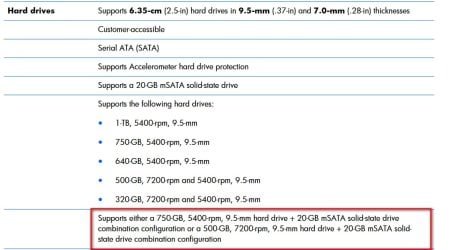
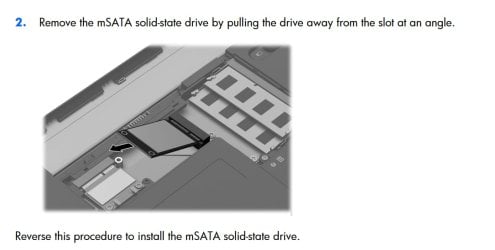
According to the manual:

HP Pavilion dm4 Entertainment PC.jpg


HP Pavilion dm4 Entertainment PC-msata.jpg

Is that the setup on your machine?
 

My Computers My Computers

  • At a glance

    7 X64i5 84002x8gb 3200mhz
    Computer type
    PC/Desktop
    OS
    7 X64
    CPU
    i5 8400
    Motherboard
    gigabyte b365m ds3h
    Memory
    2x8gb 3200mhz
    Hard Drives
    various
    PSU
    pure power 11 400w cm
    Case
    Coolermaster
    Cooling
    cryorig m9i
  • At a glance

    7x64g54008gb ddr4 2400
    Computer type
    PC/Desktop
    OS
    7x64
    CPU
    g5400
    Motherboard
    ga b365m ds3h
    Memory
    8gb ddr4 2400
    PSU
    xfx pro 450w
No, I have a standard 2.5" SSD installed.
 

My Computer My Computer

At a glance

Windows 7 - Home Premium 64bit6.00 GB
Computer type
PC/Desktop
Computer Manufacturer/Model Number
HP DM4-3099se
OS
Windows 7 - Home Premium 64bit
Memory
6.00 GB
Back
Top