
Closed Program Screens Ghost on Desktop

TexasBruiser

New member
Local time
3:58 AM
Messages
4
The issue:

When running two or more programs, one of which is Acrobat X 10.1.3 and the other is IE9, on closing IE9, the last page visited stays in the Acrobat window.

I use CCleaner and went into Task Manager to make sure iexplorer was closed - including using Process Explorer to close the handles. Still the issue remains.

I have looked all over the 'net for the answer to what seems a common problem. Used all the words I could think of, could not find a single mention.

I have a screenshot if anyone is interested. Thanks.
 

Attachments
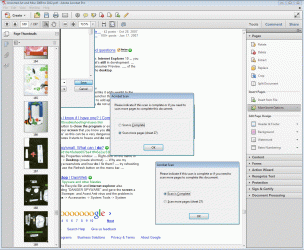
  • IE9 Ghost in Adobe Acobat X Scan Dialog.gif
    IE9 Ghost in Adobe Acobat X Scan Dialog.gif
    258 KB · Views: 32

My Computer

Computer Manufacturer/Model Number
Home built
OS
Windows 7 Ultimate x64
CPU
i5-2500
Motherboard
Gigabyte P67A-UD4-B3
Memory
8G Corsair 1800 DDR111
Graphics Card(s)
GeForce GX460
Monitor(s) Displays
Samsung Digital SyncMaster T210
Hard Drives
3 - WD Raptor 2TB each
PSU
Corsair 800W
Case
ASUS
Cooling
Multi-fan
Welcome to Seven Forums TexasBruiser. I've certainly seen that behavior on occasion with random occurrences, but not something repeatable. Is the behavior repeatable to the point you can try to troubleshoot it? If you close Acrobat and reopen it, is it back to normal? If you choose one of the bookmarks on left, does it then replace the IE "ghost"? This will be difficult to correct for sure. Does the same behavior occur if you close a Firefox window for instance? A Guy
 

My Computer

Computer type
PC/Desktop
OS
Windows 10 Home x64
CPU
INTEL Core i5-750 Quad-Core 3.37GHz
Motherboard
ASUS P7P55D
Memory
HyperX Fury Black Series 8GB (2 x 4GB) 1866Mhz
Graphics Card(s)
EVGA GeForce GTX 750 Superclocked 1GB 128-Bit GDDR5
Monitor(s) Displays
LG 32MA68HY 32" IPS
Screen Resolution
1920 x 1080
Hard Drives
Samsung 840 Evo 120GB, SEAGATE 500GB Barracuda® 7200.12, SATA 3 Gb/s, 7200 RPM, 16MB cache
PSU
ANTEC TruePower New TP-550, 80 PLUS, 550W
Case
ANTEC Three Hundred Illusion
Cooling
COOLER MASTER Hyper 212 Plus, 4 x 120mm 1 x 140mm Noctua's
Internet Speed
85 + Mbps
Antivirus
Avast
Browser
Vivaldi
Not an answer, but a work around.

Minimize other programs first.

Also suggest asking adobe.
 

My Computer

Computer Manufacturer/Model Number
Toshiba Satellite S875D-S7239 laptop
OS
MS Windows 7 Ultimate SP1 64-bit
CPU
AMD A10-4600M
Motherboard
AMD Pumori (Socket FT1)
Memory
6.00 GB Dual-Channel DDR3 @ 798MHz (11-11-12-28)
Graphics Card(s)
AMD Radeon HD 7660G
Sound Card
High Definition Audio Device
Monitor(s) Displays
Generic PnP Monitor (1600x900@60Hz)
Screen Resolution
1600x900@60Hz
Hard Drives
SSD 119GB Corsair CSSD-V128GB2 ATA Device
Keyboard
Standard PS/2 Keyboard
Mouse
HP Wireless Optical Mobile Mouse Model FHA-3410
Internet Speed
What the local pub, local coffee shop offers.
Other Info
Optical Drive:MATSHITA BD-CMB UJ160B ATA Device


Also have an Asus ha1002xp netbook with Win 7 Ultimate installed.
Yes. Consistently repeatable. FF, Chrome, IE. No diff. Just about every program I use concurrent with Acorbat X leaves a ghost (which does not change until Acrobat is closed). I've contact Adobe. No response yet. When scanning to acrobat, however, everything is usually disabled until the "scanning is complete" is checked and closed.
The ghost persists until all of Acrobat is closed. No program crashes but very annoying.
 

My Computer

Computer Manufacturer/Model Number
Home built
OS
Windows 7 Ultimate x64
CPU
i5-2500
Motherboard
Gigabyte P67A-UD4-B3
Memory
8G Corsair 1800 DDR111
Graphics Card(s)
GeForce GX460
Monitor(s) Displays
Samsung Digital SyncMaster T210
Hard Drives
3 - WD Raptor 2TB each
PSU
Corsair 800W
Case
ASUS
Cooling
Multi-fan
Hi,
As this only occurs with Adobe Acrobat X, it narrows down the cause. I have some ideas on how to fix it.

Idea One - Repair the install. To do so:

  1. Open Acrobat. Just do it from the start menu, don't open anything in it.
  2. Go to Help
  3. Click repair Acrobat Installation
  4. Follow the on screen instructions
Idea Two - If this doesn't work, try uninstalling Acrobat. Use Revo Uninstaller to get rid of all traces of the program.

Hope this helps
Stephen
http://www.revouninstaller.com/revo_uninstaller_free_download.html
 

My Computer

Computer Manufacturer/Model Number
Dell XPS 15 L502x
OS
Windows 7 Home Premium 64bit (O.E.M)
CPU
Intel Core i7 2630QM @2.00GHz
Memory
6GB DDR3
Graphics Card(s)
Intel Intergrated Graphics 3000, nVidia GT525M (1GB)
Screen Resolution
1366x768
Hard Drives
750GB Seagate 7200rpm
Keyboard
Backlit Dell XPS 15 L502x Keyboard
Mouse
Microsoft Wireless Mobile Mouse 4000
Internet Speed
2.5 Mb/s down, 0.36 up
TexasBruiser,

Let us know the results of following the sound advice from Tekno Venus.
 

My Computer

Computer Manufacturer/Model Number
Toshiba Satellite S875D-S7239 laptop
OS
MS Windows 7 Ultimate SP1 64-bit
CPU
AMD A10-4600M
Motherboard
AMD Pumori (Socket FT1)
Memory
6.00 GB Dual-Channel DDR3 @ 798MHz (11-11-12-28)
Graphics Card(s)
AMD Radeon HD 7660G
Sound Card
High Definition Audio Device
Monitor(s) Displays
Generic PnP Monitor (1600x900@60Hz)
Screen Resolution
1600x900@60Hz
Hard Drives
SSD 119GB Corsair CSSD-V128GB2 ATA Device
Keyboard
Standard PS/2 Keyboard
Mouse
HP Wireless Optical Mobile Mouse Model FHA-3410
Internet Speed
What the local pub, local coffee shop offers.
Other Info
Optical Drive:MATSHITA BD-CMB UJ160B ATA Device


Also have an Asus ha1002xp netbook with Win 7 Ultimate installed.
I did reply, but the post is missing. Been there, did that. Used Your Unistaller 2012 Pro (better at cleaning up remnants in Registry). No improvement as no errors in install detected. Waiting for response from Adobe X Forum.
 

My Computer

Computer Manufacturer/Model Number
Home built
OS
Windows 7 Ultimate x64
CPU
i5-2500
Motherboard
Gigabyte P67A-UD4-B3
Memory
8G Corsair 1800 DDR111
Graphics Card(s)
GeForce GX460
Monitor(s) Displays
Samsung Digital SyncMaster T210
Hard Drives
3 - WD Raptor 2TB each
PSU
Corsair 800W
Case
ASUS
Cooling
Multi-fan
Hmmmm, how odd. Do you have a system restore to go back to before all of this began?

Stephen
 

My Computer

Computer Manufacturer/Model Number
Dell XPS 15 L502x
OS
Windows 7 Home Premium 64bit (O.E.M)
CPU
Intel Core i7 2630QM @2.00GHz
Memory
6GB DDR3
Graphics Card(s)
Intel Intergrated Graphics 3000, nVidia GT525M (1GB)
Screen Resolution
1366x768
Hard Drives
750GB Seagate 7200rpm
Keyboard
Backlit Dell XPS 15 L502x Keyboard
Mouse
Microsoft Wireless Mobile Mouse 4000
Internet Speed
2.5 Mb/s down, 0.36 up
Yes, I do have system restore, but this issue has occurred since Acrobat 9. I have issues with using SR unless there is a BSOD or other horrific issue. SR never tells you excatly what is rolled back, and in some cases, I read that certain Win updates cannot be rolled back - leaving mixes of old and new files pre-fetched to the same spaces & etc. Anyway, that is my personal experience. (MCSE+I from 2001).
 

My Computer

Computer Manufacturer/Model Number
Home built
OS
Windows 7 Ultimate x64
CPU
i5-2500
Motherboard
Gigabyte P67A-UD4-B3
Memory
8G Corsair 1800 DDR111
Graphics Card(s)
GeForce GX460
Monitor(s) Displays
Samsung Digital SyncMaster T210
Hard Drives
3 - WD Raptor 2TB each
PSU
Corsair 800W
Case
ASUS
Cooling
Multi-fan
TexasBruiser,

System Restore can show up what will be changed.

Please see following:

RESTORE TO A PREVIOUS SYSTEM RESTORE POINT
1) WIN | type SYSTEM RESTORE | ENTER | NEXT
| Choose a different restore point radio button | NEXT
2) Show more restore points checkbox (lower left)
3) Highlight the desired restore point
4) Scan for affected programs (lower right)make a note of affected programs
5) CLOSE | NEXT | FINISH


WIN = key with the wavy Microsoft flag on top.
==================================================

Notice item 4)
 

My Computer

Computer Manufacturer/Model Number
Toshiba Satellite S875D-S7239 laptop
OS
MS Windows 7 Ultimate SP1 64-bit
CPU
AMD A10-4600M
Motherboard
AMD Pumori (Socket FT1)
Memory
6.00 GB Dual-Channel DDR3 @ 798MHz (11-11-12-28)
Graphics Card(s)
AMD Radeon HD 7660G
Sound Card
High Definition Audio Device
Monitor(s) Displays
Generic PnP Monitor (1600x900@60Hz)
Screen Resolution
1600x900@60Hz
Hard Drives
SSD 119GB Corsair CSSD-V128GB2 ATA Device
Keyboard
Standard PS/2 Keyboard
Mouse
HP Wireless Optical Mobile Mouse Model FHA-3410
Internet Speed
What the local pub, local coffee shop offers.
Other Info
Optical Drive:MATSHITA BD-CMB UJ160B ATA Device


Also have an Asus ha1002xp netbook with Win 7 Ultimate installed.
Back
Top