Solved cmd in Desktop Context Menu

markaz

New member
Power User
VIP
Local time
1:17 PM
Messages
168
Location
Peoria, AZ
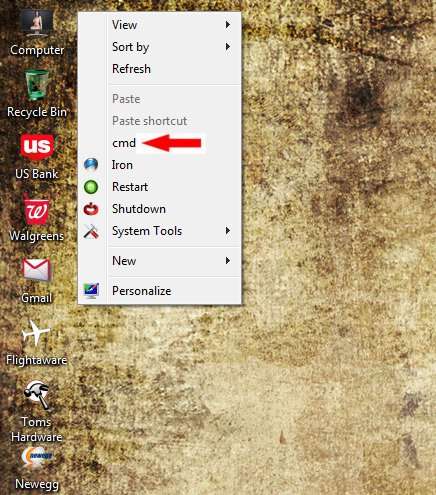
Had a power outage last night and had to start the computer. Right clicked the Desktop a bit ago and now it's populated with the "cmd" entry (pic).
bisBDs.jpg


When clicked the following appears:
c6KwqD.jpg


Any ideas on getting rid of this?
 

My Computer

Computer type
PC/Desktop
Computer Manufacturer/Model Number
Custom
OS
Windows 7 Home Premium x64
CPU
AMD A6-6400K APU
Motherboard
Gigabyte F2A88XM-D3H
Memory
8.0GB DDR3-1600
Graphics Card(s)
Radeon Onboard Graphics
Sound Card
Realtek High Def
Monitor(s) Displays
Acer K242HQL
Screen Resolution
1920x1080
Hard Drives
Samsung 850 EVO SSD 250GB
PSU
Corsair 430W
Case
Silverstone PS-08
Cooling
Enermax fans (120mm-intake, 80mm-exhaust)
Keyboard
Logitech K360
Mouse
Logitech M305 Cordless Optical
Internet Speed
Download 60.19Mbps Upload 6.71Mbps
Antivirus
AVG
Browser
Iron Version 51.0.2700.0 (64-bit)
Hello Mark, :)

If you like, export the key below from regedit.exe, and I'll be happy to post back with a .reg file to remove it.

HKEY_CLASSES_ROOT\DesktopBackground
 

My Computer

Computer type
PC/Desktop
Computer Manufacturer/Model Number
Self built custom
OS
64-bit Windows 11 Pro for Workstations
CPU
Intel i7-8700K OC'd to 5 GHz
Motherboard
ASUS ROG Maximus XI Formula Z390
Memory
64 GB (4x16GB) G.SKILL TridentZ RGB DDR4 3600 MHz
Graphics Card(s)
ASUS ROG-STRIX-GTX1080TI-O11G-GAMING
Sound Card
Integrated
Monitor(s) Displays
2 x Samsung Odyssey G7 27"
Screen Resolution
2560x1440
Hard Drives
1TB Samsung 990 PRO M.2,
4TB Samsung 990 PRO PRO M.2,
TerraMaster F8 SSD Plus NAS
PSU
Seasonic Prime Titanium 850W
Case
Thermaltake Core P3
Cooling
Corsair Hydro H115i
Keyboard
Logitech wireless K800
Mouse
Logitech MX Master 4
Internet Speed
2 Gb/s Download and 100 Mb/s Upload
Antivirus
Malwarebyte Anti-Malware Premium
Browser
Google Chrome
Other Info
Logitech Z625 speaker system,
Logitech BRIO 4K Pro webcam,
HP Color LaserJet Pro MFP M477fdn,
APC SMART-UPS RT 1000 XL - SURT1000XLI,
Galaxy S23 Plus phone
Thanks for the help, Shawn. -attached-
 

Attachments

My Computer

Computer type
PC/Desktop
Computer Manufacturer/Model Number
Custom
OS
Windows 7 Home Premium x64
CPU
AMD A6-6400K APU
Motherboard
Gigabyte F2A88XM-D3H
Memory
8.0GB DDR3-1600
Graphics Card(s)
Radeon Onboard Graphics
Sound Card
Realtek High Def
Monitor(s) Displays
Acer K242HQL
Screen Resolution
1920x1080
Hard Drives
Samsung 850 EVO SSD 250GB
PSU
Corsair 430W
Case
Silverstone PS-08
Cooling
Enermax fans (120mm-intake, 80mm-exhaust)
Keyboard
Logitech K360
Mouse
Logitech M305 Cordless Optical
Internet Speed
Download 60.19Mbps Upload 6.71Mbps
Antivirus
AVG
Browser
Iron Version 51.0.2700.0 (64-bit)
I don't see it there. Let's try the key below next.

HKEY_CLASSES_ROOT\Directory\Background
 

My Computer

Computer type
PC/Desktop
Computer Manufacturer/Model Number
Self built custom
OS
64-bit Windows 11 Pro for Workstations
CPU
Intel i7-8700K OC'd to 5 GHz
Motherboard
ASUS ROG Maximus XI Formula Z390
Memory
64 GB (4x16GB) G.SKILL TridentZ RGB DDR4 3600 MHz
Graphics Card(s)
ASUS ROG-STRIX-GTX1080TI-O11G-GAMING
Sound Card
Integrated
Monitor(s) Displays
2 x Samsung Odyssey G7 27"
Screen Resolution
2560x1440
Hard Drives
1TB Samsung 990 PRO M.2,
4TB Samsung 990 PRO PRO M.2,
TerraMaster F8 SSD Plus NAS
PSU
Seasonic Prime Titanium 850W
Case
Thermaltake Core P3
Cooling
Corsair Hydro H115i
Keyboard
Logitech wireless K800
Mouse
Logitech MX Master 4
Internet Speed
2 Gb/s Download and 100 Mb/s Upload
Antivirus
Malwarebyte Anti-Malware Premium
Browser
Google Chrome
Other Info
Logitech Z625 speaker system,
Logitech BRIO 4K Pro webcam,
HP Color LaserJet Pro MFP M477fdn,
APC SMART-UPS RT 1000 XL - SURT1000XLI,
Galaxy S23 Plus phone
Another option would be to download this ( 32 or 64 bit ): ShellExView - Shell Extension Manager For Windows

Click options > Filter by extension type > Context Menu
and Options > Hide all Microsoft Extensions

You should see a list of context menu entries and the column headers will describe additional information of where these menu items show up. ie if Desktop or My Computer column says yes, then that particular entry applies to that area... If the 6 location specifiers are empty, it may show up all the time or when selecting a file..

If using 64 bit version: Options > Show 32 Bit Shell Extensions ( if the entry isn't displayed, this shows alternatives )


When you find the entry, click it and then click the red bullet under the menu bar. That'll disable it. Next goto Options > Restart Explorer > Yes

Then you can test to see if it gets removed in realtime. Note, don't click restart explorer more than once in between restarts ( ie wait for the taskbar to reappear before trying to restart again; if the taskbar doesn't show up open the task manager by pressing: CTRL + SHIFT + ESCAPE and closing all explorer.exe processes and then File > New Task > explorer [enter or ok] )

The way Brink is offering to help is essentially the same way this utility works; I'm offering this as an alternative in case something else appears from a piece of installed software that you don't want so you know what to use and how to remove it in the future ( or re-add it if you want ).
 

My Computer

Computer type
PC/Desktop
Computer Manufacturer/Model Number
Acecool Company
OS
Windows 7 Professional x64
CPU
Intel Q6600 ( Quad Core ) @ 2.4 to 3.0 OC GHz
Motherboard
Asus P5K
Memory
Kingston 8GB ( 2x 4GB )
Graphics Card(s)
NVidia 750 TI SC 2GB
Sound Card
Onboard + USB 7.1 Simulated Surround Headset
Monitor(s) Displays
Samsung TV, HP TV ( Until PS Caps repaired 2x LG )
Screen Resolution
Primary: 1920 x 1080, Secondary ( left ): 1680 x 1050
Hard Drives
Seagate ( 1TB x2 - 1 [ logic board issue ], 3TB x 1, 320GB x 1, 500GB x 1 ) @ 7200RPM
PSU
500W
Case
Antec 900
Cooling
Air
Keyboard
Logitech K350 Wireless and MS KU-0108 Wired ( Gaming )
Mouse
Logitech MX510 Blue
Internet Speed
50MBit
Antivirus
Custom
Browser
Google Chrome
Other Info
Logitech devices have an issue with gaming when using SetPoint software ( Uninstalled because of this ) where a depressed-key registers as an unpress event after a short period of time meaning if you hold right click to aim, it stops randomly until you re-press. It is one of the most annoying pieces of software because you either need to write your own to use the extra functionality of the keyboar
Shawn,

Sorry for the delayed response.

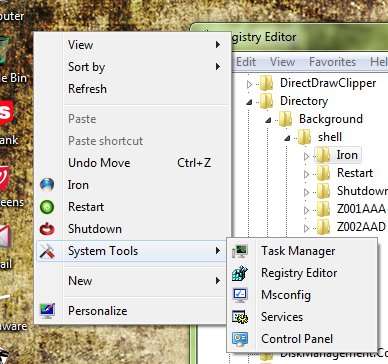
The moment I saw the altermate key you want me to export (HKR\Dir*\Background) I recognized it as the one that I have manually created numerous "quick launch" keys in the past. I currently start my browser and launch numerous utilities from there as well. Anyway, I navigated to it and there was the "cmd" key. There were no values assc with it so I deleted it and issue solved....for now anyway.
r7dduH.jpg


Thanks so much, and you as well Acecool, for helping with a resolution.

Mark (aka, markaz)
 
Last edited:

My Computer

Computer type
PC/Desktop
Computer Manufacturer/Model Number
Custom
OS
Windows 7 Home Premium x64
CPU
AMD A6-6400K APU
Motherboard
Gigabyte F2A88XM-D3H
Memory
8.0GB DDR3-1600
Graphics Card(s)
Radeon Onboard Graphics
Sound Card
Realtek High Def
Monitor(s) Displays
Acer K242HQL
Screen Resolution
1920x1080
Hard Drives
Samsung 850 EVO SSD 250GB
PSU
Corsair 430W
Case
Silverstone PS-08
Cooling
Enermax fans (120mm-intake, 80mm-exhaust)
Keyboard
Logitech K360
Mouse
Logitech M305 Cordless Optical
Internet Speed
Download 60.19Mbps Upload 6.71Mbps
Antivirus
AVG
Browser
Iron Version 51.0.2700.0 (64-bit)
Great news Mark. :party:
 

My Computer

Computer type
PC/Desktop
Computer Manufacturer/Model Number
Self built custom
OS
64-bit Windows 11 Pro for Workstations
CPU
Intel i7-8700K OC'd to 5 GHz
Motherboard
ASUS ROG Maximus XI Formula Z390
Memory
64 GB (4x16GB) G.SKILL TridentZ RGB DDR4 3600 MHz
Graphics Card(s)
ASUS ROG-STRIX-GTX1080TI-O11G-GAMING
Sound Card
Integrated
Monitor(s) Displays
2 x Samsung Odyssey G7 27"
Screen Resolution
2560x1440
Hard Drives
1TB Samsung 990 PRO M.2,
4TB Samsung 990 PRO PRO M.2,
TerraMaster F8 SSD Plus NAS
PSU
Seasonic Prime Titanium 850W
Case
Thermaltake Core P3
Cooling
Corsair Hydro H115i
Keyboard
Logitech wireless K800
Mouse
Logitech MX Master 4
Internet Speed
2 Gb/s Download and 100 Mb/s Upload
Antivirus
Malwarebyte Anti-Malware Premium
Browser
Google Chrome
Other Info
Logitech Z625 speaker system,
Logitech BRIO 4K Pro webcam,
HP Color LaserJet Pro MFP M477fdn,
APC SMART-UPS RT 1000 XL - SURT1000XLI,
Galaxy S23 Plus phone
Back
Top