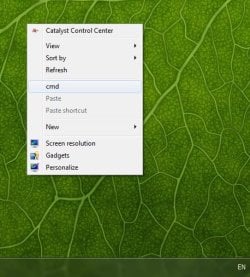
Solved Weird appearance of cmd in desktop context menu after win update

7user78

New member
Member
Local time
9:51 PM
Messages
42
Hello there guys,
After installing some updates, I've noticed the appearance of a cmd entry in the desktop context menu
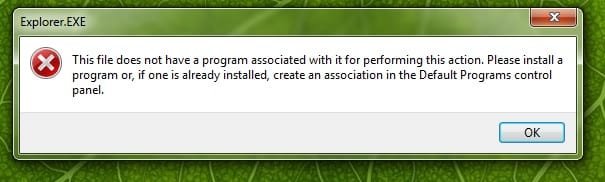
If I launch this command , I receive the explorer.exe error (also attached).

"This file does not have a program associated with it for performing this action ", blah blah blah...

I've found a workaround (I'll try to use it) but the question is , do you have any idea why this cmd appear in the context menu ?

I have to mention that there was no reg changes made before installing the updates, also no other "special effects" applied. Until this point ,I didn't noticed any other errors after this one in explorer.
Thanks,


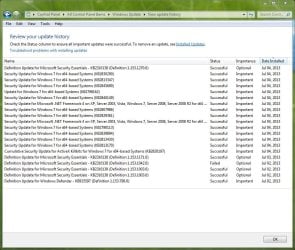
LE: one thing is for sure, this error appearance have a strong connection with one (or more) update(s) installed today on 4th Jul.
 

Attachments
  • cmd error.jpg
    cmd error.jpg
    17 KB · Views: 36
  • cmd.jpg
    cmd.jpg
    38.7 KB · Views: 37
  • cmd error update.JPG
    cmd error update.JPG
    127.1 KB · Views: 6

My Computer My Computer

At a glance

win7 x64
OS
win7 x64
Hello 7user78,

I'm not sure what added the "cmd" item to your desktop background context menu. If you like, export these two registry keys from Registry Editor, and upload them. I'll be happy to take a look at it to find the "cmd" item, then post back with a .reg file that you can merge to safely remove it. :)

HKEY_CLASSES_ROOT\DesktopBackground

HKEY_CLASSES_ROOT\Directory\Background
 

My Computer My Computer

At a glance

64-bit Windows 11 Pro for WorkstationsIntel i7-8700K OC'd to 5 GHz64 GB (4x16GB) G.SKILL TridentZ RGB DDR4 3600...ASUS ROG-STRIX-GTX1080TI-O11G-GAMING
Computer type
PC/Desktop
Computer Manufacturer/Model Number
Self built custom
OS
64-bit Windows 11 Pro for Workstations
CPU
Intel i7-8700K OC'd to 5 GHz
Motherboard
ASUS ROG Maximus XI Formula Z390
Memory
64 GB (4x16GB) G.SKILL TridentZ RGB DDR4 3600 MHz
Graphics Card(s)
ASUS ROG-STRIX-GTX1080TI-O11G-GAMING
Sound Card
Integrated
Monitor(s) Displays
2 x Samsung Odyssey G7 27"
Screen Resolution
2560x1440
Hard Drives
1TB Samsung 990 PRO M.2,
4TB Samsung 990 PRO PRO M.2,
TerraMaster F8 SSD Plus NAS
PSU
Seasonic Prime Titanium 850W
Case
Thermaltake Core P3
Cooling
Corsair Hydro H115i
Keyboard
Logitech wireless K800
Mouse
Logitech MX Master 4
Internet Speed
2 Gb/s Download and 100 Mb/s Upload
Antivirus
Malwarebyte Anti-Malware Premium
Browser
Google Chrome
Other Info
Logitech Z625 speaker system,
Logitech BRIO 4K Pro webcam,
HP Color LaserJet Pro MFP M477fdn,
APC SMART-UPS RT 1000 XL - SURT1000XLI,
Galaxy S23 Plus phone
Thank you Brink for your superfast reply and your good intention :D
First of all, for those who will need to know which update is guilty for this ,
I just restore the PC to an earlier point and install them one by one in order to find which one cause this explorer error ...and the winner is :

Update for Windows 7 for x64-based Systems (KB2798162)

Please find attached .reg files.
thanks,


PS: now I am thinking if it's ok to solve this error by modifying the reg keys or is better to avoid installing this (KB2798162) update in order to not have another hidden (for the moment) errors. (?!)
 

Attachments

My Computer My Computer

At a glance

win7 x64
OS
win7 x64
You're welcome.

Found it. It was this registry entry: [HKEY_CLASSES_ROOT\Directory\Background\shell\cmd]

If you like, download and merge the .reg file below, and it will remove "cmd" from your desktop context menu. :)
 

Attachments

My Computer My Computer

At a glance

64-bit Windows 11 Pro for WorkstationsIntel i7-8700K OC'd to 5 GHz64 GB (4x16GB) G.SKILL TridentZ RGB DDR4 3600...ASUS ROG-STRIX-GTX1080TI-O11G-GAMING
Computer type
PC/Desktop
Computer Manufacturer/Model Number
Self built custom
OS
64-bit Windows 11 Pro for Workstations
CPU
Intel i7-8700K OC'd to 5 GHz
Motherboard
ASUS ROG Maximus XI Formula Z390
Memory
64 GB (4x16GB) G.SKILL TridentZ RGB DDR4 3600 MHz
Graphics Card(s)
ASUS ROG-STRIX-GTX1080TI-O11G-GAMING
Sound Card
Integrated
Monitor(s) Displays
2 x Samsung Odyssey G7 27"
Screen Resolution
2560x1440
Hard Drives
1TB Samsung 990 PRO M.2,
4TB Samsung 990 PRO PRO M.2,
TerraMaster F8 SSD Plus NAS
PSU
Seasonic Prime Titanium 850W
Case
Thermaltake Core P3
Cooling
Corsair Hydro H115i
Keyboard
Logitech wireless K800
Mouse
Logitech MX Master 4
Internet Speed
2 Gb/s Download and 100 Mb/s Upload
Antivirus
Malwarebyte Anti-Malware Premium
Browser
Google Chrome
Other Info
Logitech Z625 speaker system,
Logitech BRIO 4K Pro webcam,
HP Color LaserJet Pro MFP M477fdn,
APC SMART-UPS RT 1000 XL - SURT1000XLI,
Galaxy S23 Plus phone
So great ,thank you so much, works like a charm.
The error is fixed ,the cause remains unknown.

For those who will experience this , I'll let the case open maybe someone will have an explanation .Tomorrow I'll mark as solved is that ok?
 

My Computer My Computer

At a glance

win7 x64
OS
win7 x64
Your most welcome.

As for the cause, did you merge any other .reg files that may have added it incomplete without the command key, or do anything else that deals with the desktop context menu?
 

My Computer My Computer

At a glance

64-bit Windows 11 Pro for WorkstationsIntel i7-8700K OC'd to 5 GHz64 GB (4x16GB) G.SKILL TridentZ RGB DDR4 3600...ASUS ROG-STRIX-GTX1080TI-O11G-GAMING
Computer type
PC/Desktop
Computer Manufacturer/Model Number
Self built custom
OS
64-bit Windows 11 Pro for Workstations
CPU
Intel i7-8700K OC'd to 5 GHz
Motherboard
ASUS ROG Maximus XI Formula Z390
Memory
64 GB (4x16GB) G.SKILL TridentZ RGB DDR4 3600 MHz
Graphics Card(s)
ASUS ROG-STRIX-GTX1080TI-O11G-GAMING
Sound Card
Integrated
Monitor(s) Displays
2 x Samsung Odyssey G7 27"
Screen Resolution
2560x1440
Hard Drives
1TB Samsung 990 PRO M.2,
4TB Samsung 990 PRO PRO M.2,
TerraMaster F8 SSD Plus NAS
PSU
Seasonic Prime Titanium 850W
Case
Thermaltake Core P3
Cooling
Corsair Hydro H115i
Keyboard
Logitech wireless K800
Mouse
Logitech MX Master 4
Internet Speed
2 Gb/s Download and 100 Mb/s Upload
Antivirus
Malwarebyte Anti-Malware Premium
Browser
Google Chrome
Other Info
Logitech Z625 speaker system,
Logitech BRIO 4K Pro webcam,
HP Color LaserJet Pro MFP M477fdn,
APC SMART-UPS RT 1000 XL - SURT1000XLI,
Galaxy S23 Plus phone
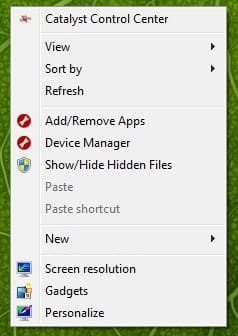
yes, but I think that everything was made properly , following the instructions (no errors since oct 2012 until now beginning with this installed update)
 

Attachments

  • context menu.jpg
    context menu.jpg
    12.5 KB · Views: 31

My Computer My Computer

At a glance

win7 x64
OS
win7 x64
thanks a lot!

this worked like a charm. i also had the same problem but in windows 8 but it worked! thanks again
 

My Computer My Computer

At a glance

windows 8 x64
Computer type
PC/Desktop
OS
windows 8 x64
I am not quite sure about it. It is really weird.
 

My Computer My Computer

At a glance

window 7
Computer type
PC/Desktop
OS
window 7
Back
Top