
Solved CML8GX3M2A1600C9W how to set them working at 1600

fireillusion

New member
Member
Local time
5:23 AM
Messages
62
Hello.
I just bought a new set of ram (CML8GX3M2A1600C9W) because i had bsod issues with my previous set (two sets of the same memory different versions).
When i set them at xmp profile1 i get bsod (error 0x124).
Any ideas on how to set them up to work at 1600 without problems?
 

My Computer My Computer

At a glance

Windows 7 Ultimate x64Intel i7 8602x CML8GX3M2A1600C9WATI RADEON Sapphire HD5870 1GB VRAM
Computer type
PC/Desktop
OS
Windows 7 Ultimate x64
CPU
Intel i7 860
Motherboard
Gigabyte P55A UD5
Memory
2x CML8GX3M2A1600C9W
Graphics Card(s)
ATI RADEON Sapphire HD5870 1GB VRAM
Sound Card
Onboard Realtek HD audio (ALC889)
Monitor(s) Displays
Samsung Syncmaster P2350
Screen Resolution
1920x1080
Hard Drives
1. SSD Sansung 840 EVO 250GB ,
2. WESTERN DIGITAL Velociraptor 150GB WD1500HLFS
AHCI enabled
PSU
Corsair TX 750 (750W) enthusiast series
Case
Zalman GS1000
Cooling
3 case fans + cpu cooler (Prolimatech megahalems rev.b)
Keyboard
Logitech wireless keyboard K520
Mouse
Logitech wireless mouse M310
Antivirus
eset security suite (latest updates installed always)
Browser
Google chrome (latest updates installed always)
Other Info
Custom Arctic GPU cooler installed for lower temps
What Dram volt have you picked? according to corsairs site there are 1.35 volt ones and then there are 1.5 volt

But the 0x124 usually refeers to to little IMC/VTT
 

My Computer My Computer

At a glance

Windows 7 Home Premium x64Intel Core i7 860 (Lynnfield)Corsair Vengeance 9,9,9,24 1600Mhz 1.50v 2x4GAsus nVidia 560 GTX
Computer type
PC/Desktop
OS
Windows 7 Home Premium x64
CPU
Intel Core i7 860 (Lynnfield)
Motherboard
Asus P7P55D (LGA1156)
Memory
Corsair Vengeance 9,9,9,24 1600Mhz 1.50v 2x4G
Graphics Card(s)
Asus nVidia 560 GTX
Sound Card
Asus Xonar DG
Monitor(s) Displays
Acer P235H & NEC E201W
Screen Resolution
1920x1080 & 900x1600
Hard Drives
2
PSU
Corsair 650 Modular
Case
Corsair 800D
Cooling
Corsair H80 with Noctua fans
Keyboard
Ducky Shine
Mouse
tT Theron
Internet Speed
100/100
Browser
IE10
Assuming that the bsods root is the ram settings (99% sure) mine are rated for 1.35 volts on xmp at 1600 MHz and for 1.5 volts at 1333 MHz.
How much do I have to set the qpi/vtt voltage n order to be safe and stable? I tried 1.2 but no luck.
 

My Computer My Computer

At a glance

Windows 7 Ultimate x64Intel i7 8602x CML8GX3M2A1600C9WATI RADEON Sapphire HD5870 1GB VRAM
Computer type
PC/Desktop
OS
Windows 7 Ultimate x64
CPU
Intel i7 860
Motherboard
Gigabyte P55A UD5
Memory
2x CML8GX3M2A1600C9W
Graphics Card(s)
ATI RADEON Sapphire HD5870 1GB VRAM
Sound Card
Onboard Realtek HD audio (ALC889)
Monitor(s) Displays
Samsung Syncmaster P2350
Screen Resolution
1920x1080
Hard Drives
1. SSD Sansung 840 EVO 250GB ,
2. WESTERN DIGITAL Velociraptor 150GB WD1500HLFS
AHCI enabled
PSU
Corsair TX 750 (750W) enthusiast series
Case
Zalman GS1000
Cooling
3 case fans + cpu cooler (Prolimatech megahalems rev.b)
Keyboard
Logitech wireless keyboard K520
Mouse
Logitech wireless mouse M310
Antivirus
eset security suite (latest updates installed always)
Browser
Google chrome (latest updates installed always)
Other Info
Custom Arctic GPU cooler installed for lower temps
1.2 seems like a bit high and there should not be any need to increase it that high either, have you been overclocking your computer?

You could try to set the motherboard to default settings and see if the BSOD stops
 

My Computer My Computer

At a glance

Windows 7 Home Premium x64Intel Core i7 860 (Lynnfield)Corsair Vengeance 9,9,9,24 1600Mhz 1.50v 2x4GAsus nVidia 560 GTX
Computer type
PC/Desktop
OS
Windows 7 Home Premium x64
CPU
Intel Core i7 860 (Lynnfield)
Motherboard
Asus P7P55D (LGA1156)
Memory
Corsair Vengeance 9,9,9,24 1600Mhz 1.50v 2x4G
Graphics Card(s)
Asus nVidia 560 GTX
Sound Card
Asus Xonar DG
Monitor(s) Displays
Acer P235H & NEC E201W
Screen Resolution
1920x1080 & 900x1600
Hard Drives
2
PSU
Corsair 650 Modular
Case
Corsair 800D
Cooling
Corsair H80 with Noctua fans
Keyboard
Ducky Shine
Mouse
tT Theron
Internet Speed
100/100
Browser
IE10
The only setting that I overclock is the xmp for ram in order to work at 1600 MHz. All other settings at default. No other overclocking.
Yesterday I had two sudden restarts while playing bf3 without a bsod and the ram working at normal 1333 MHz.
Maybe there is a problem with my m/b.
 

My Computer My Computer

At a glance

Windows 7 Ultimate x64Intel i7 8602x CML8GX3M2A1600C9WATI RADEON Sapphire HD5870 1GB VRAM
Computer type
PC/Desktop
OS
Windows 7 Ultimate x64
CPU
Intel i7 860
Motherboard
Gigabyte P55A UD5
Memory
2x CML8GX3M2A1600C9W
Graphics Card(s)
ATI RADEON Sapphire HD5870 1GB VRAM
Sound Card
Onboard Realtek HD audio (ALC889)
Monitor(s) Displays
Samsung Syncmaster P2350
Screen Resolution
1920x1080
Hard Drives
1. SSD Sansung 840 EVO 250GB ,
2. WESTERN DIGITAL Velociraptor 150GB WD1500HLFS
AHCI enabled
PSU
Corsair TX 750 (750W) enthusiast series
Case
Zalman GS1000
Cooling
3 case fans + cpu cooler (Prolimatech megahalems rev.b)
Keyboard
Logitech wireless keyboard K520
Mouse
Logitech wireless mouse M310
Antivirus
eset security suite (latest updates installed always)
Browser
Google chrome (latest updates installed always)
Other Info
Custom Arctic GPU cooler installed for lower temps
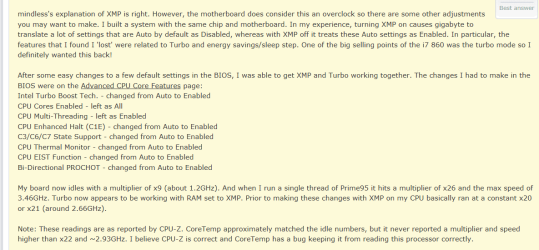
To me it seems to be the motherboard is this motherboard old or new? and maybe there was no problems with your other rams, did you try them in a different computer? or have you tried moving them around, like for instance my computer refuses to even boot if I put my ram sticks in s2 & s4, if not maybe someone else can pop in and give some other advice
 

My Computer My Computer

At a glance

Windows 7 Home Premium x64Intel Core i7 860 (Lynnfield)Corsair Vengeance 9,9,9,24 1600Mhz 1.50v 2x4GAsus nVidia 560 GTX
Computer type
PC/Desktop
OS
Windows 7 Home Premium x64
CPU
Intel Core i7 860 (Lynnfield)
Motherboard
Asus P7P55D (LGA1156)
Memory
Corsair Vengeance 9,9,9,24 1600Mhz 1.50v 2x4G
Graphics Card(s)
Asus nVidia 560 GTX
Sound Card
Asus Xonar DG
Monitor(s) Displays
Acer P235H & NEC E201W
Screen Resolution
1920x1080 & 900x1600
Hard Drives
2
PSU
Corsair 650 Modular
Case
Corsair 800D
Cooling
Corsair H80 with Noctua fans
Keyboard
Ducky Shine
Mouse
tT Theron
Internet Speed
100/100
Browser
IE10
As per your other trend. http://www.sevenforums.com/hardware-devices/241220-ram-upgrade-2.html#post2038992 My post #19. Did you try this?
Set ram speed manualy (no xmp).
-------------------------------------------------------------------------------------
I know, I did the same as you. Check my specs. Your i860 chip is rated by Intel at 1066/1333 and you hav 1600 ram. In my case and maybe yours XMP put the setting even faster and Bingo BSOD. No two chips are the same but with proper cooling you could problably run the ram at 1600 if you set things manualy. Your memory controler is built into the cpu if I remember correctly so watch your cpu temps
 

My Computer My Computer

At a glance

Windows 10 Pro. 64/ version 1709 Windows 7 Pr...Intel i7-6800K @ 4.3Corsair Platinum 16 gig @2400EVGA GTX 1070 OC
Computer type
PC/Desktop
Computer Manufacturer/Model Number
Home made Desktop
OS
Windows 10 Pro. 64/ version 1709 Windows 7 Pro/64
CPU
Intel i7-6800K @ 4.3
Motherboard
ASUS X-99 Deluxe II
Memory
Corsair Platinum 16 gig @2400
Graphics Card(s)
EVGA GTX 1070 OC
Monitor(s) Displays
Asus 27" LED LCD/VE278Q
Screen Resolution
1920-1080 or 1280-720 HDMI
Hard Drives
INTEL SSD 730-240 Gb Sata 3.0/
PSU
EVGA Platium 1200W
Case
Phanteks Luxe Tempered Glass 8 fans/ one radiator
Cooling
XSPC/ Water Cooled CPU
Keyboard
Das 4 Professional
Mouse
Logitech M705/MX Anywhere 2-S
Internet Speed
100 mbits
Antivirus
Microsoft Security Essentials/ Malwarebytes Premium 3.0/ SAS
Browser
I.E. 11 default/Firefox/ ISP Time Warner Cable/Spectrum
Other Info
LG BluRay Burner/
Sound system-KLipsch-THX/
Icy Dock ssd Hot Swap bays.
I tried every possible way manually and automatically. The problem remains. I also tried different combinations. The only one that seemed to work is only with 4 GB of my original xms3. But I want to use 8 GB. My pc is 2,5 years old. I think it is time to start researching for a new one. I already opened a new thread asking for opinions.
 

My Computer My Computer

At a glance

Windows 7 Ultimate x64Intel i7 8602x CML8GX3M2A1600C9WATI RADEON Sapphire HD5870 1GB VRAM
Computer type
PC/Desktop
OS
Windows 7 Ultimate x64
CPU
Intel i7 860
Motherboard
Gigabyte P55A UD5
Memory
2x CML8GX3M2A1600C9W
Graphics Card(s)
ATI RADEON Sapphire HD5870 1GB VRAM
Sound Card
Onboard Realtek HD audio (ALC889)
Monitor(s) Displays
Samsung Syncmaster P2350
Screen Resolution
1920x1080
Hard Drives
1. SSD Sansung 840 EVO 250GB ,
2. WESTERN DIGITAL Velociraptor 150GB WD1500HLFS
AHCI enabled
PSU
Corsair TX 750 (750W) enthusiast series
Case
Zalman GS1000
Cooling
3 case fans + cpu cooler (Prolimatech megahalems rev.b)
Keyboard
Logitech wireless keyboard K520
Mouse
Logitech wireless mouse M310
Antivirus
eset security suite (latest updates installed always)
Browser
Google chrome (latest updates installed always)
Other Info
Custom Arctic GPU cooler installed for lower temps
How many trends do you have going on this one ram problem. It make it very hard to help you chasing you around. The last I understand is the bsod is gone as long as you don't use XMP. Is that still true.
 

My Computer My Computer

At a glance

Windows 10 Pro. 64/ version 1709 Windows 7 Pr...Intel i7-6800K @ 4.3Corsair Platinum 16 gig @2400EVGA GTX 1070 OC
Computer type
PC/Desktop
Computer Manufacturer/Model Number
Home made Desktop
OS
Windows 10 Pro. 64/ version 1709 Windows 7 Pro/64
CPU
Intel i7-6800K @ 4.3
Motherboard
ASUS X-99 Deluxe II
Memory
Corsair Platinum 16 gig @2400
Graphics Card(s)
EVGA GTX 1070 OC
Monitor(s) Displays
Asus 27" LED LCD/VE278Q
Screen Resolution
1920-1080 or 1280-720 HDMI
Hard Drives
INTEL SSD 730-240 Gb Sata 3.0/
PSU
EVGA Platium 1200W
Case
Phanteks Luxe Tempered Glass 8 fans/ one radiator
Cooling
XSPC/ Water Cooled CPU
Keyboard
Das 4 Professional
Mouse
Logitech M705/MX Anywhere 2-S
Internet Speed
100 mbits
Antivirus
Microsoft Security Essentials/ Malwarebytes Premium 3.0/ SAS
Browser
I.E. 11 default/Firefox/ ISP Time Warner Cable/Spectrum
Other Info
LG BluRay Burner/
Sound system-KLipsch-THX/
Icy Dock ssd Hot Swap bays.
With the new modules without xmp it runs more stable but still with some sudden restarts.
One thread I started when I had only my original ram and this one for the new ram. You are right. I have to close the other one.
 

My Computer My Computer

At a glance

Windows 7 Ultimate x64Intel i7 8602x CML8GX3M2A1600C9WATI RADEON Sapphire HD5870 1GB VRAM
Computer type
PC/Desktop
OS
Windows 7 Ultimate x64
CPU
Intel i7 860
Motherboard
Gigabyte P55A UD5
Memory
2x CML8GX3M2A1600C9W
Graphics Card(s)
ATI RADEON Sapphire HD5870 1GB VRAM
Sound Card
Onboard Realtek HD audio (ALC889)
Monitor(s) Displays
Samsung Syncmaster P2350
Screen Resolution
1920x1080
Hard Drives
1. SSD Sansung 840 EVO 250GB ,
2. WESTERN DIGITAL Velociraptor 150GB WD1500HLFS
AHCI enabled
PSU
Corsair TX 750 (750W) enthusiast series
Case
Zalman GS1000
Cooling
3 case fans + cpu cooler (Prolimatech megahalems rev.b)
Keyboard
Logitech wireless keyboard K520
Mouse
Logitech wireless mouse M310
Antivirus
eset security suite (latest updates installed always)
Browser
Google chrome (latest updates installed always)
Other Info
Custom Arctic GPU cooler installed for lower temps
Next step is to take it all al apart clean it and put it back together. After that I will set the memory manually at 1600 once again and see how it behaves.
I have to find time for all this though........
 

My Computer My Computer

At a glance

Windows 7 Ultimate x64Intel i7 8602x CML8GX3M2A1600C9WATI RADEON Sapphire HD5870 1GB VRAM
Computer type
PC/Desktop
OS
Windows 7 Ultimate x64
CPU
Intel i7 860
Motherboard
Gigabyte P55A UD5
Memory
2x CML8GX3M2A1600C9W
Graphics Card(s)
ATI RADEON Sapphire HD5870 1GB VRAM
Sound Card
Onboard Realtek HD audio (ALC889)
Monitor(s) Displays
Samsung Syncmaster P2350
Screen Resolution
1920x1080
Hard Drives
1. SSD Sansung 840 EVO 250GB ,
2. WESTERN DIGITAL Velociraptor 150GB WD1500HLFS
AHCI enabled
PSU
Corsair TX 750 (750W) enthusiast series
Case
Zalman GS1000
Cooling
3 case fans + cpu cooler (Prolimatech megahalems rev.b)
Keyboard
Logitech wireless keyboard K520
Mouse
Logitech wireless mouse M310
Antivirus
eset security suite (latest updates installed always)
Browser
Google chrome (latest updates installed always)
Other Info
Custom Arctic GPU cooler installed for lower temps
Have you tried running memtest86 just to make sure there are no problems with the ram sticks, and if possible you could even try and see if you could borrow a friends ram sticks for a short ammount of time and if your getting BSOD with 3 different ram sets I would suspect its the motherboard
 

My Computer My Computer

At a glance

Windows 7 Home Premium x64Intel Core i7 860 (Lynnfield)Corsair Vengeance 9,9,9,24 1600Mhz 1.50v 2x4GAsus nVidia 560 GTX
Computer type
PC/Desktop
OS
Windows 7 Home Premium x64
CPU
Intel Core i7 860 (Lynnfield)
Motherboard
Asus P7P55D (LGA1156)
Memory
Corsair Vengeance 9,9,9,24 1600Mhz 1.50v 2x4G
Graphics Card(s)
Asus nVidia 560 GTX
Sound Card
Asus Xonar DG
Monitor(s) Displays
Acer P235H & NEC E201W
Screen Resolution
1920x1080 & 900x1600
Hard Drives
2
PSU
Corsair 650 Modular
Case
Corsair 800D
Cooling
Corsair H80 with Noctua fans
Keyboard
Ducky Shine
Mouse
tT Theron
Internet Speed
100/100
Browser
IE10
I have run memtest and several other tests for the processor VGA card hard disk etc and all came out ok.
I used to think it was ram problem but since it continues with the new kit I think it the motherboard too.
I think it is time to buy a new one......
 

My Computer My Computer

At a glance

Windows 7 Ultimate x64Intel i7 8602x CML8GX3M2A1600C9WATI RADEON Sapphire HD5870 1GB VRAM
Computer type
PC/Desktop
OS
Windows 7 Ultimate x64
CPU
Intel i7 860
Motherboard
Gigabyte P55A UD5
Memory
2x CML8GX3M2A1600C9W
Graphics Card(s)
ATI RADEON Sapphire HD5870 1GB VRAM
Sound Card
Onboard Realtek HD audio (ALC889)
Monitor(s) Displays
Samsung Syncmaster P2350
Screen Resolution
1920x1080
Hard Drives
1. SSD Sansung 840 EVO 250GB ,
2. WESTERN DIGITAL Velociraptor 150GB WD1500HLFS
AHCI enabled
PSU
Corsair TX 750 (750W) enthusiast series
Case
Zalman GS1000
Cooling
3 case fans + cpu cooler (Prolimatech megahalems rev.b)
Keyboard
Logitech wireless keyboard K520
Mouse
Logitech wireless mouse M310
Antivirus
eset security suite (latest updates installed always)
Browser
Google chrome (latest updates installed always)
Other Info
Custom Arctic GPU cooler installed for lower temps
could be a bad memory controller did you ever update the bios or see if it has an update for better memory usage that tends to help situations like these

check your mainboard updates see if there is one for better memory usage

Also most Corsair I'ven seen is either 1.5 v Oc'ed can be turned up to 1.65v 1.2 is too low especially for overclocked ram make sure you have the right voltage rating that could be it as well

I would figure at 1.2 that is low
 

My Computer My Computer

At a glance

Windows 10 Home Premium 64bit sp1Intel I7-6700K @ 4.6 Ghz 1.344 volts everyday OC32GB G-Skill TridentZ 3200mhz 16-18-18-38 DDR4Sli Gigabyte Windforce GTX 980 G1
Computer type
PC/Desktop
Computer Manufacturer/Model Number
CoreI7-6700K MrFingerIII Special Builds
OS
Windows 10 Home Premium 64bit sp1
CPU
Intel I7-6700K @ 4.6 Ghz 1.344 volts everyday OC
Motherboard
Asrock Fatality K6 Z170 Socket 1151
Memory
32GB G-Skill TridentZ 3200mhz 16-18-18-38 DDR4
Graphics Card(s)
Sli Gigabyte Windforce GTX 980 G1
Sound Card
AC97 Creative Rage Tactic 3D Headphones Bluetooth
Monitor(s) Displays
27" Asus ROG Swift PG278Q G-Sync 48" Vizio Smart HD TV
Screen Resolution
2560x1440p 27"- 48" Currently Gaming at 2560x1440p Res 2K
Hard Drives
250GB Samsung Evo840SSD Seagate baracuda 500 GB WD Mybook 500Gb 1TB Seagate Barracuda
PSU
HX1050w Corsair Silver 80plus certified crosfire/sli
Case
Enthod Pro Full Tower
Cooling
Corsair H110i GT 280 mm High Performance WaterBlock
Keyboard
Logitech wireless keyboard
Mouse
Logitech wireless mouse
Internet Speed
Cox Cable 100+ mb
Antivirus
WebRoot Spysweeper with Antivirus
Browser
IE-10, Chrome, Opera
Other Info
My Other Rig is a AMD FX8320E @4.6Ghz 16GB Ballistic Sport Ram
Mobo Asrock Fatality 990FX 120GB OCZ SSD 1TB Seagate Barracuda Corsair H75 Cooling PSU Corsair CX750
GPU GTX Gigabyte 970G1
I use the latest bios from gigabyte f13 beta and they confirmed that it is fully operational. They were supposed to have fixed the memory compatibility a few versions back.
 

My Computer My Computer

At a glance

Windows 7 Ultimate x64Intel i7 8602x CML8GX3M2A1600C9WATI RADEON Sapphire HD5870 1GB VRAM
Computer type
PC/Desktop
OS
Windows 7 Ultimate x64
CPU
Intel i7 860
Motherboard
Gigabyte P55A UD5
Memory
2x CML8GX3M2A1600C9W
Graphics Card(s)
ATI RADEON Sapphire HD5870 1GB VRAM
Sound Card
Onboard Realtek HD audio (ALC889)
Monitor(s) Displays
Samsung Syncmaster P2350
Screen Resolution
1920x1080
Hard Drives
1. SSD Sansung 840 EVO 250GB ,
2. WESTERN DIGITAL Velociraptor 150GB WD1500HLFS
AHCI enabled
PSU
Corsair TX 750 (750W) enthusiast series
Case
Zalman GS1000
Cooling
3 case fans + cpu cooler (Prolimatech megahalems rev.b)
Keyboard
Logitech wireless keyboard K520
Mouse
Logitech wireless mouse M310
Antivirus
eset security suite (latest updates installed always)
Browser
Google chrome (latest updates installed always)
Other Info
Custom Arctic GPU cooler installed for lower temps

Attachments

  • Quote.PNG
    Quote.PNG
    31.6 KB · Views: 20

My Computer My Computer

At a glance

Windows 10 Home Premium 64bit sp1Intel I7-6700K @ 4.6 Ghz 1.344 volts everyday OC32GB G-Skill TridentZ 3200mhz 16-18-18-38 DDR4Sli Gigabyte Windforce GTX 980 G1
Computer type
PC/Desktop
Computer Manufacturer/Model Number
CoreI7-6700K MrFingerIII Special Builds
OS
Windows 10 Home Premium 64bit sp1
CPU
Intel I7-6700K @ 4.6 Ghz 1.344 volts everyday OC
Motherboard
Asrock Fatality K6 Z170 Socket 1151
Memory
32GB G-Skill TridentZ 3200mhz 16-18-18-38 DDR4
Graphics Card(s)
Sli Gigabyte Windforce GTX 980 G1
Sound Card
AC97 Creative Rage Tactic 3D Headphones Bluetooth
Monitor(s) Displays
27" Asus ROG Swift PG278Q G-Sync 48" Vizio Smart HD TV
Screen Resolution
2560x1440p 27"- 48" Currently Gaming at 2560x1440p Res 2K
Hard Drives
250GB Samsung Evo840SSD Seagate baracuda 500 GB WD Mybook 500Gb 1TB Seagate Barracuda
PSU
HX1050w Corsair Silver 80plus certified crosfire/sli
Case
Enthod Pro Full Tower
Cooling
Corsair H110i GT 280 mm High Performance WaterBlock
Keyboard
Logitech wireless keyboard
Mouse
Logitech wireless mouse
Internet Speed
Cox Cable 100+ mb
Antivirus
WebRoot Spysweeper with Antivirus
Browser
IE-10, Chrome, Opera
Other Info
My Other Rig is a AMD FX8320E @4.6Ghz 16GB Ballistic Sport Ram
Mobo Asrock Fatality 990FX 120GB OCZ SSD 1TB Seagate Barracuda Corsair H75 Cooling PSU Corsair CX750
GPU GTX Gigabyte 970G1
Thank you very much for the reply. I will try once more after I take my pc apart and put it back together.
If this fails I will buy new parts. I already started a research just to be prepared.
 

My Computer My Computer

At a glance

Windows 7 Ultimate x64Intel i7 8602x CML8GX3M2A1600C9WATI RADEON Sapphire HD5870 1GB VRAM
Computer type
PC/Desktop
OS
Windows 7 Ultimate x64
CPU
Intel i7 860
Motherboard
Gigabyte P55A UD5
Memory
2x CML8GX3M2A1600C9W
Graphics Card(s)
ATI RADEON Sapphire HD5870 1GB VRAM
Sound Card
Onboard Realtek HD audio (ALC889)
Monitor(s) Displays
Samsung Syncmaster P2350
Screen Resolution
1920x1080
Hard Drives
1. SSD Sansung 840 EVO 250GB ,
2. WESTERN DIGITAL Velociraptor 150GB WD1500HLFS
AHCI enabled
PSU
Corsair TX 750 (750W) enthusiast series
Case
Zalman GS1000
Cooling
3 case fans + cpu cooler (Prolimatech megahalems rev.b)
Keyboard
Logitech wireless keyboard K520
Mouse
Logitech wireless mouse M310
Antivirus
eset security suite (latest updates installed always)
Browser
Google chrome (latest updates installed always)
Other Info
Custom Arctic GPU cooler installed for lower temps
Yesterday i opened my case took out the cooler and the processor cleaned it all up and put them back together.
When i use 8 gb of ram it always crashes. I used 4 sticks of 2 gb xms 3 (two ver 2.3 and two ver 6.0) which are included in my m/b's qvl list and 2 sticks of 4 gb vengeance lp white. The only way that i can make it work is when i use 4 gb only (2x2gb xms3 ver 2.3).
I tried several combinations in bios but whatever i do the system crashes.
So the system can work trouble free with only 4gb of ram?
Does this sound logical to you?
 

My Computer My Computer

At a glance

Windows 7 Ultimate x64Intel i7 8602x CML8GX3M2A1600C9WATI RADEON Sapphire HD5870 1GB VRAM
Computer type
PC/Desktop
OS
Windows 7 Ultimate x64
CPU
Intel i7 860
Motherboard
Gigabyte P55A UD5
Memory
2x CML8GX3M2A1600C9W
Graphics Card(s)
ATI RADEON Sapphire HD5870 1GB VRAM
Sound Card
Onboard Realtek HD audio (ALC889)
Monitor(s) Displays
Samsung Syncmaster P2350
Screen Resolution
1920x1080
Hard Drives
1. SSD Sansung 840 EVO 250GB ,
2. WESTERN DIGITAL Velociraptor 150GB WD1500HLFS
AHCI enabled
PSU
Corsair TX 750 (750W) enthusiast series
Case
Zalman GS1000
Cooling
3 case fans + cpu cooler (Prolimatech megahalems rev.b)
Keyboard
Logitech wireless keyboard K520
Mouse
Logitech wireless mouse M310
Antivirus
eset security suite (latest updates installed always)
Browser
Google chrome (latest updates installed always)
Other Info
Custom Arctic GPU cooler installed for lower temps
Taken from their site

4 x 1.5V DDR3 DIMM sockets supporting up to 16 GB of system memory (Note 1)
Dual channel memory architecture
Support for DDR3 2600+/ 2200/1600/1333/1066/800 MHz memory modules
Support for non-ECC memory modules
Support for Extreme Memory Profile (XMP) memory modules
Go to Memory Support List for the latest memory support list.

So based on your info it makes no logic sense to me at all, there have to be something wrong most likely the motherboard
 

My Computer My Computer

At a glance

Windows 7 Home Premium x64Intel Core i7 860 (Lynnfield)Corsair Vengeance 9,9,9,24 1600Mhz 1.50v 2x4GAsus nVidia 560 GTX
Computer type
PC/Desktop
OS
Windows 7 Home Premium x64
CPU
Intel Core i7 860 (Lynnfield)
Motherboard
Asus P7P55D (LGA1156)
Memory
Corsair Vengeance 9,9,9,24 1600Mhz 1.50v 2x4G
Graphics Card(s)
Asus nVidia 560 GTX
Sound Card
Asus Xonar DG
Monitor(s) Displays
Acer P235H & NEC E201W
Screen Resolution
1920x1080 & 900x1600
Hard Drives
2
PSU
Corsair 650 Modular
Case
Corsair 800D
Cooling
Corsair H80 with Noctua fans
Keyboard
Ducky Shine
Mouse
tT Theron
Internet Speed
100/100
Browser
IE10
This is the reason I started searching for a new mobo and processor.
It doesn't make sense to me either.
 

My Computer My Computer

At a glance

Windows 7 Ultimate x64Intel i7 8602x CML8GX3M2A1600C9WATI RADEON Sapphire HD5870 1GB VRAM
Computer type
PC/Desktop
OS
Windows 7 Ultimate x64
CPU
Intel i7 860
Motherboard
Gigabyte P55A UD5
Memory
2x CML8GX3M2A1600C9W
Graphics Card(s)
ATI RADEON Sapphire HD5870 1GB VRAM
Sound Card
Onboard Realtek HD audio (ALC889)
Monitor(s) Displays
Samsung Syncmaster P2350
Screen Resolution
1920x1080
Hard Drives
1. SSD Sansung 840 EVO 250GB ,
2. WESTERN DIGITAL Velociraptor 150GB WD1500HLFS
AHCI enabled
PSU
Corsair TX 750 (750W) enthusiast series
Case
Zalman GS1000
Cooling
3 case fans + cpu cooler (Prolimatech megahalems rev.b)
Keyboard
Logitech wireless keyboard K520
Mouse
Logitech wireless mouse M310
Antivirus
eset security suite (latest updates installed always)
Browser
Google chrome (latest updates installed always)
Other Info
Custom Arctic GPU cooler installed for lower temps
Back
Top