
Solved Code 8024402F in Windows Update

NeroLigerzid

New member
Member
Local time
5:53 PM
Messages
30
Location
Davao City, Philippines
Hello! Good evening, morning, noon to you!
I have a problem that quite happened 3 days passed.
Like what the title says, "Code 8024402F in Windows Update"

Every once and awhile.. I check for updates for my Windows 7 x64 Ultimate
3 days ago.. This error appeared..
Options I tried
-Troubleshooting with Windows
-Searching the net (Over and over again)
-Did what the net says (Like removing third party firewalls, stopping processes that eat up connection or interfere with the connection for Win update, troubleshooting and etc)
-Still quite didn't work
-I reformat my PC.. And back to Home Premium 64 bit. Still the error is there..
-Upgraded again to Ultimate.. {Still no dice}
-Quite did some exploring in this forum and still no dice
~After the reformat, I activated my Windows x64 HP (No other programs were installed including anti-virus progs), Error persist.. Upgraded to Ultimate x64 (Still no programs installed), still the error stays.~

Overall of that I got frustrated... So Any help is much appreciated!
 

Attachments
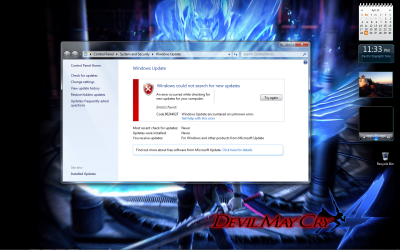
  • Untitled.png
    Untitled.png
    343 KB · Views: 225

My Computer

OS
Windows 7 Ultimate 64bit
Motherboard
ASRock G31M-S
Memory
4GB
Graphics Card(s)
Nvidia GeForce 9500
Screen Resolution
1440x900
Hard Drives
C/
D/
E/
Keyboard
Genius

Still no slice man...
I somewhat did a little much more researching.. I got as far as activeX and etc..
I do wonder helluva lot what this error means!!
Man so frustrating.. Tried killing my router.. Still no dice..
All else fails.. I blew the modem back to stone age..
Brought another.. And still no dice..
Thanks for the effort to help me! Much appreciated!


But consider this thread "SOLVED"
I solved it by myself.. Not because of the new modem..
It's because I'm AWESOME..

Seriously.. If some others meet this problem.. Tell them to do this..
Win 7 (Works with Vista?)
START MENU-> CONTROL PANEL->NETWORK AND INTERNET->NETWORK AND SHARING CENTER->CHANGE ADAPTER SETTINGS->LOCAL AREA CONNECTION (RIGHT CLICK THE ONE YOU USE TO CONNECT TO THE NET AND CLICK PROPERTIES)->CLICK INTERNET PROTOCOL VERSION 4 (TCP/IPv4) {CLICK PROPERTIES}->ADD THESE DNS SETTINGS
PREFERRED 4.2.2.1
ALTERNATE 4.2.2.2

AFTERWARDS...
BACK TRACK TO NETWORK AND INTERNET->INTERNET OPTIONS->SECURITY {TAB}->TRUSTED SITES {ZONE}-> CLICK "SITES"
//\\OPTIONAL//\\ {TICK OFF (UNCHECK) "REQUIRE SERVER VERIFICATION (HTTPS:) FOR ALL SITES IN ZONE"} //\\OPTIONAL//\\
ADD THESE

HTTP://WWW.MICROSOFT.COM
HTTPS://*.UPDATE.MICROSOFT.COM
HTTPS://DOWNLOAD.WINDOWSUPDATE.COM

Now.. Go to WindowsUpdate and check for updates..
VIOLA!! Problem solved! Viva La Revalucion!!
 

My Computer

OS
Windows 7 Ultimate 64bit
Motherboard
ASRock G31M-S
Memory
4GB
Graphics Card(s)
Nvidia GeForce 9500
Screen Resolution
1440x900
Hard Drives
C/
D/
E/
Keyboard
Genius
Wow.. It really works man :) thanks a lot...

How did you manage to solve this problem?
 

My Computer

OS
Windows 7 Professional x64
CPU
Intel i5-760 2.8GHz
Motherboard
Asus P7P55D-E Pro
Memory
G.Skill Trident (CL8) 1600MHZ
Graphics Card(s)
Palit GeForce 9500 GT
Sound Card
Built in Mobo
Monitor(s) Displays
Samsung P2270
Screen Resolution
1920 x 1080
Hard Drives
500GB Seagate 7200.12
PSU
Silverstone ST60F-P
Case
NZXT Tempest Evo
Cooling
CM 212 Plus
Keyboard
A4tect
Mouse
Razer Orochi
Internet Speed
3Mbps
@NeroLigerzid

I tried that but still did not work for me. Hope I can solve this problem sometime.

After doing all those steps.. Try restarting the computer. Or atleast turn it off and wait off 5 mins. (3 mins is fine)

Then that should do..
 

My Computer

OS
Windows 7 Ultimate 64bit
Motherboard
ASRock G31M-S
Memory
4GB
Graphics Card(s)
Nvidia GeForce 9500
Screen Resolution
1440x900
Hard Drives
C/
D/
E/
Keyboard
Genius
ayaw pa rin.. i tried what you said, it still didn't work.
 

My Computer

OS
Windows 7 Ultimate x86
i dont know what happened, but suddenly this morning i was able to update.
 

My Computer

OS
Windows 7 Ultimate x86
i got that error when im upgrading in windows 7 ultimate..and try to google it ang i see this instruction and i follow it..and its work for me thanks man...and i put it back what i change..and the update still workin for me!!thank's...:D
 

My Computer

OS
windows 7 ultimate x86
i got that error when im upgrading in windows 7 ultimate..and try to google it ang i see this instruction and i follow it..and its work for me thanks man...and i put it back what i change..and the update still workin for me!!thank's...:D

No problem mate.. Maybe it's just a little error in the network or the server..
When Win 7 Ultimate was freshly installed via upgrade in my computer.
The Windows Update kinda twisted.. Oh yeah.. I even forget how I came up with this solution. But.. It stays as is now.. And I'm hoping this thread of mine will help many people..
 

My Computer

OS
Windows 7 Ultimate 64bit
Motherboard
ASRock G31M-S
Memory
4GB
Graphics Card(s)
Nvidia GeForce 9500
Screen Resolution
1440x900
Hard Drives
C/
D/
E/
Keyboard
Genius
Adding the Microsoft sites to the Trusted Sites Zone is what resolved the updating issue.
Changing the DNS server address has nothing to do with Windows Updates, it's related to one's Internet Service Provider's settings.

Microsoft Knowledge Base articles that include instructions for adding the update sites to the Trusted Sites Zone do not include any steps to change the DNS server address.

See Method E: Add the Windows Update Web site and the Microsoft Update Web site to the Trusted Sites list in this KB - You may encounter temporary connection-related errors when you use Windows Update or Microsoft Update to install updates
and, although this KB is somewhat outdated, see Add the Windows Update Web site and the Microsoft Update Web site to the list of trusted sites in this KB - How to troubleshoot problems connecting to Windows Update or to Microsoft Update
 

My Computer

OS
Windows 7 Ultimate x86; Windows XP Pro SP3 x86; Windows Vista Ultimate x86
This is not an insult or something but.. I question it.. I had a friend that had a similar problem with me..
I told him what to do.. He followed the steps except the steps adding the websites to the trusted zone..
He simply changed the DNS ~He's lazy~

Then Win Update started working again.. Anyhow.. What's important is.. Case is resolved..
 

My Computer

OS
Windows 7 Ultimate 64bit
Motherboard
ASRock G31M-S
Memory
4GB
Graphics Card(s)
Nvidia GeForce 9500
Screen Resolution
1440x900
Hard Drives
C/
D/
E/
Keyboard
Genius
No insult taken. The important part is getting the issue resolved.
One question, though ... does your friend use the same ISP that you do ?
 

My Computer

OS
Windows 7 Ultimate x86; Windows XP Pro SP3 x86; Windows Vista Ultimate x86
OMG

THANK YOU SO MUCH!!!!!

This worked straight away after a reboot. I actually was considering re-installing windows for the second time before I saw this thread. I'm so glad I found it, and yes, you are a genius!

I went and signed up to SevenForums just so I could thank you :D
 

My Computer

OS
Windows 7 Ultimate 64bit
This worked straight away after a reboot. I actually was considering re-installing windows for the second time before I saw this thread. I'm so glad I found it, and yes, you are a genius!

I went and signed up to SevenForums just so I could thank you :D

^^
This!!
Nice one bud!
 

My Computer

Computer Manufacturer/Model Number
Home Build
OS
Windows & Ultimate x64
CPU
AMD PhenomII 1090T
Motherboard
Gigabyte GA-890FXA-UD5
Memory
2x4GB Corsair XMS3
Graphics Card(s)
Sapphire HD5770 Vapor-X
Sound Card
Asus Xonar STX
Monitor(s) Displays
iiyama B2409 & AOC 22" LCD
Hard Drives
2x OCZ Vertex3 120GB (AMD RAID0)
2x Western Digital 1TB Green
PSU
Corsair HX850W
Case
Antec 902
Cooling
Corsair HX850W
genius man

thank thank thank you very much i was trying to solve this problem and i read almost all forumes and downloaded all fix it microsoft and nothing worked but your way was perfect i can now search for updates :)
 

My Computer

OS
windows 7 home premium
Old thread I know...

Nero: yes you are indeed awesome, adding the microsoft urls to 'trusted' fixed it for me too. Thanks!
 

My Computer

Computer type
PC/Desktop
Computer Manufacturer/Model Number
dell
OS
7 professional 64 bit
Memory
4GB
Antivirus
Eset
Browser
Chrome
Thanks

I know this a very old thread but thanks Nero. :):):)
After days and days of trying to resolve my windows 7 update issues, implementing every suggestion I could find online, your suggestion broke through the logjam. Not sure whether it was changing the dns server or setting up the MS update sites as trusted sites. Your list did include one that was not listed on other suggestions for placing the updates sites on trusted sites. That is https://download.windowsupdate.com.
 

My Computer

Computer type
PC/Desktop
OS
Windows 7 Pro
Back
Top