Solved Code error 800f0900 appears when installing windows update

grizelda29

New member
Local time
7:49 AM
Messages
14
Location
Manila, Philippines

My Computer

Computer type
PC/Desktop
Computer Manufacturer/Model Number
custom built
OS
Windows 7 Home Basic 64-bit
please disregard.***
 
Last edited:

My Computer

Computer type
PC/Desktop
Computer Manufacturer/Model Number
custom built
OS
Windows 7 Home Basic 64-bit
Some of your problems are caused by malware.


Please download and install Malwarebytes Anti-malware (free version) from http://www.malwarebytes.org/products/malwarebytes_free/ - UNtick 'Enable free trial of MBAM Premium' at the end of the installation - and update it, then run a full scan in your main account, and Quick scans in any other user accounts.

Quarantine everything it finds

The CheckSUR log is corrupt - it's full of NULL characters - please run the tool again, then post the new CheckSUR.log, and CheckSUR.Persist.log files

There are no problems in the SFC scan results.
There are problems in the background CBS data - here's one such...
Code:
2015-05-24 10:13:33, Info                  CBS    Failed to peek next token (status=0xc0000161) [HRESULT = 0x800f0900 - CBS_E_XML_PARSER_FAILURE]
2015-05-24 10:13:33, Info                  CBS    Failed to get next Token [HRESULT = 0x800f0900 - CBS_E_XML_PARSER_FAILURE]
2015-05-24 10:13:33, Info                  CBS    Wrong XML DECL [HRESULT = 0x800f0900 - CBS_E_XML_PARSER_FAILURE]
2015-05-24 10:13:33, Info                  CBS    Invalid xml format [HRESULT = 0x800f0900 - CBS_E_XML_PARSER_FAILURE]
2015-05-24 10:13:33, Info                  CBS    Manifest parsing error at line: 1, context: 
"旦zACKSM��^܋惗ҏηڲdܴ3R�gR̔Wťؤ蔋ʣϺƢ֍��[HRESULT = 0x800f0900 - CBS_E_XML_PARSER_FAILURE]
2015-05-24 10:13:33, Info                  CBS    Failed to parse the manifest from the buffer. [HRESULT = 0x800f0900 - CBS_E_XML_PARSER_FAILURE]
2015-05-24 10:13:33, Error                 CBS    Failed to parse package manifest: [URL="file://\\?\C:\Windows\Servicing\Packages\Package_125_for_KB3035131~31bf3856ad364e35~amd64~~6.1.1.1.mum"]\\?\C:\Windows\Servicing\Packages\Package_125_for_KB3035131~31bf3856ad364e35~amd64~~6.1.1.1.mum[/URL] [HRESULT = 0x800f0900 - CBS_E_XML_PARSER_FAILURE]
2015-05-24 10:13:33, Info                  CBS    Mark store corruption flag because of package: Package_125_for_KB3035131~31bf3856ad364e35~amd64~~6.1.1.1. [HRESULT = 0x800f0900 - CBS_E_XML_PARSER_FAILURE]
2015-05-24 10:13:33, Info                  CBS    Failed to initialize package: Package_125_for_KB3035131~31bf3856ad364e35~amd64~~6.1.1.1, from path: [URL="file://\\?\C:\Windows\Servicing\Packages\Package_125_for_KB3035131~31bf3856ad364e35~amd64~~6.1.1.1.mum"]\\?\C:\Windows\Servicing\Packages\Package_125_for_KB3035131~31bf3856ad364e35~amd64~~6.1.1.1.mum[/URL], existing package: 1 [HRESULT = 0x800f0900 - CBS_E_XML_PARSER_FAILURE]
2015-05-24 10:13:33, Info                  CBS    Failed to resolve package [HRESULT = 0x800f0900 - CBS_E_XML_PARSER_FAILURE]


I need to have a look at your COMPONENTS registry hive

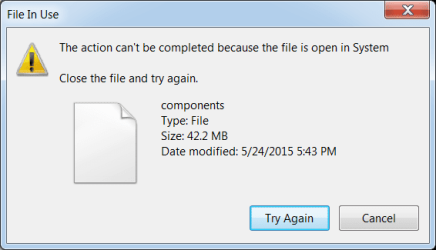
Please copy the C:\Windows\System32\config\COMPONENTS file (no extension) to your desktop and then compress it - upload the compressed file to your favoured fileshare site (preferably Dropbox or OneDrive) and post a link.
 

My Computer

Computer type
Laptop
Computer Manufacturer/Model Number
Asus K52F or Lenovo B51-80
OS
Win 7 x64 Home Premium (and x86 VirtualBox VM)/Win10
CPU
i3 370M/i7 6500U
Motherboard
Asus/Lenovo
Memory
8GB - finally :)/8GB
Graphics Card(s)
it's an i3, dude!/dual Intel&nVidia
Sound Card
onboard
Monitor(s) Displays
15.6" built-in
Screen Resolution
1366x768/1920x1080
Hard Drives
750GB Seagate internal
Sundry external drives attached to other computers on the local network
1TB SSD on the Lenovo
PSU
n/a
Internet Speed
as much as I can get - usually on a dongle/phone, so <1MB/s
Antivirus
MSE/Defender
Browser
IE11/12/Edge/Chrome/FF(if I must)

My Computer

Computer type
PC/Desktop
Computer Manufacturer/Model Number
custom built
OS
Windows 7 Home Basic 64-bit
When I scanned using the Malwarebytes, there were 526 threats found. I really do appreciate your modest reply Sir Noel
 

My Computer

Computer type
PC/Desktop
Computer Manufacturer/Model Number
custom built
OS
Windows 7 Home Basic 64-bit
Boot to Safe Mode, and do the copy of the COMPONENTS file there - usually, once it's been loaded, Windows does what it need to do to the file, and then unloads it again.
The corruption here is such that Windows can't do what it needs to - so the file never gets unloaded. Booting to Safe Mode means that Windows never loads it in the first place ;)

Compress the file, then reboot to Normal mode, and upload it. - post a link.
 

My Computer

Computer type
Laptop
Computer Manufacturer/Model Number
Asus K52F or Lenovo B51-80
OS
Win 7 x64 Home Premium (and x86 VirtualBox VM)/Win10
CPU
i3 370M/i7 6500U
Motherboard
Asus/Lenovo
Memory
8GB - finally :)/8GB
Graphics Card(s)
it's an i3, dude!/dual Intel&nVidia
Sound Card
onboard
Monitor(s) Displays
15.6" built-in
Screen Resolution
1366x768/1920x1080
Hard Drives
750GB Seagate internal
Sundry external drives attached to other computers on the local network
1TB SSD on the Lenovo
PSU
n/a
Internet Speed
as much as I can get - usually on a dongle/phone, so <1MB/s
Antivirus
MSE/Defender
Browser
IE11/12/Edge/Chrome/FF(if I must)
Sorry, that's the wrong COMPONENTS file - that one is actually the COMPONENTS.log file ;)
Please try again.

The one you need should be about 30-50MB in size (30,000 to 50,000KB)
 

My Computer

Computer type
Laptop
Computer Manufacturer/Model Number
Asus K52F or Lenovo B51-80
OS
Win 7 x64 Home Premium (and x86 VirtualBox VM)/Win10
CPU
i3 370M/i7 6500U
Motherboard
Asus/Lenovo
Memory
8GB - finally :)/8GB
Graphics Card(s)
it's an i3, dude!/dual Intel&nVidia
Sound Card
onboard
Monitor(s) Displays
15.6" built-in
Screen Resolution
1366x768/1920x1080
Hard Drives
750GB Seagate internal
Sundry external drives attached to other computers on the local network
1TB SSD on the Lenovo
PSU
n/a
Internet Speed
as much as I can get - usually on a dongle/phone, so <1MB/s
Antivirus
MSE/Defender
Browser
IE11/12/Edge/Chrome/FF(if I must)
OK - while you've been doing that, I've got a fix protocol for you...


I've uploaded a file - g29aa.zip - to my OneDrive at Noel's OneDrive
Please download and save it.
Right-click on the downloaded file, and select Extract all…
Extract to the default location - which will create a new folder g29aa in the same place.
Open this folder - there should be two folders inside it (Manifests, and Packages)

Copy the content of the Packages folder to the folder
C:\Windows\Temp\CheckSur\Servicing\Packages

Now run the CheckSUR tool again (it may take a while)

Post the new CheckSUR.log file, and the CheckSUR.persist.log file.
 

My Computer

Computer type
Laptop
Computer Manufacturer/Model Number
Asus K52F or Lenovo B51-80
OS
Win 7 x64 Home Premium (and x86 VirtualBox VM)/Win10
CPU
i3 370M/i7 6500U
Motherboard
Asus/Lenovo
Memory
8GB - finally :)/8GB
Graphics Card(s)
it's an i3, dude!/dual Intel&nVidia
Sound Card
onboard
Monitor(s) Displays
15.6" built-in
Screen Resolution
1366x768/1920x1080
Hard Drives
750GB Seagate internal
Sundry external drives attached to other computers on the local network
1TB SSD on the Lenovo
PSU
n/a
Internet Speed
as much as I can get - usually on a dongle/phone, so <1MB/s
Antivirus
MSE/Defender
Browser
IE11/12/Edge/Chrome/FF(if I must)
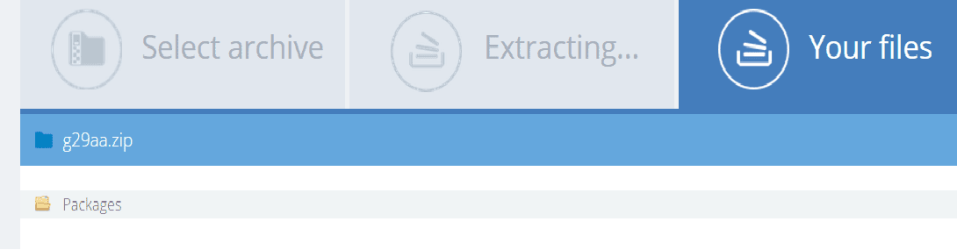
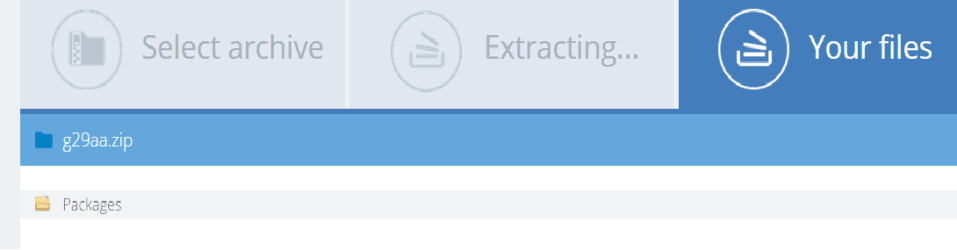
the g29aa.zip file has only one folder which is packega, am I doing it right?
Untitled.png
 

My Computer

Computer type
PC/Desktop
Computer Manufacturer/Model Number
custom built
OS
Windows 7 Home Basic 64-bit
That's great - and as far as I can tell, the file is OK, so the fix I posted should work OK.
 

My Computer

Computer type
Laptop
Computer Manufacturer/Model Number
Asus K52F or Lenovo B51-80
OS
Win 7 x64 Home Premium (and x86 VirtualBox VM)/Win10
CPU
i3 370M/i7 6500U
Motherboard
Asus/Lenovo
Memory
8GB - finally :)/8GB
Graphics Card(s)
it's an i3, dude!/dual Intel&nVidia
Sound Card
onboard
Monitor(s) Displays
15.6" built-in
Screen Resolution
1366x768/1920x1080
Hard Drives
750GB Seagate internal
Sundry external drives attached to other computers on the local network
1TB SSD on the Lenovo
PSU
n/a
Internet Speed
as much as I can get - usually on a dongle/phone, so <1MB/s
Antivirus
MSE/Defender
Browser
IE11/12/Edge/Chrome/FF(if I must)
...yep - my fault for not editing the standard script properly!
just cop the content of the Packages folder into the CheckSUR folder as described, and run the tool again.
 

My Computer

Computer type
Laptop
Computer Manufacturer/Model Number
Asus K52F or Lenovo B51-80
OS
Win 7 x64 Home Premium (and x86 VirtualBox VM)/Win10
CPU
i3 370M/i7 6500U
Motherboard
Asus/Lenovo
Memory
8GB - finally :)/8GB
Graphics Card(s)
it's an i3, dude!/dual Intel&nVidia
Sound Card
onboard
Monitor(s) Displays
15.6" built-in
Screen Resolution
1366x768/1920x1080
Hard Drives
750GB Seagate internal
Sundry external drives attached to other computers on the local network
1TB SSD on the Lenovo
PSU
n/a
Internet Speed
as much as I can get - usually on a dongle/phone, so <1MB/s
Antivirus
MSE/Defender
Browser
IE11/12/Edge/Chrome/FF(if I must)
Yep - the COMPONENTS file is fine -

If you've run the CheckSUR tool again after copying the files from the Packages folder, then please post the new CheckSUR.log file (from the :\Windows\Logs\CBS folder)
 

My Computer

Computer type
Laptop
Computer Manufacturer/Model Number
Asus K52F or Lenovo B51-80
OS
Win 7 x64 Home Premium (and x86 VirtualBox VM)/Win10
CPU
i3 370M/i7 6500U
Motherboard
Asus/Lenovo
Memory
8GB - finally :)/8GB
Graphics Card(s)
it's an i3, dude!/dual Intel&nVidia
Sound Card
onboard
Monitor(s) Displays
15.6" built-in
Screen Resolution
1366x768/1920x1080
Hard Drives
750GB Seagate internal
Sundry external drives attached to other computers on the local network
1TB SSD on the Lenovo
PSU
n/a
Internet Speed
as much as I can get - usually on a dongle/phone, so <1MB/s
Antivirus
MSE/Defender
Browser
IE11/12/Edge/Chrome/FF(if I must)
I am running the CheckSUR tool now... I'll be posting the CheckSUR.log file after. Thank you so much for the assistance. I'll keep you posted. :D
 

My Computer

Computer type
PC/Desktop
Computer Manufacturer/Model Number
custom built
OS
Windows 7 Home Basic 64-bit
Great! - CheckSUR gives it a clean bill of health now...
Code:
Summary:
Seconds executed: 1161
 Found 3 errors
 Fixed 3 errors
  CBS MUM Corrupt Total count: 3
  Fixed: CBS MUM Corrupt.  Total count: 3
  Fixed: CBS Paired File.  Total count: 3

Try Windows Update again - first do a Check For Updates.
 

My Computer

Computer type
Laptop
Computer Manufacturer/Model Number
Asus K52F or Lenovo B51-80
OS
Win 7 x64 Home Premium (and x86 VirtualBox VM)/Win10
CPU
i3 370M/i7 6500U
Motherboard
Asus/Lenovo
Memory
8GB - finally :)/8GB
Graphics Card(s)
it's an i3, dude!/dual Intel&nVidia
Sound Card
onboard
Monitor(s) Displays
15.6" built-in
Screen Resolution
1366x768/1920x1080
Hard Drives
750GB Seagate internal
Sundry external drives attached to other computers on the local network
1TB SSD on the Lenovo
PSU
n/a
Internet Speed
as much as I can get - usually on a dongle/phone, so <1MB/s
Antivirus
MSE/Defender
Browser
IE11/12/Edge/Chrome/FF(if I must)
WOW, simply great. Thank you for the great help, for the assistance and the patience in walking me through the solution of the issues I have posted.... Thank you! Thank you Sir Noel! Would you by any chance recommend a great or rather reliable antivirus for Windows 7 Home Basic.... Thanks so much! Problem Solved in less than a day....
 

My Computer

Computer type
PC/Desktop
Computer Manufacturer/Model Number
custom built
OS
Windows 7 Home Basic 64-bit
Back
Top