Solved Color Problem Help?

tythebuilder

New member
Local time
5:00 AM
Messages
2
Location
Toronto, Ontario
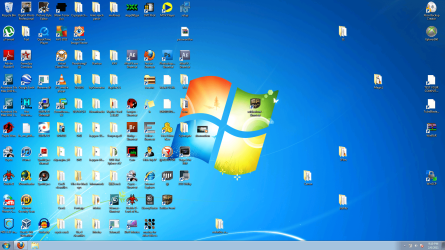
This is what happened to my pc after A random restart. How do I fix it?
As you can see the gradient is weird. Look at the background?
 

Attachments

  • color.png
    color.png
    543.2 KB · Views: 54

My Computer

Computer Manufacturer/Model Number
HP Pavilian
OS
Windows 7 ultimate 64bit
CPU
AMD Phenom(tm) 8550 Triple-Core Processor 2.20 GHzz
Memory
4.00 GB (3.75 GB usable)
Graphics Card(s)
Geforce 9100
Monitor(s) Displays
32" Insignia LED HD TV
Hard Drives
500 GB
Hello,
I'm unable to see the image clearly as i'm on mobile. But from what i can see, are you talking about the basic taskbar? Or something else?
If the whole display has problem, under your graphic card's control centre, there should be an option to restore default settings? Have you tried that?
For ATI, it's under CCC>Preferences>Restore factory defaults.
Also, update your card's driver if you haven't already.
 

My Computer

Computer Manufacturer/Model Number
HCL
OS
Winbdows 7 ultimate x64 | Ubuntu 12.04 x64 LTS
CPU
Core 2 Duo e7400 @ 2.90GHz
Motherboard
Gigabyte G31M-ES2L
Memory
3GB DDR2
Graphics Card(s)
Asus Nvidia GTX 560Ti 1GB
Sound Card
On-board
Monitor(s) Displays
HCL eZeeBee 18.5" LCD
Screen Resolution
1366x768 @ 60Hz
Hard Drives
Western Digital 320GB
PSU
Corsair CX500 V2 500W
Cooling
Stock
Keyboard
Stock
Mouse
Stock
Internet Speed
15-25kBps D/L | 10kBps U/L | Hey Don't laugh
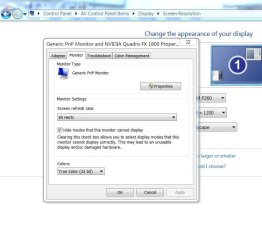
Are you referring to the stair stepping in the color gradient, particularly in the upper right? If so, that looks as though you've changed the screen bit depth from 32 bits to say 8. Look in Control Panel > Display > Adjust Resolution > Advanced Settings. In the Monitor tab you should see a control called Colors. It should be set to True Color (32 Bit). Look at the picture in the attachment.
Andacar


Attachments

  • Capture.JPG
    Capture.JPG
    63.9 KB · Views: 8

My Computer

Computer Manufacturer/Model Number
Custom machine
OS
Windows 7 Professional 64 bit
CPU
i7 920
Motherboard
ASUS P6T Deluxe V2
Memory
6 gigabytes
Graphics Card(s)
nVidia Quadro FX 1800
Sound Card
Creative SB Audigy 2
Monitor(s) Displays
IBM 21" CRT
Screen Resolution
1600 x 1200
Hard Drives
Hitachi 1 TB Main Drive
Western Digital 1 TB Storage
Western Digital 2 TB Projects
Keyboard
Logitec Access 600
Mouse
Logitec M100
Thanks for your help but it ended up just being that is was set to 16 bit so i changed to 32 And works fine.
 

My Computer

Computer Manufacturer/Model Number
HP Pavilian
OS
Windows 7 ultimate 64bit
CPU
AMD Phenom(tm) 8550 Triple-Core Processor 2.20 GHzz
Memory
4.00 GB (3.75 GB usable)
Graphics Card(s)
Geforce 9100
Monitor(s) Displays
32" Insignia LED HD TV
Hard Drives
500 GB
Glad you got it sorted. And thanks for the update. :)
 

My Computer

Computer Manufacturer/Model Number
HCL
OS
Winbdows 7 ultimate x64 | Ubuntu 12.04 x64 LTS
CPU
Core 2 Duo e7400 @ 2.90GHz
Motherboard
Gigabyte G31M-ES2L
Memory
3GB DDR2
Graphics Card(s)
Asus Nvidia GTX 560Ti 1GB
Sound Card
On-board
Monitor(s) Displays
HCL eZeeBee 18.5" LCD
Screen Resolution
1366x768 @ 60Hz
Hard Drives
Western Digital 320GB
PSU
Corsair CX500 V2 500W
Cooling
Stock
Keyboard
Stock
Mouse
Stock
Internet Speed
15-25kBps D/L | 10kBps U/L | Hey Don't laugh
That's what I figured...
 

My Computer

Computer Manufacturer/Model Number
Custom machine
OS
Windows 7 Professional 64 bit
CPU
i7 920
Motherboard
ASUS P6T Deluxe V2
Memory
6 gigabytes
Graphics Card(s)
nVidia Quadro FX 1800
Sound Card
Creative SB Audigy 2
Monitor(s) Displays
IBM 21" CRT
Screen Resolution
1600 x 1200
Hard Drives
Hitachi 1 TB Main Drive
Western Digital 1 TB Storage
Western Digital 2 TB Projects
Keyboard
Logitec Access 600
Mouse
Logitec M100
Back
Top