color profile

deviantsaby

New member
Local time
9:33 AM
Messages
4
Hi,
I hope to find a solution to my problem here.

The problem:

I've calibrated my monitor and made a new ICC color profile. In "color management" I made that profile as a default profile for my monitor and devices.
BUT still all colors I see are not right, seems like color profile is not used.
BUT when I open images via Adobe Photoshop and converting them to my color profile - I'm getting right colors.

Question:

How can I make ICC profile work not only for Photoshop?

OS: Windows 7 64-bit
Video card: ATI Radeon HD 5400 series

Thanks in advance!
 
Last edited:

My Computer

OS
windows 7
Graphics Card(s)
ati radeon hd 5400 series
Hi Deviantsaby,

When you say you calibrated your monitor what program did you use? And did/do you have it setup to auto load/start when Windows starts?

Color Management is a very tricky dog that not only requires coordination between your software, computer and monitor, but also your printer.

Let me know.
 

My Computer

Computer type
PC/Desktop
Computer Manufacturer/Model Number
Custom built by me.
OS
Windows 10 Pro
CPU
Intel Core i7-4770K (3.5Ghz)
Motherboard
Gigabyte G1 Sniper 5 (F10 Bios)
Memory
32 gig Corsair Dominator Platinum (4x8Gig)
Graphics Card(s)
Sapphire Tri-X R9 Fury
Sound Card
Soundblaster ZXR
Monitor(s) Displays
NEC PA242W 24" LCD Monitor
Screen Resolution
1920 x 1200
Hard Drives
Primary - Samsung 850 Pro (512gig), Samsung 840 Pro (256gig), 2TB WD Caviar Black.
PSU
EVGA Supernova 1000 G2
Case
Cooler Master HAF X
Cooling
Corsair H100i with Corsair Air Series SP120 Quiet Fans
Keyboard
Logitech Wireless Wave
Mouse
Logitech Performance MX
Internet Speed
High Speed Cable
Antivirus
Norton Security
Browser
IE11
Other Info
Memory Timings - 1866MHz @ 9-9-9-27-1T @ 1.5 volts
sygnus21,

I've used Eye-One Match 3. I'm not really sure if it runs with start-up...

I did calibration with same software on my previous PC (with XP OS) and had no issues. So I'm thinking that maybe I'm doing smth wrong in Windows 7.
 

My Computer

OS
windows 7
Graphics Card(s)
ati radeon hd 5400 series
Have you checked to see if Eye-One Match is compatible with Windows 7? Also, i'm quite positive that thing needs to auto start to load the ICC/ICM profile.

It's been a while since I've used a color management program, but when you create a profile it needs to be loaded automatically to work. Adobe Photoshop works this way.

Once you create a do the color management, you will see Adobe Gama loaded in your "Startup" menu under Start (windows orb), All Programs, Startup.

If you don't have something like that in the Startup folder, chances are that's what the problem is.

Let me know
 

My Computer

Computer type
PC/Desktop
Computer Manufacturer/Model Number
Custom built by me.
OS
Windows 10 Pro
CPU
Intel Core i7-4770K (3.5Ghz)
Motherboard
Gigabyte G1 Sniper 5 (F10 Bios)
Memory
32 gig Corsair Dominator Platinum (4x8Gig)
Graphics Card(s)
Sapphire Tri-X R9 Fury
Sound Card
Soundblaster ZXR
Monitor(s) Displays
NEC PA242W 24" LCD Monitor
Screen Resolution
1920 x 1200
Hard Drives
Primary - Samsung 850 Pro (512gig), Samsung 840 Pro (256gig), 2TB WD Caviar Black.
PSU
EVGA Supernova 1000 G2
Case
Cooler Master HAF X
Cooling
Corsair H100i with Corsair Air Series SP120 Quiet Fans
Keyboard
Logitech Wireless Wave
Mouse
Logitech Performance MX
Internet Speed
High Speed Cable
Antivirus
Norton Security
Browser
IE11
Other Info
Memory Timings - 1866MHz @ 9-9-9-27-1T @ 1.5 volts
It is compatible with windows 7.
In startup i've found "Logo calibration loader" and "Profile reminder".
 

My Computer

OS
windows 7
Graphics Card(s)
ati radeon hd 5400 series
Is it not working? If not, try this...

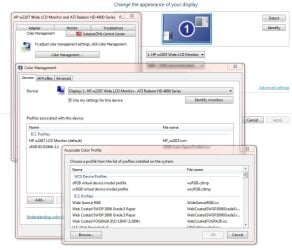
Right click on your desktop and click Display, Change display settings, click Advance Settings, click the Color Management tab and click Color Management, click Device tab, check the box “Use my settings for this device” than click “Add” at the bottom then find the profile you created, highlight it and click OK. The profile should now be added to the color management tab for your monitor and should be working now.

Display settings.JPG

Let me know
 

My Computer

Computer type
PC/Desktop
Computer Manufacturer/Model Number
Custom built by me.
OS
Windows 10 Pro
CPU
Intel Core i7-4770K (3.5Ghz)
Motherboard
Gigabyte G1 Sniper 5 (F10 Bios)
Memory
32 gig Corsair Dominator Platinum (4x8Gig)
Graphics Card(s)
Sapphire Tri-X R9 Fury
Sound Card
Soundblaster ZXR
Monitor(s) Displays
NEC PA242W 24" LCD Monitor
Screen Resolution
1920 x 1200
Hard Drives
Primary - Samsung 850 Pro (512gig), Samsung 840 Pro (256gig), 2TB WD Caviar Black.
PSU
EVGA Supernova 1000 G2
Case
Cooler Master HAF X
Cooling
Corsair H100i with Corsair Air Series SP120 Quiet Fans
Keyboard
Logitech Wireless Wave
Mouse
Logitech Performance MX
Internet Speed
High Speed Cable
Antivirus
Norton Security
Browser
IE11
Other Info
Memory Timings - 1866MHz @ 9-9-9-27-1T @ 1.5 volts
It's not working. It shows 2 different color shades in Photoshop and in Windows as well (with same profile).
But when I put sRGB profile in both - colors are alike.
So I'll go with sRGB for now.. and then will calibrate again. Maybe the problem was in profile.

Thank you for your time and help.
 

My Computer

OS
windows 7
Graphics Card(s)
ati radeon hd 5400 series
This was a while ago. Just wanted to add that not all programs can manage ICC profiles, IE8 is one of them. I am in Vista right now. When testing, on my screen it seems Office Picture Manager cannot, ACDSee Photo Manager 10 cannot but Windows live Photo Gallery can.
 

My Computer

Computer Manufacturer/Model Number
Dell XPS720
OS
Windows Seven Ultimate 64bit + Vista Ultimate 32bit SP2 Dual Boot
CPU
Intel Quad Q6600 2.40GHz
Motherboard
Dell 0YU822, NVIDIA nForce 680i SLI SPP / SLI MCP
Memory
4GB DDR2 800MHz
Graphics Card(s)
Gainward GeForce GTX 560 Ti, 1024 MB GDDR5
Sound Card
Creative SB X-Fi Xtreme Gamer
Monitor(s) Displays
Dell 2407WFP-HC
Screen Resolution
1920 x 1200
Hard Drives
NVIDIA 640GB SATA Raid 0 (2x320GB) (7200 rpm) for Vista,
Intel X25-M G2 SSD 160 GB for W7,
Maxtor OT III External HDD,
WD Elements 1TB External HDD
Keyboard
Logitech MX 3200
Mouse
Logitech MX 3200 Laser
Internet Speed
100/20 MB
Other Info
M779 PCIe PAL/SECAM/DVB-T Desktop TV Tuner. Broadcom NetXtreme 57xx Gigabit Controller. ASUS U3S6 SATA III/USB3 PSI Ex x4 Controller Card.
Back
Top