
Hi everyone, this is my first post on sevenforums. Was on vistax64 and switched to Win 7 just about a week back. The switch from Vista to 7 was pretty easy unlike XP to Vista.
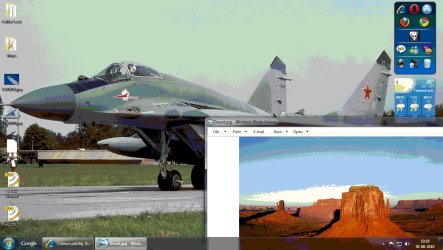
Now for my problem. I was using a D-sub VGA cable to connect my graphics card to my display (BIG Geforce 8600GT to Bravia KLV-26V300A). The cable was cheap and of poor quality. I guess it had interference issues. If they are of relevence i will post it later. But now i changed to a DVI-D Dual Link - HDMI cable. The problems i had with the other cable are gone. But now the colour gradients are not displayed properly. Its like how you would see it in a 16-bit or 256 colours display. A patch of one shade then a patch of the next, and not a gradual change. It is not as noticable as 256 mode, but it is noticable. Even on the login screen it can be observed.
What could be wrong? I would be grateful for any help. Thank you.
Adding some details:
Eg: The blue on either side of this page has horizontal patches in the area that the gradation occurs.
My resolution: 1360x768, colour depth: 32-bit, Refresh rate: 60Hz. NVIDIA drivers downloaded just a week back.
I'm uploading two pictures.
The first (desktop) is just a simulation, ie. i saved the picture in 256 colours just to show an exaggerated example of my problem.
The second, i created a new black image and used a gradient tool. I can see diagonal patches, but im not sure if others will see it.
Now for my problem. I was using a D-sub VGA cable to connect my graphics card to my display (BIG Geforce 8600GT to Bravia KLV-26V300A). The cable was cheap and of poor quality. I guess it had interference issues. If they are of relevence i will post it later. But now i changed to a DVI-D Dual Link - HDMI cable. The problems i had with the other cable are gone. But now the colour gradients are not displayed properly. Its like how you would see it in a 16-bit or 256 colours display. A patch of one shade then a patch of the next, and not a gradual change. It is not as noticable as 256 mode, but it is noticable. Even on the login screen it can be observed.
What could be wrong? I would be grateful for any help. Thank you.
Adding some details:
Eg: The blue on either side of this page has horizontal patches in the area that the gradation occurs.
My resolution: 1360x768, colour depth: 32-bit, Refresh rate: 60Hz. NVIDIA drivers downloaded just a week back.
I'm uploading two pictures.
The first (desktop) is just a simulation, ie. i saved the picture in 256 colours just to show an exaggerated example of my problem.
The second, i created a new black image and used a gradient tool. I can see diagonal patches, but im not sure if others will see it.
Attachments

Last edited:
My Computer
- Computer Manufacturer/Model Number
- NA
- OS
- Windows 7 Professional 32bit
- CPU
- AMD Athlon II X2 4450e @2.8GHz (Sempron 145)
- Motherboard
- ASUS M4A78LT-M LE
- Memory
- 2x2GB DDR3 1333MHz Kingston
- Graphics Card(s)
- MSI R7750 PMD1GD5
- Sound Card
- VIA HD 7.1 onboard
- Monitor(s) Displays
- Sony Bravia V Series - KLV-26V300A
- Screen Resolution
- 1360x768
- Hard Drives
- WD Caviar Blue
WD5000AAKS
500GB SATA
- PSU
- Corsair CX500 V2
- Case
- Enterage Generic
- Cooling
- CM Hyper TX3 EVO, GPU 2x 80mm, Stock PSU fan, 1x80mm cab fan


