16 bit message on my 64 bit computer

mjb1957

New member
Local time
6:53 AM
Messages
14
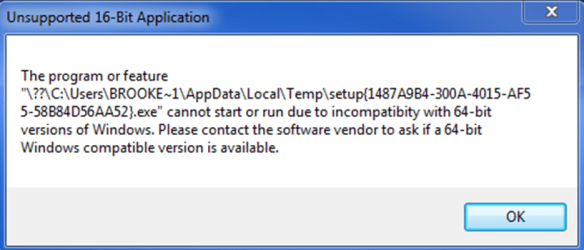
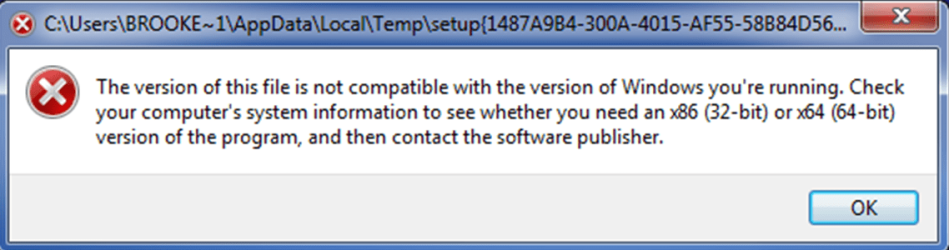
I am getting a couple of 16 bit error messages
the error message is hopefully attached to this thread.
Can someone help as the error message does not say what progam is 16 bit all it says is " program or feature". I do not know where to look. How can I identify what the 16 bit progam or feature is??

My computer is a Dell XPS 8700

Thank you
 

Attachments

My Computer

Computer type
PC/Desktop
Computer Manufacturer/Model Number
Dell
OS
windows 7 64 bit Ultimate
CPU
i7 intel - [email protected]
Memory
32gb
Graphics Card(s)
Nvidia Geforce GTX 645
Hard Drives
1.80TB
Antivirus
McAfee
Browser
explorer 10
Welcome to the Seven Forums.

The preferred method of attaching screenshots is found here:
http://www.sevenforums.com/tutorials/9733-screenshots-files-upload-post-seven-forums.html

And I mention some issues with MS Paint in this post:
http://www.sevenforums.com/system-s...en-after-firewall-disabled-2.html#post2678725

MS Word always shrinks screenshots of the entire desktop and documents can be infected, so people might hesitate to open them. Of course, image files can be infected too :-(


Anyway, I've extracted the images from your doc so that members can help you:

error0.PNG

error1.PNG

When you would see these errors come up? Each time the computer starts?
 

My Computer

Computer type
Laptop
Computer Manufacturer/Model Number
Employer provided Dell Latitude
OS
W7 Pro SP1 64bit
CPU
i7
Memory
8GB
Graphics Card(s)
Intel HD Graphics
Hard Drives
crappy SSD
Antivirus
Employer mandated Symantec Endpoint Protection
Browser
Pale Moon 64bit, IE11 64bit & Chrome 64bit
Error messages in themselves often don't mean very much. The conditions under which you receive them are vital.
64 bit Windows cannot run 16 bit applications at all.
 

My Computer

Computer type
PC/Desktop
Computer Manufacturer/Model Number
HP
OS
Windows 7 Pro 64 bit
CPU
Xeon W3520
Memory
8 GB
Graphics Card(s)
Nvidia Geforce 210
16 bit error message

I get one message first, I click ok then the second error message appears. I cannot find a way to track down the 16bit program or feature to eliminate it. Any advice would be appreciated. Thank you
 

My Computer

Computer type
PC/Desktop
Computer Manufacturer/Model Number
Dell
OS
windows 7 64 bit Ultimate
CPU
i7 intel - [email protected]
Memory
32gb
Graphics Card(s)
Nvidia Geforce GTX 645
Hard Drives
1.80TB
Antivirus
McAfee
Browser
explorer 10
What are you doing when you get the error message?
 

My Computer

Computer type
PC/Desktop
Computer Manufacturer/Model Number
Custom Built
OS
Windows 10 Pro x64, Windows 8.1 Pro x64, Windows 7 Ultimate x64 SP1,
CPU
INTEL i9-7920X LGA 2066
Motherboard
Gigabyte X299-WU8 F3
Memory
64 GB (4 X 16 GB) G-Skill V Series DDR4 3200 Quad Channel
Graphics Card(s)
EVGA GTX 1060 SC 3 GB
Sound Card
Realtek Onboard ALC1220
Monitor(s) Displays
2 x Samsung S27E310
Screen Resolution
1920x1080
Hard Drives
Samsung 2 x 970 EVO Plus 500 GB NVMe
1 x 6TB WD 6003FZBX SATA
1 x 6TB WD 60EFRX SATA
12 x 3TB WD 30EFRX SATA
PSU
Seasonic X-1050
Case
Thermaltake Armor+
Cooling
Corsair H80i V2 Liquid AOI Cooler
Keyboard
Logitech G510s
Mouse
Logitech MX Master 2S
Internet Speed
200 Mb/s
Antivirus
ESET NOD32 13.1
Browser
EDGE (Dev, Canary, Beta), Chrome
Other Info
ASUS RT-AC68U router
Malwarebytes 4.0.4
error message

Sometimes when I come back to my computer and the error message is on my screen.
There has not been one occasion when I am using a program or feature and the error message comes up, it appears to be when I am not using the computer the message then comes up.
 

My Computer

Computer type
PC/Desktop
Computer Manufacturer/Model Number
Dell
OS
windows 7 64 bit Ultimate
CPU
i7 intel - [email protected]
Memory
32gb
Graphics Card(s)
Nvidia Geforce GTX 645
Hard Drives
1.80TB
Antivirus
McAfee
Browser
explorer 10
It's a setup program in temp.

See if Disk cleanup will remove it.

If not a more powerful tool might be needed.


I'd like you to do a quick malware scan on your system just to make sure there isn't anything lurking.

Download Malwarebytes Anti-Malware Free (click here to download, select the free version)
"Save as" the install package to your Desktop
Double click the mbam-setup file on your desktop to install and run Malwarebytes (Mbam)

Answer YES to all authorization prompts and then follow the Mbam setup prompts.
Do not make any changes to default settings.
When the install is finished, verify that only the following two options have checkmarks,
change to match if necessary.
[[FONT=Webdings, serif]a[/FONT]] Update Malwarebytes’ Anti-Malware
[a] Launch Malwarebytes’ Anti-Malware

Make sure that there is NOT a checkmark next to:
[ ] Enable free trial of Malwarebytes Anti-Malware PRO

Then click the Finish button.

Allow Mbam to update, then
Select Perform Quick Scan from the options on the Scanner tab, then
Click the Scan button.

After the scan is complete
Click on Show Results
A window displaying any detected malware is shown
Select all malware (make sure all objects are ticked [a]), then
Click on Remove Selected

The Mbam report file pops up in your text editor when Mbam has completed the removal process.

:ar: Select all of the text in the report (Ctrl+A) and paste the text in a new post on this thread.

   Note
If MBAM encounters a file that is difficult to remove, you are asked to restart the computer.
The restart is REQUIRED to allow Mbam to complete the removal of the malware.
Failure to restart means that the malware is still present on your machine.

:info: You want to restart in Normal mode, not in Safe mode.
 

My Computer

Computer type
Laptop
Computer Manufacturer/Model Number
HP Pavilion dv6-6c10us
OS
x64 (6.3.9600) Win8.1 Pro & soon dual boot x64 (6.1.7601) Win7_SP1 HomePrem
CPU
AMD A6-3420M APU with Radeon(tm) HD Graphics
Motherboard
Hewlett-Packard 1805
Memory
6.00 GB
Graphics Card(s)
AMD Radeon(TM) HD 6520G
Sound Card
(1) AMD High Definition Audio Device (2) IDT High Definiti
Monitor(s) Displays
HP W2072a 20" LCD (1600 x 900) @ 60 Hz
Screen Resolution
1366 x 768 x 32 bits (4294967296 colors) @ 60 Hz
Hard Drives
ST640LM0 00 HM641JI SATA Disk Device
Keyboard
Logitech k520 wireless KB
Mouse
Logitech m320 wireless mouse (bundled with KB)
Internet Speed
15/5 | 54 MB Wireless 'n'
Antivirus
Realtime: Defender or Avast | On-demand: Malwarebytes, ESET
Browser
IE 11 on Win8, IE 10 on win 7
Other Info
Media: [Gimp, Audacity, VLC] || Comm: [WEmail 2012, Skype] || Productivity: [OpenOffice,| Textpad] || Utils: [Sysinternals, cCleaner, Speccy, Defraggler]
Back
Top