COM Surrogate Windows 7 64bit

My Computer

Computer Manufacturer/Model Number
HP Pavilion e9110t
OS
Windows 7 Home Premium 64 Bit
CPU
Intel(R) Core(TM)2 Quad CPU Q9550 @ 2.83GHz
Motherboard
Pegatron IPIEL-LA3
Memory
6.00 GB Hundai HMT125U6BFR8C-H9
Graphics Card(s)
ATI Radeon HD 4850
Sound Card
Realtek High Definition Audio/ATI High Definition Audio
Monitor(s) Displays
Acer AL2216W
Screen Resolution
1680x1050
Hard Drives
Hitachi HDP725050GLA360 ATA Device 500 GB
PSU
Unknown/installed by HP
Case
HP generic case
Cooling
Intel Stock Cooling
Keyboard
HP Keyboard
Mouse
HP Mouse
Internet Speed
Download: 19.15 Mbps Upload: 1.67 Mbps
Other Info
Network Adapter Realtek RTL8168D/8111D Family PCI-E Gigabit Ethernet NIC (NDIS 6.20)
Network Adapter 802.11n Wireless PCI Express Card LAN Adapter
Thanks. Malwarebytes didn't find anything.

That looks like a sweet list of optimization for general purposes also.

I have the feeling that windows should work with all of them enabled still because I didn't change anything from the default and on other computers all the transparency etc also works together with the windows photo viewer (at least I presume so...).

Things I can think of that are the same between the two computers are:

Is there anything on that list that you think might cause the problem?

Also on a different note; My friend has an old laptop which used to have windows vista home premium (I think 32 bit) and she still has a license key but not the install CD. She needs to reinstall this. I tried googling for ISO images but I can't say what is genuine and what isn't. Do you know where I could find a genuine version?

Thanks!!http://www.newegg.com/Product/Product.aspx?Item=N82E16824001388
http://www.newegg.com/Product/Product.aspx?Item=N82E16824001388
 

My Computer

Computer Manufacturer/Model Number
home built
OS
Windows 7 Professional x64
CPU
Intel Core i7-2600 Sandy Bridge
Motherboard
ASRock Z68 Gen3 Pro
Memory
CORSAIR Vengeance 16GB (4 x 4GB) 240-Pin DDR3
Graphics Card(s)
none so far (using chip inbuilt graphics)
Monitor(s) Displays
SAMSUNG B2430H Glossy Black 24"
Hard Drives
Seagate Barracuda Green ST2000DL003 2TB
Crucial M4 CT128M4SSD2 2.5" 128GB (SSD)
PSU
SeaSonic X Series X650 Gold ((SS-650KM Active PFC F3)) 650W
Case
Corsair Obsidian Series 650D
Cooling
COOLER MASTER Hyper 212 Plus
Oh; and I have the same mouse: Logitech M510
 

My Computer

Computer Manufacturer/Model Number
home built
OS
Windows 7 Professional x64
CPU
Intel Core i7-2600 Sandy Bridge
Motherboard
ASRock Z68 Gen3 Pro
Memory
CORSAIR Vengeance 16GB (4 x 4GB) 240-Pin DDR3
Graphics Card(s)
none so far (using chip inbuilt graphics)
Monitor(s) Displays
SAMSUNG B2430H Glossy Black 24"
Hard Drives
Seagate Barracuda Green ST2000DL003 2TB
Crucial M4 CT128M4SSD2 2.5" 128GB (SSD)
PSU
SeaSonic X Series X650 Gold ((SS-650KM Active PFC F3)) 650W
Case
Corsair Obsidian Series 650D
Cooling
COOLER MASTER Hyper 212 Plus
Unfortunately, the Vista version of the ISOs are no longer available to my knowledge. She could try posting in the VistaForums which are a neighbor site to these forums. There is not as much activity there, so no guarantees help will be given.

If anyone else knows of a genuine Vista ISO that is allowed to be linked, please share.


As to your problem, it could be the themes you use. Try a basic Windows 7 theme and see if it persists. If so, that would rule that out as a likely candidate. I am with you that it is likely something else underlying, but I am not able to discern what. Do you have any explorer based applications built in (winRAR, for instance, can cause problems like these if it is not functioning properly)? If you right click on a file, can you provide us with what options you are given? That may lend some clue to what might be interfering.
 

My Computer

Computer Manufacturer/Model Number
HP Pavilion e9110t
OS
Windows 7 Home Premium 64 Bit
CPU
Intel(R) Core(TM)2 Quad CPU Q9550 @ 2.83GHz
Motherboard
Pegatron IPIEL-LA3
Memory
6.00 GB Hundai HMT125U6BFR8C-H9
Graphics Card(s)
ATI Radeon HD 4850
Sound Card
Realtek High Definition Audio/ATI High Definition Audio
Monitor(s) Displays
Acer AL2216W
Screen Resolution
1680x1050
Hard Drives
Hitachi HDP725050GLA360 ATA Device 500 GB
PSU
Unknown/installed by HP
Case
HP generic case
Cooling
Intel Stock Cooling
Keyboard
HP Keyboard
Mouse
HP Mouse
Internet Speed
Download: 19.15 Mbps Upload: 1.67 Mbps
Other Info
Network Adapter Realtek RTL8168D/8111D Family PCI-E Gigabit Ethernet NIC (NDIS 6.20)
Network Adapter 802.11n Wireless PCI Express Card LAN Adapter
Thanks for the tip! I'll tell her.

I tried a basic theme and it didn't work... Attached are screenshots for right clicks on Folders and a Word document for Work and home respectively (the text for the work Pc is weird because I connected remotely).

What I did for the moment is download Picasa and work with that. If I have time I can maybe reinstall windows from scratch on my home PC where I don't have to run around (that far) to get all the software back together. Then I could slowly build up the system and check at every step if the problem occurs.

If I was to do that, I need to two things though:


  • When I bought the PC pre-installed, will there be any issue when I reinstall windows? If not then I might need a Windows Home Premium SP1 ISO
  • One thing that bugs me is: My Laptopt came with a test version of Microsoft office Pre installed (in English; the language that I would like it in). I upgraded that with a license from a CD purchased in Germany:rolleyes:. Because the test version was English, the language pack remained English. For my work PC where I used the same German office CD to install MS office, (it was one of those disks with 3 licenses) I had to buy an English Language pack. Now, if I was to reinstall windows on my Laptop I would need to install office from the CD and end up with having to buy another language pack. I could see two solutions (maybe you have another?):
    • I find out how I can get the original installation with the test office version back. The laptop did not come with an install DVD. Maybe I can ask someone if they provide ISO images...
    • OR is there any way of getting an official, free, English trial office version install file that I could then activate with the (German) key I have?
Sounds complicated. :rolleyes:The thing is, so far the error is not THAT bad but now that I spent four days trying to fix it it would be nice to know what it was...:)
 

My Computer

Computer Manufacturer/Model Number
home built
OS
Windows 7 Professional x64
CPU
Intel Core i7-2600 Sandy Bridge
Motherboard
ASRock Z68 Gen3 Pro
Memory
CORSAIR Vengeance 16GB (4 x 4GB) 240-Pin DDR3
Graphics Card(s)
none so far (using chip inbuilt graphics)
Monitor(s) Displays
SAMSUNG B2430H Glossy Black 24"
Hard Drives
Seagate Barracuda Green ST2000DL003 2TB
Crucial M4 CT128M4SSD2 2.5" 128GB (SSD)
PSU
SeaSonic X Series X650 Gold ((SS-650KM Active PFC F3)) 650W
Case
Corsair Obsidian Series 650D
Cooling
COOLER MASTER Hyper 212 Plus
Attachments...:o
 

Attachments

My Computer

Computer Manufacturer/Model Number
home built
OS
Windows 7 Professional x64
CPU
Intel Core i7-2600 Sandy Bridge
Motherboard
ASRock Z68 Gen3 Pro
Memory
CORSAIR Vengeance 16GB (4 x 4GB) 240-Pin DDR3
Graphics Card(s)
none so far (using chip inbuilt graphics)
Monitor(s) Displays
SAMSUNG B2430H Glossy Black 24"
Hard Drives
Seagate Barracuda Green ST2000DL003 2TB
Crucial M4 CT128M4SSD2 2.5" 128GB (SSD)
PSU
SeaSonic X Series X650 Gold ((SS-650KM Active PFC F3)) 650W
Case
Corsair Obsidian Series 650D
Cooling
COOLER MASTER Hyper 212 Plus
Things I can think of that are the same between the two computers are:

  • I have some of the same software c.f. list of software attached with some of my earlier threads.

I can't seem to find where you list your software. Could you list all of the software, to include any themes or tweaks, you have done on the fresh install of your system?
 

My Computer

OS
XP / Win7 x64 Pro
CPU
Intel Quad-Core Q9450 @ 3.2GHz
Motherboard
Asus P5-E
Memory
2x2GB GSkill DDR2
Graphics Card(s)
NVIDIA GeForce 8600 GTS (EVGA)
Monitor(s) Displays
Dell 2408WFP
Screen Resolution
1920x1200
Sorry that list was in another thread...

Here is a list both for home and for work including windows features that are turned on and off.

Other tweaks than that are

  • themes but changing my PC to a basic theme didn't change anything.
  • Make windows ask me before installing updates. (so disable "automatic" updates. I have been good on updating though.
  • I can't even think of anything else (maybe some energy things like "never shut down" etc)
 

Attachments

My Computer

Computer Manufacturer/Model Number
home built
OS
Windows 7 Professional x64
CPU
Intel Core i7-2600 Sandy Bridge
Motherboard
ASRock Z68 Gen3 Pro
Memory
CORSAIR Vengeance 16GB (4 x 4GB) 240-Pin DDR3
Graphics Card(s)
none so far (using chip inbuilt graphics)
Monitor(s) Displays
SAMSUNG B2430H Glossy Black 24"
Hard Drives
Seagate Barracuda Green ST2000DL003 2TB
Crucial M4 CT128M4SSD2 2.5" 128GB (SSD)
PSU
SeaSonic X Series X650 Gold ((SS-650KM Active PFC F3)) 650W
Case
Corsair Obsidian Series 650D
Cooling
COOLER MASTER Hyper 212 Plus

My Computer

Computer Manufacturer/Model Number
home built
OS
Windows 7 Professional x64
CPU
Intel Core i7-2600 Sandy Bridge
Motherboard
ASRock Z68 Gen3 Pro
Memory
CORSAIR Vengeance 16GB (4 x 4GB) 240-Pin DDR3
Graphics Card(s)
none so far (using chip inbuilt graphics)
Monitor(s) Displays
SAMSUNG B2430H Glossy Black 24"
Hard Drives
Seagate Barracuda Green ST2000DL003 2TB
Crucial M4 CT128M4SSD2 2.5" 128GB (SSD)
PSU
SeaSonic X Series X650 Gold ((SS-650KM Active PFC F3)) 650W
Case
Corsair Obsidian Series 650D
Cooling
COOLER MASTER Hyper 212 Plus
Hi PrinorB,

I did have that problem a few months ago and I tracked it down to the codec pack I was using (k-lite) which was causing the issue. But if you're getting that error on a clean install that's a different story. :confused:
 

My Computer

Computer type
PC/Desktop
Computer Manufacturer/Model Number
Custom Build
OS
Win 7 Ultimate, Win 8.1 Pro, Linux Mint 19 Cinnamon (All 64-Bit)
CPU
Intel i5 4690K
Motherboard
Gigabyte Z97X-UD3H
Memory
Corsair Vengeance LP 32GB DDR3
Graphics Card(s)
MSI GTX 1060 GAMING X 6GB
Sound Card
Onboard
Hard Drives
Samsung 850 EVO 250GB SSD (x2)
Samsung 860 EVO 1TB SSD (x2)
Crucial MX300 525GB SSD
WD Blue 2TB 5400rpm Intellipark Disabled (x2)
PSU
Corsair HX750i
Case
Phanteks Enthoo Pro
Cooling
CM Hyper 212 EVO on CPU, Noctua Redux NF-P14S 1500rpm (x6)
Keyboard
Corsair K70 RGB LUX
Mouse
Corsair Sabre RGB
Antivirus
Avast Free, MalwareBytes, SAS & CryptoPrevent
Browser
Chrome
Other Info
StarTech PEXESAT322I 2 Port PCI-E SATA Card
ASUS PCE-AC56 Dual-band AC1300 Wireless Card
Akasa FC.Six Manual Fan Controller
And a Partridge in a Pear Tree!
Hi PrinorB,

I did have that problem a few months ago and I tracked it down to the codec pack I was using (k-lite) which was causing the issue. But if you're getting that error on a clean install that's a different story. :confused:

Right, that was my first thought. Codec packs and theme modifiers/tweakers are the notorious culprits for such errors. However, the OP is getting this on a clean install. Something is definitely awry here.

Prinor, It is very possible it's a driver issue. When you installed Windows, did you let Windows Update install all of your drivers or did you download them from the ASUS website? It's possible Windows isn't installing the suitable drivers for your system and that's what is causing the issue.

ASUS - Motherboards- ASUS P8Z68-V PRO/GEN3

First, make sure your BIOS is the latest version. Other than that, the only thing I'd personally install myself over Windows Updates is the Intel chipset driver utility, which might be a bit out of date on the ASUS website. Instead, I'd go here and check for the latest drivers for your chipset and update/install them:

Intel® Driver Update Utility

None of this may be related to your issue, but they are basic things that need to be done to prevent possible other issues in the future.
 

My Computer

OS
XP / Win7 x64 Pro
CPU
Intel Quad-Core Q9450 @ 3.2GHz
Motherboard
Asus P5-E
Memory
2x2GB GSkill DDR2
Graphics Card(s)
NVIDIA GeForce 8600 GTS (EVGA)
Monitor(s) Displays
Dell 2408WFP
Screen Resolution
1920x1200
Hmm,
I am not sure why ASUS motherboards? Is ASRock the same as ASUS? For the work computer I installed the drivers that were on the ASRock website:

ASRock > Products > Motherboard > Z68 Pro3 Gen3 > Download
I think I installed:

  • Realtek audio
  • Intel management engine
  • Realteck LAN
  • Etron USB
  • Intel HD graphics driver: That driver is the "VGA driver" from the ASRock website I think. Should I maybe reinstall that driver ()
I am not sure what the MSXML is. The question is though why do I have the same on my home computer which I didn't do anything with? It came with everything pre-installed. I didn't install any drivers codecs etc unless there was some update from windows update that I clicked yes on.


Two questions about drivers:

  • Can I just uninstall a driver with the control panel and then reinstall it Without making the hole system crash? I just noticed that some of the drivers have a newer version on the ASrock website. I could also try reinstalling the HD graphics driver.
  • When the system is pre built, is there any way to find out what motherboard there is and what drivers I would need?
It is so strange. My friend has an Acer Laptop that she bought a months earlier than me and she hasn't got the issue. When she comes to visit in a week I can look more closely what she hasn't got and what I have
 

My Computer

Computer Manufacturer/Model Number
home built
OS
Windows 7 Professional x64
CPU
Intel Core i7-2600 Sandy Bridge
Motherboard
ASRock Z68 Gen3 Pro
Memory
CORSAIR Vengeance 16GB (4 x 4GB) 240-Pin DDR3
Graphics Card(s)
none so far (using chip inbuilt graphics)
Monitor(s) Displays
SAMSUNG B2430H Glossy Black 24"
Hard Drives
Seagate Barracuda Green ST2000DL003 2TB
Crucial M4 CT128M4SSD2 2.5" 128GB (SSD)
PSU
SeaSonic X Series X650 Gold ((SS-650KM Active PFC F3)) 650W
Case
Corsair Obsidian Series 650D
Cooling
COOLER MASTER Hyper 212 Plus
Sorry my bad. None of the drivers are out of date. For some reason the version numbering on the website isn't the same as the one that shows in the control panel from the installed version. I looked at the downloaded drivers that I have and they are all the same as on the website.

Unless of course they have been subsequently tempered with by windows update. When searching through all my windows updates however, I didn't find any graphics driver update.
 

My Computer

Computer Manufacturer/Model Number
home built
OS
Windows 7 Professional x64
CPU
Intel Core i7-2600 Sandy Bridge
Motherboard
ASRock Z68 Gen3 Pro
Memory
CORSAIR Vengeance 16GB (4 x 4GB) 240-Pin DDR3
Graphics Card(s)
none so far (using chip inbuilt graphics)
Monitor(s) Displays
SAMSUNG B2430H Glossy Black 24"
Hard Drives
Seagate Barracuda Green ST2000DL003 2TB
Crucial M4 CT128M4SSD2 2.5" 128GB (SSD)
PSU
SeaSonic X Series X650 Gold ((SS-650KM Active PFC F3)) 650W
Case
Corsair Obsidian Series 650D
Cooling
COOLER MASTER Hyper 212 Plus
Sorry about that. I read ASUS instead of ASRock when I went to look up drivers for you. But, you are already on the right path. If you aren't having problems with your VGA driver, I wouldn't reinstall. I definitely would update any driver that has a later version on the site. You can just uninstall from the Programs menu, if it shows up there, and reinstall the later version. Personally, I reboot after each driver update/reinstall to make sure it takes affect and has no bearing on other things I install.

The specific one I'm referring to is the one titled "INF driver" on that webpage. Those are the Intel drivers I was referring to that you should download from Intel directly, as they have the latest versions (and these manufacturers do not).

Don't worry about MSXML, it's inconsequential to anything we're talking about. So, just leave it on there.
 

My Computer

OS
XP / Win7 x64 Pro
CPU
Intel Quad-Core Q9450 @ 3.2GHz
Motherboard
Asus P5-E
Memory
2x2GB GSkill DDR2
Graphics Card(s)
NVIDIA GeForce 8600 GTS (EVGA)
Monitor(s) Displays
Dell 2408WFP
Screen Resolution
1920x1200
They also both have motherboards that are called Pro3...

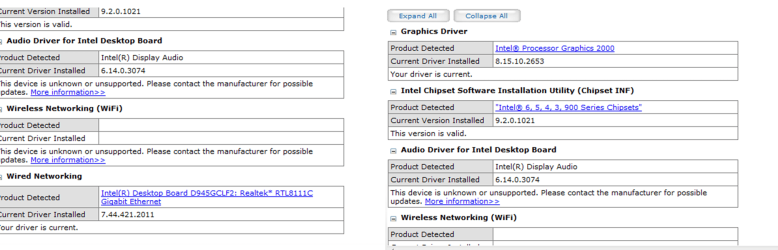
I attached the results to the driver update search. It looks like everything is up to date except for the Audio driver which isn't recognized (I take it because it is from Realtek instead of Intel?)

I don't know if the VGA doesn't cause problems A user in below thread suggested that it might. But there is no newer version available as far as I know so I don't know if it will change anything if I reinstall it

http://www.sevenforums.com/crashes-d...ms-work-3.html

As an aside:
Also, one weird thing happened. I just wanted to show someone my error (work computer) and it didn't occur after a minute of flicking through pics! I was confused. The only thing I could think of what I changed was

1) I had changed the windows theme to a shuffle through pre-installed images instead of a folder of images that I downloaded and I had installed Picasa.

2) Thus, I changed the theme back to the my own picks and sure enough the error occurred.

3) HOWEVER, when I changed it back to windows theme (the same exact state as in point 1 when the error didn't occur), restarted etc. the error was still there again. :confused::confused::confused::confused::confused: I had the feeling though that it took longer for the Software to crash with state 1) than with state 2).

I don't expect anyone to make sense of this but I tell you just in case
 

Attachments

  • Picture1.png
    Picture1.png
    414.9 KB · Views: 122

My Computer

Computer Manufacturer/Model Number
home built
OS
Windows 7 Professional x64
CPU
Intel Core i7-2600 Sandy Bridge
Motherboard
ASRock Z68 Gen3 Pro
Memory
CORSAIR Vengeance 16GB (4 x 4GB) 240-Pin DDR3
Graphics Card(s)
none so far (using chip inbuilt graphics)
Monitor(s) Displays
SAMSUNG B2430H Glossy Black 24"
Hard Drives
Seagate Barracuda Green ST2000DL003 2TB
Crucial M4 CT128M4SSD2 2.5" 128GB (SSD)
PSU
SeaSonic X Series X650 Gold ((SS-650KM Active PFC F3)) 650W
Case
Corsair Obsidian Series 650D
Cooling
COOLER MASTER Hyper 212 Plus
Yea, the Intel utility isn't going to recognize any components that aren't a part of the chipset (e.g. your audio).

Here is the utility to update your chipset drivers to the latest version:

http://downloadcenter.intel.com/confirm.aspx?httpDown=http://downloadmirror.intel.com/20775/eng/infinst_autol.exe&lang=eng&Dwnldid=20775&DownloadType=Drivers&OSFullname=Windows+7+(64-bit)*&ProductID=816

Wait... is your system only getting this error when viewing the pictures in that folder or having them cycled through in your theme? Do you get this error at all when viewing pictures in other folders and using a theme without pictures from this folder?
 

My Computer

OS
XP / Win7 x64 Pro
CPU
Intel Quad-Core Q9450 @ 3.2GHz
Motherboard
Asus P5-E
Memory
2x2GB GSkill DDR2
Graphics Card(s)
NVIDIA GeForce 8600 GTS (EVGA)
Monitor(s) Displays
Dell 2408WFP
Screen Resolution
1920x1200
Oh; so "your current version is valid" doesn't mean that it is up to date... I had not understood that...

Do I need to uninstall anything before or do I just need to run the setup file? Do I need to backup anything or is it just like a normal software install?

Thanks
 

My Computer

Computer Manufacturer/Model Number
home built
OS
Windows 7 Professional x64
CPU
Intel Core i7-2600 Sandy Bridge
Motherboard
ASRock Z68 Gen3 Pro
Memory
CORSAIR Vengeance 16GB (4 x 4GB) 240-Pin DDR3
Graphics Card(s)
none so far (using chip inbuilt graphics)
Monitor(s) Displays
SAMSUNG B2430H Glossy Black 24"
Hard Drives
Seagate Barracuda Green ST2000DL003 2TB
Crucial M4 CT128M4SSD2 2.5" 128GB (SSD)
PSU
SeaSonic X Series X650 Gold ((SS-650KM Active PFC F3)) 650W
Case
Corsair Obsidian Series 650D
Cooling
COOLER MASTER Hyper 212 Plus
Oh sorry, I didn't see the second question.

I can look at any pictures (totally unrelated to the theme). I also once downloaded three random pics from the internet (that were also pretty small files) and cycled through them and the error occurred.
 

My Computer

Computer Manufacturer/Model Number
home built
OS
Windows 7 Professional x64
CPU
Intel Core i7-2600 Sandy Bridge
Motherboard
ASRock Z68 Gen3 Pro
Memory
CORSAIR Vengeance 16GB (4 x 4GB) 240-Pin DDR3
Graphics Card(s)
none so far (using chip inbuilt graphics)
Monitor(s) Displays
SAMSUNG B2430H Glossy Black 24"
Hard Drives
Seagate Barracuda Green ST2000DL003 2TB
Crucial M4 CT128M4SSD2 2.5" 128GB (SSD)
PSU
SeaSonic X Series X650 Gold ((SS-650KM Active PFC F3)) 650W
Case
Corsair Obsidian Series 650D
Cooling
COOLER MASTER Hyper 212 Plus
Right, just means it's valid and working. I'd still download and install the latest version. Sometimes all you need to do is double click it and it will install the later version. You might just try doing that and then running the tool to check which version you have again to verify it upgraded. If it didn't, you will have to run it from the command line with the "-overall" flag like "updinf.exe -overall" in order to force it to update.

Here's a thread dedicated to the latest chipset versions if you care to take a gander:

http://www.sevenforums.com/drivers/23909-latest-intel-chipset-device-software.html
 

My Computer

OS
XP / Win7 x64 Pro
CPU
Intel Quad-Core Q9450 @ 3.2GHz
Motherboard
Asus P5-E
Memory
2x2GB GSkill DDR2
Graphics Card(s)
NVIDIA GeForce 8600 GTS (EVGA)
Monitor(s) Displays
Dell 2408WFP
Screen Resolution
1920x1200
Ok cool. The update utility still says "its valid" and not "current" but it updated to version 9.3.0.1019

The COM error is still there though...
 

My Computer

Computer Manufacturer/Model Number
home built
OS
Windows 7 Professional x64
CPU
Intel Core i7-2600 Sandy Bridge
Motherboard
ASRock Z68 Gen3 Pro
Memory
CORSAIR Vengeance 16GB (4 x 4GB) 240-Pin DDR3
Graphics Card(s)
none so far (using chip inbuilt graphics)
Monitor(s) Displays
SAMSUNG B2430H Glossy Black 24"
Hard Drives
Seagate Barracuda Green ST2000DL003 2TB
Crucial M4 CT128M4SSD2 2.5" 128GB (SSD)
PSU
SeaSonic X Series X650 Gold ((SS-650KM Active PFC F3)) 650W
Case
Corsair Obsidian Series 650D
Cooling
COOLER MASTER Hyper 212 Plus
Back
Top