COM Surrogate Windows 7 64bit

Yea, I didn't think it would fix the error, as this is a bit of a separate issue but it's good to have the latest drivers and you are now aware of what they are and where they're located if you do another fresh install in the future. You'll want to download all those latest drivers again and install them yourself onto the system before Windows runs its updates and tries to pick for you which ones it thinks are best.

Edit: Have you run a Disk Check on your drive yet? I can't recall. If not, you might want to in order to rule that out.

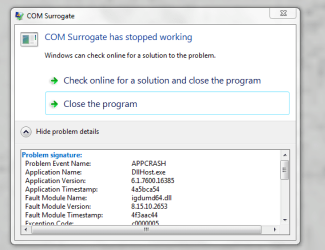
Also, when you view the problem details on the error box, what is the fault module name? Is it the same every time?
 

My Computer

OS
XP / Win7 x64 Pro
CPU
Intel Quad-Core Q9450 @ 3.2GHz
Motherboard
Asus P5-E
Memory
2x2GB GSkill DDR2
Graphics Card(s)
NVIDIA GeForce 8600 GTS (EVGA)
Monitor(s) Displays
Dell 2408WFP
Screen Resolution
1920x1200
Yeah! Thanks for the driver tip.

I guess the thing to try next is to get the fresh install on my laptop. I am still not sure yet because it was a pre-installed system. (c.f. several posts earlier).

Yes I did disk checks for both SSD and HDD (and atm I only run the SSD and the error is still there). Also I guess it is unlikely that two computers would have faulty disks (but its good to rule it out obviously).
 

My Computer

Computer Manufacturer/Model Number
home built
OS
Windows 7 Professional x64
CPU
Intel Core i7-2600 Sandy Bridge
Motherboard
ASRock Z68 Gen3 Pro
Memory
CORSAIR Vengeance 16GB (4 x 4GB) 240-Pin DDR3
Graphics Card(s)
none so far (using chip inbuilt graphics)
Monitor(s) Displays
SAMSUNG B2430H Glossy Black 24"
Hard Drives
Seagate Barracuda Green ST2000DL003 2TB
Crucial M4 CT128M4SSD2 2.5" 128GB (SSD)
PSU
SeaSonic X Series X650 Gold ((SS-650KM Active PFC F3)) 650W
Case
Corsair Obsidian Series 650D
Cooling
COOLER MASTER Hyper 212 Plus

My Computer

OS
XP / Win7 x64 Pro
CPU
Intel Quad-Core Q9450 @ 3.2GHz
Motherboard
Asus P5-E
Memory
2x2GB GSkill DDR2
Graphics Card(s)
NVIDIA GeForce 8600 GTS (EVGA)
Monitor(s) Displays
Dell 2408WFP
Screen Resolution
1920x1200
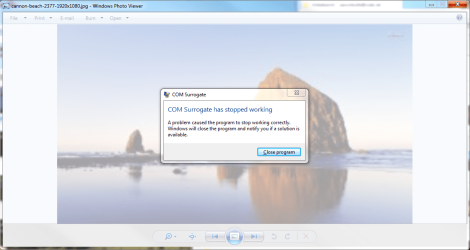
Oh sorry. Forgot about the fault module name. On the error box there is no option to view details. It just gives the option to close the program. I attached Error messages from the Event viewer. the COM surrogate error is the one with error ID1000.

I tried to add dllhost.exe to the DEP exception but I get the message "you cannot set DEP attributes on 64-bit executables". I did this under Advanced Settings-> Performance tab: Settings->Data Execution Prevention->Turn on DEP for all programs and services except those I select:->add.... Also as you said as well, I read somewhere that changing the DEP isn't the best solution for security so I didn't try to resolve the issue. But you are right it would add another piece of info to the puzzle
 

Attachments

My Computer

Computer Manufacturer/Model Number
home built
OS
Windows 7 Professional x64
CPU
Intel Core i7-2600 Sandy Bridge
Motherboard
ASRock Z68 Gen3 Pro
Memory
CORSAIR Vengeance 16GB (4 x 4GB) 240-Pin DDR3
Graphics Card(s)
none so far (using chip inbuilt graphics)
Monitor(s) Displays
SAMSUNG B2430H Glossy Black 24"
Hard Drives
Seagate Barracuda Green ST2000DL003 2TB
Crucial M4 CT128M4SSD2 2.5" 128GB (SSD)
PSU
SeaSonic X Series X650 Gold ((SS-650KM Active PFC F3)) 650W
Case
Corsair Obsidian Series 650D
Cooling
COOLER MASTER Hyper 212 Plus
Actually recently there have been two versions of the error message. Both are attached. I am pretty sure that at some time both of my computers showed the same message. Now my work PC shows it differently (I think since I reinstalled windows but I am not 100% positive on that)
 

Attachments

  • Home error.png
    Home error.png
    399 KB · Views: 92
  • Work error.PNG
    Work error.PNG
    78 KB · Views: 108

My Computer

Computer Manufacturer/Model Number
home built
OS
Windows 7 Professional x64
CPU
Intel Core i7-2600 Sandy Bridge
Motherboard
ASRock Z68 Gen3 Pro
Memory
CORSAIR Vengeance 16GB (4 x 4GB) 240-Pin DDR3
Graphics Card(s)
none so far (using chip inbuilt graphics)
Monitor(s) Displays
SAMSUNG B2430H Glossy Black 24"
Hard Drives
Seagate Barracuda Green ST2000DL003 2TB
Crucial M4 CT128M4SSD2 2.5" 128GB (SSD)
PSU
SeaSonic X Series X650 Gold ((SS-650KM Active PFC F3)) 650W
Case
Corsair Obsidian Series 650D
Cooling
COOLER MASTER Hyper 212 Plus
It sounds like it is a faulty Intel graphics driver - an issue that people have attempted to get addressed but have yet to find a fix:

Windows 7 RTM - Intel 946GZ games crash - Neowin Forums
GMA 3000 - Windows 7 64-bit AppCrash source igdumd64.dll

The only fix so far is when people have purchased separate graphics cards. So, it sounds like that is your only option at this point (if you can't or don't want to return the machine). Obviously you don't need a fancy graphics card since you appear to be doing just fine without one (sans this error), so it shouldn't be much money and might solve all of these problems (while giving you better graphics abilities).

I like to peruse Tom's Hardware for their regular shootouts for "Best X for the Money". Their most recent "Best Graphics Cards for the Money" is from this month.

Best PCIe Card: $100 And Under : Best Graphics Cards For The Money: March 2012

So, depending on whether you are an ATI or NVIDIA fan (either will work fine, just some people have a preference), you are looking at $65-$85 for the cheapest cards from Newegg or Amazon. Personally, I think that's money well spent, especially on a desktop machine where the rest of your components are already top notch. No reason to bottleneck your system with crappy, on-board graphics.
 

My Computer

OS
XP / Win7 x64 Pro
CPU
Intel Quad-Core Q9450 @ 3.2GHz
Motherboard
Asus P5-E
Memory
2x2GB GSkill DDR2
Graphics Card(s)
NVIDIA GeForce 8600 GTS (EVGA)
Monitor(s) Displays
Dell 2408WFP
Screen Resolution
1920x1200
Hmm. That is interesting and what another user had suggested.

For my work computer I was looking to buy a graphics card at some point anyway. I just wanted to wait until I know what I was using it for (but I have already got my eye on one).

However, I am still puzzled as to why this is the same on my Acer Laptop of which I thought it would have an external graphics card (but obviously I would have to check that.)

Is there anything I can do to be notified in case there was an update that might fix that issue? e.g. sign up to/regularly check some intel web page etc?
 

My Computer

Computer Manufacturer/Model Number
home built
OS
Windows 7 Professional x64
CPU
Intel Core i7-2600 Sandy Bridge
Motherboard
ASRock Z68 Gen3 Pro
Memory
CORSAIR Vengeance 16GB (4 x 4GB) 240-Pin DDR3
Graphics Card(s)
none so far (using chip inbuilt graphics)
Monitor(s) Displays
SAMSUNG B2430H Glossy Black 24"
Hard Drives
Seagate Barracuda Green ST2000DL003 2TB
Crucial M4 CT128M4SSD2 2.5" 128GB (SSD)
PSU
SeaSonic X Series X650 Gold ((SS-650KM Active PFC F3)) 650W
Case
Corsair Obsidian Series 650D
Cooling
COOLER MASTER Hyper 212 Plus
Doesn't quite make sense to myself, either, but this sounds like the most plausible issue/solution that we have. What model is your Acer laptop? Most laptops do not have external graphics cards due to the issue of size and cost.
 

My Computer

OS
XP / Win7 x64 Pro
CPU
Intel Quad-Core Q9450 @ 3.2GHz
Motherboard
Asus P5-E
Memory
2x2GB GSkill DDR2
Graphics Card(s)
NVIDIA GeForce 8600 GTS (EVGA)
Monitor(s) Displays
Dell 2408WFP
Screen Resolution
1920x1200
Ouff. I will have to look that up once I am at home... I think it was some obscure model put together for Costco. At least I couldn't find any internet shop that sold it when I was looking for reviews :) It was a rather hasty buy :)
 

My Computer

Computer Manufacturer/Model Number
home built
OS
Windows 7 Professional x64
CPU
Intel Core i7-2600 Sandy Bridge
Motherboard
ASRock Z68 Gen3 Pro
Memory
CORSAIR Vengeance 16GB (4 x 4GB) 240-Pin DDR3
Graphics Card(s)
none so far (using chip inbuilt graphics)
Monitor(s) Displays
SAMSUNG B2430H Glossy Black 24"
Hard Drives
Seagate Barracuda Green ST2000DL003 2TB
Crucial M4 CT128M4SSD2 2.5" 128GB (SSD)
PSU
SeaSonic X Series X650 Gold ((SS-650KM Active PFC F3)) 650W
Case
Corsair Obsidian Series 650D
Cooling
COOLER MASTER Hyper 212 Plus
Yea, odds are very unlikely it has a separate, dedicated graphics card.
 

My Computer

OS
XP / Win7 x64 Pro
CPU
Intel Quad-Core Q9450 @ 3.2GHz
Motherboard
Asus P5-E
Memory
2x2GB GSkill DDR2
Graphics Card(s)
NVIDIA GeForce 8600 GTS (EVGA)
Monitor(s) Displays
Dell 2408WFP
Screen Resolution
1920x1200
My model is:
Acer Aspire 4830T-6841

Just for your info the Intel HD graphics driver versions are:


  • My Acer laptop: 8.15.10.2345 (ERROR)
  • My self built system (work): 8.15.10.2372(ERROR)
  • My friends Acer 5750G: 8.15.10.2418 (NO error)
  • forum user john129d: 8.15.10.2509 (NO error). He didn't say what the version was that he had upated to and that had an error
I am not sure if that means anything. Looks to me like different versions are for different motherboards/chips? Because my PCs are the youngest ones and still they have the lowest version number.
 

My Computer

Computer Manufacturer/Model Number
home built
OS
Windows 7 Professional x64
CPU
Intel Core i7-2600 Sandy Bridge
Motherboard
ASRock Z68 Gen3 Pro
Memory
CORSAIR Vengeance 16GB (4 x 4GB) 240-Pin DDR3
Graphics Card(s)
none so far (using chip inbuilt graphics)
Monitor(s) Displays
SAMSUNG B2430H Glossy Black 24"
Hard Drives
Seagate Barracuda Green ST2000DL003 2TB
Crucial M4 CT128M4SSD2 2.5" 128GB (SSD)
PSU
SeaSonic X Series X650 Gold ((SS-650KM Active PFC F3)) 650W
Case
Corsair Obsidian Series 650D
Cooling
COOLER MASTER Hyper 212 Plus
I don't believe the Intel Graphics Drivers are specific to any motherboard. The fact that the versions vary is most likely just a result of what drivers were available via Windows Update or provided by the manufacturer at the time. If you have time to play around, you can certainly search for the versions that aren't exhibiting problems and load them on to your machine to see if it fixes anything. You never know. It just might work.
 

My Computer

OS
XP / Win7 x64 Pro
CPU
Intel Quad-Core Q9450 @ 3.2GHz
Motherboard
Asus P5-E
Memory
2x2GB GSkill DDR2
Graphics Card(s)
NVIDIA GeForce 8600 GTS (EVGA)
Monitor(s) Displays
Dell 2408WFP
Screen Resolution
1920x1200
Came across this thread when doing a google search for a "Com Surrogate" error while trying to view photos with Windows Photo Viewer. I'd bought a new Sony Laptop for my wife, came home and didn't even bother booting it up. Just went straight to formatting and reinstalling Win7Ultimate x64 (can't be having all that crap bloatware). In any case got the computer all setup, installed updates, firefox, java, adobe flash, all the basics. Then my wife was going thru her pics and started getting "Com Surrogate" errors when flipping thru pics in Windows Photo Viewer.

Long story short it ended up being the Intel HD Graphics 3000 Driver that Windows Update had installed. After I uninstalled the driver I didn't get anymore Com Surrogate errors.

To uninstall...
- Went into device manager
- Expand the "Display Adapters"
- Right Click on Intel HD Graphics and select uninstall
- Tick the "Delete the driver software for this device" option and then click "OK"

Ended up installing the drivers directly from the Intel Website which surprisingly worked without any issues.

Hope this helps. Good Luck!
 

My Computer

OS
Windows 7 Ultimate x64
Thank you XenonKilla! I have Intel HD integrated graphics too and I've been trying to find a fix for this problem for weeks. All I kept finding was Nero this and Codecs that and none of it related to my situation.

I just installed the updated driver through Device Manager (without uninstalling the current one, I just used "Update Driver" from the Device Manager window) and the Com Surroagte warning appears to be gone!!! :D It's so obvious now that I should have tried that but it didn't occur to me.

So I just wanted to second XenonKilla's suggestion!

Thank you again!!!
 

My Computer

OS
Windows 7 Home Premium 64 bit
I am having the same problem. I have an Asus U46SM laptop, which I love and adore and does everything seemlessly except for viewing photos in Windows Photoviewer. Windows 7 64bit was installed when i purchased it. Ever since I started it the first time I have had issues with 'COM surrogate has stopped working' when i view pics in Windows Photo viewer, which is a pain considering a lot of my work is with photos. It doesn't seem to happen when i use a different photo viewer, but after reading this thread I've just changed my settings to use picasa every time i view a pic... I'll see how this goes.
I'm have little to no IT knowledge what so ever, so any ideas on how to actually fix this would be much appreciated! It's making me a little crazy.
 

My Computer

OS
Windows 7 64bit
I was having the same problem, found out that and Intel DLL was the cause (igdumd64.dll) searched around the web for an answer that would work, couldn't. Finally found a solution on my own.

Downloaded the old version of the igdumd64.dll from igdumd64.dll : Free .DLL download. - DLLme.com replaced the orignal at C:\Windows\System32 and it seems to be working for now.
 

My Computer

Computer Manufacturer/Model Number
HP Pavillion DV
OS
Windows 7 Home Premium
CPU
Intel Core i7
Motherboard
Default
Memory
8GB
Graphics Card(s)
Intel Default
Sound Card
Default
Monitor(s) Displays
15.6 Default
Hard Drives
123GB SSD
Thanks Xenon!!!

I did the sfc/scannow, and it said everything was ok, i was gettin frustrated i just purchased this computer a week ago brand new and every time i was going through my windows viewer for pictures it kept closing with that COM surrogate error, grrr frustrating, I ended up doing what you stated, uninstalling that HD Intel Graphics Driver, Im not a gamer nor anything like that so hopefully I dont need it bc i am puter illiterate and wouldnt know what else to do, it did change my screen resolution big time when i uninstalled but just went in and adjusted it, now its as good as new and went through photo albums and it seems to have worked, so want to say thank you for your "helpful" post :)
QUOTE=XenonKilla;1884980]Came across this thread when doing a google search for a "Com Surrogate" error while trying to view photos with Windows Photo Viewer. I'd bought a new Sony Laptop for my wife, came home and didn't even bother booting it up. Just went straight to formatting and reinstalling Win7Ultimate x64 (can't be having all that crap bloatware). In any case got the computer all setup, installed updates, firefox, java, adobe flash, all the basics. Then my wife was going thru her pics and started getting "Com Surrogate" errors when flipping thru pics in Windows Photo Viewer.

Long story short it ended up being the Intel HD Graphics 3000 Driver that Windows Update had installed. After I uninstalled the driver I didn't get anymore Com Surrogate errors.

To uninstall...
- Went into device manager
- Expand the "Display Adapters"
- Right Click on Intel HD Graphics and select uninstall
- Tick the "Delete the driver software for this device" option and then click "OK"

Ended up installing the drivers directly from the Intel Website which surprisingly worked without any issues.

Hope this helps. Good Luck![/QUOTE]
 

My Computer

Computer Manufacturer/Model Number
Asus K55A
OS
Windows 7 64bit
Windows Update giving out bad video drivers? Get them at Intel instead? I've got an Intel HD 4000 Graphics system.
 

My Computer

Computer Manufacturer/Model Number
HP Pavillion m7-1015dx
OS
Windows 7 Home Premium 64 bit
CPU
Intel Core i7 3610QM @2.3Ghz w 3.3 Ghz boost
Graphics Card(s)
Intel HD Graphics 4000
Screen Resolution
1600 x 900
Keyboard
Laptop
Mouse
M$ Optical
Internet Speed
10 mbps/1.0 mbps
fix for Com Surrogate has stoped working DllHost.exe

I've got the same situation (Intel HD 4000)
A new computer, 3 months old and Windows 7 up to date. But the Com surrogate error kept bugging me. When opened Windows Photo Viewer the Com Surrogate has stoped working Dllhost.exe Error was annoying me.

The error is (sorry it's Dutch)
Naam van toepassing met fout: DllHost.exe, versie: 6.1.7600.16385, tijdstempel: 0x4a5bca54
Naam van module met fout: igdumd64.dll, versie: 8.15.10.2653, tijdstempel: 0x4f3aac44
Uitzonderingscode: 0xc0000005
Foutoffset: 0x000000000030eb06
Id van proces met fout: 0x13f8
Starttijd van toepassing met fout: 0x01cdd526521d13e6
Pad naar toepassing met fout: C:\Windows\system32\DllHost.exe
Pad naar module met fout: C:\Windows\system32\igdumd64.dll
Rapport-id: d67b9d0a-4119-11e2-833f-3085a916328e

The sollution, fix for "Com Surrogate has stoped working" for me was to uninstall your Intell HD Graphics 400 8.15.10.2653 driver, reboot and let Windows Device Manager Automaticly search for a new driver. I got version 9.17.10.2867 and the problem was gone.
 

My Computer

OS
Windows 7 home Premium 64bit
Back
Top