Combining 'pst' files

mikemyers

New member
Local time
12:53 AM
Messages
29
I've just upgraded to Office 2010. I was running the 'beta version' until yesterday.

For reasons that seemed to make sense at the time, I had several separate email accounts, each being saved in separate 'pst' files. In retrospect, that no longer seems like such a good idea.

Let's say I have four 'pst' files, A, B, C, and D. Is there any simple way to combine them all into a new pst file with all the information?
 

My Computer My Computer

At a glance

Windows 7 Ultimate 64-bit, 6.1.7600 Build 7600Intel(R) Core(TM)2 Quad CPU Q9300 @ 2.50GHz, ...4GB Corsair XMS3 DHX PC3-12800 1600MHz 240 pi...GeForce 8800 GT
Computer Manufacturer/Model Number
Self-Assembled
OS
Windows 7 Ultimate 64-bit, 6.1.7600 Build 7600
CPU
Intel(R) Core(TM)2 Quad CPU Q9300 @ 2.50GHz, 2500 Mhz,
Motherboard
nForce 790i Ultra SLI Mainboard
Memory
4GB Corsair XMS3 DHX PC3-12800 1600MHz 240 pin DDR3 CL9
Graphics Card(s)
GeForce 8800 GT
Sound Card
no additional sound card
Monitor(s) Displays
Samsung 2243 BWX, Dell
Screen Resolution
Samsung - 1680 x 1050, Dell -
Hard Drives
First drive: C: 100gb, D: 200gb
Second drive: F: 500 gb
Duo-Pro Raid-1: 500 gb
My Book World backup: 1 TB
PSU
pc power and cooling silencer 760 quad #s75qb 750 watt
Case
Cooler Master
Cooling
water cooling being installed soon...
Keyboard
Logitech Illuminated Keyboard
Mouse
Logitech G9x
Internet Speed
Download: 5349 Kb/s, Upload: 424 Kb/s
I just sorted this out myself

go to File - Info - account settings

under email. down the bottom you will see change folder - change it back to your original pst.

If you want to delete the other pst for each email account

click Data files - the next tab

make sure your original one is there - add if need be - set it to default

then remove the others

very easy
 

My Computer My Computer

At a glance

windows 7 Home premium 32 bitintel core 2 duo cpu t6500 @ 2.10 ghz 2095 mhz4Ati mobility radeon hd 4530
Computer Manufacturer/Model Number
Hp DVD6 1242tx
OS
windows 7 Home premium 32 bit
CPU
intel core 2 duo cpu t6500 @ 2.10 ghz 2095 mhz
Memory
4
Graphics Card(s)
Ati mobility radeon hd 4530
  • Like
Reactions: JMH
I just sorted this out myself

go to File - Info - account settings

under email. down the bottom you will see change folder - change it back to your original pst.

If you want to delete the other pst for each email account

click Data files - the next tab

make sure your original one is there - add if need be - set it to default

then remove the others

very easy


I must be missing something. Suppose each of my four PST files have the follwing information:
file #1 100 emails, 40 contacts
file #2 56 emails, 33 contacts (some the same)
file #3 399 emails, 54 contacts (many duplicates of the other files)
file #4 42 emails, 23 contacts (not in the other files).

How will your method all all those emails together into one file, and also combine the contacts?
 

My Computer My Computer

At a glance

Windows 7 Ultimate 64-bit, 6.1.7600 Build 7600Intel(R) Core(TM)2 Quad CPU Q9300 @ 2.50GHz, ...4GB Corsair XMS3 DHX PC3-12800 1600MHz 240 pi...GeForce 8800 GT
Computer Manufacturer/Model Number
Self-Assembled
OS
Windows 7 Ultimate 64-bit, 6.1.7600 Build 7600
CPU
Intel(R) Core(TM)2 Quad CPU Q9300 @ 2.50GHz, 2500 Mhz,
Motherboard
nForce 790i Ultra SLI Mainboard
Memory
4GB Corsair XMS3 DHX PC3-12800 1600MHz 240 pin DDR3 CL9
Graphics Card(s)
GeForce 8800 GT
Sound Card
no additional sound card
Monitor(s) Displays
Samsung 2243 BWX, Dell
Screen Resolution
Samsung - 1680 x 1050, Dell -
Hard Drives
First drive: C: 100gb, D: 200gb
Second drive: F: 500 gb
Duo-Pro Raid-1: 500 gb
My Book World backup: 1 TB
PSU
pc power and cooling silencer 760 quad #s75qb 750 watt
Case
Cooler Master
Cooling
water cooling being installed soon...
Keyboard
Logitech Illuminated Keyboard
Mouse
Logitech G9x
Internet Speed
Download: 5349 Kb/s, Upload: 424 Kb/s
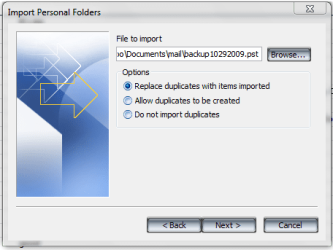
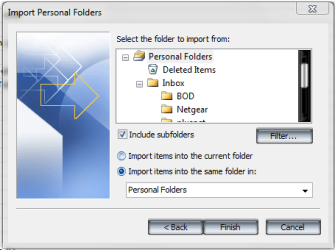
Have you tried to use the "import" option pal

This should merge your other pst files into the current main pst file you are using
 

Attachments

  • import_pst1.PNG
    import_pst1.PNG
    16.8 KB · Views: 26
  • import_pst.PNG
    import_pst.PNG
    17.5 KB · Views: 16
  • import_pst2.PNG
    import_pst2.PNG
    18.4 KB · Views: 17

My Computer My Computer

At a glance

Windows 7 Ultimate 64bitAMD Phenom Quad core 9950 black edition16Gb2x XFX Radeon 5850
Computer type
PC/Desktop
Computer Manufacturer/Model Number
Self Built
OS
Windows 7 Ultimate 64bit
CPU
AMD Phenom Quad core 9950 black edition
Motherboard
Gigabyte
Memory
16Gb
Graphics Card(s)
2x XFX Radeon 5850
Sound Card
PCI Express X-Fi Titanium / Logitech G35
Monitor(s) Displays
2x HP 2410i
Screen Resolution
1920x1080
Hard Drives
2x 500Gb Seagate
1x 300Gb Seagate
1x 1Tb Seagate
2x 1Tb Hitatchi
PSU
Jean Tech Storm 700W
Case
Cooler Master COSMOS S
Cooling
Akasa Evo Blue Pro
Keyboard
Logitech G15
Mouse
Mad Catz M.M.O. 7
Internet Speed
12mb
Hi there
even easier solution
Download pfbackup.exe from the MS site and install (office 32 bit versions only). This will add another option on the OUTLOOK file menu called Backup.

If you are using Office 2010 you will see this under the ADD INS menu --for earlier releases it will appear in the File menu.

You can then open all the PST files individually (from the BACKUP option just open backup) and move the entries to your current outlook inbox / sent etc folder.

Cheers
jimbo
 

My Computer My Computer

At a glance

Linux CENTOS 7 / various Windows OS'es and se...Intel i7 Intel i58GB, 16GBOn Motherboard
Computer type
PC/Desktop
Computer Manufacturer/Model Number
Custom built, several laptops HP/ASUS
OS
Linux CENTOS 7 / various Windows OS'es and servers
CPU
Intel i7 Intel i5
Memory
8GB, 16GB
Graphics Card(s)
On Motherboard
Sound Card
Realtek HD audio
Monitor(s) Displays
Apple Cinema display, Samsung LCD
Screen Resolution
1920 X 1080
Hard Drives
4 X 1TB SATA
Mouse
Toshiba wireless laser
Internet Speed
> 20MB up
Hi there
Still think the easiest way --even for Outlook 2010 - is to use the pfbackup.exe Microsoft utility. Works fine.

Once you've installed this :

Just go to addons==>Backup then open any .pst file you want . Copy / move the relevant folders (or better some times individual mail items) to where you want them.

The backup folder can be stored anywhere you like -- I usually have mine saved every so often on an external USB device,


Another tip - especially if you are using several different computers to access the same email account is to switch from POP3 to IMAP. Some POP3 systems automatically move the email to the client computer's local hard drive - so other computers can't access the email.

Cheers
jimbo


Cheers
jimbo
 

My Computer My Computer

At a glance

Linux CENTOS 7 / various Windows OS'es and se...Intel i7 Intel i58GB, 16GBOn Motherboard
Computer type
PC/Desktop
Computer Manufacturer/Model Number
Custom built, several laptops HP/ASUS
OS
Linux CENTOS 7 / various Windows OS'es and servers
CPU
Intel i7 Intel i5
Memory
8GB, 16GB
Graphics Card(s)
On Motherboard
Sound Card
Realtek HD audio
Monitor(s) Displays
Apple Cinema display, Samsung LCD
Screen Resolution
1920 X 1080
Hard Drives
4 X 1TB SATA
Mouse
Toshiba wireless laser
Internet Speed
> 20MB up
Back
Top