Solved Combining Several Files Into One

  • Thread starter Thread starter sk8rgui
  • Start date Start date
S

sk8rgui

Guest
I have the complete Batman Animated Series in my WMC. The problem I have is that they all show up as individual movies in my library. Is there a way to combine them all into one file with multiple episodes in that file?

A great example is how Netflix streams their TV show DVDs. It shows up as One Item in your Netflix library with individual episodes inside.

Currently I have all my Batman Series in a folder "Called Batman Animated Series" (ie D:/video/Batman-Animated-Series).

Thanks for the help in advanced.
 
What format are the files? Have you looked at trying or searching for any software that can join video files? I have used a few software in the past to join video clips, but they were usually one single video that was split in two. I am sure you could do the same with what you have, you just have to know what the ending and starting points are.
 

My Computer

Computer Manufacturer/Model Number
Gigabyte
OS
Windows 7 Ultimate
CPU
Intel Core(TM)2 Quad- Q9550, 2.83GHz
Motherboard
G31M-ES2L
Memory
4GB
Graphics Card(s)
ATI Radeon HD4600
Sound Card
On Board:
Monitor(s) Displays
Acer AL2223W, Acer AL1916
Screen Resolution
1680 x 1050, 1280 x 1024
Hard Drives
160GB
350GB
250GB
250GB
PSU
600W
Case
Cooler Master
Keyboard
Microsoft Laser 6000
Mouse
Logitech Optical Trackman
Internet Speed
1.5MB
Other Info
I am also running a quasar gamatron flux capacitor with twin pulse tronic phasers......jk, I have no such stuff.
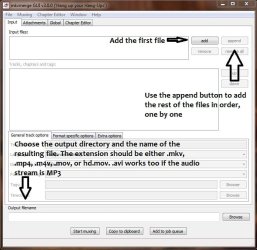
Assuming that the files have the H264 for video, download and install MKVtoolnix.
Open mkvmerge.exe and:
h264muxer.JPG

If the video files have DivX or XviD video streams, you can use AVImuxGUI which works in a similar way.

!NOTE!
If some of the main features of these clips are NOT exactly the same, the resulting file may be corrupted. The framerate must be exactly the same across all the files, as well as the resolution. For example, if one file has a framerate of 25FPS, all the rest of the files have to be exactly the same, otherwise the file will be corrupt or not be able to play further than the first video inserted into the muxer... or it won't play at all. the same goes for resolution, if one is for example 848x480, all the rest have to be exactly the same.

Also, to be able to choose individual episodes from within a single file, you need to create a chapter file to mux into the file. You can simply use notepad and then poke around mkvmerge, it has the option of muxing the chapter file into the resulting file (again, only works for H264 video within one of the mentioned containers)

If that doesn't work, the only option left is to re-encode those files with the exact same settings, which I don't recommend unless the original files are of excellent quality, and then use the method described.
 

My Computer

Computer type
Laptop
Computer Manufacturer/Model Number
Custom
OS
Windows 7 Home Premium x64
CPU
Intel Core i5 2500K
Motherboard
MSI MS-7750
Memory
8GB DDR3
Graphics Card(s)
nVidia GeForce GTX650 Ti BOOST
Sound Card
Realtek
Monitor(s) Displays
21' Philips
Screen Resolution
Full HD
Hard Drives
1TB
PSU
500W
Back
Top