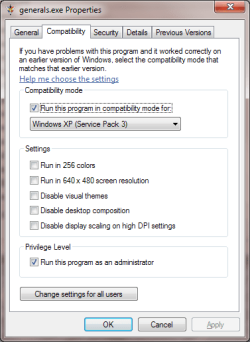
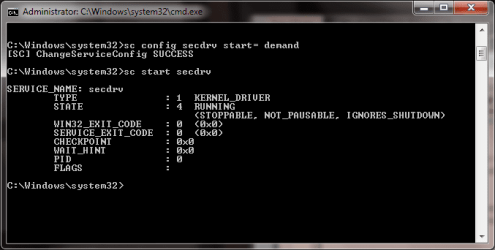
for anybody that wants to know how to play c&c generals on win7, here it is:
1.install the game (duh...)
2. goto documents
3. right click c&c generals data and goto properties.
4. goto security and give your account all the (read/write)rights. click ok
5. open notepad
6. typ this in notepad(copy/paste):
AntiAliasing = 4
BuildingOcclusion = yes
CampaignDifficulty = 0
DrawScrollAnchor =
DynamicLOD = yes
ExtraAnimations = yes
FirewallBehavior = 3
FirewallNeedToRefresh = FALSE
FirewallPortAllocationDelta = 0
GameSpyIPAddress = 127.0.0.1
Gamma = 50
IPAddress = 127.0.0.1
IdealStaticGameLOD = High
LanguageFilter = true
MaxParticleCount = 4861
MoveScrollAnchor =
MusicVolume = 55
Resolution = 1024 768
Retaliation = yes
SFX3DVolume = 79
SFXVolume = 71
ScrollFactor = 50
SendDelay = no
ShowSoftWaterEdge = yes
ShowTrees = yes
StaticGameLOD = Custom
TextureReduction = 0
UseAlternateMouse = no
UseCloudMap = yes
UseDoubleClickAttackMove = no
UseLightMap = yes
UseShadowDecals = yes
UseShadowVolumes = yes
VoiceVolume = 70
(it is highest quality, but you can change this later)
7. save as: options.ini (w/out capital letters) save it in the c&c data map.
8. close everything
9. run as admin and under win xp compatibility
10.launch the game!
11.Play the game!!!
this works on all versions of generals and generals zero hour.
if it doesn't work for you then post your problem and i will try to help you
1.install the game (duh...)
2. goto documents
3. right click c&c generals data and goto properties.
4. goto security and give your account all the (read/write)rights. click ok
5. open notepad
6. typ this in notepad(copy/paste):
AntiAliasing = 4
BuildingOcclusion = yes
CampaignDifficulty = 0
DrawScrollAnchor =
DynamicLOD = yes
ExtraAnimations = yes
FirewallBehavior = 3
FirewallNeedToRefresh = FALSE
FirewallPortAllocationDelta = 0
GameSpyIPAddress = 127.0.0.1
Gamma = 50
IPAddress = 127.0.0.1
IdealStaticGameLOD = High
LanguageFilter = true
MaxParticleCount = 4861
MoveScrollAnchor =
MusicVolume = 55
Resolution = 1024 768
Retaliation = yes
SFX3DVolume = 79
SFXVolume = 71
ScrollFactor = 50
SendDelay = no
ShowSoftWaterEdge = yes
ShowTrees = yes
StaticGameLOD = Custom
TextureReduction = 0
UseAlternateMouse = no
UseCloudMap = yes
UseDoubleClickAttackMove = no
UseLightMap = yes
UseShadowDecals = yes
UseShadowVolumes = yes
VoiceVolume = 70
(it is highest quality, but you can change this later)
7. save as: options.ini (w/out capital letters) save it in the c&c data map.
8. close everything
9. run as admin and under win xp compatibility
10.launch the game!
11.Play the game!!!
this works on all versions of generals and generals zero hour.
if it doesn't work for you then post your problem and i will try to help you
My Computer
At a glance
Windows 7 Ultimate x86AMD athlon II X2 2506GB DDR-3 RAMATI Raedon 5600 HD
- Computer Manufacturer/Model Number
- Selfbuild
- OS
- Windows 7 Ultimate x86
- CPU
- AMD athlon II X2 250
- Motherboard
- MSI 760GM-E51
- Memory
- 6GB DDR-3 RAM
- Graphics Card(s)
- ATI Raedon 5600 HD
- Sound Card
- Onboard Realtek .......
- Monitor(s) Displays
- Acer
- Screen Resolution
- 1680X1050
- Hard Drives
- 500GB WD 5000AADS SATA
- PSU
- Sweex 400Watt .........
- Case
- KONIG
- Keyboard
- Acer SK-9625
- Mouse
- Acer SM-9625
- Internet Speed
- 15Mb/S (30MBPS) WiFi