Command & Conquer Generals Launch Problem Solved

kevies99

New member
Local time
11:21 PM
Messages
23
Location
Holland
for anybody that wants to know how to play c&c generals on win7, here it is:

1.install the game (duh...)
2. goto documents
3. right click c&c generals data and goto properties.
4. goto security and give your account all the (read/write)rights. click ok
5. open notepad
6. typ this in notepad(copy/paste):
AntiAliasing = 4
BuildingOcclusion = yes
CampaignDifficulty = 0
DrawScrollAnchor =
DynamicLOD = yes
ExtraAnimations = yes
FirewallBehavior = 3
FirewallNeedToRefresh = FALSE
FirewallPortAllocationDelta = 0
GameSpyIPAddress = 127.0.0.1
Gamma = 50
IPAddress = 127.0.0.1
IdealStaticGameLOD = High
LanguageFilter = true
MaxParticleCount = 4861
MoveScrollAnchor =
MusicVolume = 55
Resolution = 1024 768
Retaliation = yes
SFX3DVolume = 79
SFXVolume = 71
ScrollFactor = 50
SendDelay = no
ShowSoftWaterEdge = yes
ShowTrees = yes
StaticGameLOD = Custom
TextureReduction = 0
UseAlternateMouse = no
UseCloudMap = yes
UseDoubleClickAttackMove = no
UseLightMap = yes
UseShadowDecals = yes
UseShadowVolumes = yes
VoiceVolume = 70

(it is highest quality, but you can change this later)
7. save as: options.ini (w/out capital letters) save it in the c&c data map.
8. close everything
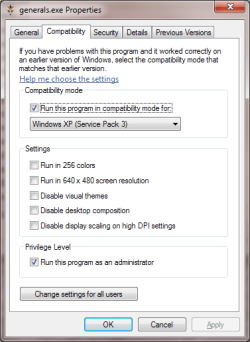
9. run as admin and under win xp compatibility
10.launch the game!
11.Play the game!!!

this works on all versions of generals and generals zero hour.
if it doesn't work for you then post your problem and i will try to help you
 

My Computer

Computer Manufacturer/Model Number
Selfbuild
OS
Windows 7 Ultimate x86
CPU
AMD athlon II X2 250
Motherboard
MSI 760GM-E51
Memory
6GB DDR-3 RAM
Graphics Card(s)
ATI Raedon 5600 HD
Sound Card
Onboard Realtek .......
Monitor(s) Displays
Acer
Screen Resolution
1680X1050
Hard Drives
500GB WD 5000AADS SATA
PSU
Sweex 400Watt .........
Case
KONIG
Keyboard
Acer SK-9625
Mouse
Acer SM-9625
Internet Speed
15Mb/S (30MBPS) WiFi
Try this as well if the above does not work..


thought i would post this as it may help others.

First install i got the serious error popup box.Tried the options.ini fix in the My documents cnc folder posted everywhere on the net but no go .Tried all compatibility modes but still no good.so deleted and did a clean install after a cc clean of course.

After the clean install (no patches) this is how i got it working.Most of it is info i scoured from different places on the net but not once did i find what i did in the last step. :)

1. right click on the Command & Conquer desktop icon go to Properties -> Security -> Advanced -> Owner -> Edit -> Select your username -> Tick "Replace Owner" box -> Apply.

2. Went to documents, openc&c generals data folder and made a new txt doc, paste in the following..


AntiAliasing = 1
BuildingOcclusion = yes
DrawScrollAnchor =
DynamicLOD = no
ExtraAnimations = yes
GameSpyIPAddress = 0.0.0.0
Gamma = 50
IPAddress = 0.0.0.0
IdealStaticGameLOD = High
LanguageFilter = true
MaxParticleCount = 5000
MoveScrollAnchor =
MusicVolume = 55
Resolution = 1024 768
Retaliation = yes
SFX3DVolume = 79
SFXVolume = 71
ScrollFactor = 50
SendDelay = no
ShowSoftWaterEdge = yes
ShowTrees = yes
StaticGameLOD = Custom
TextureReduction = 0
UseAlternateMouse = no
UseCloudMap = yes
UseDoubleClickAttackMove = no
UseLightMap = yes
UseShadowDecals = yes
UseShadowVolumes = yes
VoiceVolume = 100

Save as options.ini make sure saved as All in lower tab.

Tried game no go.

3.Set compatibility to game for xpsp3

Tried game no go.

4.Went to explore disc and ran the dx setup hoping it would place the older files needed, then having a brain fart i thought, maybe that options.ini should also live in the main folder so right click game icon,open file location, then copied and pasted the options.ini into the main folder, also putting one in the data folder in the main game folder just in case.

5.Bam..game works fine.

I realise i should have tried it directly after doing the directx8 run but i forgot as i was then thinking about putting the options.ini in the game folder a a lot of games i have had in the past need these sort of files to be where the game is actually installed to work.

So i tcould be a result of all of the above working together or just the directx or just putting the options.ini in both places.

Hope this helps anyway :)
 

My Computer

OS
Windows 7 Premium 32bit.
CPU
i5 @ 3.33
Motherboard
Gigabyte budget :)
Memory
4 gb
Graphics Card(s)
gtx 460 1gb
Monitor(s) Displays
24 1920 1080
PSU
750 w
Actually this happens in Laptops having Windows 7 installed because from which I've learned is that it's the problem of resolution. In Windows XP the options.ini file doesn't has any resolution line added.
 

My Computer

Computer Manufacturer/Model Number
Custom
OS
Windows 7 Ultimate 64 Bit
CPU
Intel 2.6GHz Core 2 Duo
Motherboard
Intel DG41TY
Memory
4GB
Graphics Card(s)
BuiltIn
Sound Card
Realtek HD Audio
Monitor(s) Displays
Philips
Screen Resolution
1280x1024
Case
Gateway E Series
Directx error

Hello,

I've tried all the things you suggested, but I still get the Directx error:

Please make sure you have DirectX 8.1 or higher installed. Also verify that your video card meets the minimum requirements.


What should I do?
 

My Computer

Computer type
Laptop
Computer Manufacturer/Model Number
Asus
OS
Windows 7 64-bit
CPU
AMD E-350 @1.60 GHz
Motherboard
don't know
Memory
4GB
Graphics Card(s)
don't know

My Computer

Computer type
Laptop
Computer Manufacturer/Model Number
Asus
OS
Windows 7 64-bit
CPU
AMD E-350 @1.60 GHz
Motherboard
don't know
Memory
4GB
Graphics Card(s)
don't know
Guys i wish i could help more but i don't have any other answers sorry excepting the one that worked for me :)

good luck
 

My Computer

OS
Windows 7 Premium 32bit.
CPU
i5 @ 3.33
Motherboard
Gigabyte budget :)
Memory
4 gb
Graphics Card(s)
gtx 460 1gb
Monitor(s) Displays
24 1920 1080
PSU
750 w
Worked !
 

My Computer

Computer type
PC/Desktop
Computer Manufacturer/Model Number
Gigabyte
OS
windows 7 ultimate 32bit
CPU
AMD Athlon X2
Motherboard
Gigabyte
Memory
4GB
Graphics Card(s)
Radeon 210
Hard Drives
160GB
Antivirus
Eset nod32 8
Browser
Chrome
I installed the game but i don't see a map of the game in My documents. when is start the game it doesn't do anything, just nothing happens. i already reinstalled it but nothing works and i don't have the map in My documents. can somebody help?
 

My Computer

Computer type
PC/Desktop
Computer Manufacturer/Model Number
Custom Build
OS
Windows 7 Ultimate x64
CPU
Intel Core i3-6100 CPU @ 3.70GHz
Motherboard
Gigabyte H110M-S2H-CF (U3E1)
Memory
Kingston Max Bandwidth 8GB DDR4-2135 (1067 MHz)
Graphics Card(s)
NVIDIA GeForce GTX 960 2GB (MSI)
Hard Drives
Seagate Baracuda 1TB 7200 rpm
Antivirus
AVG Free Edition
Browser
Google Chrome
I have the same problem as TheStormerMan.
Uninstalled, reinstalled, still nothing. Seemingly nobody talks about that issue.
 

My Computer

Computer type
Laptop
Computer Manufacturer/Model Number
Acer
OS
Windows 7 Home Premium x64 SP1
CPU
Intel Core i5-2450M 2.5GHz
Memory
4 GB DDR3
Graphics Card(s)
NVIDIA GeForce GT 630M 1GB Dedicated VRAM
Hard Drives
500 GB HDD
Antivirus
Superantispyware FREE, Malwarebytes FREE, CCleaner
Browser
Goolgle Chrome

My Computer

Computer type
PC/Desktop
Computer Manufacturer/Model Number
Mellon Labs (custom build)
OS
Win 7 Pro x64/Win 10 Pro x64 dual boot
CPU
AMD FX 8350 Vishera @ 4200
Motherboard
ASUS M5A97 R2.0
Memory
16 GB Mushkin Blackline DDR3-2400 @ 1866 (9-10-10-10-31)
Graphics Card(s)
XFX Radeon R9 280 Double D Black Edition
Sound Card
Realtek HD Audio on MB. Sounds great.
Monitor(s) Displays
Acer 24", Acer 22"
Screen Resolution
3840 x 1080
Hard Drives
1 x Mushkin Chronos 120 GB SSD (Win 10)
1 x Samsung 850 EVO 250 GB SSD (Win 7)
1 x WD 1TB SATA Blue
1 x WD 1TB SATA Green
PSU
Corsair TX-750
Case
CoolerMaster HAF 912+
Cooling
Coolermaster Seidon 240M Liquid AIO. 6 case fans
Keyboard
Logitech G710+
Mouse
Logitech G500s
Internet Speed
Much better since I got fiber, but still way overpriced.
Antivirus
MSE, Malware Bytes for scanning
Browser
Firefox
Other Info
Corsair VOID USB headphones.

A Mellon Labs X-1 - LCD Smartie driven system status display.

Brought to you by the letter E
My problem is, that the installation, what goes down seemingly all right, does not create anything in the /My Documents, like the other games. Most people talk about what to do to fix the "running the game" problem once you located the files in /My Documents. But I don't have anything there related to C&C Generals! Do you have any idea why is that happening?
Having admin privileges is not my priority issue right now. That will come later, I'm sure.
 

My Computer

Computer type
Laptop
Computer Manufacturer/Model Number
Acer
OS
Windows 7 Home Premium x64 SP1
CPU
Intel Core i5-2450M 2.5GHz
Memory
4 GB DDR3
Graphics Card(s)
NVIDIA GeForce GT 630M 1GB Dedicated VRAM
Hard Drives
500 GB HDD
Antivirus
Superantispyware FREE, Malwarebytes FREE, CCleaner
Browser
Goolgle Chrome

My Computer

Computer type
Laptop
Computer Manufacturer/Model Number
Acer
OS
Windows 7 Home Premium x64 SP1
CPU
Intel Core i5-2450M 2.5GHz
Memory
4 GB DDR3
Graphics Card(s)
NVIDIA GeForce GT 630M 1GB Dedicated VRAM
Hard Drives
500 GB HDD
Antivirus
Superantispyware FREE, Malwarebytes FREE, CCleaner
Browser
Goolgle Chrome
Just got mine working.

When naming the file "options.ini". Don't forget to enable extensions for known file types (folder and search options - view - untick hide extensions for known file types).

Otherwise the file will actually be "options.ini.txt". took me a while to work out where I was going wrong :confused:
 

My Computer

Computer type
PC/Desktop
OS
W7 x32
Guys, can you clarify,
WHAT IS THE EXACT PATH FOR SAVING IT? Please?

The OP makes no sense:
save it in the c&c data map
Are you still talking about the Documents > c&c generals data? Or are you talking about the main installation folder? If you're talking about the Documents subdirectory, there is no "map" folder. There's this directory:
"C:\Users\[..]\Documents\Command and Conquer Generals Data\Maps"
Is that where we're supposed to save it?

So far I've placed this options.ini file with the indicated lines into the folders:
"C:\Users\[..]\Documents\Command and Conquer Generals Data\Maps"
and
the main game directory

Still doesn't work. When I try to launch the game nothing happens at all. It doesn't even open and then crash. It just seems to do nothing.

I do have it set to compatibility mode for WinXP SP 3. And running it as administrator.

Am I still missing anything?
 

My Computer

Computer type
PC/Desktop
OS
Windows 7 Pro x64
I have CC Generals installed and when I'm on my desktop I'll have a look. I don't even recall having to create an ini file to get it running, but maybe I did. The one issue I'm now having myself is that when I create a building with a dozer all buildings immediately blow up and I immediately lose. This was never the case before.
 

My Computer

Computer type
PC/Desktop
OS
Windows 7 Ultimate x64
Okay, I checked what I have and the options.ini files are in both the following directories.

C:\Users\YOUR_USERNAME\Documents\Command and Conquer Generals Zero Hour Data

C:\Users\YOUR_USERNAME\Documents\Command and Conquer Generals Data

It's not placed in the maps folder. Just the main profile folder for the game. And I don't see the options.ini file in the installation path either.
 

My Computer

Computer type
PC/Desktop
OS
Windows 7 Ultimate x64
Okay, I checked what I have and the options.ini files are in both the following directories.

C:\Users\YOUR_USERNAME\Documents\Command and Conquer Generals Zero Hour Data

C:\Users\YOUR_USERNAME\Documents\Command and Conquer Generals Data

It's not placed in the maps folder. Just the main profile folder for the game. And I don't see the options.ini file in the installation path either.

Thank you for verifying that.

Okay, it still does nothing when I try to launch the game. No error message, no crash. Just nothing happens at all when I try to launch it. What else should I check?

Is your compatibility set like this?
 

Attachments

  • C&C generals compatibility.png
    C&C generals compatibility.png
    39.8 KB · Views: 6

My Computer

Computer type
PC/Desktop
OS
Windows 7 Pro x64
EDIT:

Ohh, I got it! Ok it has to do with what marrs101 said. The link in marrs101's post isn't very clear. This is a good overview of the issue:
How to Play PC Games That Require SafeDisc or SecuROM DRM on Windows 10, 8.1, 8, 7, and Vista

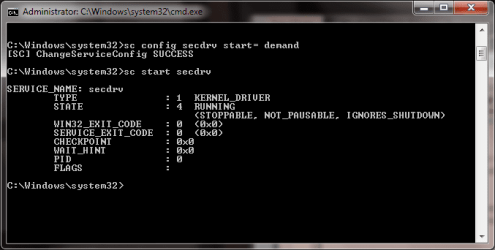
However, while the description of the root of the problem in that How-To Geek article may be illuminating, the given solution doesn't actually work. Simply typing “sc start secdrv” into command prompt doesn't work. You get error 1058. You need another command first.

The actual command sequence required is:
Code:
sc config secdrv start= demand 
sc start secdrv
See below. Then, after you're done playing you can turn it back off:
Code:
sc stop secdrv
 

Attachments

  • cmd prompt sequence.png
    cmd prompt sequence.png
    35 KB · Views: 6

My Computer

Computer type
PC/Desktop
OS
Windows 7 Pro x64
Glad you found the solution. Now I just need to figure out why building a building with a dozer causes the buildings to explode.
 

My Computer

Computer type
PC/Desktop
OS
Windows 7 Ultimate x64
That's a crazy bug! I finally just played it for the first time after getting it to work, and everything is normal. No exploding buildings...

Is your game patched to the latest version?
 

My Computer

Computer type
PC/Desktop
OS
Windows 7 Pro x64
Back
Top