Solved Compatibility pack for 2007 office system

pappi

Banned
Local time
3:27 PM
Messages
294
Location
Manhattan, New York City
I am not using 2007 office system. I use Microsoft works and WordPad. Can I safely remove the Compatibility Pack(and free all 173 MB HD space it occupies)? Also, what is Microsoft Office Power Point Viewer? Am I using it?
 

My Computer

Computer type
Laptop
Computer Manufacturer/Model Number
HP Pavilion dv7-2173cl Entertainment Notebook PC
OS
W7 pro 32-bit.
Memory
4GB
Graphics Card(s)
ATI Mobility Radeon HD 4650 (M96)
Sound Card
•Altec Lansing with SRS Premium Sound and Sub-Woofer
Monitor(s) Displays
17.3” Diagonal HD+ High-Definition HP LED BrightView W
Screen Resolution
1600 x 900
Hard Drives
500GB (5400RPM)
Keyboard
101-key compatible with full size keyboard
Antivirus
MSE
Browser
IE 11
The Power Point Viewer allows you to view PowerPoint shows. I would keep that because you might get PP files from your friends thru the mail - like this one. But for this one you need no PP Viewer because it is an uploaded file.

I am not sure what the compatibility pack is. I would investigate some more before deleting it. 173 MBs is peanuts.
 

My Computer

Computer Manufacturer/Model Number
HP, Dell, Gateway, Toshiba - 4 laptops and 2 desktops
OS
Vista, Windows7, Mint Mate, Zorin, Windows 8
CPU
from 1.6GHz Duo to i7
Monitor(s) Displays
2x HP w2207
Hard Drives
5x HDD, 7x SSD, 12x Externals
Keyboard
with trackball - no mices
Mouse
Trackball mice
Internet Speed
DSL 6000
pappi
the compatibility pack is to upgrade MS word and other programs so that you can read ".DOCX " files that are created by word 2007 and later. I would keep it, because people are updating there Office programs and if you uninstall it, you will not be able to read them

Sven
 

My Computer

Computer type
PC/Desktop
Computer Manufacturer/Model Number
Custom Build
OS
windows 7 ultimate x64
CPU
AMD FX 6 CORE PROCESSOR
Memory
16 GB
Graphics Card(s)
on MB
Sound Card
on MB
Monitor(s) Displays
Acer
Screen Resolution
1920x1080
Hard Drives
Seagate ( C:\)
Case
mini tower
Keyboard
Logitech wireless
Mouse
Logitech wireless
Antivirus
MSE
Browser
IE11
pappi
the compatibility pack is to upgrade MS word and other programs so that you can read ".DOCX " files that are created by word 2007 and later. I would keep it, because people are updating there Office programs and if you uninstall it, you will not be able to read them

Sven
But he does not have Word - he has Works.
 

My Computer

Computer Manufacturer/Model Number
HP, Dell, Gateway, Toshiba - 4 laptops and 2 desktops
OS
Vista, Windows7, Mint Mate, Zorin, Windows 8
CPU
from 1.6GHz Duo to i7
Monitor(s) Displays
2x HP w2207
Hard Drives
5x HDD, 7x SSD, 12x Externals
Keyboard
with trackball - no mices
Mouse
Trackball mice
Internet Speed
DSL 6000
whs,
you are correct, I misread that.
Who would install the compatibility pack if you don't need it, or does it work on MS Works also?

Sven
 

My Computer

Computer type
PC/Desktop
Computer Manufacturer/Model Number
Custom Build
OS
windows 7 ultimate x64
CPU
AMD FX 6 CORE PROCESSOR
Memory
16 GB
Graphics Card(s)
on MB
Sound Card
on MB
Monitor(s) Displays
Acer
Screen Resolution
1920x1080
Hard Drives
Seagate ( C:\)
Case
mini tower
Keyboard
Logitech wireless
Mouse
Logitech wireless
Antivirus
MSE
Browser
IE11

My Computer

Computer type
PC/Desktop
Computer Manufacturer/Model Number
Self Built
OS
Win 10 Pro x64
CPU
Intel I5-2500K @3.3GHz
Motherboard
Asrock P67 Extreme4
Memory
16GB G.Skill Ripjaws X (4x4GB)
Graphics Card(s)
EVGA GeForce 750 Ti SC 2GB
Sound Card
ASUS Xonar DG 5.1 Channels 24-bit 96KHz PCI Interface Sound
Monitor(s) Displays
auria eq2367
Screen Resolution
1920 x 1080
Hard Drives
250GB Samsung 850 EVO SSD
1TB WD Blue
1TB Hitachi
PSU
SeaSonic X 650W 80 Plus Gold
Case
Corsair Obsidian 750D
Cooling
Corsair H60, Three 140mm case fans
Keyboard
Logitech Wireless Keyboard K520
Mouse
Logitech Wireless Mouse M310
Internet Speed
Wave Broadband ~ 100 dn 5 up
Antivirus
Windows Defender, Malwarebytes Premium
Browser
Edge, IE11, Chrome
Other Info
Laptop specs: HP g7-1365dx /
CPU: AMD A6-3420M APU with Radeon(tm) HD Graphics /
RAM: Crucial 8Gb (2x4Gb) /
SSD: Crucial M4-CT128M4SSD2 ATA Device/ FW 000F /
GFX: AMD Radeon HD 6520G /
OS: Windows 10 Pro x64
I doubt it has anything to do with Works. That is a very old program from before 2000. Some people like it though. I have it on my system too but I never use it. Was just tinkering around with it.

I guess the OP can get rid of the compatibility pack - agreed ?
 

My Computer

Computer Manufacturer/Model Number
HP, Dell, Gateway, Toshiba - 4 laptops and 2 desktops
OS
Vista, Windows7, Mint Mate, Zorin, Windows 8
CPU
from 1.6GHz Duo to i7
Monitor(s) Displays
2x HP w2207
Hard Drives
5x HDD, 7x SSD, 12x Externals
Keyboard
with trackball - no mices
Mouse
Trackball mice
Internet Speed
DSL 6000
I think I already had deleted the 2007 suite(it no longer appears in All Programs list or in Control Panel Uninstall) but because I still have both the Compatibility Pack and PP I keep getting loads of important updates for them. So far, together, there have been 21 important labeled updates.

I am itching to delete anything that has 2007 vintage year(seems too old, to begin with) but I am not sure if deletion has deleterious effect on other programs, like PP and Works.

"I would keep that because you might get PP files from your friends thru the mail - like this one. But for this one you need no PP Viewer because it is an uploaded file.".....I clicked "like this one" but it did not show. Dunno why. Wait!!!!...OMG, it does show. It's beautiful. But how is this different from other regular viewing of clickable links?
 

My Computer

Computer type
Laptop
Computer Manufacturer/Model Number
HP Pavilion dv7-2173cl Entertainment Notebook PC
OS
W7 pro 32-bit.
Memory
4GB
Graphics Card(s)
ATI Mobility Radeon HD 4650 (M96)
Sound Card
•Altec Lansing with SRS Premium Sound and Sub-Woofer
Monitor(s) Displays
17.3” Diagonal HD+ High-Definition HP LED BrightView W
Screen Resolution
1600 x 900
Hard Drives
500GB (5400RPM)
Keyboard
101-key compatible with full size keyboard
Antivirus
MSE
Browser
IE 11
But how is this different from other regular viewing of clickable links?
This is not a video uploaded to Youtube. It is a PowerPoint show uploaded to authorStream. If I would send you the file, you could view it with your PowerPoint viewer just like that. So whenever you receive a .pptx or .ppsx file (or .ppt and .pps), the Viewer will play it.
 

My Computer

Computer Manufacturer/Model Number
HP, Dell, Gateway, Toshiba - 4 laptops and 2 desktops
OS
Vista, Windows7, Mint Mate, Zorin, Windows 8
CPU
from 1.6GHz Duo to i7
Monitor(s) Displays
2x HP w2207
Hard Drives
5x HDD, 7x SSD, 12x Externals
Keyboard
with trackball - no mices
Mouse
Trackball mice
Internet Speed
DSL 6000
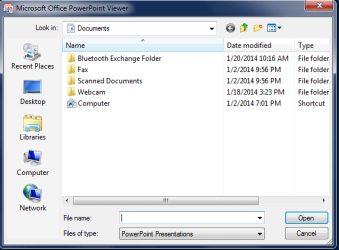
Can you post a link to click/view that requires PP viewer? At this point I am not even sure I have PP viewer although Control Panel Uninstall list shows it(132 MB size). It is also listed in All Programs....but when I double click it a window pops out and I have no idea what to do with it.
CapturePP.PNG
 

My Computer

Computer type
Laptop
Computer Manufacturer/Model Number
HP Pavilion dv7-2173cl Entertainment Notebook PC
OS
W7 pro 32-bit.
Memory
4GB
Graphics Card(s)
ATI Mobility Radeon HD 4650 (M96)
Sound Card
•Altec Lansing with SRS Premium Sound and Sub-Woofer
Monitor(s) Displays
17.3” Diagonal HD+ High-Definition HP LED BrightView W
Screen Resolution
1600 x 900
Hard Drives
500GB (5400RPM)
Keyboard
101-key compatible with full size keyboard
Antivirus
MSE
Browser
IE 11
Can you post a link to click/view that requires PP viewer? At this point I am not even sure I have PP viewer although Control Panel Uninstall list shows it(132 MB size). It is also listed in All Programs....but when I double click it a window pops out and I have no idea what to do with it.
View attachment 308414

That window just wants you to select a powerpoint file from your computer.

If you don't have any and really want the 132MB of space, you can uninstall it. If you ever need it again you can reinstall it.

132MB is really not a big chunk, but it's your computer.
 

My Computer

Computer type
PC/Desktop
Computer Manufacturer/Model Number
Self Built
OS
Win 10 Pro x64
CPU
Intel I5-2500K @3.3GHz
Motherboard
Asrock P67 Extreme4
Memory
16GB G.Skill Ripjaws X (4x4GB)
Graphics Card(s)
EVGA GeForce 750 Ti SC 2GB
Sound Card
ASUS Xonar DG 5.1 Channels 24-bit 96KHz PCI Interface Sound
Monitor(s) Displays
auria eq2367
Screen Resolution
1920 x 1080
Hard Drives
250GB Samsung 850 EVO SSD
1TB WD Blue
1TB Hitachi
PSU
SeaSonic X 650W 80 Plus Gold
Case
Corsair Obsidian 750D
Cooling
Corsair H60, Three 140mm case fans
Keyboard
Logitech Wireless Keyboard K520
Mouse
Logitech Wireless Mouse M310
Internet Speed
Wave Broadband ~ 100 dn 5 up
Antivirus
Windows Defender, Malwarebytes Premium
Browser
Edge, IE11, Chrome
Other Info
Laptop specs: HP g7-1365dx /
CPU: AMD A6-3420M APU with Radeon(tm) HD Graphics /
RAM: Crucial 8Gb (2x4Gb) /
SSD: Crucial M4-CT128M4SSD2 ATA Device/ FW 000F /
GFX: AMD Radeon HD 6520G /
OS: Windows 10 Pro x64

My Computer

Computer Manufacturer/Model Number
HP, Dell, Gateway, Toshiba - 4 laptops and 2 desktops
OS
Vista, Windows7, Mint Mate, Zorin, Windows 8
CPU
from 1.6GHz Duo to i7
Monitor(s) Displays
2x HP w2207
Hard Drives
5x HDD, 7x SSD, 12x Externals
Keyboard
with trackball - no mices
Mouse
Trackball mice
Internet Speed
DSL 6000
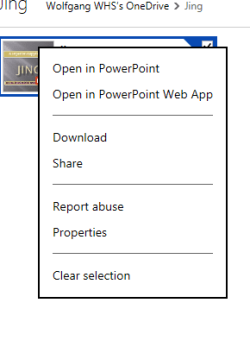
Right clicking the icon results in an insert pop out box that gives several selection menu:
PP1.PNG

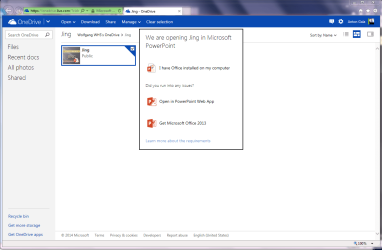
Going for the first option, another insert pop-out box appears:
CapturePP4.PNG

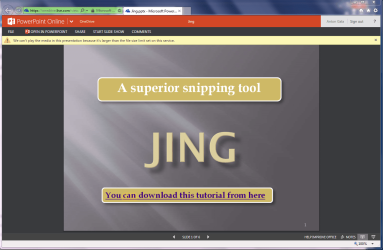
Going for 2nd option or just double clicking the icon, I got this window that opens to 6 pages:
CapturePP3.PNG
 

My Computer

Computer type
Laptop
Computer Manufacturer/Model Number
HP Pavilion dv7-2173cl Entertainment Notebook PC
OS
W7 pro 32-bit.
Memory
4GB
Graphics Card(s)
ATI Mobility Radeon HD 4650 (M96)
Sound Card
•Altec Lansing with SRS Premium Sound and Sub-Woofer
Monitor(s) Displays
17.3” Diagonal HD+ High-Definition HP LED BrightView W
Screen Resolution
1600 x 900
Hard Drives
500GB (5400RPM)
Keyboard
101-key compatible with full size keyboard
Antivirus
MSE
Browser
IE 11
Try the download option, then you can give the powerpoint viewer you have installed a practice run.

Once downloaded, you can just double click on it to see if it plays.

Or, from this previous window you posted,

308414-compatibility-pack-2007-office-system-capturepp.png


Point it to the file you just downloaded.
 

My Computer

Computer type
PC/Desktop
Computer Manufacturer/Model Number
Self Built
OS
Win 10 Pro x64
CPU
Intel I5-2500K @3.3GHz
Motherboard
Asrock P67 Extreme4
Memory
16GB G.Skill Ripjaws X (4x4GB)
Graphics Card(s)
EVGA GeForce 750 Ti SC 2GB
Sound Card
ASUS Xonar DG 5.1 Channels 24-bit 96KHz PCI Interface Sound
Monitor(s) Displays
auria eq2367
Screen Resolution
1920 x 1080
Hard Drives
250GB Samsung 850 EVO SSD
1TB WD Blue
1TB Hitachi
PSU
SeaSonic X 650W 80 Plus Gold
Case
Corsair Obsidian 750D
Cooling
Corsair H60, Three 140mm case fans
Keyboard
Logitech Wireless Keyboard K520
Mouse
Logitech Wireless Mouse M310
Internet Speed
Wave Broadband ~ 100 dn 5 up
Antivirus
Windows Defender, Malwarebytes Premium
Browser
Edge, IE11, Chrome
Other Info
Laptop specs: HP g7-1365dx /
CPU: AMD A6-3420M APU with Radeon(tm) HD Graphics /
RAM: Crucial 8Gb (2x4Gb) /
SSD: Crucial M4-CT128M4SSD2 ATA Device/ FW 000F /
GFX: AMD Radeon HD 6520G /
OS: Windows 10 Pro x64
PP viewer does not play the video:(file is bigger...or something)
CapturePP5.PNG

And then I am advised to install Student 2013 which cost $99.99/one year.
 

My Computer

Computer type
Laptop
Computer Manufacturer/Model Number
HP Pavilion dv7-2173cl Entertainment Notebook PC
OS
W7 pro 32-bit.
Memory
4GB
Graphics Card(s)
ATI Mobility Radeon HD 4650 (M96)
Sound Card
•Altec Lansing with SRS Premium Sound and Sub-Woofer
Monitor(s) Displays
17.3” Diagonal HD+ High-Definition HP LED BrightView W
Screen Resolution
1600 x 900
Hard Drives
500GB (5400RPM)
Keyboard
101-key compatible with full size keyboard
Antivirus
MSE
Browser
IE 11
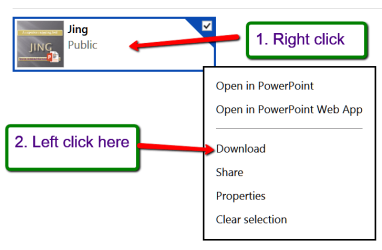
This is NOT your PowerPoint Viewer. This is PP On-line thru your browser. You have to download the file and then double click on it once it is on your system.

To download the file to your system, follow the instructions on the picture.
 

Attachments

  • 2014-03-01_1718.png
    2014-03-01_1718.png
    15.2 KB · Views: 1

My Computer

Computer Manufacturer/Model Number
HP, Dell, Gateway, Toshiba - 4 laptops and 2 desktops
OS
Vista, Windows7, Mint Mate, Zorin, Windows 8
CPU
from 1.6GHz Duo to i7
Monitor(s) Displays
2x HP w2207
Hard Drives
5x HDD, 7x SSD, 12x Externals
Keyboard
with trackball - no mices
Mouse
Trackball mice
Internet Speed
DSL 6000
OK, I did download and then tried to view some vids...but PP Viewer warns that the hyperlink video might contain some malwares that might have detrimental effect to my system. So, I did not play the vid. But it seems I do have PP viewer and perhaps it is cautiously working.

And since I already have a very good default snipping tool, I see no reason to use another. So I decided to delete the downloaded JING.

WHS, thanks for turning me on PP and PP viewer. I had zero clue on what PP was. Now I do and can't wait to use it on some files that have no malware warning. I also decided to keep the compatibility pack since PP might be dependent on it.
 

My Computer

Computer type
Laptop
Computer Manufacturer/Model Number
HP Pavilion dv7-2173cl Entertainment Notebook PC
OS
W7 pro 32-bit.
Memory
4GB
Graphics Card(s)
ATI Mobility Radeon HD 4650 (M96)
Sound Card
•Altec Lansing with SRS Premium Sound and Sub-Woofer
Monitor(s) Displays
17.3” Diagonal HD+ High-Definition HP LED BrightView W
Screen Resolution
1600 x 900
Hard Drives
500GB (5400RPM)
Keyboard
101-key compatible with full size keyboard
Antivirus
MSE
Browser
IE 11
pappi, there is no malware. It is all data from my system. Go ahead and run it and let us know whether it worked.

Deleting Jing may have been a mistake. It has a lot of nifty options. What snipping tool are you using.
 

My Computer

Computer Manufacturer/Model Number
HP, Dell, Gateway, Toshiba - 4 laptops and 2 desktops
OS
Vista, Windows7, Mint Mate, Zorin, Windows 8
CPU
from 1.6GHz Duo to i7
Monitor(s) Displays
2x HP w2207
Hard Drives
5x HDD, 7x SSD, 12x Externals
Keyboard
with trackball - no mices
Mouse
Trackball mice
Internet Speed
DSL 6000
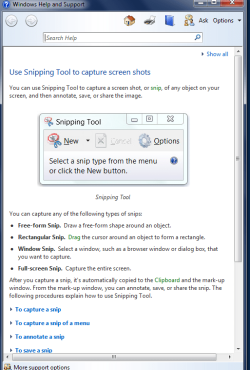
W7(and Vista)comes with built in snipping tool buried in Accessories folder. It's super uncomplicated and so user friendly that even I can use it. (by the way is that the same as screenshot?).
SnipTool.PNG

Do you have another PP file that is didactic or entertaining like the Venice Carnival?
 

My Computer

Computer type
Laptop
Computer Manufacturer/Model Number
HP Pavilion dv7-2173cl Entertainment Notebook PC
OS
W7 pro 32-bit.
Memory
4GB
Graphics Card(s)
ATI Mobility Radeon HD 4650 (M96)
Sound Card
•Altec Lansing with SRS Premium Sound and Sub-Woofer
Monitor(s) Displays
17.3” Diagonal HD+ High-Definition HP LED BrightView W
Screen Resolution
1600 x 900
Hard Drives
500GB (5400RPM)
Keyboard
101-key compatible with full size keyboard
Antivirus
MSE
Browser
IE 11
With your snipping tool I could never have made the snip in post #16 above. Make a test - right click on the desktop and make a snip of the context menu like this.

2014-03-01_1955.png

I have a very large collection of PowerPoint files, but none are uploaded. I'll see what I can do and let you know.
 

My Computer

Computer Manufacturer/Model Number
HP, Dell, Gateway, Toshiba - 4 laptops and 2 desktops
OS
Vista, Windows7, Mint Mate, Zorin, Windows 8
CPU
from 1.6GHz Duo to i7
Monitor(s) Displays
2x HP w2207
Hard Drives
5x HDD, 7x SSD, 12x Externals
Keyboard
with trackball - no mices
Mouse
Trackball mice
Internet Speed
DSL 6000
Back
Top