Complete freeze shortly after startup, and sudden shutdown

ToxicXGL

New member
Member
VIP
Local time
12:28 PM
Messages
266
Location
Canada Alberta, Edmonton
PC has been randomly completely freezing up after pc startup. Time it takes to freeze is random but seems to follow anything past 10 mins.

After freezing up it suddenly shuts down after ~8 mins.

RAM and HDD have been replaced with new hardware, but this didnt seem to fix the issue.

OS has also been reinstalled, no fix tho.

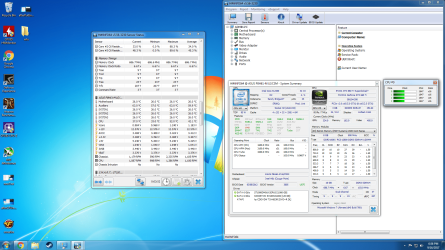
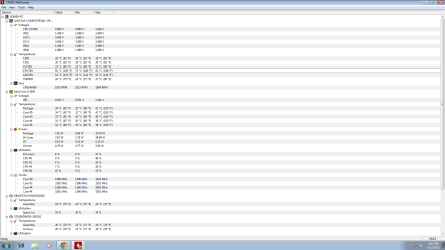
Temps seem normal except for 1 spot on the motherboard which is sitting at a constant 80-90C upon startup. This pushes me to believe something is overheating on the mobo and forcing it to freeze and shutdown.

Drive health for SSD and HDD are healthy RAM was RMAd so have brand new sticks. Dont know what the issue is. Granted this PC is ~ 6 years old

The odd temp is labeled CPUTIN
 

Attachments
  • termps.png
    termps.png
    41.8 KB · Views: 9

My Computer My Computer

At a glance

Microsoft Windows 7 Ultimate 64-bit 7601 Mult...Intel(R) Core(TM) i5-2400 CPU @ 3.10GHz16.00 GBNVIDIA GeForce GTX 660 Ti SC 3GB
Computer type
PC/Desktop
Computer Manufacturer/Model Number
Custom Build
OS
Microsoft Windows 7 Ultimate 64-bit 7601 Multiprocessor Free Service Pack 1
CPU
Intel(R) Core(TM) i5-2400 CPU @ 3.10GHz
Motherboard
ASUSTeK COMPUTER INC. P8H61-M LE/CSM
Memory
16.00 GB
Graphics Card(s)
NVIDIA GeForce GTX 660 Ti SC 3GB
Sound Card
(1) NVIDIA High Definition Audio (2) Realtek High Definiti
Monitor(s) Displays
21.5" HP
Screen Resolution
1600 x 900 x 32 bits (4294967296 colors) @ 60 Hz
Hard Drives
ST31000524AS ATA Device 7200
PSU
OCZ 650W Bronze Plus
Case
Zalman Z9 Plus
Mouse
Razer naga molten edition
Antivirus
Microsoft Security Essentials along with Malwarbytes
Browser
Chrome
Other Info
Love computers but wanting to learn more about troubleshooting and wanting to contribute to this community!
CPUTIN is usually the sensor located in the socket of your CPU. It is either malfunctioning (which I suspect, based on your core temps), or your CPU is actually getting that hot and freezing and shutting down.

Just to rule out an actual temperature problem, have you checked to make sure that your heat sink and fan are properly seated?

Also, what is the "CPU" temp reading in BIOS? It should be no higher than your core temps show at idle. In fact, it should be a little bit lower. If it is reading 80 to 90C in BIOS, then you either have a sensor problem, which means a new mobo, or you have an actual thermal issue that needs to be addressed before you torch that i5.
 

My Computer My Computer

At a glance

Win 7 Pro x64/Win 10 Pro x64 dual bootAMD FX 8350 Vishera @ 420016 GB Mushkin Blackline DDR3-2400 @ 1866 (9-1...XFX Radeon R9 280 Double D Black Edition
Computer type
PC/Desktop
Computer Manufacturer/Model Number
Mellon Labs (custom build)
OS
Win 7 Pro x64/Win 10 Pro x64 dual boot
CPU
AMD FX 8350 Vishera @ 4200
Motherboard
ASUS M5A97 R2.0
Memory
16 GB Mushkin Blackline DDR3-2400 @ 1866 (9-10-10-10-31)
Graphics Card(s)
XFX Radeon R9 280 Double D Black Edition
Sound Card
Realtek HD Audio on MB. Sounds great.
Monitor(s) Displays
Acer 24", Acer 22"
Screen Resolution
3840 x 1080
Hard Drives
1 x Mushkin Chronos 120 GB SSD (Win 10)
1 x Samsung 850 EVO 250 GB SSD (Win 7)
1 x WD 1TB SATA Blue
1 x WD 1TB SATA Green
PSU
Corsair TX-750
Case
CoolerMaster HAF 912+
Cooling
Coolermaster Seidon 240M Liquid AIO. 6 case fans
Keyboard
Logitech G710+
Mouse
Logitech G500s
Internet Speed
Much better since I got fiber, but still way overpriced.
Antivirus
MSE, Malware Bytes for scanning
Browser
Firefox
Other Info
Corsair VOID USB headphones.

A Mellon Labs X-1 - LCD Smartie driven system status display.

Brought to you by the letter E
CPUTIN is usually the sensor located in the socket of your CPU. It is either malfunctioning (which I suspect, based on your core temps), or your CPU is actually getting that hot and freezing and shutting down.

Just to rule out an actual temperature problem, have you checked to make sure that your heat sink and fan are properly seated?

Also, what is the "CPU" temp reading in BIOS? It should be no higher than your core temps show at idle. In fact, it should be a little bit lower. If it is reading 80 to 90C in BIOS, then you either have a sensor problem, which means a new mobo, or you have an actual thermal issue that needs to be addressed before you torch that i5.

Temps after about 5 mins in bios. Didnt go over 33. So if this sensor is fried why would that cause the pc to freeze and crash?
 

Attachments

  • 170915190751.png
    170915190751.png
    57.7 KB · Views: 1

My Computer My Computer

At a glance

Microsoft Windows 7 Ultimate 64-bit 7601 Mult...Intel(R) Core(TM) i5-2400 CPU @ 3.10GHz16.00 GBNVIDIA GeForce GTX 660 Ti SC 3GB
Computer type
PC/Desktop
Computer Manufacturer/Model Number
Custom Build
OS
Microsoft Windows 7 Ultimate 64-bit 7601 Multiprocessor Free Service Pack 1
CPU
Intel(R) Core(TM) i5-2400 CPU @ 3.10GHz
Motherboard
ASUSTeK COMPUTER INC. P8H61-M LE/CSM
Memory
16.00 GB
Graphics Card(s)
NVIDIA GeForce GTX 660 Ti SC 3GB
Sound Card
(1) NVIDIA High Definition Audio (2) Realtek High Definiti
Monitor(s) Displays
21.5" HP
Screen Resolution
1600 x 900 x 32 bits (4294967296 colors) @ 60 Hz
Hard Drives
ST31000524AS ATA Device 7200
PSU
OCZ 650W Bronze Plus
Case
Zalman Z9 Plus
Mouse
Razer naga molten edition
Antivirus
Microsoft Security Essentials along with Malwarbytes
Browser
Chrome
Other Info
Love computers but wanting to learn more about troubleshooting and wanting to contribute to this community!
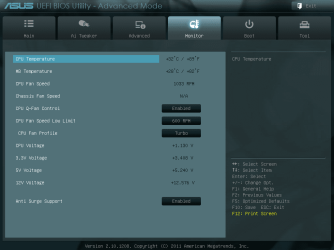
Temps after about 5 mins in bios. Didnt go over 33. So if this sensor is fried why would that cause the pc to freeze and crash?
Well, this is a puzzler.

If the sensor is malfunctioning, the computer can read this as the CPU overheating. CPUs have a self protection mechanism where they throttle the processor speed and shut down if they get too hot. I suppose it isn't unreasonable for the clock speed to go to zero in an extreme case of (perceived) overheating. Although 80 to 90C is extremely hot, Intels can run a little hotter than AMD chips for instance, but still, 80 to 90C is too hot and probably will cause throttling. It is my understanding, however, that the throttling temperature measurement is controlled by BIOS. If your BIOS reading never went above 33C, there is another problem somewhere. Since it crashed in BIOS, that points to a hardware problem IMO, since Windows is not involved at that point.

It could be a couple of things, though I would suspect the motherboard first of all. Your power supply could be flaky, but that wouldn't cause the freezing. The other culprits are the mobo and the CPU and the graphics card. If the graphics card is overheating, it can cause a freeze and reboot. I have had that happen with a failed GPU fan.

Have you checked the temps of your GPU?
 

My Computer My Computer

At a glance

Win 7 Pro x64/Win 10 Pro x64 dual bootAMD FX 8350 Vishera @ 420016 GB Mushkin Blackline DDR3-2400 @ 1866 (9-1...XFX Radeon R9 280 Double D Black Edition
Computer type
PC/Desktop
Computer Manufacturer/Model Number
Mellon Labs (custom build)
OS
Win 7 Pro x64/Win 10 Pro x64 dual boot
CPU
AMD FX 8350 Vishera @ 4200
Motherboard
ASUS M5A97 R2.0
Memory
16 GB Mushkin Blackline DDR3-2400 @ 1866 (9-10-10-10-31)
Graphics Card(s)
XFX Radeon R9 280 Double D Black Edition
Sound Card
Realtek HD Audio on MB. Sounds great.
Monitor(s) Displays
Acer 24", Acer 22"
Screen Resolution
3840 x 1080
Hard Drives
1 x Mushkin Chronos 120 GB SSD (Win 10)
1 x Samsung 850 EVO 250 GB SSD (Win 7)
1 x WD 1TB SATA Blue
1 x WD 1TB SATA Green
PSU
Corsair TX-750
Case
CoolerMaster HAF 912+
Cooling
Coolermaster Seidon 240M Liquid AIO. 6 case fans
Keyboard
Logitech G710+
Mouse
Logitech G500s
Internet Speed
Much better since I got fiber, but still way overpriced.
Antivirus
MSE, Malware Bytes for scanning
Browser
Firefox
Other Info
Corsair VOID USB headphones.

A Mellon Labs X-1 - LCD Smartie driven system status display.

Brought to you by the letter E
Well, this is a puzzler.

If the sensor is malfunctioning, the computer can read this as the CPU overheating. CPUs have a self protection mechanism where they throttle the processor speed and shut down if they get too hot. I suppose it isn't unreasonable for the clock speed to go to zero in an extreme case of (perceived) overheating. Although 80 to 90C is extremely hot, Intels can run a little hotter than AMD chips for instance, but still, 80 to 90C is too hot and probably will cause throttling. It is my understanding, however, that the throttling temperature measurement is controlled by BIOS. If your BIOS reading never went above 33C, there is another problem somewhere. Since it crashed in BIOS, that points to a hardware problem IMO, since Windows is not involved at that point.

It could be a couple of things, though I would suspect the motherboard first of all. Your power supply could be flaky, but that wouldn't cause the freezing. The other culprits are the mobo and the CPU and the graphics card. If the graphics card is overheating, it can cause a freeze and reboot. I have had that happen with a failed GPU fan.

Have you checked the temps of your GPU?

Alright so i left the system on in the bios idle for ~ 2 hours and nothing happened, no crashes.

Checking the GPU temps, they stay under 31 for the most of it.

CPUTIN now goes anywhere from 50-90c and when it hits 80+ the CPU does throttle to about 1.5ghz

Also yesterday i was able to run a benchmark without any problems, but 30 mins after it froze and crash.
 

Attachments

  • newTest.png
    newTest.png
    256.1 KB · Views: 3
  • throttle.png
    throttle.png
    264.4 KB · Views: 1

My Computer My Computer

At a glance

Microsoft Windows 7 Ultimate 64-bit 7601 Mult...Intel(R) Core(TM) i5-2400 CPU @ 3.10GHz16.00 GBNVIDIA GeForce GTX 660 Ti SC 3GB
Computer type
PC/Desktop
Computer Manufacturer/Model Number
Custom Build
OS
Microsoft Windows 7 Ultimate 64-bit 7601 Multiprocessor Free Service Pack 1
CPU
Intel(R) Core(TM) i5-2400 CPU @ 3.10GHz
Motherboard
ASUSTeK COMPUTER INC. P8H61-M LE/CSM
Memory
16.00 GB
Graphics Card(s)
NVIDIA GeForce GTX 660 Ti SC 3GB
Sound Card
(1) NVIDIA High Definition Audio (2) Realtek High Definiti
Monitor(s) Displays
21.5" HP
Screen Resolution
1600 x 900 x 32 bits (4294967296 colors) @ 60 Hz
Hard Drives
ST31000524AS ATA Device 7200
PSU
OCZ 650W Bronze Plus
Case
Zalman Z9 Plus
Mouse
Razer naga molten edition
Antivirus
Microsoft Security Essentials along with Malwarbytes
Browser
Chrome
Other Info
Love computers but wanting to learn more about troubleshooting and wanting to contribute to this community!
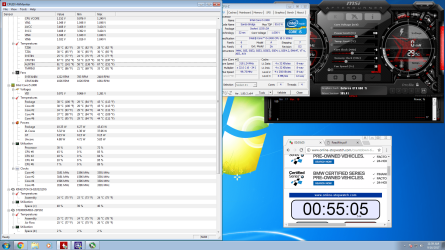
I'm beginning to strongly suspect that your CPUTIN sensor is flaky. Especially since it is causing your CPU to throttle. CPUTIN is even kind of high in the first picture when it is not throttling.

What were you doing when the temp climbed to 92C? If you were idling, either your CPU heatsink/fan is not properly attached, or you have a problem with the mobo.

Also, your AUXTIN temp is rather high. What have you got for case cooling? You might need some fresh air intake to bring that temp down, and it will help your CPU temps.

Do you have the internal speaker connected? If so, you should hear some alarms (usually with most motherboards, though yours may or may not) when the CPU gets over temperature, and especially when it shuts down from over heat.
 

My Computer My Computer

At a glance

Win 7 Pro x64/Win 10 Pro x64 dual bootAMD FX 8350 Vishera @ 420016 GB Mushkin Blackline DDR3-2400 @ 1866 (9-1...XFX Radeon R9 280 Double D Black Edition
Computer type
PC/Desktop
Computer Manufacturer/Model Number
Mellon Labs (custom build)
OS
Win 7 Pro x64/Win 10 Pro x64 dual boot
CPU
AMD FX 8350 Vishera @ 4200
Motherboard
ASUS M5A97 R2.0
Memory
16 GB Mushkin Blackline DDR3-2400 @ 1866 (9-10-10-10-31)
Graphics Card(s)
XFX Radeon R9 280 Double D Black Edition
Sound Card
Realtek HD Audio on MB. Sounds great.
Monitor(s) Displays
Acer 24", Acer 22"
Screen Resolution
3840 x 1080
Hard Drives
1 x Mushkin Chronos 120 GB SSD (Win 10)
1 x Samsung 850 EVO 250 GB SSD (Win 7)
1 x WD 1TB SATA Blue
1 x WD 1TB SATA Green
PSU
Corsair TX-750
Case
CoolerMaster HAF 912+
Cooling
Coolermaster Seidon 240M Liquid AIO. 6 case fans
Keyboard
Logitech G710+
Mouse
Logitech G500s
Internet Speed
Much better since I got fiber, but still way overpriced.
Antivirus
MSE, Malware Bytes for scanning
Browser
Firefox
Other Info
Corsair VOID USB headphones.

A Mellon Labs X-1 - LCD Smartie driven system status display.

Brought to you by the letter E
I'm beginning to strongly suspect that your CPUTIN sensor is flaky. Especially since it is causing your CPU to throttle. CPUTIN is even kind of high in the first picture when it is not throttling.

What were you doing when the temp climbed to 92C? If you were idling, either your CPU heatsink/fan is not properly attached, or you have a problem with the mobo.

Also, your AUXTIN temp is rather high. What have you got for case cooling? You might need some fresh air intake to bring that temp down, and it will help your CPU temps.

Do you have the internal speaker connected? If so, you should hear some alarms (usually with most motherboards, though yours may or may not) when the CPU gets over temperature, and especially when it shuts down from over heat.

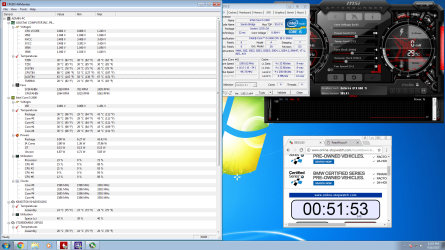
Idle when 80-92.

So i replaced the thermal compound and re-seated the CPU cooler which brought down the temps to a stable 60-70c, but this only lasted for about 2 mins. After that it went back to the usual 80+. What i did notice tho is that my cpu cooler mounting pin is kind of busted, but the cooler still sits well and firm on the CPU. Fan is also working. CPU still throttling.

Ive got 3 intake fans. 1 in the front panel and 2 in the side window all blowing intake.

CPUTIN seems to be staying at 80+ all the time no longer ranging from 60-90, constant throttling

Going to try the mobo speaker right now. Just need to find the sucker
 

Attachments

  • afterCPUreseat.png
    afterCPUreseat.png
    425.7 KB · Views: 3

My Computer My Computer

At a glance

Microsoft Windows 7 Ultimate 64-bit 7601 Mult...Intel(R) Core(TM) i5-2400 CPU @ 3.10GHz16.00 GBNVIDIA GeForce GTX 660 Ti SC 3GB
Computer type
PC/Desktop
Computer Manufacturer/Model Number
Custom Build
OS
Microsoft Windows 7 Ultimate 64-bit 7601 Multiprocessor Free Service Pack 1
CPU
Intel(R) Core(TM) i5-2400 CPU @ 3.10GHz
Motherboard
ASUSTeK COMPUTER INC. P8H61-M LE/CSM
Memory
16.00 GB
Graphics Card(s)
NVIDIA GeForce GTX 660 Ti SC 3GB
Sound Card
(1) NVIDIA High Definition Audio (2) Realtek High Definiti
Monitor(s) Displays
21.5" HP
Screen Resolution
1600 x 900 x 32 bits (4294967296 colors) @ 60 Hz
Hard Drives
ST31000524AS ATA Device 7200
PSU
OCZ 650W Bronze Plus
Case
Zalman Z9 Plus
Mouse
Razer naga molten edition
Antivirus
Microsoft Security Essentials along with Malwarbytes
Browser
Chrome
Other Info
Love computers but wanting to learn more about troubleshooting and wanting to contribute to this community!
Going to try the mobo speaker right now. Just need to find the sucker
I've asked some other experienced users to look in to offer a second opinion. There is definitely an issue here if it is reaching 80 to 92C at idle.

Bear with us as we examine the thread.
 

My Computer My Computer

At a glance

Win 7 Pro x64/Win 10 Pro x64 dual bootAMD FX 8350 Vishera @ 420016 GB Mushkin Blackline DDR3-2400 @ 1866 (9-1...XFX Radeon R9 280 Double D Black Edition
Computer type
PC/Desktop
Computer Manufacturer/Model Number
Mellon Labs (custom build)
OS
Win 7 Pro x64/Win 10 Pro x64 dual boot
CPU
AMD FX 8350 Vishera @ 4200
Motherboard
ASUS M5A97 R2.0
Memory
16 GB Mushkin Blackline DDR3-2400 @ 1866 (9-10-10-10-31)
Graphics Card(s)
XFX Radeon R9 280 Double D Black Edition
Sound Card
Realtek HD Audio on MB. Sounds great.
Monitor(s) Displays
Acer 24", Acer 22"
Screen Resolution
3840 x 1080
Hard Drives
1 x Mushkin Chronos 120 GB SSD (Win 10)
1 x Samsung 850 EVO 250 GB SSD (Win 7)
1 x WD 1TB SATA Blue
1 x WD 1TB SATA Green
PSU
Corsair TX-750
Case
CoolerMaster HAF 912+
Cooling
Coolermaster Seidon 240M Liquid AIO. 6 case fans
Keyboard
Logitech G710+
Mouse
Logitech G500s
Internet Speed
Much better since I got fiber, but still way overpriced.
Antivirus
MSE, Malware Bytes for scanning
Browser
Firefox
Other Info
Corsair VOID USB headphones.

A Mellon Labs X-1 - LCD Smartie driven system status display.

Brought to you by the letter E
Ok now just my two cents worth an it is always one of my first things to look at with sudden dropouts / crashes etc is the PSU
Can you read though this and send back the PSU info please you can also go into great depths with other components but please start with the PSU
Using HW Info
PART A:
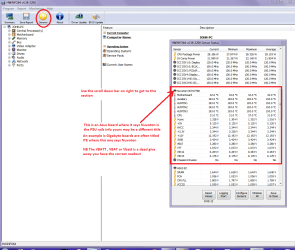
You can test the volts on the PSU with HW Info HWiNFO - Download < download the right bit version and close the right hand window select Sensors and scroll down to the power section where you will see what the volts are doing see my pic. In my pic the section (Nuvoton) with VBATT as a dead give away you are in the section for the rail voltages. There are other section titles and one that pops up often is ITE (sometimes the usual one for Gigabyte boards)
Now the voltage on the different rails have to be within 5% =+/- of what is required or the machine will not work properly if at all.
Limits +/- (minimum - correct - maximum)
12v1 = 11.4 - 12 - 12.6v
12v2 = 11.4 - 12- 12.6v
5v = 4.75 – 5 - 5.25v
3.3v = 3.135 – 3 – 3.465v
-12v = -10.80 - -12 - -13.20v
+5VSB = 4.75 – 5 - 5.25v
The Power good signal voltage at pin 8 on the 24 pin plug (grey cable) should be the same as the 5v rail reading/s
See this for the rail voltage info
PSUs 101: A Detailed Look Into Power Supplies (Section 2.)
The original right hand window shows the machine running and is handy for that but for looking at the components in some detail close it and use the main left hand side panel
FOR OTHER COMPONENTS
PART B:
Open each small square with + in it on the section the components are in and then click on the individual component/s (it will highlight in blue) - in the right hand side will appear all sorts of details including brands speeds and other essential info that particular device. See pic for example.

You can also use PART B: to see in detail and of the other components data ie temps speeds frequencies etc etc

Edit: This is an old shot the format of HW Info is very slightly different now.
 

Attachments

  • HW INFO DESKTOP PSU.PNG
    HW INFO DESKTOP PSU.PNG
    51.3 KB · Views: 3

My Computer My Computer

At a glance

Desk1 7 Home Prem / Desk2 10 Pro / Main lap A...Desk1 i5 3750K / Laptop i7 GTX 860M / Desk2 i...Desk1 8GB (1866) / Desk2 16GB (1333) / Laptop...Desk 1& 2NVidia GTX 650 & Laptops on board Intel
Computer type
PC/Desktop
Computer Manufacturer/Model Number
Own build (new) Desk1 / Asus ROG Win 7 / Desk2 1st build
OS
Desk1 7 Home Prem / Desk2 10 Pro / Main lap Asus ROG 10 Pro 2 laptop Toshiba 7 Pro Asus P2520 7 & 10
CPU
Desk1 i5 3750K / Laptop i7 GTX 860M / Desk2 i5 2500
Motherboard
Desk1 Asus P877-V / Desk2 Gigabyte H67 UD3H / Laptop ?
Memory
Desk1 8GB (1866) / Desk2 16GB (1333) / Laptop 8Gb DDR3
Graphics Card(s)
Desk 1& 2NVidia GTX 650 & Laptops on board Intel
Sound Card
Desk 1 & 2 -XONAR DG Realtek High Def audio Laptop
Monitor(s) Displays
Desk 1 Benq HD 2450 / Desk2 Philips 24" / Laptop 17.5"
Screen Resolution
1920x1080 D1 & D2 & Laptop 1
Hard Drives
Desk1 Samsung 120GB 830 SSD
Asus ROG 256GB 850 Pro SSD
Desk2 Samsung 840 256 SSD
Toshiba 120GB EVO
PSU
Desk 1 Corsair HX 1050/ Laptop ? / Desk 2 Corsair HX 650
Case
Desk 1 Cooler HAF XM ? Toshiba laptop / Desk2 Coolermaster
Cooling
Fans on all Desk1 -2 Desk2 - all Coolermasters 5 Laptop ?
Keyboard
Desk 1 MS Sidewinder X6 Desk 2 MS Sidewinder X 4
Mouse
Desk 1&2 - Gigabyte MS 900 gamer - laptop - Logitec wireless
Internet Speed
ADSL2+
Other Info
One other Desktop (tester) and spare Toshba laptop both with SSD's
Running Kaspersky 2016 ISS on all machines config'd identically
Logitec audio stereo systems on each machine (x3)
Canon MG5250MFC
Router/modem TP-Link running WPA2SK
Ok now just my two cents worth an it is always one of my first things to look at with sudden dropouts / crashes etc is the PSU
Can you read though this and send back the PSU info please you can also go into great depths with other components but please start with the PSU
Using HW Info
PART A:
You can test the volts on the PSU with HW Info HWiNFO - Download < download the right bit version and close the right hand window select Sensors and scroll down to the power section where you will see what the volts are doing see my pic. In my pic the section (Nuvoton) with VBATT as a dead give away you are in the section for the rail voltages. There are other section titles and one that pops up often is ITE (sometimes the usual one for Gigabyte boards)
Now the voltage on the different rails have to be within 5% =+/- of what is required or the machine will not work properly if at all.
Limits +/- (minimum - correct - maximum)
12v1 = 11.4 - 12 - 12.6v
12v2 = 11.4 - 12- 12.6v
5v = 4.75 – 5 - 5.25v
3.3v = 3.135 – 3 – 3.465v
-12v = -10.80 - -12 - -13.20v
+5VSB = 4.75 – 5 - 5.25v
The Power good signal voltage at pin 8 on the 24 pin plug (grey cable) should be the same as the 5v rail reading/s
See this for the rail voltage info
PSUs 101: A Detailed Look Into Power Supplies (Section 2.)
The original right hand window shows the machine running and is handy for that but for looking at the components in some detail close it and use the main left hand side panel
FOR OTHER COMPONENTS
PART B:
Open each small square with + in it on the section the components are in and then click on the individual component/s (it will highlight in blue) - in the right hand side will appear all sorts of details including brands speeds and other essential info that particular device. See pic for example.

You can also use PART B: to see in detail and of the other components data ie temps speeds frequencies etc etc

Edit: This is an old shot the format of HW Info is very slightly different now.

After windows updates was able to play Warframe on max for 2 hours without any issues. PC is still running as we speak.
 

Attachments

  • psuInfo.png
    psuInfo.png
    326.3 KB · Views: 7

My Computer My Computer

At a glance

Microsoft Windows 7 Ultimate 64-bit 7601 Mult...Intel(R) Core(TM) i5-2400 CPU @ 3.10GHz16.00 GBNVIDIA GeForce GTX 660 Ti SC 3GB
Computer type
PC/Desktop
Computer Manufacturer/Model Number
Custom Build
OS
Microsoft Windows 7 Ultimate 64-bit 7601 Multiprocessor Free Service Pack 1
CPU
Intel(R) Core(TM) i5-2400 CPU @ 3.10GHz
Motherboard
ASUSTeK COMPUTER INC. P8H61-M LE/CSM
Memory
16.00 GB
Graphics Card(s)
NVIDIA GeForce GTX 660 Ti SC 3GB
Sound Card
(1) NVIDIA High Definition Audio (2) Realtek High Definiti
Monitor(s) Displays
21.5" HP
Screen Resolution
1600 x 900 x 32 bits (4294967296 colors) @ 60 Hz
Hard Drives
ST31000524AS ATA Device 7200
PSU
OCZ 650W Bronze Plus
Case
Zalman Z9 Plus
Mouse
Razer naga molten edition
Antivirus
Microsoft Security Essentials along with Malwarbytes
Browser
Chrome
Other Info
Love computers but wanting to learn more about troubleshooting and wanting to contribute to this community!
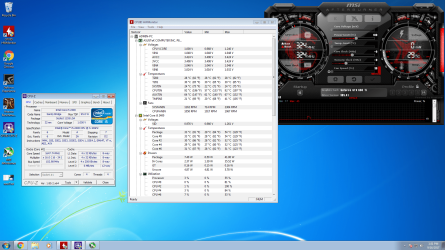
That's ok mate the rail volts are fine that's the main thing and to be honest the PSU is often overlooked as a cause for problems and as I said it is always something I like to check early on.;)
 

My Computer My Computer

At a glance

Desk1 7 Home Prem / Desk2 10 Pro / Main lap A...Desk1 i5 3750K / Laptop i7 GTX 860M / Desk2 i...Desk1 8GB (1866) / Desk2 16GB (1333) / Laptop...Desk 1& 2NVidia GTX 650 & Laptops on board Intel
Computer type
PC/Desktop
Computer Manufacturer/Model Number
Own build (new) Desk1 / Asus ROG Win 7 / Desk2 1st build
OS
Desk1 7 Home Prem / Desk2 10 Pro / Main lap Asus ROG 10 Pro 2 laptop Toshiba 7 Pro Asus P2520 7 & 10
CPU
Desk1 i5 3750K / Laptop i7 GTX 860M / Desk2 i5 2500
Motherboard
Desk1 Asus P877-V / Desk2 Gigabyte H67 UD3H / Laptop ?
Memory
Desk1 8GB (1866) / Desk2 16GB (1333) / Laptop 8Gb DDR3
Graphics Card(s)
Desk 1& 2NVidia GTX 650 & Laptops on board Intel
Sound Card
Desk 1 & 2 -XONAR DG Realtek High Def audio Laptop
Monitor(s) Displays
Desk 1 Benq HD 2450 / Desk2 Philips 24" / Laptop 17.5"
Screen Resolution
1920x1080 D1 & D2 & Laptop 1
Hard Drives
Desk1 Samsung 120GB 830 SSD
Asus ROG 256GB 850 Pro SSD
Desk2 Samsung 840 256 SSD
Toshiba 120GB EVO
PSU
Desk 1 Corsair HX 1050/ Laptop ? / Desk 2 Corsair HX 650
Case
Desk 1 Cooler HAF XM ? Toshiba laptop / Desk2 Coolermaster
Cooling
Fans on all Desk1 -2 Desk2 - all Coolermasters 5 Laptop ?
Keyboard
Desk 1 MS Sidewinder X6 Desk 2 MS Sidewinder X 4
Mouse
Desk 1&2 - Gigabyte MS 900 gamer - laptop - Logitec wireless
Internet Speed
ADSL2+
Other Info
One other Desktop (tester) and spare Toshba laptop both with SSD's
Running Kaspersky 2016 ISS on all machines config'd identically
Logitec audio stereo systems on each machine (x3)
Canon MG5250MFC
Router/modem TP-Link running WPA2SK
Hi, just thinking out loud here:

First this:
What i did notice tho is that my cpu cooler mounting pin is kind of busted, but the cooler still sits well and firm on the CPU. Fan is also working. CPU still throttling.

Then this:
That means that HW Monitor is looking for a sensor where there isn't one, for some reason it has CPUTIN sensor mapped to the wrong location for your motherboard and since its not getting any data at all its reading as its max possible value (128 C)

Check your temps with some other programs, and check in BIOS to see what it says, you may have a faulty CPU temperature probe.

Source: http://www.tomshardware.com/forum/327738-28-cputin-temp-128c#r3045959
Did you ever stop to consider that, that mounting pin that is kind of busted is part of the CPU temperature probe system? It doesn't matter if it sits well and firm, it's kinda busted and until you test with a known good cooling unit you won't know for sure.

Think of it this way; How can the cooler know how the CPU is doing if a probe is busted?
 

My Computer My Computer

At a glance

Originally Win 7 Hm Prem x64 Ver 6.1.7600 Bui...Intel i3 530 2.93GHz, 2933MHz 2 Cores 4 Logic...6GB of 1,333MHz DDR3 SDRAM32MB Intel Graphics Media Accelerator HD IGChip
Computer type
PC/Desktop
Computer Manufacturer/Model Number
Gateway DX4831-01e (Mid-Tower Desktop)
OS
Originally Win 7 Hm Prem x64 Ver 6.1.7600 Build 7601-SP1 | Upgraded to Windows 10 December 14, 2019
CPU
Intel i3 530 2.93GHz, 2933MHz 2 Cores 4 Logical Processors
Motherboard
Gateway H57M01 133 megahertz
Memory
6GB of 1,333MHz DDR3 SDRAM
Graphics Card(s)
32MB Intel Graphics Media Accelerator HD IGChip
Sound Card
Realtek High Definition Audio
Monitor(s) Displays
Gateway HX2000 20inch TFT active matrix TN
Screen Resolution
1600 x 900 x 59 hertz
Hard Drives
WDC WD10EADS-00M2B0 [HDD] (1000.20 GB) -- drive 0,
HL-DT-ST DVDRAM GH41N [CD-ROM dr]
Four card readers, and Four USB 2.0
PSU
300watts.
Case
Mid-Tower Desktop
Cooling
Stock from Gateway
Keyboard
Natural Ergonomic Keyboard 4000, see Other Info
Mouse
Orig. Gateway wore out now using Insignia USB wired optical
Internet Speed
Vz FIOS 10ms png 57.64Mbps down 65.53Mbps up Speedtest.org
Antivirus
Zamana Anti-logger with Anti-malware, MSE, Windows Firewall,
Browser
IE11.0.9600.19399-Upd ver11.0.135, Firefox 68.0.1 x64
Other Info
System Specs by Belarc.

BIOS: American Megatrends Inc. P01-A0 11/17/2009

Replaced the MS 'Natural' Standard PS/2 Enhanced 101-102 Keyboard with a new Natural Ergonomic Keyboard 4000 on August 1st 2014.

Canon Pixma MG3222 Printer.

Updated to IE11 on 12102015 | Fios Quantum Router g1100

Additional AV: SpywareBlaster, manual Mbam, SAS
Think of it this way; How can the cooler know how the CPU is doing if a probe is busted?

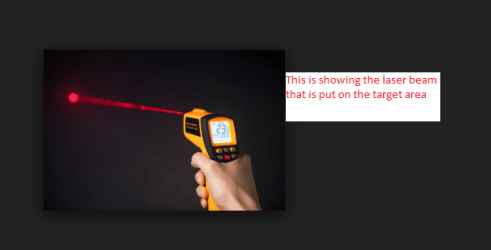
Very true and I am guessing that maybe a purely mechanical method might be needed as in one of those infrared guns - they are not very expensive and I have found them really good even if you can only get half way close enough shot at the CPU.

Now in my experience too say with a liquid cooled unit the reading from the gun even off the radiator or cooling pipes if the unit is an air cooled one the difference between the actual CPU temp and the cooler is within approx 10C of the CPU proper sensor reading.

As I said the guns themselves are really cheap and very accurate.
 

Attachments

  • GUN.PNG
    GUN.PNG
    20.3 KB · Views: 22

My Computer My Computer

At a glance

Desk1 7 Home Prem / Desk2 10 Pro / Main lap A...Desk1 i5 3750K / Laptop i7 GTX 860M / Desk2 i...Desk1 8GB (1866) / Desk2 16GB (1333) / Laptop...Desk 1& 2NVidia GTX 650 & Laptops on board Intel
Computer type
PC/Desktop
Computer Manufacturer/Model Number
Own build (new) Desk1 / Asus ROG Win 7 / Desk2 1st build
OS
Desk1 7 Home Prem / Desk2 10 Pro / Main lap Asus ROG 10 Pro 2 laptop Toshiba 7 Pro Asus P2520 7 & 10
CPU
Desk1 i5 3750K / Laptop i7 GTX 860M / Desk2 i5 2500
Motherboard
Desk1 Asus P877-V / Desk2 Gigabyte H67 UD3H / Laptop ?
Memory
Desk1 8GB (1866) / Desk2 16GB (1333) / Laptop 8Gb DDR3
Graphics Card(s)
Desk 1& 2NVidia GTX 650 & Laptops on board Intel
Sound Card
Desk 1 & 2 -XONAR DG Realtek High Def audio Laptop
Monitor(s) Displays
Desk 1 Benq HD 2450 / Desk2 Philips 24" / Laptop 17.5"
Screen Resolution
1920x1080 D1 & D2 & Laptop 1
Hard Drives
Desk1 Samsung 120GB 830 SSD
Asus ROG 256GB 850 Pro SSD
Desk2 Samsung 840 256 SSD
Toshiba 120GB EVO
PSU
Desk 1 Corsair HX 1050/ Laptop ? / Desk 2 Corsair HX 650
Case
Desk 1 Cooler HAF XM ? Toshiba laptop / Desk2 Coolermaster
Cooling
Fans on all Desk1 -2 Desk2 - all Coolermasters 5 Laptop ?
Keyboard
Desk 1 MS Sidewinder X6 Desk 2 MS Sidewinder X 4
Mouse
Desk 1&2 - Gigabyte MS 900 gamer - laptop - Logitec wireless
Internet Speed
ADSL2+
Other Info
One other Desktop (tester) and spare Toshba laptop both with SSD's
Running Kaspersky 2016 ISS on all machines config'd identically
Logitec audio stereo systems on each machine (x3)
Canon MG5250MFC
Router/modem TP-Link running WPA2SK
After windows updates was able to play Warframe on max for 2 hours without any issues. PC is still running as we speak.
Well, now I'm really baffled.
 

My Computer My Computer

At a glance

Win 7 Pro x64/Win 10 Pro x64 dual bootAMD FX 8350 Vishera @ 420016 GB Mushkin Blackline DDR3-2400 @ 1866 (9-1...XFX Radeon R9 280 Double D Black Edition
Computer type
PC/Desktop
Computer Manufacturer/Model Number
Mellon Labs (custom build)
OS
Win 7 Pro x64/Win 10 Pro x64 dual boot
CPU
AMD FX 8350 Vishera @ 4200
Motherboard
ASUS M5A97 R2.0
Memory
16 GB Mushkin Blackline DDR3-2400 @ 1866 (9-10-10-10-31)
Graphics Card(s)
XFX Radeon R9 280 Double D Black Edition
Sound Card
Realtek HD Audio on MB. Sounds great.
Monitor(s) Displays
Acer 24", Acer 22"
Screen Resolution
3840 x 1080
Hard Drives
1 x Mushkin Chronos 120 GB SSD (Win 10)
1 x Samsung 850 EVO 250 GB SSD (Win 7)
1 x WD 1TB SATA Blue
1 x WD 1TB SATA Green
PSU
Corsair TX-750
Case
CoolerMaster HAF 912+
Cooling
Coolermaster Seidon 240M Liquid AIO. 6 case fans
Keyboard
Logitech G710+
Mouse
Logitech G500s
Internet Speed
Much better since I got fiber, but still way overpriced.
Antivirus
MSE, Malware Bytes for scanning
Browser
Firefox
Other Info
Corsair VOID USB headphones.

A Mellon Labs X-1 - LCD Smartie driven system status display.

Brought to you by the letter E
So a little status update.

Looking for a new cpu cooler.

The pc has been running smoothly since yesterday no crashes. Able to play games such as PUBG and warframe.

Still will buy the cooler regardless. Thanks for the replies!

EDIT: As typing this the pc crashed. Idle.
 

My Computer My Computer

At a glance

Microsoft Windows 7 Ultimate 64-bit 7601 Mult...Intel(R) Core(TM) i5-2400 CPU @ 3.10GHz16.00 GBNVIDIA GeForce GTX 660 Ti SC 3GB
Computer type
PC/Desktop
Computer Manufacturer/Model Number
Custom Build
OS
Microsoft Windows 7 Ultimate 64-bit 7601 Multiprocessor Free Service Pack 1
CPU
Intel(R) Core(TM) i5-2400 CPU @ 3.10GHz
Motherboard
ASUSTeK COMPUTER INC. P8H61-M LE/CSM
Memory
16.00 GB
Graphics Card(s)
NVIDIA GeForce GTX 660 Ti SC 3GB
Sound Card
(1) NVIDIA High Definition Audio (2) Realtek High Definiti
Monitor(s) Displays
21.5" HP
Screen Resolution
1600 x 900 x 32 bits (4294967296 colors) @ 60 Hz
Hard Drives
ST31000524AS ATA Device 7200
PSU
OCZ 650W Bronze Plus
Case
Zalman Z9 Plus
Mouse
Razer naga molten edition
Antivirus
Microsoft Security Essentials along with Malwarbytes
Browser
Chrome
Other Info
Love computers but wanting to learn more about troubleshooting and wanting to contribute to this community!
Yes well I did notice back in post #7 you said that the cooler mount was kinf of busted just what did you mean by busted?? bent or the thing has cracked away from the board ?

Am asking because as you probably know the CPU spreader and the cooler heatsink have to have as much contact as possible and to do that the two surfaces have to have as much even pressure between them plus the compound to make sure the microscopic scratches and pits on those two surfaces have the optimum level of contact to carry away the heat produced by the CPU.
Now it stands to reason that if the two surfaces are not at 180 degrees to each other as is physically possible then the heat transfer is not going to be even at best and useless at worst.

If you do get a new cooler then I don't know how well you know how to do this and I am not being presumptuous then you need to not only clean the two surfaces but prepare them first before applying a reputable brand compound.
Personally I use Arctic Silver products and my method is to clean the two surfaces (even if they are new) with the AS cleaning solution and then prepare the surface with the prep solution and then using one of my fingers inside a vinyl glove - a latex one will do to keep any body oils from myself from contaminating the two surfaces and genrtly spread an even thin film of the AS thermal compound over each surface.
I then place a spot (rice grain size) of the AS compound on the centre of the CPU heatsink and then fix down the cooler plate / spreader. The compound will on heating up "bleed out" across the two surfaces which have been "primed" with compound. This way I am sure that the compound is in contact with the entire surface of the two components.
I do not subscribe to just using alcohol and/or just putting a blob of compound on the CPU an just putting back the cooler only because I am very pedantic and OCD about doing this because of problems I have had I the past.
The products are in these links Arctic Silver Incorporated - ArctiClean & Arctic Silver Incorporated - Arctic Silver 5 The products are a little more expensive than other s which might be good but I use only this now.

Edit: I should have said though that the choice is yours of course. Plus use clean pieces of cloth or tissue for each solution do not mix them.
 

My Computer My Computer

At a glance

Desk1 7 Home Prem / Desk2 10 Pro / Main lap A...Desk1 i5 3750K / Laptop i7 GTX 860M / Desk2 i...Desk1 8GB (1866) / Desk2 16GB (1333) / Laptop...Desk 1& 2NVidia GTX 650 & Laptops on board Intel
Computer type
PC/Desktop
Computer Manufacturer/Model Number
Own build (new) Desk1 / Asus ROG Win 7 / Desk2 1st build
OS
Desk1 7 Home Prem / Desk2 10 Pro / Main lap Asus ROG 10 Pro 2 laptop Toshiba 7 Pro Asus P2520 7 & 10
CPU
Desk1 i5 3750K / Laptop i7 GTX 860M / Desk2 i5 2500
Motherboard
Desk1 Asus P877-V / Desk2 Gigabyte H67 UD3H / Laptop ?
Memory
Desk1 8GB (1866) / Desk2 16GB (1333) / Laptop 8Gb DDR3
Graphics Card(s)
Desk 1& 2NVidia GTX 650 & Laptops on board Intel
Sound Card
Desk 1 & 2 -XONAR DG Realtek High Def audio Laptop
Monitor(s) Displays
Desk 1 Benq HD 2450 / Desk2 Philips 24" / Laptop 17.5"
Screen Resolution
1920x1080 D1 & D2 & Laptop 1
Hard Drives
Desk1 Samsung 120GB 830 SSD
Asus ROG 256GB 850 Pro SSD
Desk2 Samsung 840 256 SSD
Toshiba 120GB EVO
PSU
Desk 1 Corsair HX 1050/ Laptop ? / Desk 2 Corsair HX 650
Case
Desk 1 Cooler HAF XM ? Toshiba laptop / Desk2 Coolermaster
Cooling
Fans on all Desk1 -2 Desk2 - all Coolermasters 5 Laptop ?
Keyboard
Desk 1 MS Sidewinder X6 Desk 2 MS Sidewinder X 4
Mouse
Desk 1&2 - Gigabyte MS 900 gamer - laptop - Logitec wireless
Internet Speed
ADSL2+
Other Info
One other Desktop (tester) and spare Toshba laptop both with SSD's
Running Kaspersky 2016 ISS on all machines config'd identically
Logitec audio stereo systems on each machine (x3)
Canon MG5250MFC
Router/modem TP-Link running WPA2SK
Yes well I did notice back in post #7 you said that the cooler mount was kinf of busted just what did you mean by busted?? bent or the thing has cracked away from the board ?

Am asking because as you probably know the CPU spreader and the cooler heatsink have to have as much contact as possible and to do that the two surfaces have to have as much even pressure between them plus the compound to make sure the microscopic scratches and pits on those two surfaces have the optimum level of contact to carry away the heat produced by the CPU.
Now it stands to reason that if the two surfaces are not at 180 degrees to each other as is physically possible then the heat transfer is not going to be even at best and useless at worst.

If you do get a new cooler then I don't know how well you know how to do this and I am not being presumptuous then you need to not only clean the two surfaces but prepare them first before applying a reputable brand compound.
Personally I use Arctic Silver products and my method is to clean the two surfaces (even if they are new) with the AS cleaning solution and then prepare the surface with the prep solution and then using one of my fingers inside a vinyl glove - a latex one will do to keep any body oils from myself from contaminating the two surfaces and genrtly spread an even thin film of the AS thermal compound over each surface.
I then place a spot (rice grain size) of the AS compound on the centre of the CPU heatsink and then fix down the cooler plate / spreader. The compound will on heating up "bleed out" across the two surfaces which have been "primed" with compound. This way I am sure that the compound is in contact with the entire surface of the two components.
I do not subscribe to just using alcohol and/or just putting a blob of compound on the CPU an just putting back the cooler only because I am very pedantic and OCD about doing this because of problems I have had I the past.
The products are in these links Arctic Silver Incorporated - ArctiClean & Arctic Silver Incorporated - Arctic Silver 5 The products are a little more expensive than other s which might be good but I use only this now.

Edit: I should have said though that the choice is yours of course.


Haha no worries I'm not a noob. I have a tube of good Ole artic mx4. And I prefer the pea :)

So on the lga 1155 it has those weird fastening pins and one of the 2 plastic ends broke off completely. May be able to get a new stock cooler tomorrow.
 

My Computer My Computer

At a glance

Microsoft Windows 7 Ultimate 64-bit 7601 Mult...Intel(R) Core(TM) i5-2400 CPU @ 3.10GHz16.00 GBNVIDIA GeForce GTX 660 Ti SC 3GB
Computer type
PC/Desktop
Computer Manufacturer/Model Number
Custom Build
OS
Microsoft Windows 7 Ultimate 64-bit 7601 Multiprocessor Free Service Pack 1
CPU
Intel(R) Core(TM) i5-2400 CPU @ 3.10GHz
Motherboard
ASUSTeK COMPUTER INC. P8H61-M LE/CSM
Memory
16.00 GB
Graphics Card(s)
NVIDIA GeForce GTX 660 Ti SC 3GB
Sound Card
(1) NVIDIA High Definition Audio (2) Realtek High Definiti
Monitor(s) Displays
21.5" HP
Screen Resolution
1600 x 900 x 32 bits (4294967296 colors) @ 60 Hz
Hard Drives
ST31000524AS ATA Device 7200
PSU
OCZ 650W Bronze Plus
Case
Zalman Z9 Plus
Mouse
Razer naga molten edition
Antivirus
Microsoft Security Essentials along with Malwarbytes
Browser
Chrome
Other Info
Love computers but wanting to learn more about troubleshooting and wanting to contribute to this community!
Haha no worries I'm not a noob.
Got you my friend and I was not insinuating you do not know what you are doing just offering you a different method of reapplying the compound as I have tried all manner of methods and find mine ensures that tight contact without contaminating the surfaces and every square millimetre of the surfaces are covered with compound.

But as I said too it's your gear and choice.

Yes those fixers are a piece of work too personally I have had many battles with them and why they make them so flimsy (in my mind) is crazy when one is plating around a piece of equipment that costs hundreds of dollars.

Again I now would only choose liquid coolers because most of my issues have been with those enormous air types.
 

My Computer My Computer

At a glance

Desk1 7 Home Prem / Desk2 10 Pro / Main lap A...Desk1 i5 3750K / Laptop i7 GTX 860M / Desk2 i...Desk1 8GB (1866) / Desk2 16GB (1333) / Laptop...Desk 1& 2NVidia GTX 650 & Laptops on board Intel
Computer type
PC/Desktop
Computer Manufacturer/Model Number
Own build (new) Desk1 / Asus ROG Win 7 / Desk2 1st build
OS
Desk1 7 Home Prem / Desk2 10 Pro / Main lap Asus ROG 10 Pro 2 laptop Toshiba 7 Pro Asus P2520 7 & 10
CPU
Desk1 i5 3750K / Laptop i7 GTX 860M / Desk2 i5 2500
Motherboard
Desk1 Asus P877-V / Desk2 Gigabyte H67 UD3H / Laptop ?
Memory
Desk1 8GB (1866) / Desk2 16GB (1333) / Laptop 8Gb DDR3
Graphics Card(s)
Desk 1& 2NVidia GTX 650 & Laptops on board Intel
Sound Card
Desk 1 & 2 -XONAR DG Realtek High Def audio Laptop
Monitor(s) Displays
Desk 1 Benq HD 2450 / Desk2 Philips 24" / Laptop 17.5"
Screen Resolution
1920x1080 D1 & D2 & Laptop 1
Hard Drives
Desk1 Samsung 120GB 830 SSD
Asus ROG 256GB 850 Pro SSD
Desk2 Samsung 840 256 SSD
Toshiba 120GB EVO
PSU
Desk 1 Corsair HX 1050/ Laptop ? / Desk 2 Corsair HX 650
Case
Desk 1 Cooler HAF XM ? Toshiba laptop / Desk2 Coolermaster
Cooling
Fans on all Desk1 -2 Desk2 - all Coolermasters 5 Laptop ?
Keyboard
Desk 1 MS Sidewinder X6 Desk 2 MS Sidewinder X 4
Mouse
Desk 1&2 - Gigabyte MS 900 gamer - laptop - Logitec wireless
Internet Speed
ADSL2+
Other Info
One other Desktop (tester) and spare Toshba laptop both with SSD's
Running Kaspersky 2016 ISS on all machines config'd identically
Logitec audio stereo systems on each machine (x3)
Canon MG5250MFC
Router/modem TP-Link running WPA2SK
Back
Top