
Solved Complete power failure when using video editors...?

MrMii Win 7

Personalization Freak
Member
Local time
6:45 AM
Messages
94
Location
Missouri, USA
No clue if you can help with this but any pointers would help. So I'll start off by saying that I do YouTube videos for gaming, and I've used both VideoPad Video Editor (2.41) and Sony Vegas Pro 12 (build 3xx) for editing and rendering. The first problem I thought was a coincidence. I was downloading a music file from Chrome (which was open to YouTube) with VideoPad in the background, simply idling, when the PC just hard shutdown on its own. :huh: :eek: (Only had VideoPad, Chrome, and a folder window open) Me thinking it was a coincidence, I turned it back on and went back to doing the stuff from before. The problem only arose again last night when I decided to do a test render with Vegas 12. Only a four minute clip, I told it to render and walked out of the room. When I came back, the PC's power was off. Turned it on again, told Vegas 12 to render again, and the same thing happened, power failing at less than 10% complete. The thing that really makes me scratch my head is that all the diagnostic tools I knew how to use, including reliability history and event viewer, tells me nothing useful. The only event logged is that the previous shutdown was unexpected. No technical details were given. There is no BSOD, it just simply loses power. I have a feeling that this is related to my PSU. :confused:
 

My Computer

Computer type
PC/Desktop
Computer Manufacturer/Model Number
MrMiios (Custom Build by Me)
OS
Windows 7 Professional x64 (SP1)
CPU
AMD FX-6300 Six Core Processor 3.5GHz (Not OC'd)
Motherboard
ASROCK 980DE3/US3S
Memory
G.Skill Ripjaws - 4x4GB (16GB)
Graphics Card(s)
MSI GeForce GTX 970 TwinFrozr 4GB
Sound Card
[[Using Onboard HD Audio]]
Monitor(s) Displays
HP 27es
Screen Resolution
1920x1080
Hard Drives
Western Digital Red 1TB (Internal)
Toshiba Canvio 2TB USB 3.0 Desktop Hard Drive (External)
PSU
EVGA 850W 80+ GOLD 220-G2-0850-XR (Fully Modular)
Case
DIYPC Ranger-R4-R
Cooling
Cooler Master Hyper 212 Evo
Keyboard
Dell USB Keyboard
Mouse
Red Logitech Wireless Mouse
Internet Speed
DL: 95mb/s, UL: 5.9mb/s
Antivirus
Norton Security (previous year's)
Browser
Google Chrome
Other Info
Now Aero SOMETIMES works on start, but everything's sluggish and Aero will usually crash back to Basic. Restarting still resolves the issue. I'll probably clean install later... But what a pain reinstalling the programs will be... ugh...

My Computers

System One System Two

  • Computer type
    PC/Desktop
    Computer Manufacturer/Model Number
    ChillBlast - Custom to my design
    OS
    Windows 11 Pro x64 [Latest Release and Release Preview]
    CPU
    Ryzen 9 5950X, 3.8 - 5.2 MHz
    Motherboard
    Asus Prime X570-Pro
    Memory
    64GB [2 x 32GB] DDR4 3200MHz
    Graphics Card(s)
    4GB NVIDIA GEFORCE GTX 1650 Ti
    Sound Card
    On-board SPDIF to 5.1 System + HDMI [5.1 system]
    Monitor(s) Displays
    32" UHD 32 Bit HDR Monitor + 43" UHD 4K 32Bit HDR TV
    Screen Resolution
    2 x 3840 x 2160 @60Hz
    Hard Drives
    1TB M2 SSD OS, 500GB Fast Access SSD, 2 x 8TB Data + Various Externals from 1TB to 4TB, 10TB NAS
    PSU
    NZXT C750 80 PLUS Gold 750W Modular PSU
    Case
    Workstation Case [Matt Black]
    Cooling
    NZXT Kraken X63 280mm CPU Cooler +2x Quiet Case fans
    Keyboard
    Logitech Wireless MX Keys & K400 + others
    Mouse
    Logitech Wireless MX Master 3S
    Internet Speed
    920 MB Down 50 MB Up
    Antivirus
    BitDefender Total Security Pro
    Browser
    Chrome (always run latest Non-Beta)
    Other Info
    Also run ...
    Laptop - Quad 8GB - Windows 10 Pro x64
    Nexus 7 Android tablet x2
    Samsung 10.2" tablet
    Blackview TAB 8 4G Android Tablet c/w Keyboard
    Wacom Intuos Pro Medium Pen Pad
    Wacom Intuos Pro Small Pen Pad
    Wacom Expresskeys Remote
    Loopdeck+ Graphics Controller
    Shuttle Pro v2 Control
  • Computer type
    Laptop
    System Manufacturer/Model Number
    Dell XPS 17 10750H
    OS
    Windows 11 Pro x64 Latest RP
    CPU
    Intel I7 10750H 5.0GHz
    Motherboard
    Dell XPS
    Memory
    32GB [2x16GB] DDR4 2933 MHz
    Graphics Card(s)
    nVidia GTX1650Ti 4 GB GDDR6
    Sound Card
    Stock [Realtek] 4 Speaker
    Monitor(s) Displays
    17" IPS UHD+ Infinity Edge Touchscreen
    Screen Resolution
    3840 x 2400
    Hard Drives
    2TB M2 NVMe, 4TB External + various 500GB & 1TB External NVMe (also have access to spinner HDD from
    PSU
    Stock
    Case
    Stock XPS Aluminium & Carbon Fibre
    Cooling
    Stock - Active Fan Control
    Keyboard
    Backlit + Various Logitech
    Mouse
    Stock Track Pad + Logitech MX Trackball
    Internet Speed
    72 MB Down 18MB Up
    Browser
    Chrome
    Other Info
    Also run ...
    Laptop - Quad 8GB - Windows 10 Pro x64
    Nexus 7 Android tablet x2
    10.2" tablet
    Sony Z3 Android Smartphone
    Wacom Intuos Pro Medium Pen Pad
    Wacom Intuos Pro Small Pen Pad
    Wacom Expresskeys Remote
    Loopdeck+ Graphics Controller
    Shuttle Pro v2 Control Pad
    10TB NAS
How old is the power supply?

If you use the tools that Barman58 suggested, they will definitely tell you if you have a voltage going south on you, but you may have to actually use a meter and measure the voltages to be completely accurate. Sometimes software gives false readings of the voltages.

Also, use the programs that Barman58 suggested to monitor your temperatures as well. It could be that the stress of rendering is causing your CPU temp to go too high. The computer will shut down as a result of that. Open the case, and make sure that your CPU fan is turning properly and isn't caked by dust.
 

My Computer

Computer type
PC/Desktop
Computer Manufacturer/Model Number
Mellon Labs (custom build)
OS
Win 7 Pro x64/Win 10 Pro x64 dual boot
CPU
AMD FX 8350 Vishera @ 4200
Motherboard
ASUS M5A97 R2.0
Memory
16 GB Mushkin Blackline DDR3-2400 @ 1866 (9-10-10-10-31)
Graphics Card(s)
XFX Radeon R9 280 Double D Black Edition
Sound Card
Realtek HD Audio on MB. Sounds great.
Monitor(s) Displays
Acer 24", Acer 22"
Screen Resolution
3840 x 1080
Hard Drives
1 x Mushkin Chronos 120 GB SSD (Win 10)
1 x Samsung 850 EVO 250 GB SSD (Win 7)
1 x WD 1TB SATA Blue
1 x WD 1TB SATA Green
PSU
Corsair TX-750
Case
CoolerMaster HAF 912+
Cooling
Coolermaster Seidon 240M Liquid AIO. 6 case fans
Keyboard
Logitech G710+
Mouse
Logitech G500s
Internet Speed
Much better since I got fiber, but still way overpriced.
Antivirus
MSE, Malware Bytes for scanning
Browser
Firefox
Other Info
Corsair VOID USB headphones.

A Mellon Labs X-1 - LCD Smartie driven system status display.

Brought to you by the letter E
Moved from software to hardware
 

My Computers

System One System Two

  • Computer type
    PC/Desktop
    Computer Manufacturer/Model Number
    ChillBlast - Custom to my design
    OS
    Windows 11 Pro x64 [Latest Release and Release Preview]
    CPU
    Ryzen 9 5950X, 3.8 - 5.2 MHz
    Motherboard
    Asus Prime X570-Pro
    Memory
    64GB [2 x 32GB] DDR4 3200MHz
    Graphics Card(s)
    4GB NVIDIA GEFORCE GTX 1650 Ti
    Sound Card
    On-board SPDIF to 5.1 System + HDMI [5.1 system]
    Monitor(s) Displays
    32" UHD 32 Bit HDR Monitor + 43" UHD 4K 32Bit HDR TV
    Screen Resolution
    2 x 3840 x 2160 @60Hz
    Hard Drives
    1TB M2 SSD OS, 500GB Fast Access SSD, 2 x 8TB Data + Various Externals from 1TB to 4TB, 10TB NAS
    PSU
    NZXT C750 80 PLUS Gold 750W Modular PSU
    Case
    Workstation Case [Matt Black]
    Cooling
    NZXT Kraken X63 280mm CPU Cooler +2x Quiet Case fans
    Keyboard
    Logitech Wireless MX Keys & K400 + others
    Mouse
    Logitech Wireless MX Master 3S
    Internet Speed
    920 MB Down 50 MB Up
    Antivirus
    BitDefender Total Security Pro
    Browser
    Chrome (always run latest Non-Beta)
    Other Info
    Also run ...
    Laptop - Quad 8GB - Windows 10 Pro x64
    Nexus 7 Android tablet x2
    Samsung 10.2" tablet
    Blackview TAB 8 4G Android Tablet c/w Keyboard
    Wacom Intuos Pro Medium Pen Pad
    Wacom Intuos Pro Small Pen Pad
    Wacom Expresskeys Remote
    Loopdeck+ Graphics Controller
    Shuttle Pro v2 Control
  • Computer type
    Laptop
    System Manufacturer/Model Number
    Dell XPS 17 10750H
    OS
    Windows 11 Pro x64 Latest RP
    CPU
    Intel I7 10750H 5.0GHz
    Motherboard
    Dell XPS
    Memory
    32GB [2x16GB] DDR4 2933 MHz
    Graphics Card(s)
    nVidia GTX1650Ti 4 GB GDDR6
    Sound Card
    Stock [Realtek] 4 Speaker
    Monitor(s) Displays
    17" IPS UHD+ Infinity Edge Touchscreen
    Screen Resolution
    3840 x 2400
    Hard Drives
    2TB M2 NVMe, 4TB External + various 500GB & 1TB External NVMe (also have access to spinner HDD from
    PSU
    Stock
    Case
    Stock XPS Aluminium & Carbon Fibre
    Cooling
    Stock - Active Fan Control
    Keyboard
    Backlit + Various Logitech
    Mouse
    Stock Track Pad + Logitech MX Trackball
    Internet Speed
    72 MB Down 18MB Up
    Browser
    Chrome
    Other Info
    Also run ...
    Laptop - Quad 8GB - Windows 10 Pro x64
    Nexus 7 Android tablet x2
    10.2" tablet
    Sony Z3 Android Smartphone
    Wacom Intuos Pro Medium Pen Pad
    Wacom Intuos Pro Small Pen Pad
    Wacom Expresskeys Remote
    Loopdeck+ Graphics Controller
    Shuttle Pro v2 Control Pad
    10TB NAS
The power supply was brand new, bought this past July. However, I conducted my own test using SpeedFan, (unsure how reliable it is for reading temperatures but it was recommended by my instructor) and used it to monitor the CPU temp before and during rendering. Before, it kept within 100-110 degrees. While rendering however, it gradually rose up to 180+ before finally killing the power. I think I found the problem... And late reply...
 

My Computer

Computer type
PC/Desktop
Computer Manufacturer/Model Number
MrMiios (Custom Build by Me)
OS
Windows 7 Professional x64 (SP1)
CPU
AMD FX-6300 Six Core Processor 3.5GHz (Not OC'd)
Motherboard
ASROCK 980DE3/US3S
Memory
G.Skill Ripjaws - 4x4GB (16GB)
Graphics Card(s)
MSI GeForce GTX 970 TwinFrozr 4GB
Sound Card
[[Using Onboard HD Audio]]
Monitor(s) Displays
HP 27es
Screen Resolution
1920x1080
Hard Drives
Western Digital Red 1TB (Internal)
Toshiba Canvio 2TB USB 3.0 Desktop Hard Drive (External)
PSU
EVGA 850W 80+ GOLD 220-G2-0850-XR (Fully Modular)
Case
DIYPC Ranger-R4-R
Cooling
Cooler Master Hyper 212 Evo
Keyboard
Dell USB Keyboard
Mouse
Red Logitech Wireless Mouse
Internet Speed
DL: 95mb/s, UL: 5.9mb/s
Antivirus
Norton Security (previous year's)
Browser
Google Chrome
Other Info
Now Aero SOMETIMES works on start, but everything's sluggish and Aero will usually crash back to Basic. Restarting still resolves the issue. I'll probably clean install later... But what a pain reinstalling the programs will be... ugh...
MrMii Win 7 do you mean 180+ degrees Celsius?
 

My Computer

Computer type
PC/Desktop
Computer Manufacturer/Model Number
Home made Desktop
OS
Windows 10 Pro. 64/ version 1709 Windows 7 Pro/64
CPU
Intel i7-6800K @ 4.3
Motherboard
ASUS X-99 Deluxe II
Memory
Corsair Platinum 16 gig @2400
Graphics Card(s)
EVGA GTX 1070 OC
Monitor(s) Displays
Asus 27" LED LCD/VE278Q
Screen Resolution
1920-1080 or 1280-720 HDMI
Hard Drives
INTEL SSD 730-240 Gb Sata 3.0/
PSU
EVGA Platium 1200W
Case
Phanteks Luxe Tempered Glass 8 fans/ one radiator
Cooling
XSPC/ Water Cooled CPU
Keyboard
Das 4 Professional
Mouse
Logitech M705/MX Anywhere 2-S
Internet Speed
100 mbits
Antivirus
Microsoft Security Essentials/ Malwarebytes Premium 3.0/ SAS
Browser
I.E. 11 default/Firefox/ ISP Time Warner Cable/Spectrum
Other Info
LG BluRay Burner/
Sound system-KLipsch-THX/
Icy Dock ssd Hot Swap bays.
If it's getting that hot, it's likely shutting down to reduce damage.

What kind of cooling do you have? And check to make sure that your heatsink/fan is mounted properly and the fan is working.
 

My Computer

Computer type
PC/Desktop
Computer Manufacturer/Model Number
Mellon Labs (custom build)
OS
Win 7 Pro x64/Win 10 Pro x64 dual boot
CPU
AMD FX 8350 Vishera @ 4200
Motherboard
ASUS M5A97 R2.0
Memory
16 GB Mushkin Blackline DDR3-2400 @ 1866 (9-10-10-10-31)
Graphics Card(s)
XFX Radeon R9 280 Double D Black Edition
Sound Card
Realtek HD Audio on MB. Sounds great.
Monitor(s) Displays
Acer 24", Acer 22"
Screen Resolution
3840 x 1080
Hard Drives
1 x Mushkin Chronos 120 GB SSD (Win 10)
1 x Samsung 850 EVO 250 GB SSD (Win 7)
1 x WD 1TB SATA Blue
1 x WD 1TB SATA Green
PSU
Corsair TX-750
Case
CoolerMaster HAF 912+
Cooling
Coolermaster Seidon 240M Liquid AIO. 6 case fans
Keyboard
Logitech G710+
Mouse
Logitech G500s
Internet Speed
Much better since I got fiber, but still way overpriced.
Antivirus
MSE, Malware Bytes for scanning
Browser
Firefox
Other Info
Corsair VOID USB headphones.

A Mellon Labs X-1 - LCD Smartie driven system status display.

Brought to you by the letter E
MrMii Win 7 do you mean 180+ degrees Celsius?

Jack, I would assume, (and Hope), that these are Fahrenheit temperatures 180° F is seriously hot 180° C is an oven Temperature - useful for steaks but not so for a PC :D

Another option could of course be a sensor issue, but the cut off happening would tend to exclude this
 

My Computers

System One System Two

  • Computer type
    PC/Desktop
    Computer Manufacturer/Model Number
    ChillBlast - Custom to my design
    OS
    Windows 11 Pro x64 [Latest Release and Release Preview]
    CPU
    Ryzen 9 5950X, 3.8 - 5.2 MHz
    Motherboard
    Asus Prime X570-Pro
    Memory
    64GB [2 x 32GB] DDR4 3200MHz
    Graphics Card(s)
    4GB NVIDIA GEFORCE GTX 1650 Ti
    Sound Card
    On-board SPDIF to 5.1 System + HDMI [5.1 system]
    Monitor(s) Displays
    32" UHD 32 Bit HDR Monitor + 43" UHD 4K 32Bit HDR TV
    Screen Resolution
    2 x 3840 x 2160 @60Hz
    Hard Drives
    1TB M2 SSD OS, 500GB Fast Access SSD, 2 x 8TB Data + Various Externals from 1TB to 4TB, 10TB NAS
    PSU
    NZXT C750 80 PLUS Gold 750W Modular PSU
    Case
    Workstation Case [Matt Black]
    Cooling
    NZXT Kraken X63 280mm CPU Cooler +2x Quiet Case fans
    Keyboard
    Logitech Wireless MX Keys & K400 + others
    Mouse
    Logitech Wireless MX Master 3S
    Internet Speed
    920 MB Down 50 MB Up
    Antivirus
    BitDefender Total Security Pro
    Browser
    Chrome (always run latest Non-Beta)
    Other Info
    Also run ...
    Laptop - Quad 8GB - Windows 10 Pro x64
    Nexus 7 Android tablet x2
    Samsung 10.2" tablet
    Blackview TAB 8 4G Android Tablet c/w Keyboard
    Wacom Intuos Pro Medium Pen Pad
    Wacom Intuos Pro Small Pen Pad
    Wacom Expresskeys Remote
    Loopdeck+ Graphics Controller
    Shuttle Pro v2 Control
  • Computer type
    Laptop
    System Manufacturer/Model Number
    Dell XPS 17 10750H
    OS
    Windows 11 Pro x64 Latest RP
    CPU
    Intel I7 10750H 5.0GHz
    Motherboard
    Dell XPS
    Memory
    32GB [2x16GB] DDR4 2933 MHz
    Graphics Card(s)
    nVidia GTX1650Ti 4 GB GDDR6
    Sound Card
    Stock [Realtek] 4 Speaker
    Monitor(s) Displays
    17" IPS UHD+ Infinity Edge Touchscreen
    Screen Resolution
    3840 x 2400
    Hard Drives
    2TB M2 NVMe, 4TB External + various 500GB & 1TB External NVMe (also have access to spinner HDD from
    PSU
    Stock
    Case
    Stock XPS Aluminium & Carbon Fibre
    Cooling
    Stock - Active Fan Control
    Keyboard
    Backlit + Various Logitech
    Mouse
    Stock Track Pad + Logitech MX Trackball
    Internet Speed
    72 MB Down 18MB Up
    Browser
    Chrome
    Other Info
    Also run ...
    Laptop - Quad 8GB - Windows 10 Pro x64
    Nexus 7 Android tablet x2
    10.2" tablet
    Sony Z3 Android Smartphone
    Wacom Intuos Pro Medium Pen Pad
    Wacom Intuos Pro Small Pen Pad
    Wacom Expresskeys Remote
    Loopdeck+ Graphics Controller
    Shuttle Pro v2 Control Pad
    10TB NAS
By 180 degrees I mean Fahrenheit. If it could reach that in Celsius before shutting down, I'd be amazed and wonder why Vegas made it get that hot in less than two minutes (356 F). Jokes aside, I'm only using the stock fans that my CPU and case came with. I would implement water cooling but that's a pain and I don't have the space in my case to put such a setup. And as far as I know, the CPU fan hasn't stopped spinning, even the moment before it kills the power. My only guess is that they can't spin fast enough to cool it down. Or...something... My mom says that I should clean out the fans, and although she's right, I think it goes beyond that.
 
Last edited:

My Computer

Computer type
PC/Desktop
Computer Manufacturer/Model Number
MrMiios (Custom Build by Me)
OS
Windows 7 Professional x64 (SP1)
CPU
AMD FX-6300 Six Core Processor 3.5GHz (Not OC'd)
Motherboard
ASROCK 980DE3/US3S
Memory
G.Skill Ripjaws - 4x4GB (16GB)
Graphics Card(s)
MSI GeForce GTX 970 TwinFrozr 4GB
Sound Card
[[Using Onboard HD Audio]]
Monitor(s) Displays
HP 27es
Screen Resolution
1920x1080
Hard Drives
Western Digital Red 1TB (Internal)
Toshiba Canvio 2TB USB 3.0 Desktop Hard Drive (External)
PSU
EVGA 850W 80+ GOLD 220-G2-0850-XR (Fully Modular)
Case
DIYPC Ranger-R4-R
Cooling
Cooler Master Hyper 212 Evo
Keyboard
Dell USB Keyboard
Mouse
Red Logitech Wireless Mouse
Internet Speed
DL: 95mb/s, UL: 5.9mb/s
Antivirus
Norton Security (previous year's)
Browser
Google Chrome
Other Info
Now Aero SOMETIMES works on start, but everything's sluggish and Aero will usually crash back to Basic. Restarting still resolves the issue. I'll probably clean install later... But what a pain reinstalling the programs will be... ugh...
Any video rendering will cause that temp rise, any program. You must have proper airflow and seated cooler for the CPU. My primary video unit is set to shut down at 170F. At least I have manual control over some of my fans so I kick them to max before rendering.

Regards,
GEWB
 

My Computer

Computer type
PC/Desktop
Computer Manufacturer/Model Number
(7 different computers booting up to 10 systems)
OS
Linux Mint / XP / Win7 Home, Pro, Ultimate / Win8.1 / Win10
Other Info
Four desktops, two laptops, one notebook and one tablet
By 180 degrees I mean Fahrenheit. If it could reach that in Celsius before shutting down, I'd be amazed and wonder why Vegas made it get that hot in less than two minutes (356 F). Jokes aside, I'm only using the stock fans that my CPU and case came with. I would implement water cooling but that's a pain and I don't have the space in my case to put such a setup. And as far as I know, the CPU fan hasn't stopped spinning, even the moment before it kills the power. My only guess is that they can't spin fast enough to cool it down. Or...something... My mom says that I should clean out the fans, and although she's right, I think it goes beyond that.
Here's the thing. You need to check to see that your cooler is properly fastened to the CPU before you operate your computer any more. You could severely damage the CPU if the cooler is loose. It also wouldn't hurt to put new thermal paste on the CPU when you check the cooler.

You also need to clean those fans, and the cooler.

What is your CPU temp at idle? How fast is your CPU fan turning? Use something like HWInfo to find out, or better yet, take a screenshot of HWInfo so that we can see it, and give you better advice.
 

My Computer

Computer type
PC/Desktop
Computer Manufacturer/Model Number
Mellon Labs (custom build)
OS
Win 7 Pro x64/Win 10 Pro x64 dual boot
CPU
AMD FX 8350 Vishera @ 4200
Motherboard
ASUS M5A97 R2.0
Memory
16 GB Mushkin Blackline DDR3-2400 @ 1866 (9-10-10-10-31)
Graphics Card(s)
XFX Radeon R9 280 Double D Black Edition
Sound Card
Realtek HD Audio on MB. Sounds great.
Monitor(s) Displays
Acer 24", Acer 22"
Screen Resolution
3840 x 1080
Hard Drives
1 x Mushkin Chronos 120 GB SSD (Win 10)
1 x Samsung 850 EVO 250 GB SSD (Win 7)
1 x WD 1TB SATA Blue
1 x WD 1TB SATA Green
PSU
Corsair TX-750
Case
CoolerMaster HAF 912+
Cooling
Coolermaster Seidon 240M Liquid AIO. 6 case fans
Keyboard
Logitech G710+
Mouse
Logitech G500s
Internet Speed
Much better since I got fiber, but still way overpriced.
Antivirus
MSE, Malware Bytes for scanning
Browser
Firefox
Other Info
Corsair VOID USB headphones.

A Mellon Labs X-1 - LCD Smartie driven system status display.

Brought to you by the letter E
I think the first thing to understand is all computer temps are in Celsius around the world. No matter what country one is in.

100 F = 38 C which is very good.

180 F = 82 C which is to hot but with proper cooling can be lowered to proper working range.

Because of the limits of your case, I thinking a AIO water cooler would work well for you along with proper case fan arrangement for air flow.
 

My Computer

Computer type
PC/Desktop
Computer Manufacturer/Model Number
Home made Desktop
OS
Windows 10 Pro. 64/ version 1709 Windows 7 Pro/64
CPU
Intel i7-6800K @ 4.3
Motherboard
ASUS X-99 Deluxe II
Memory
Corsair Platinum 16 gig @2400
Graphics Card(s)
EVGA GTX 1070 OC
Monitor(s) Displays
Asus 27" LED LCD/VE278Q
Screen Resolution
1920-1080 or 1280-720 HDMI
Hard Drives
INTEL SSD 730-240 Gb Sata 3.0/
PSU
EVGA Platium 1200W
Case
Phanteks Luxe Tempered Glass 8 fans/ one radiator
Cooling
XSPC/ Water Cooled CPU
Keyboard
Das 4 Professional
Mouse
Logitech M705/MX Anywhere 2-S
Internet Speed
100 mbits
Antivirus
Microsoft Security Essentials/ Malwarebytes Premium 3.0/ SAS
Browser
I.E. 11 default/Firefox/ ISP Time Warner Cable/Spectrum
Other Info
LG BluRay Burner/
Sound system-KLipsch-THX/
Icy Dock ssd Hot Swap bays.
My fans, with the exception of the side panel, are not controllable as they're 3 pin. Even with the side panel fan being connected directly to the PSU, I haven't found a way to control the speed of even that one. (Although I'm sure there are programs that can let you do that) They do seem to increase in speed as the temperature rises however, but that's probably a normal thing. I am (or at least before, I haven't tested it since I began crashing) able to render with my other, lower end editor. The last time I checked, the fans do not even increase their speed if I use that. But I did note in the original post that the program (VideoPad, not Vegas) was only sitting in the background when I crashed. I like this stuff, but then also hate it... Urgh...
 

My Computer

Computer type
PC/Desktop
Computer Manufacturer/Model Number
MrMiios (Custom Build by Me)
OS
Windows 7 Professional x64 (SP1)
CPU
AMD FX-6300 Six Core Processor 3.5GHz (Not OC'd)
Motherboard
ASROCK 980DE3/US3S
Memory
G.Skill Ripjaws - 4x4GB (16GB)
Graphics Card(s)
MSI GeForce GTX 970 TwinFrozr 4GB
Sound Card
[[Using Onboard HD Audio]]
Monitor(s) Displays
HP 27es
Screen Resolution
1920x1080
Hard Drives
Western Digital Red 1TB (Internal)
Toshiba Canvio 2TB USB 3.0 Desktop Hard Drive (External)
PSU
EVGA 850W 80+ GOLD 220-G2-0850-XR (Fully Modular)
Case
DIYPC Ranger-R4-R
Cooling
Cooler Master Hyper 212 Evo
Keyboard
Dell USB Keyboard
Mouse
Red Logitech Wireless Mouse
Internet Speed
DL: 95mb/s, UL: 5.9mb/s
Antivirus
Norton Security (previous year's)
Browser
Google Chrome
Other Info
Now Aero SOMETIMES works on start, but everything's sluggish and Aero will usually crash back to Basic. Restarting still resolves the issue. I'll probably clean install later... But what a pain reinstalling the programs will be... ugh...
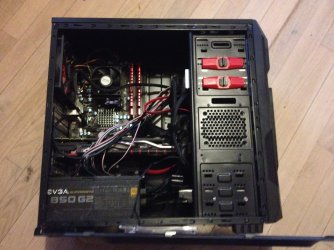
I checked the CPU cooler and it's still firmly in place. The thermal paste is also still looking good. I also checked the orientation of my fans and as far as I can tell, they're all pointing in the right direction. (Only one had an indicator but when I did remove them, such as while building the PC, I made sure they went back on the same way they came) And as for idling temperature, the CPU idles around 90-105 Fahrenheit. (32.2-40.6 C) And in case these would help, I have some pictures of the current inside situation. The wires aren't behind my other side panel because most are too short, now especially with the 970 in there.
 

Attachments

  • IMG_1659.JPG
    IMG_1659.JPG
    774.1 KB · Views: 1
  • IMG_1662.jpg
    IMG_1662.jpg
    668.1 KB · Views: 1

My Computer

Computer type
PC/Desktop
Computer Manufacturer/Model Number
MrMiios (Custom Build by Me)
OS
Windows 7 Professional x64 (SP1)
CPU
AMD FX-6300 Six Core Processor 3.5GHz (Not OC'd)
Motherboard
ASROCK 980DE3/US3S
Memory
G.Skill Ripjaws - 4x4GB (16GB)
Graphics Card(s)
MSI GeForce GTX 970 TwinFrozr 4GB
Sound Card
[[Using Onboard HD Audio]]
Monitor(s) Displays
HP 27es
Screen Resolution
1920x1080
Hard Drives
Western Digital Red 1TB (Internal)
Toshiba Canvio 2TB USB 3.0 Desktop Hard Drive (External)
PSU
EVGA 850W 80+ GOLD 220-G2-0850-XR (Fully Modular)
Case
DIYPC Ranger-R4-R
Cooling
Cooler Master Hyper 212 Evo
Keyboard
Dell USB Keyboard
Mouse
Red Logitech Wireless Mouse
Internet Speed
DL: 95mb/s, UL: 5.9mb/s
Antivirus
Norton Security (previous year's)
Browser
Google Chrome
Other Info
Now Aero SOMETIMES works on start, but everything's sluggish and Aero will usually crash back to Basic. Restarting still resolves the issue. I'll probably clean install later... But what a pain reinstalling the programs will be... ugh...
I see a potential problem. The 12V CPU power line is possibly touching the CPU fan, and it may cause it not to spin properly. This may not be a problem when the case is upright, but I would still move the power cable to the side of the CPU fan assembly.

As for CPU cooling, a 36C idle temp is not outlandish for a cooler like that, but I would suggest that for video rendering that you consider a better cooler, such as a Coolermaster Hyper 212 EVO, or even a small all-in-one water kit, like the Corsair H80i. Both would fit and offer superior cooling to what you have, because the cooler that you have now is not doing the job.
 

My Computer

Computer type
PC/Desktop
Computer Manufacturer/Model Number
Mellon Labs (custom build)
OS
Win 7 Pro x64/Win 10 Pro x64 dual boot
CPU
AMD FX 8350 Vishera @ 4200
Motherboard
ASUS M5A97 R2.0
Memory
16 GB Mushkin Blackline DDR3-2400 @ 1866 (9-10-10-10-31)
Graphics Card(s)
XFX Radeon R9 280 Double D Black Edition
Sound Card
Realtek HD Audio on MB. Sounds great.
Monitor(s) Displays
Acer 24", Acer 22"
Screen Resolution
3840 x 1080
Hard Drives
1 x Mushkin Chronos 120 GB SSD (Win 10)
1 x Samsung 850 EVO 250 GB SSD (Win 7)
1 x WD 1TB SATA Blue
1 x WD 1TB SATA Green
PSU
Corsair TX-750
Case
CoolerMaster HAF 912+
Cooling
Coolermaster Seidon 240M Liquid AIO. 6 case fans
Keyboard
Logitech G710+
Mouse
Logitech G500s
Internet Speed
Much better since I got fiber, but still way overpriced.
Antivirus
MSE, Malware Bytes for scanning
Browser
Firefox
Other Info
Corsair VOID USB headphones.

A Mellon Labs X-1 - LCD Smartie driven system status display.

Brought to you by the letter E
I've already spent no short of $900 on this machine in total, including stuff I've upgraded since building, so I'll likely go with the Hyper 212 Evo, since it's only $35. The other issue is whether my mom will let me spend more on it xD But you know, when you compare a $350 970 to a $35 cooler that will probably extend the lifespan of my system and save me from perilous potential data loss from sudden crashes while rendering, it's a considerable buy. (She's very VERY conscious of how I spend my money so yeah, I'll see how it plays out) If that cooler doesn't work out, I could try for the Corsair you mentioned, though I've always been uneasy about water cooling because of potential leaks...
 

My Computer

Computer type
PC/Desktop
Computer Manufacturer/Model Number
MrMiios (Custom Build by Me)
OS
Windows 7 Professional x64 (SP1)
CPU
AMD FX-6300 Six Core Processor 3.5GHz (Not OC'd)
Motherboard
ASROCK 980DE3/US3S
Memory
G.Skill Ripjaws - 4x4GB (16GB)
Graphics Card(s)
MSI GeForce GTX 970 TwinFrozr 4GB
Sound Card
[[Using Onboard HD Audio]]
Monitor(s) Displays
HP 27es
Screen Resolution
1920x1080
Hard Drives
Western Digital Red 1TB (Internal)
Toshiba Canvio 2TB USB 3.0 Desktop Hard Drive (External)
PSU
EVGA 850W 80+ GOLD 220-G2-0850-XR (Fully Modular)
Case
DIYPC Ranger-R4-R
Cooling
Cooler Master Hyper 212 Evo
Keyboard
Dell USB Keyboard
Mouse
Red Logitech Wireless Mouse
Internet Speed
DL: 95mb/s, UL: 5.9mb/s
Antivirus
Norton Security (previous year's)
Browser
Google Chrome
Other Info
Now Aero SOMETIMES works on start, but everything's sluggish and Aero will usually crash back to Basic. Restarting still resolves the issue. I'll probably clean install later... But what a pain reinstalling the programs will be... ugh...
All in one water cooling systems are pretty leak proof these days, and even if they do leak, the coolant isn't water. It's non-conductive. You still have to clean everything, but it doesn't short out the electronic components. So I'm told...

The Hyper 212 EVO is a good buy and works well to keep your CPU cool. Almost anything will be an improvement at this point. Just make sure to apply new thermal paste when you pop the new cooler on. And get some good thermal paste, like Arctic Silver. Your processor runs hot (most AMD FX series chips do) and everything you can do to cool it will help.
 

My Computer

Computer type
PC/Desktop
Computer Manufacturer/Model Number
Mellon Labs (custom build)
OS
Win 7 Pro x64/Win 10 Pro x64 dual boot
CPU
AMD FX 8350 Vishera @ 4200
Motherboard
ASUS M5A97 R2.0
Memory
16 GB Mushkin Blackline DDR3-2400 @ 1866 (9-10-10-10-31)
Graphics Card(s)
XFX Radeon R9 280 Double D Black Edition
Sound Card
Realtek HD Audio on MB. Sounds great.
Monitor(s) Displays
Acer 24", Acer 22"
Screen Resolution
3840 x 1080
Hard Drives
1 x Mushkin Chronos 120 GB SSD (Win 10)
1 x Samsung 850 EVO 250 GB SSD (Win 7)
1 x WD 1TB SATA Blue
1 x WD 1TB SATA Green
PSU
Corsair TX-750
Case
CoolerMaster HAF 912+
Cooling
Coolermaster Seidon 240M Liquid AIO. 6 case fans
Keyboard
Logitech G710+
Mouse
Logitech G500s
Internet Speed
Much better since I got fiber, but still way overpriced.
Antivirus
MSE, Malware Bytes for scanning
Browser
Firefox
Other Info
Corsair VOID USB headphones.

A Mellon Labs X-1 - LCD Smartie driven system status display.

Brought to you by the letter E
I looked up reviews and installs of the Evo and thinking that it might not fit in the case. Are there popular ones (with good reviews obviously) that just go on top of the CPU like the stock one that's currently installed? Or is that the reason why it doesn't cool well?
 

My Computer

Computer type
PC/Desktop
Computer Manufacturer/Model Number
MrMiios (Custom Build by Me)
OS
Windows 7 Professional x64 (SP1)
CPU
AMD FX-6300 Six Core Processor 3.5GHz (Not OC'd)
Motherboard
ASROCK 980DE3/US3S
Memory
G.Skill Ripjaws - 4x4GB (16GB)
Graphics Card(s)
MSI GeForce GTX 970 TwinFrozr 4GB
Sound Card
[[Using Onboard HD Audio]]
Monitor(s) Displays
HP 27es
Screen Resolution
1920x1080
Hard Drives
Western Digital Red 1TB (Internal)
Toshiba Canvio 2TB USB 3.0 Desktop Hard Drive (External)
PSU
EVGA 850W 80+ GOLD 220-G2-0850-XR (Fully Modular)
Case
DIYPC Ranger-R4-R
Cooling
Cooler Master Hyper 212 Evo
Keyboard
Dell USB Keyboard
Mouse
Red Logitech Wireless Mouse
Internet Speed
DL: 95mb/s, UL: 5.9mb/s
Antivirus
Norton Security (previous year's)
Browser
Google Chrome
Other Info
Now Aero SOMETIMES works on start, but everything's sluggish and Aero will usually crash back to Basic. Restarting still resolves the issue. I'll probably clean install later... But what a pain reinstalling the programs will be... ugh...
MrMii Win 7 do you mean 180+ degrees Celsius?

Jack, I would assume, (and Hope), that these are Fahrenheit temperatures 180° F is seriously hot 180° C is an oven Temperature - useful for steaks but not so for a PC :D

Another option could of course be a sensor issue, but the cut off happening would tend to exclude this
Nigel, that was worth a good laugh. You made my day. :D
 

My Computer

Computer Manufacturer/Model Number
HP, Dell, Gateway, Toshiba - 4 laptops and 2 desktops
OS
Vista, Windows7, Mint Mate, Zorin, Windows 8
CPU
from 1.6GHz Duo to i7
Monitor(s) Displays
2x HP w2207
Hard Drives
5x HDD, 7x SSD, 12x Externals
Keyboard
with trackball - no mices
Mouse
Trackball mice
Internet Speed
DSL 6000
Any recommendation for a CPU cleaner? Or should I just put the new thermal paste right on? (Note that I haven't bought anything yet but will tomorrow) Or is there such a thing as a cleaner besides like, a tissue...? :doh:
 

My Computer

Computer type
PC/Desktop
Computer Manufacturer/Model Number
MrMiios (Custom Build by Me)
OS
Windows 7 Professional x64 (SP1)
CPU
AMD FX-6300 Six Core Processor 3.5GHz (Not OC'd)
Motherboard
ASROCK 980DE3/US3S
Memory
G.Skill Ripjaws - 4x4GB (16GB)
Graphics Card(s)
MSI GeForce GTX 970 TwinFrozr 4GB
Sound Card
[[Using Onboard HD Audio]]
Monitor(s) Displays
HP 27es
Screen Resolution
1920x1080
Hard Drives
Western Digital Red 1TB (Internal)
Toshiba Canvio 2TB USB 3.0 Desktop Hard Drive (External)
PSU
EVGA 850W 80+ GOLD 220-G2-0850-XR (Fully Modular)
Case
DIYPC Ranger-R4-R
Cooling
Cooler Master Hyper 212 Evo
Keyboard
Dell USB Keyboard
Mouse
Red Logitech Wireless Mouse
Internet Speed
DL: 95mb/s, UL: 5.9mb/s
Antivirus
Norton Security (previous year's)
Browser
Google Chrome
Other Info
Now Aero SOMETIMES works on start, but everything's sluggish and Aero will usually crash back to Basic. Restarting still resolves the issue. I'll probably clean install later... But what a pain reinstalling the programs will be... ugh...
Back
Top