Completely disable the Win7 power button?

bgirardbond

New member
Local time
1:51 PM
Messages
6
Is there any way to completely disable the Win7 power button? I mean removing or disabling shut down, hibernate, log off, switch user... all of the options. I manage a large public computer network for a library and the computers need to stay logged on to a specific user at all times. We implemented autologin so that the computers boot and log in to that user, but our patrons keep logging out of the session and we have to manually log back into the session.

So is there any way to take away the option to shut down the computer or log off or switch user from our patrons? Or if there isn't any, is it possible to make it so that whenever a user logs off, it automatically logs back in with a specific username and password?

Thanks!
 

My Computer

OS
Windows 7

My Computer

Computer Manufacturer/Model Number
Acer Aspire TimelineX AS4820T-6645
OS
Windows 7 Home Premium 64bit
CPU
Intel Core i3 380M(2.53GHz)
Memory
4GB DDR3 1066
Graphics Card(s)
Intel HD Graphics 128MB VRAM
Screen Resolution
1366x768
Hard Drives
640GB 5400RPM SATA
Well the thing is I don't want anything to happen. I don't want users to be able to log off, or hibernate, or shut down, or lock the computer... It seems like I have to choose one of those options, but I just want them to disappear completely...
 

My Computer

OS
Windows 7
There should be the option in there that says "do nothing"
 

My Computer

Computer Manufacturer/Model Number
Acer Aspire TimelineX AS4820T-6645
OS
Windows 7 Home Premium 64bit
CPU
Intel Core i3 380M(2.53GHz)
Memory
4GB DDR3 1066
Graphics Card(s)
Intel HD Graphics 128MB VRAM
Screen Resolution
1366x768
Hard Drives
640GB 5400RPM SATA
Oh I get what you're saying. My bad, I forgot to specify that I mean the button in the Start menu, not the one on the computer.
 

My Computer

OS
Windows 7

This would do part of it if you have Local Group Policy Editor
Note: This process uses Local Group Policy Editor which is not available in Starter or Home versions of Windows 7.
it still leaves Log off, Switch user, and Lock.
From what I have read you can do 1 or the other not
both.
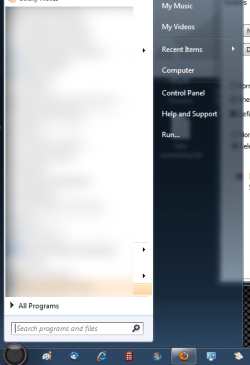
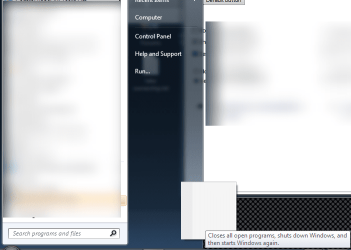
But I have removed the images & put a blank font in there & got this (screenshots) they are still there but
you cannot see them, the tooltip balloon still shows up but it is delayed a little & that text can be blank to, the little menu cannot be removed at all but can have a solid color. If you are using the default aero theme I can do it for you.
Maybe if they do not see it they wont try it?
Jerry
 

Attachments

  • start.png
    start.png
    39.8 KB · Views: 92
  • start2.png
    start2.png
    45 KB · Views: 80

My Computer

Computer type
Laptop
Computer Manufacturer/Model Number
Sager NP9170
OS
Win 7 Pro x64 / Win 10 Pro
CPU
Intel(R) Core(TM) i7-3630QM CPU @ 2.40GHz
Motherboard
CLEVO P170EM
Memory
12 GB
Graphics Card(s)
(1) Intel(R) HD Graphics 4000 (2) NVIDIA GeForce GTX 675M
Sound Card
(1) Realtek High Definition Audio (2) Intel(R) Display Aud
Monitor(s) Displays
17.3
Screen Resolution
1920x1080
Hard Drives
(1) Samsung 860 EVO 500GB(OS) (1) Samsung 860 EVO 500GB(Data)
Keyboard
Backlite
Antivirus
MSE, Malwarebytes Pro
Browser
Firefox
Other Info
DESKTOP: Custom-built.
OS: Win 10 Pro x64.
CASE: Rosewill R5.
CPU: Intel I5 4670K CPU @ 3.40GHz.
CPU COOLER: Cool Master Hyper 212 EVO.
MOTHERBOARD: Asus Z87-A.
MEMORY: Kingston HyperX 2x4 GB.
GPU: Nvidia Geforce 650 TI.
PSU: Corsair TX750.
DRIVES: (1) Samsung 840 120 GB SSD (2) Western Digital blue 500 GB 7200 RPM.

My Computer

Computer type
Laptop
Computer Manufacturer/Model Number
Sager NP9170
OS
Win 7 Pro x64 / Win 10 Pro
CPU
Intel(R) Core(TM) i7-3630QM CPU @ 2.40GHz
Motherboard
CLEVO P170EM
Memory
12 GB
Graphics Card(s)
(1) Intel(R) HD Graphics 4000 (2) NVIDIA GeForce GTX 675M
Sound Card
(1) Realtek High Definition Audio (2) Intel(R) Display Aud
Monitor(s) Displays
17.3
Screen Resolution
1920x1080
Hard Drives
(1) Samsung 860 EVO 500GB(OS) (1) Samsung 860 EVO 500GB(Data)
Keyboard
Backlite
Antivirus
MSE, Malwarebytes Pro
Browser
Firefox
Other Info
DESKTOP: Custom-built.
OS: Win 10 Pro x64.
CASE: Rosewill R5.
CPU: Intel I5 4670K CPU @ 3.40GHz.
CPU COOLER: Cool Master Hyper 212 EVO.
MOTHERBOARD: Asus Z87-A.
MEMORY: Kingston HyperX 2x4 GB.
GPU: Nvidia Geforce 650 TI.
PSU: Corsair TX750.
DRIVES: (1) Samsung 840 120 GB SSD (2) Western Digital blue 500 GB 7200 RPM.
OK I got it for you, I tested it & you will need to do 1 of these 2 ways of Enabling custom themes. Changing the images makes it a custom theme.
http://www.sevenforums.com/tutorials/34579-enabling-custom-themes-windows-7-a.html
Or
http://www.sevenforums.com/tutorials/28377-theme-how-apply-custom-themes.html?filter

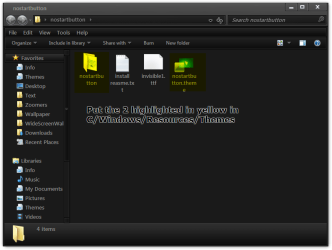
After that put the theme folder & the msstyle (screenshot)in
C:\Windows\Resources\Themes
Right click on the font & click on install
It will show up in Personalization as nostartbutton if
You would like a different name let me know.
Jerry
 

Attachments

My Computer

Computer type
Laptop
Computer Manufacturer/Model Number
Sager NP9170
OS
Win 7 Pro x64 / Win 10 Pro
CPU
Intel(R) Core(TM) i7-3630QM CPU @ 2.40GHz
Motherboard
CLEVO P170EM
Memory
12 GB
Graphics Card(s)
(1) Intel(R) HD Graphics 4000 (2) NVIDIA GeForce GTX 675M
Sound Card
(1) Realtek High Definition Audio (2) Intel(R) Display Aud
Monitor(s) Displays
17.3
Screen Resolution
1920x1080
Hard Drives
(1) Samsung 860 EVO 500GB(OS) (1) Samsung 860 EVO 500GB(Data)
Keyboard
Backlite
Antivirus
MSE, Malwarebytes Pro
Browser
Firefox
Other Info
DESKTOP: Custom-built.
OS: Win 10 Pro x64.
CASE: Rosewill R5.
CPU: Intel I5 4670K CPU @ 3.40GHz.
CPU COOLER: Cool Master Hyper 212 EVO.
MOTHERBOARD: Asus Z87-A.
MEMORY: Kingston HyperX 2x4 GB.
GPU: Nvidia Geforce 650 TI.
PSU: Corsair TX750.
DRIVES: (1) Samsung 840 120 GB SSD (2) Western Digital blue 500 GB 7200 RPM.
Thanks for your work, Bongo! I got it to work on my personal computer, and now I have to get around all the restrictions on our public computers... but I'm pretty sure I'll be able to!

Thanks again!
 

My Computer

OS
Windows 7
Thanks for your work, Bongo! I got it to work on my personal computer, and now I have to get around all the restrictions on our public computers... but I'm pretty sure I'll be able to!

Thanks again!

Your Welcome
Can the public get to Personalization in the control panel or right click menu?
If you do not like it showing up in Personalization as nostartbutton (I should have name it noshutdownbutton:D) let my know I know a way to make it aero in Personalization.
Jerry
 

My Computer

Computer type
Laptop
Computer Manufacturer/Model Number
Sager NP9170
OS
Win 7 Pro x64 / Win 10 Pro
CPU
Intel(R) Core(TM) i7-3630QM CPU @ 2.40GHz
Motherboard
CLEVO P170EM
Memory
12 GB
Graphics Card(s)
(1) Intel(R) HD Graphics 4000 (2) NVIDIA GeForce GTX 675M
Sound Card
(1) Realtek High Definition Audio (2) Intel(R) Display Aud
Monitor(s) Displays
17.3
Screen Resolution
1920x1080
Hard Drives
(1) Samsung 860 EVO 500GB(OS) (1) Samsung 860 EVO 500GB(Data)
Keyboard
Backlite
Antivirus
MSE, Malwarebytes Pro
Browser
Firefox
Other Info
DESKTOP: Custom-built.
OS: Win 10 Pro x64.
CASE: Rosewill R5.
CPU: Intel I5 4670K CPU @ 3.40GHz.
CPU COOLER: Cool Master Hyper 212 EVO.
MOTHERBOARD: Asus Z87-A.
MEMORY: Kingston HyperX 2x4 GB.
GPU: Nvidia Geforce 650 TI.
PSU: Corsair TX750.
DRIVES: (1) Samsung 840 120 GB SSD (2) Western Digital blue 500 GB 7200 RPM.
Awesome fix! Is there a way you could create a customized theme based on the Win 7 Classic theme that does the same thing? That is, "hides" the Power button? Much appreciated.
 

My Computer

OS
Windows 7
Awesome fix! Is there a way you could create a customized theme based on the Win 7 Classic theme that does the same thing? That is, "hides" the Power button? Much appreciated.
Welcome to the Seven Forums
Windows 7 Classic Theme as far as I know cannot be themed.
Sorry
Jerry
 

My Computer

Computer type
Laptop
Computer Manufacturer/Model Number
Sager NP9170
OS
Win 7 Pro x64 / Win 10 Pro
CPU
Intel(R) Core(TM) i7-3630QM CPU @ 2.40GHz
Motherboard
CLEVO P170EM
Memory
12 GB
Graphics Card(s)
(1) Intel(R) HD Graphics 4000 (2) NVIDIA GeForce GTX 675M
Sound Card
(1) Realtek High Definition Audio (2) Intel(R) Display Aud
Monitor(s) Displays
17.3
Screen Resolution
1920x1080
Hard Drives
(1) Samsung 860 EVO 500GB(OS) (1) Samsung 860 EVO 500GB(Data)
Keyboard
Backlite
Antivirus
MSE, Malwarebytes Pro
Browser
Firefox
Other Info
DESKTOP: Custom-built.
OS: Win 10 Pro x64.
CASE: Rosewill R5.
CPU: Intel I5 4670K CPU @ 3.40GHz.
CPU COOLER: Cool Master Hyper 212 EVO.
MOTHERBOARD: Asus Z87-A.
MEMORY: Kingston HyperX 2x4 GB.
GPU: Nvidia Geforce 650 TI.
PSU: Corsair TX750.
DRIVES: (1) Samsung 840 120 GB SSD (2) Western Digital blue 500 GB 7200 RPM.
Back
Top