- Local time
- 6:10 PM
- Messages
- 16,796
You are using EFI firmware.
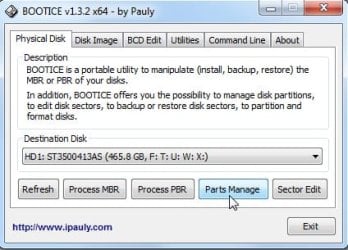
You may already have an EFI System partition (ESP) - likely the first partition on the disk - check with Aomei partition Assistant. It will be FAT32.
[If you don't have an EFI System partition, create one. You can put it at the end of the drive, if necessary.]
1.Tick the box that says "tick for Uefi/bios"
2. In Active partition dropdown, you select the EFI System partition letter.
3. In the Windows partition dropdown, select your windows partition letter.
You may already have an EFI System partition (ESP) - likely the first partition on the disk - check with Aomei partition Assistant. It will be FAT32.
[If you don't have an EFI System partition, create one. You can put it at the end of the drive, if necessary.]
1.Tick the box that says "tick for Uefi/bios"
2. In Active partition dropdown, you select the EFI System partition letter.
3. In the Windows partition dropdown, select your windows partition letter.
My Computers
-
At a glance
7 X64i5 84002x8gb 3200mhz- Computer type
- PC/Desktop
- OS
- 7 X64
- CPU
- i5 8400
- Motherboard
- gigabyte b365m ds3h
- Memory
- 2x8gb 3200mhz
- Hard Drives
- various
- PSU
- pure power 11 400w cm
- Case
- Coolermaster
- Cooling
- cryorig m9i
-
At a glance
7x64g54008gb ddr4 2400- Computer type
- PC/Desktop
- OS
- 7x64
- CPU
- g5400
- Motherboard
- ga b365m ds3h
- Memory
- 8gb ddr4 2400
- PSU
- xfx pro 450w