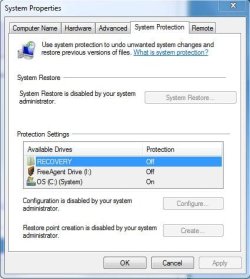
Can't access System Protection options

mremaknu

New member
Local time
12:59 AM
Messages
6
Dangit, all I want is System Restore turned on...!

I'm able to get to the System Protection tab and open the window, but I can't do anything except look at what's turned on or off; all options (System Restore, Configure, Create) are greyed out and labeled 'disabled by administrator'. Thing is, I AM the administrator, and I haven't been able to figure out how to get system restore running without going through that option. No other user accounts exist on this computer, nor does anyone except me use it...

Please help! I'm going crazy trying to access my own computer.
 

My Computer

OS
Windows 7 Home Premium 32-bit
  1. <LI class=step>Open System by clicking the Start button
    4f6cbd09-148c-4dd8-b1f2-48f232a2fd33.png
    , clicking Control Panel, clicking System and Maintenance, and then clicking System.
    <LI class=step>In the left pane, click System Protection.
    18abb370-ac1e-4b6b-b663-e028a75bf05b.png
    If you are prompted for an administrator password or confirmation, type the password or provide confirmation.
  2. To turn on System Protection for a hard disk, select the check box next to the disk, and then click OK.
    – or –
    To turn off System Protection for a hard disk, clear the check box next to the disk, and then click OK.
  3. Try this and let ,me know
 

My Computer

Computer Manufacturer/Model Number
Microsoft
OS
Windows 7 and MAC
Graphics Card(s)
NVIDIA 9200 GT
Sound Card
NvIdiA
go to run-> type control userpasswords2 and then click on the second tab and there you will find an option that says other , choose other and then click the drop down and choose administrator from there and just keep it administratot nothing else and restart the machine and check
 

My Computer

Computer Manufacturer/Model Number
Microsoft
OS
Windows 7 and MAC
Graphics Card(s)
NVIDIA 9200 GT
Sound Card
NvIdiA
I mean after opening control user passwords 2
 

My Computer

Computer Manufacturer/Model Number
Microsoft
OS
Windows 7 and MAC
Graphics Card(s)
NVIDIA 9200 GT
Sound Card
NvIdiA
Stevy, I tried your control user passwords suggestion but nothing changed. The first post you made is precisely my problem; all options in the System Protection window are ghosted and I can't change them, as they are "disabled by my system administrator".
 

My Computer

OS
Windows 7 Home Premium 32-bit
Whats your windows Log on ID and what does it say as a security role when you go to control userpasswords2... This seems to be with the problem of the administrative rights.. let me know what does it say next to your user account information
Letme send you an attachment
Take a look at it........
 

Attachments

  • 21339_18.gif
    21339_18.gif
    17.8 KB · Views: 67

My Computer

Computer Manufacturer/Model Number
Microsoft
OS
Windows 7 and MAC
Graphics Card(s)
NVIDIA 9200 GT
Sound Card
NvIdiA
My account username is my first name, and under Groups it does get classified as "Administrators." Aside from my username not being Admin, the window looks identical to the screenshot you provided.
 

My Computer

OS
Windows 7 Home Premium 32-bit
Same Issue

I have been experiencing exactly the same issue. My account is Admin and everything under System Properties\ System Protection tab is greyed out with the reasoning being the Admin has diabled. I have recently removed Anitmalware Doctor and suspect this has had impact. Any assistance would be greatly appreciated.
 

Attachments

  • System Restore Issue.JPG
    System Restore Issue.JPG
    37.5 KB · Views: 24
Last edited:

My Computer

Computer Manufacturer/Model Number
Dell
OS
Win 7 Home Prem 64
CPU
Core I7
Hard Drives
1TB
There's probably a value in the registry called "DisableConfig" or "DisableSR" at HKEY_LOCAL_MACHINE\Software\Policies\Microsoft\Windows NT\SystemRestore. Open regedit, browse to that key, and if either value exists, delete and reboot the PC. You should get your System Restore tab back after doing this.
 
Last edited:

My Computer

Computer type
PC/Desktop
Computer Manufacturer/Model Number
Custom
OS
Windows 10 Pro x64
CPU
Intel Core i7 4790K @ 4.5GHz
Motherboard
Asus Maximus Hero VII
Memory
32GB DDR3
Graphics Card(s)
Nvidia GeForce GTX970
Sound Card
Realtek HD Audio
Screen Resolution
1920x1200
Hard Drives
1x Samsung 250GB SSD
4x WD RE 2TB (RAIDZ)
PSU
Corsair AX760i
Case
Fractal Design Define R4
Cooling
Noctua NH-D15
Checked in the registry just now, I don't have DisableConfig but I do have DisableSR. I know better than to piddle around with the registry if I don't know what it does, but... Should I?
 

My Computer

OS
Windows 7 Home Premium 32-bit
"There is probably a value in the registry called "DisableConfig" at HKEY_LOCAL_MACHINE\Software\Policies\Microsoft\Windows NT\SystemRestore. Open regedit, browse to that key, and if the "DisableConfig" value exists, delete it and reboot the PC. You should get your System Restore tab back after doing this. "

I went to this location in the registry and found the DisableSR key. I deleted it, as I had nothing to lose (next step was reload Win7).

It worked straight away and all is now good. Encourage mremaknu to do the same.

Cheers,
Bourbasted
 

My Computer

Computer Manufacturer/Model Number
Dell
OS
Win 7 Home Prem 64
CPU
Core I7
Hard Drives
1TB
Went ahead and killed off DisableSR. Options opened up, and I've made my first restore point since I got 7. Yay!
 

My Computer

OS
Windows 7 Home Premium 32-bit
Don't forget to report this thread to a mod that it is resolved! Click the "report" button in the top-right-hand button of your first post, and report this thread as resolved.
 

My Computer

Computer type
PC/Desktop
Computer Manufacturer/Model Number
Custom
OS
Windows 10 Pro x64
CPU
Intel Core i7 4790K @ 4.5GHz
Motherboard
Asus Maximus Hero VII
Memory
32GB DDR3
Graphics Card(s)
Nvidia GeForce GTX970
Sound Card
Realtek HD Audio
Screen Resolution
1920x1200
Hard Drives
1x Samsung 250GB SSD
4x WD RE 2TB (RAIDZ)
PSU
Corsair AX760i
Case
Fractal Design Define R4
Cooling
Noctua NH-D15
Done and done. Thanks for your help, folks.
 

My Computer

OS
Windows 7 Home Premium 32-bit
Corrupted my system

@bourbasted :cry:
I followed your steps , and deleted the DisableSR key and poof, now I cannot access the system restore menu, network, sound, theme, trackpad, and lots of stuff which I haven't figured out yet... I cannot replace DisableSR registry key as well, because I didn't back it up, which I should have done....

please help me if you know a solution to get my computer back to normalcy. And of course enable me to set up system restore !
 

My Computer

Computer Manufacturer/Model Number
Acer
OS
Windows 7 Ultimate x64
CPU
Core i5
Memory
4GB
Graphics Card(s)
ATI Mobility Radeon HD 5470
Hard Drives
500GB
Back
Top