Hello.
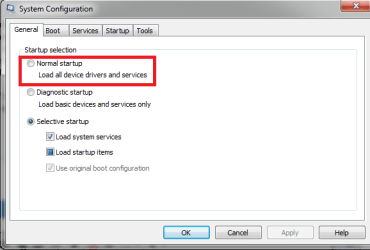
I am not any good at PC and I desperately need your help! I turned on my computer after a friend of mine had done some clean up stuff, and this box with options appeard. I think it was something about which programs to run when i start the computer, and I think I cliked for the option with as few programs running at startup as possible. This was a very bad idea.
When the computer restarts everything is "gone". The old design of windows is used (although i managed to get the Win7 design back through help in here), it is not possible to adjust the brightness on the screen, there is no way i can connect to the internet (the "connect to the internet" icon is gone, and everything i try is impossible as if this computer never was set up to connect to the internet at all haha) and it seems like the computer wont "save" battery, if I remove the charger it will die (the battery is not bad).
Im sure theres a bunch of other things that doesnt work aswell. It seems like everything except a minimum is removed or something. I really hope someone can help me!! Possible to "regret" changes f.ex?
I am not any good at PC and I desperately need your help! I turned on my computer after a friend of mine had done some clean up stuff, and this box with options appeard. I think it was something about which programs to run when i start the computer, and I think I cliked for the option with as few programs running at startup as possible. This was a very bad idea.
When the computer restarts everything is "gone". The old design of windows is used (although i managed to get the Win7 design back through help in here), it is not possible to adjust the brightness on the screen, there is no way i can connect to the internet (the "connect to the internet" icon is gone, and everything i try is impossible as if this computer never was set up to connect to the internet at all haha) and it seems like the computer wont "save" battery, if I remove the charger it will die (the battery is not bad).
Im sure theres a bunch of other things that doesnt work aswell. It seems like everything except a minimum is removed or something. I really hope someone can help me!! Possible to "regret" changes f.ex?
My Computer
- Computer type
- Laptop
- Computer Manufacturer/Model Number
- Asus
- OS
- Windows 7 home premium 64 bit
- Antivirus
- avast
- Browser
- opera