Solved Computer crashes while installing MS Office on a Computer with 2 drive

seanlg

New member
Local time
4:13 AM
Messages
7
So I have recently bought a Samsung 850 Evo 120 GB ssd drive. My HP computer now has a 1TB hitachi hard drive and a ssd drive. The computer loads from the SSD drive. To try and maintain space, I have tried to download MS Office on the HDD. But when I install office, while in the middle of installing, my computer always crashes. This has happened on all three of my attempts to install office so far. Is there any reason why I should not be able to install office on the HDD or do I have to install it on the SSD?

Thanks in advance for the help!
 

My Computer

Computer type
PC/Desktop
Computer Manufacturer/Model Number
Dell
OS
Windows 7 Home 64 Bit
Memory
4
Hard Drives
Samsung 850 Evo 120 GB
Hitachi 1 TB Drive
Antivirus
Norton
Browser
Chrome

My Computer

Computer type
PC/Desktop
Computer Manufacturer/Model Number
Self built using existing case
OS
Windows 7 Home Premium 64 bit sp1
CPU
Intel i5 3570 3.4Ghz Ivy Bridge SKT 1155 quad core
Motherboard
Gigabyte Z77-HD3 SKT 1155 2xSata 3, 4x USB 3.0
Memory
G-Skill Rip Jaws 16Gb (8x2) DDR3 -1600 PC3 12800 CL 10 red
Graphics Card(s)
Gigabyte NVIDIA GT610 1Gb DDR3 810/1200 PCI-E 2.0 Silent
Sound Card
NVIDIA High Definition & Realtech High Definition Audio
Monitor(s) Displays
2 x Philips 226V4L 16:9 aspect ratio
Screen Resolution
1920 x 1080 HD
Hard Drives
Samsung 840 Pro 256gb SSD, SATA 3.
Hitachi Touro Portable 1tb, USB 3.0 HDD used for image b/ups.
PSU
Corsair VS450
Case
Codeng
Cooling
PSU fan & CPU fan
Keyboard
Logitech
Mouse
Logitech Wireless trackball M570
Internet Speed
Wireless 3G. 3mg down & 550kb up.
Antivirus
Bitdefender Internet Security 2020
Browser
Opera (Current Version) & Firefox
Other Info
MS Office 2013 Pro. Davis weather station software. MGE Nova 600 avr UPS.
Do you get a Blue Screen Of Death (BSOD)? Did you check drive health for any bad sectors and such?
 

My Computer

Computer type
PC/Desktop
Computer Manufacturer/Model Number
Custom Build
OS
Windows 7 Ultimate x64 SP1
CPU
AMD Phenom 2 1090T
Motherboard
Gigabyte GA-890FXA-UD5
Memory
2x8GB Kingston HyperX Fury Black 1600Mhz Unganged
Graphics Card(s)
MSI GTX 970 Gaming 4G
Sound Card
Realtek On-Board HD 7.1 Audio / Logitech G35
Monitor(s) Displays
3xAcer GD245HQ
Screen Resolution
1920x1080
Hard Drives
Samsung 850 Pro 512GB SSD - OS /
WD Caviar Black SATA 3 - 1 TBx2 - Dynamic RAID 0 /
WD Caviar Green SATA 2 - 640GBx2 - Dynamic RAID 0 /
WD Caviar Green SATA 2 - 640GB - Internal Backup /
Seagate Barracude SATA 3 - 3TB - External Backup/ Sync
PSU
HighPower 1000W
Case
Cooler Master HAF 932
Cooling
Noctua NH-D14
Keyboard
Logitech G19
Mouse
Logitech G500
Internet Speed
100/4 Mbit Cable (100GB quota)
Antivirus
ZoneAlarm Extreme Security / MBAM Pro / MBAE Free / SAS Free
Browser
IE 11 - Firefox - Chrome
Other Info
Logitech F710/ G27/ G940/ Z5500 // TrackIR 5 // Nvidia 3D Surround Vision
Hm. I'm not sure if this is the blue screen of death, but what happens is that it will just automatically restart sometime in the process on loading outlook. When it restarts, there is a blue screen that says computer was not shut down properly and it says that this might be because of new software installed.

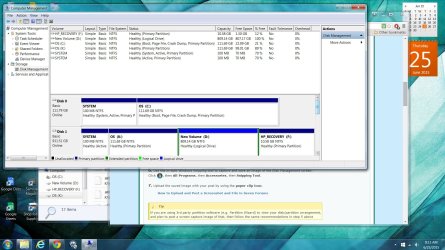
This is the picture of my disk drives. I have tried to install it on the new volume 3 times and once on OS:K. They have failed every time. OS:K was created because when I tried to clone my software back onto the HDD, it created a partition for me (the program, macrium reflect)

If I do download outlook onto the ssd, is it possible to store the outlook files of my account onto the HDD, as my outlook files are/do become quite big.

Thanks
 

Attachments

  • diskdrive.jpg
    diskdrive.jpg
    260.3 KB · Views: 6

My Computer

Computer type
PC/Desktop
Computer Manufacturer/Model Number
Dell
OS
Windows 7 Home 64 Bit
Memory
4
Hard Drives
Samsung 850 Evo 120 GB
Hitachi 1 TB Drive
Antivirus
Norton
Browser
Chrome
Thanks for supplying the screen shot. I have asked for more help with your disc set up, as I am not an expert with it. So be patient.
 

My Computer

Computer type
PC/Desktop
Computer Manufacturer/Model Number
Self built using existing case
OS
Windows 7 Home Premium 64 bit sp1
CPU
Intel i5 3570 3.4Ghz Ivy Bridge SKT 1155 quad core
Motherboard
Gigabyte Z77-HD3 SKT 1155 2xSata 3, 4x USB 3.0
Memory
G-Skill Rip Jaws 16Gb (8x2) DDR3 -1600 PC3 12800 CL 10 red
Graphics Card(s)
Gigabyte NVIDIA GT610 1Gb DDR3 810/1200 PCI-E 2.0 Silent
Sound Card
NVIDIA High Definition & Realtech High Definition Audio
Monitor(s) Displays
2 x Philips 226V4L 16:9 aspect ratio
Screen Resolution
1920 x 1080 HD
Hard Drives
Samsung 840 Pro 256gb SSD, SATA 3.
Hitachi Touro Portable 1tb, USB 3.0 HDD used for image b/ups.
PSU
Corsair VS450
Case
Codeng
Cooling
PSU fan & CPU fan
Keyboard
Logitech
Mouse
Logitech Wireless trackball M570
Internet Speed
Wireless 3G. 3mg down & 550kb up.
Antivirus
Bitdefender Internet Security 2020
Browser
Opera (Current Version) & Firefox
Other Info
MS Office 2013 Pro. Davis weather station software. MGE Nova 600 avr UPS.
As already stated it defeats the purpose of the SSD to have Office or any other program installed on the slower HD. So try installing it correctly to C where it writes Registry keys that integrate it into the OS so that it should remain on C until uninstalled.

If you are still using the old OS on the hard drive then it can remain Active but if not then I would double check you have everything off of it, mark System Reserved on the hard drive Inactive, delete that and the old K partition in Disk Mgmt or using Partition Wizard, then either create New partition(s) in the space or extend D to the left using How to Move/Resize Partition | MiniTool Partition Wizard Tutorial.

What works best without compromising SSD speed is to move as necessary the User folders: http://www.sevenforums.com/tutorials/18629-user-folders-change-default-location.html
 
Last edited:
Read through what gregrocker has said, as he is an expert on disc management.

I notice you do not have a lot of free space on your SSD. What programs have you got installed on it. Normally Windows takes about 25gb when fully installed & running normally.

If you clean up your hard drive disc 1, then you may be able to transfer a lot of files from your SSD onto it. As mentioned MS Office should be on your SSD to give best speed & performance when using a SSD.

When you installed your SSD did you clone Windows on to it from your other disc. You said you have cloned the SSD back onto the hard drive, so in effect you probably have 2 Windows Operating Systems installed, which certainly would cause problems with installing Office.
 

My Computer

Computer type
PC/Desktop
Computer Manufacturer/Model Number
Self built using existing case
OS
Windows 7 Home Premium 64 bit sp1
CPU
Intel i5 3570 3.4Ghz Ivy Bridge SKT 1155 quad core
Motherboard
Gigabyte Z77-HD3 SKT 1155 2xSata 3, 4x USB 3.0
Memory
G-Skill Rip Jaws 16Gb (8x2) DDR3 -1600 PC3 12800 CL 10 red
Graphics Card(s)
Gigabyte NVIDIA GT610 1Gb DDR3 810/1200 PCI-E 2.0 Silent
Sound Card
NVIDIA High Definition & Realtech High Definition Audio
Monitor(s) Displays
2 x Philips 226V4L 16:9 aspect ratio
Screen Resolution
1920 x 1080 HD
Hard Drives
Samsung 840 Pro 256gb SSD, SATA 3.
Hitachi Touro Portable 1tb, USB 3.0 HDD used for image b/ups.
PSU
Corsair VS450
Case
Codeng
Cooling
PSU fan & CPU fan
Keyboard
Logitech
Mouse
Logitech Wireless trackball M570
Internet Speed
Wireless 3G. 3mg down & 550kb up.
Antivirus
Bitdefender Internet Security 2020
Browser
Opera (Current Version) & Firefox
Other Info
MS Office 2013 Pro. Davis weather station software. MGE Nova 600 avr UPS.

My Computer

Computer type
PC/Desktop
Computer Manufacturer/Model Number
Custom Build
OS
Windows 7 Ultimate x64 SP1
CPU
AMD Phenom 2 1090T
Motherboard
Gigabyte GA-890FXA-UD5
Memory
2x8GB Kingston HyperX Fury Black 1600Mhz Unganged
Graphics Card(s)
MSI GTX 970 Gaming 4G
Sound Card
Realtek On-Board HD 7.1 Audio / Logitech G35
Monitor(s) Displays
3xAcer GD245HQ
Screen Resolution
1920x1080
Hard Drives
Samsung 850 Pro 512GB SSD - OS /
WD Caviar Black SATA 3 - 1 TBx2 - Dynamic RAID 0 /
WD Caviar Green SATA 2 - 640GBx2 - Dynamic RAID 0 /
WD Caviar Green SATA 2 - 640GB - Internal Backup /
Seagate Barracude SATA 3 - 3TB - External Backup/ Sync
PSU
HighPower 1000W
Case
Cooler Master HAF 932
Cooling
Noctua NH-D14
Keyboard
Logitech G19
Mouse
Logitech G500
Internet Speed
100/4 Mbit Cable (100GB quota)
Antivirus
ZoneAlarm Extreme Security / MBAM Pro / MBAE Free / SAS Free
Browser
IE 11 - Firefox - Chrome
Other Info
Logitech F710/ G27/ G940/ Z5500 // TrackIR 5 // Nvidia 3D Surround Vision
Thanks for all the help, I guess I'll just install in on the SSD. Just wondering though, is it possible to save the outlook data file on the HDD so that it won't take up the remaining space (roughly 15 GB) on the SSD? I also don't know what is on the computer that makes the memory so large, as it is not mine and is owned by the company I work for.

Originally, the goal was just to speed up the computer. After installing it, I then had to give it more space as the outlook files in our company just ate all the memory. We saved it in the HDD, but is there a way to directly store it in the HDD all the time? Sorry I've actually never dealt with a dual drive computer, but I have installed ss drives on past PC's before. Also I could not do a clean install of windows 7 due to not having it and my boss not willing to also buy a windows 7 disk.

Sorry about that last part, sort of a rant.:/

But I truly thank those who have helped!

Should I mark this post as solved and make a new post about asking how I make office save it to the HDD or just keep this post going? Sorry, kind of new here.
 

My Computer

Computer type
PC/Desktop
Computer Manufacturer/Model Number
Dell
OS
Windows 7 Home 64 Bit
Memory
4
Hard Drives
Samsung 850 Evo 120 GB
Hitachi 1 TB Drive
Antivirus
Norton
Browser
Chrome
You can try the method in post #8. Move the file and make a link to it.
 

My Computer

Computer type
PC/Desktop
Computer Manufacturer/Model Number
Custom Build
OS
Windows 7 Ultimate x64 SP1
CPU
AMD Phenom 2 1090T
Motherboard
Gigabyte GA-890FXA-UD5
Memory
2x8GB Kingston HyperX Fury Black 1600Mhz Unganged
Graphics Card(s)
MSI GTX 970 Gaming 4G
Sound Card
Realtek On-Board HD 7.1 Audio / Logitech G35
Monitor(s) Displays
3xAcer GD245HQ
Screen Resolution
1920x1080
Hard Drives
Samsung 850 Pro 512GB SSD - OS /
WD Caviar Black SATA 3 - 1 TBx2 - Dynamic RAID 0 /
WD Caviar Green SATA 2 - 640GBx2 - Dynamic RAID 0 /
WD Caviar Green SATA 2 - 640GB - Internal Backup /
Seagate Barracude SATA 3 - 3TB - External Backup/ Sync
PSU
HighPower 1000W
Case
Cooler Master HAF 932
Cooling
Noctua NH-D14
Keyboard
Logitech G19
Mouse
Logitech G500
Internet Speed
100/4 Mbit Cable (100GB quota)
Antivirus
ZoneAlarm Extreme Security / MBAM Pro / MBAE Free / SAS Free
Browser
IE 11 - Firefox - Chrome
Other Info
Logitech F710/ G27/ G940/ Z5500 // TrackIR 5 // Nvidia 3D Surround Vision
I was going to try the method. However, I now immediately receive the blue screen of death when I try to install outlook onto my SSD drive. Is it because I downloaded the installer on the new volume portion of the HDD?
 

My Computer

Computer type
PC/Desktop
Computer Manufacturer/Model Number
Dell
OS
Windows 7 Home 64 Bit
Memory
4
Hard Drives
Samsung 850 Evo 120 GB
Hitachi 1 TB Drive
Antivirus
Norton
Browser
Chrome

My Computer

Computer type
PC/Desktop
Computer Manufacturer/Model Number
Custom Build
OS
Windows 7 Ultimate x64 SP1
CPU
AMD Phenom 2 1090T
Motherboard
Gigabyte GA-890FXA-UD5
Memory
2x8GB Kingston HyperX Fury Black 1600Mhz Unganged
Graphics Card(s)
MSI GTX 970 Gaming 4G
Sound Card
Realtek On-Board HD 7.1 Audio / Logitech G35
Monitor(s) Displays
3xAcer GD245HQ
Screen Resolution
1920x1080
Hard Drives
Samsung 850 Pro 512GB SSD - OS /
WD Caviar Black SATA 3 - 1 TBx2 - Dynamic RAID 0 /
WD Caviar Green SATA 2 - 640GBx2 - Dynamic RAID 0 /
WD Caviar Green SATA 2 - 640GB - Internal Backup /
Seagate Barracude SATA 3 - 3TB - External Backup/ Sync
PSU
HighPower 1000W
Case
Cooler Master HAF 932
Cooling
Noctua NH-D14
Keyboard
Logitech G19
Mouse
Logitech G500
Internet Speed
100/4 Mbit Cable (100GB quota)
Antivirus
ZoneAlarm Extreme Security / MBAM Pro / MBAE Free / SAS Free
Browser
IE 11 - Firefox - Chrome
Other Info
Logitech F710/ G27/ G940/ Z5500 // TrackIR 5 // Nvidia 3D Surround Vision
Download the Office installation media to C, right click .exe to Run as Admin, install to C.
 
Thanks for the help everyone. I think I found a solution. I think I'll just wait until windows 10 comes out for a clean install disk. Then I will make a clean install of windows 10 and just re-install outlook then. Even though I was unable to solve the problem, I learned a couple of things. Thanks for all the help everybody! :)
 

My Computer

Computer type
PC/Desktop
Computer Manufacturer/Model Number
Dell
OS
Windows 7 Home 64 Bit
Memory
4
Hard Drives
Samsung 850 Evo 120 GB
Hitachi 1 TB Drive
Antivirus
Norton
Browser
Chrome
Back
Top