Computer doesnt meet minimum requirement for installing the software

GTAUSTRALIA

New member
Last year I removed my Radeon XFX 7850 and installed a GTX1060. It all worked and so I did not uninstall the amd stuff.

This year while using the software "daz studio" I was learning how to use the simulation Engine called Dforce. I learnt that my CPU was using openCL with the Dforce engine and read that I would get better results choosing my GTX 1060 for use with openCL, but I could not select because there was no Opencl for my GTX1060.....Everyone said that my card should support it but it didnt.

Looking at GPUZ i could see that OpenCL was not ticked.
So i try many things and failled , and also googled for days and then decide from reading posts that my issue could be that i still had radeon stuff still hiding somewhere and that had to be uninstalled,
Everyone recomemended for best results to use the program "Display Driver Unistaller" to remove any AMD stuff when reinstalling installing my nvidea drivers.

So i download the program DDU, I ran the DDU and admit that i did not read or take note of what was going on, I just clicked away and before you knew it the job was done.
I got my nvidea drivers reinstalled and now my OpenCL was ticked in GPUZ and was working on my GTX1060 And everything seemed ok.


But now weeks later I discover that I think i have unistalled my intel graphics because i cant see it in device manager.
No problems I said to myself, I have my gigabyte mother board dvd with all the stuff on it so i will just reinstall that vga graphics thing.
But now I was getting these errors.
I need a solution to the following error.
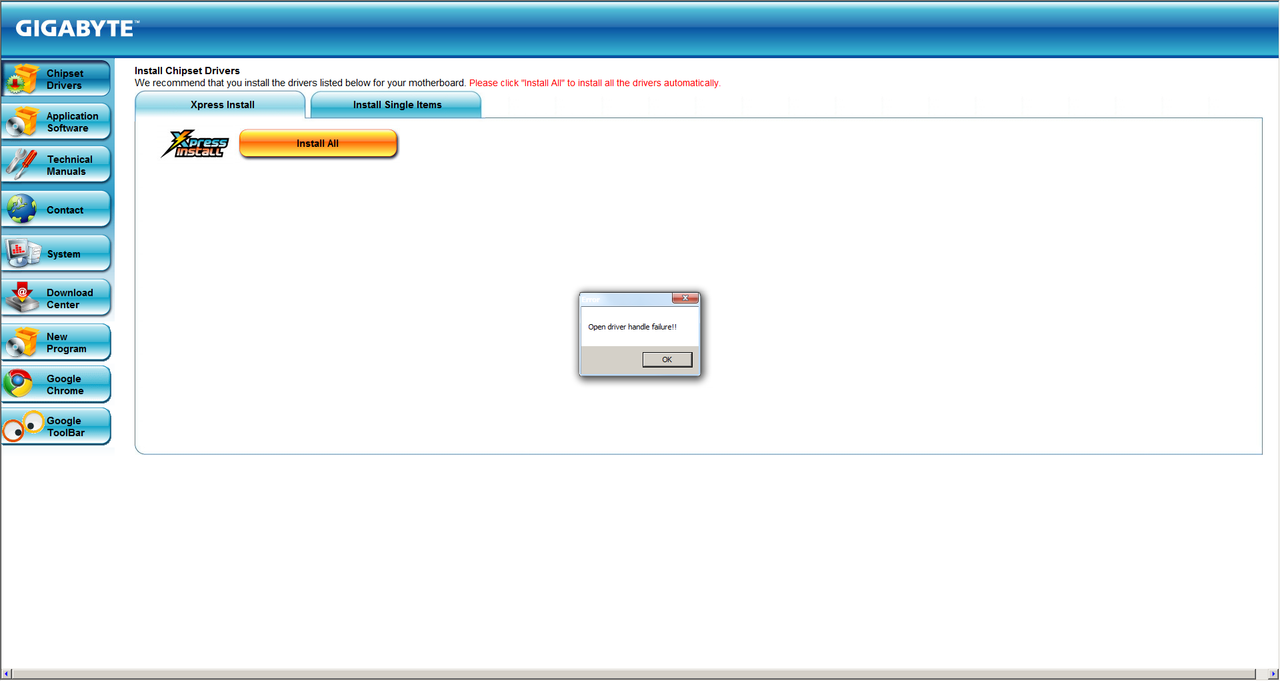
When trying to re install the intel drivers / files for VGA using my original gigabyte motherboad dvd I get the error
"Open Driver Handle Failure"
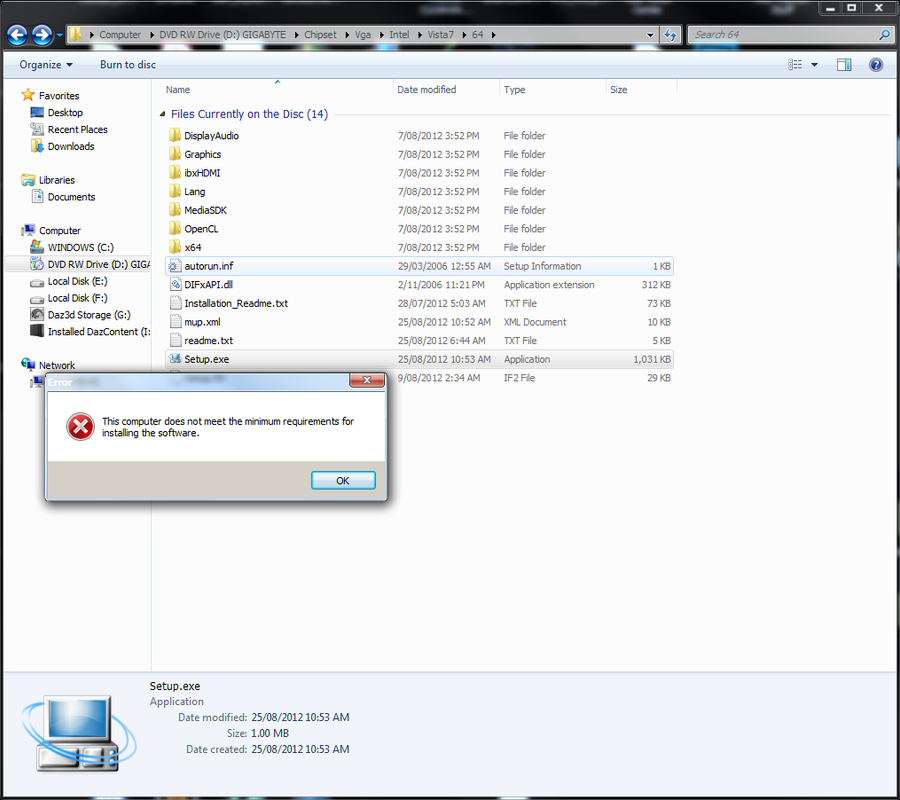
Also If I select the files from within the dvd and try to manual install i get this error
"This computer does not meet the minimum requirements for installing the software."
Even after downloading the intel drivers from Gigabytes website and also intel website also give me the same error when trying to install these intel drivers.
I am at a loss as to WTF the problem is.
Screen-Shot-20201014021958.png
Screen-Shot-20201014023036.png
 

My Computer

Computer type
PC/Desktop
Computer Manufacturer/Model Number
Custom Build
OS
Windows 7 Professional (x64) Service Pack 1 (build 7601)
CPU
Intel Core i5 3330 ivy bridge 3ghz 6mb
Motherboard
Gigabyte Z77X-D3H (ATX) Motherboard
Memory
G.Skill 8GB kit (2X4GB) DDR3 Ripjaws X C9 1600MHZ
Graphics Card(s)
XFX Radeon HD7850 Dual Fan Black Edition 975M/5000M 2GB/2xDV
Hard Drives
Drive 0 = Samsung SSD 840 PRO Series [Hard drive] (128.04 GB)
Drive 1 = WDC WD10EZEX-00RKKA0 [Hard drive] (1000.20 GB)
Drive 2 = WDC WD5000AAKX-00ERMA0 [Hard drive] (500.11 GB)
Browser
FIREFOX
You should only have one graphics card enabled to avoid any such conflicts. Why would you need more than one activated at a time? I believe that Windows can only use one at a time. Uninstall the intel drivers and look for a setting to disable integrated graphics in the BIOS settings. Also you should always uninstall graphics drivers again to avoid conflicts, as you discovered.
 

My Computers

System One System Two

The on board Intel GPU driver is for the built-in GPU withen the CPU. Since you already have a dedicated GPU, the GTX 1060, there's really no need for it. And in fact since you already have a dedicated GPU, you should go into your BIOS/UEFI settings and disable on board GPU from the CPU to mitigate any conflicts.

Same goes for dedicated sound cards. If you don't use the motherboard audio and have a dedicated sound card, disable the codec ion the BIOS/UEFI.

You CAN run more than one GPU at once for certain things, but they have to be of the same type. Nvidea or AMD. In one case you can have say a GTX 1050 and a GTX 1060 and go into the video card control panel and off load PhysX to the 1050. The other case would be to have two identical GPUs and using the SLI or Crossfire bridge that should have came with the mother board and use SLI for Nvidea or Crossfire for AMD.

I've read on overclock.net SLI or Crossfire doesn't give you any benefits, but I can hardly believe that. I can tell you that if you had say two Nvidea Titans in SLI and run a hash cracking program or Cryptocurrency mining program the results should be greater than just the one Titan.
 

My Computer

Computer type
PC/Desktop
OS
Windows 7 Ultimate x64
I'm thinking your error is because you already have a GPU installed. If you wanted both installed you may need to install the Intel driver first then the Nvidea driver. On my two laptops I have both as an option and you can right click and application and pick the GPU. It's really not necessary since the 1060 is vastly more powerful.
 

My Computer

Computer type
PC/Desktop
OS
Windows 7 Ultimate x64
My concern is that I will have no monitor....I am preparing to wipe this windows seven installation and reinstall fresh........I have been wanting to do this since last year but I just kept putting it off. If I wipe and start again I dont want to find I have no intel graphics to power monitor.
 

My Computer

Computer type
PC/Desktop
Computer Manufacturer/Model Number
Custom Build
OS
Windows 7 Professional (x64) Service Pack 1 (build 7601)
CPU
Intel Core i5 3330 ivy bridge 3ghz 6mb
Motherboard
Gigabyte Z77X-D3H (ATX) Motherboard
Memory
G.Skill 8GB kit (2X4GB) DDR3 Ripjaws X C9 1600MHZ
Graphics Card(s)
XFX Radeon HD7850 Dual Fan Black Edition 975M/5000M 2GB/2xDV
Hard Drives
Drive 0 = Samsung SSD 840 PRO Series [Hard drive] (128.04 GB)
Drive 1 = WDC WD10EZEX-00RKKA0 [Hard drive] (1000.20 GB)
Drive 2 = WDC WD5000AAKX-00ERMA0 [Hard drive] (500.11 GB)
Browser
FIREFOX
In device manager i only see the GTX1060 ......i DOnt have any other display adapter to choose.
Without the gtx i have no monitor.
 

My Computer

Computer type
PC/Desktop
Computer Manufacturer/Model Number
Custom Build
OS
Windows 7 Professional (x64) Service Pack 1 (build 7601)
CPU
Intel Core i5 3330 ivy bridge 3ghz 6mb
Motherboard
Gigabyte Z77X-D3H (ATX) Motherboard
Memory
G.Skill 8GB kit (2X4GB) DDR3 Ripjaws X C9 1600MHZ
Graphics Card(s)
XFX Radeon HD7850 Dual Fan Black Edition 975M/5000M 2GB/2xDV
Hard Drives
Drive 0 = Samsung SSD 840 PRO Series [Hard drive] (128.04 GB)
Drive 1 = WDC WD10EZEX-00RKKA0 [Hard drive] (1000.20 GB)
Drive 2 = WDC WD5000AAKX-00ERMA0 [Hard drive] (500.11 GB)
Browser
FIREFOX
My concern is that I will have no monitor....I am preparing to wipe this windows seven installation and reinstall fresh........I have been wanting to do this since last year but I just kept putting it off. If I wipe and start again I dont want to find I have no intel graphics to power monitor.

In device manager i only see the GTX1060 ......i DOnt have any other display adapter to choose.
Without the gtx i have no monitor.

As [MENTION=179301]townsbg[/MENTION] has indicated, Remember also that Switchable Graphics must be Enabled in BIOS Peripherals > Internal Graphics > Auto.

If the OS cannot find a suitable device driver for graphics, then it will use the standard generic driver from Microsoft, so you should get a display, only it will be low-res. Most people will get that low-res display when installing new graphics drivers for the first time, anyway.

Best try install graphics driver, before Updating the Operating System. The way to find out, is to uninstall the GTX1060, insert DVD, and Boot computer - the machine should install driver, or ask you for location of file. If the installer asks for location, then you can direct it to the location on the inserted DVD.
 

My Computer

Computer type
PC/Desktop
OS
Windows 7 x64, Vista x64, 8.1 smartphone
CPU
Intel E8400 65W 64-bit
Motherboard
Gigabyte EP45-UD3LR
Memory
DDR2 2 x 2GB, 1GB x 2
Graphics Card(s)
XFX Radeon HD5750
Sound Card
AMD High Definition Audio; Realtek High Definition Audio
Monitor(s) Displays
iiyama prolite X2377HDS
Screen Resolution
1920 x 1080
Hard Drives
500GB 7200 rpm Seagate ST3500413AS 16MB, 500GB 5400 rpm Toshiba MQ02ABF050H 32MB, 200GB 7200 rpm Seagate ST3200820AS 8MB, 2TB 7200 rpm Western Digital WD20EZRX 64MB
PSU
Enermax Liberty Modular
Case
Antec P193 Midi Tower
Keyboard
Mionix ZIBAL 60
Mouse
Razer USB 2.0 Diamondback Mouse or Huion Graphics Tablet
Browser
Internet Explorer, Lunascape, Firefox, Opera, Avast Safezone
I'm thinking your error is because you already have a GPU installed. If you wanted both installed you may need to install the Intel driver first then the Nvidea driver. On my two laptops I have both as an option and you can right click and application and pick the GPU. It's really not necessary since the 1060 is vastly more powerful.

I forgot about linking cards, but that's more for extra throughput for heavy gamers or video editing and not for the average end user. In that case the cards work in tandem. But having two (or more) independent cards is a bad idea.

My concern is that I will have no monitor....I am preparing to wipe this windows seven installation and reinstall fresh........I have been wanting to do this since last year but I just kept putting it off. If I wipe and start again I dont want to find I have no intel graphics to power monitor.

There is nothing to fear there. Windows has a native (builtin) graphics driver for basic video output compatible with really any graphics card. You won't likely get the optimal resolution for your monitor or have gaming quality, but you will have video long enough to install drivers. It's not like you will have a blank screen. Really hypothetically (based on your argument) without that driver you won't be able to even use the intel card unless you restore from a manufacture's image. That's because a fresh Windows install contains no manufacturer's drivers; only the generic one. You can safely disable graphics in the bios for an install because Windows will be able to use your graphics card. In general, the expert recommendation is for a system with a dedicated graphics card, onboard video should be disabled. Having two independent cards running at the same time confuses Windows.
 

My Computers

System One System Two

Back
Top