
Solved Computer doesnt respond and locks up

ramy523

New member
Local time
6:46 PM
Messages
15
Hello the problem began yesterday when I watch watching a yt video and my Firefox didn't respond and locked up my whole computer now whenever I do anything my computer will not respond and lock up sometimes I get a error saying to end the process I reset my computer and it still happens someone please help I'm so frustrated and I'm hopeless I have a HP sleekbook 15 windows 8 64bit plz help
 

My Computer

Computer type
Laptop
OS
Microsoft Windows 8 64-bit 9200 Multiprocessor Free
CPU
AMD A6-4455M APU with Radeon(tm) HD Graphics
Motherboard
Hewlett-Packard 193B
Memory
4.00 GB
Graphics Card(s)
AMD Radeon HD 7500G
Sound Card
(1) IDT High Definition Audio CODEC (2) AMD High Definitio
Screen Resolution
0 x 0 x 0 bits (0 colors) @ 0 Hz
Hard Drives
HGST HTS 545050A7E380 SATA Disk Device
Bump. Please help
 

My Computer

Computer type
Laptop
OS
Microsoft Windows 8 64-bit 9200 Multiprocessor Free
CPU
AMD A6-4455M APU with Radeon(tm) HD Graphics
Motherboard
Hewlett-Packard 193B
Memory
4.00 GB
Graphics Card(s)
AMD Radeon HD 7500G
Sound Card
(1) IDT High Definition Audio CODEC (2) AMD High Definitio
Screen Resolution
0 x 0 x 0 bits (0 colors) @ 0 Hz
Hard Drives
HGST HTS 545050A7E380 SATA Disk Device
Hello and welcome to the seven forum:

Have you tried to log into safe mode. Try it in safe mode to see if it does the same thing or not...
 

My Computer

Computer type
PC/Desktop
Computer Manufacturer/Model Number
Lenovo
OS
Windows 7 Home Premium 64-Bit SP1
CPU
Intel Core i7 2600
Motherboard
Lenovo
Memory
8.00 GB Dual-Channel DDR3
Graphics Card(s)
1024MB GeForce GT 420
Sound Card
Intergrated Realtex ALC888S
Monitor(s) Displays
LG W40 series Widescreen
Screen Resolution
1920 by 1080 widescreen
Hard Drives
932GB Hitachi HDS TB
External drive 640 GB also
PSU
300W
Case
Tower
Cooling
yes came installed
Keyboard
Lenovo
Mouse
Laser wirless 5000
Antivirus
MBAM / Superantispyware pro paid for.
Browser
Google /
Other Info
PLDS DVD-RW DH16ABSH
Thank you so much for a reply yes I have gone into safe mode and it does so the same thing
 

My Computer

Computer type
Laptop
OS
Microsoft Windows 8 64-bit 9200 Multiprocessor Free
CPU
AMD A6-4455M APU with Radeon(tm) HD Graphics
Motherboard
Hewlett-Packard 193B
Memory
4.00 GB
Graphics Card(s)
AMD Radeon HD 7500G
Sound Card
(1) IDT High Definition Audio CODEC (2) AMD High Definitio
Screen Resolution
0 x 0 x 0 bits (0 colors) @ 0 Hz
Hard Drives
HGST HTS 545050A7E380 SATA Disk Device
Hello and welcome to the seven forum:

Have you tried to log into safe mode. Try it in safe mode to see if it does the same thing or not...
I have also found out when it locks up under task manager it says 100% disk space usage if this helps
 

My Computer

Computer type
Laptop
OS
Microsoft Windows 8 64-bit 9200 Multiprocessor Free
CPU
AMD A6-4455M APU with Radeon(tm) HD Graphics
Motherboard
Hewlett-Packard 193B
Memory
4.00 GB
Graphics Card(s)
AMD Radeon HD 7500G
Sound Card
(1) IDT High Definition Audio CODEC (2) AMD High Definitio
Screen Resolution
0 x 0 x 0 bits (0 colors) @ 0 Hz
Hard Drives
HGST HTS 545050A7E380 SATA Disk Device

My Computer

Computer type
PC/Desktop
Computer Manufacturer/Model Number
Home made Desktop
OS
Windows 10 Pro. 64/ version 1709 Windows 7 Pro/64
CPU
Intel i7-6800K @ 4.3
Motherboard
ASUS X-99 Deluxe II
Memory
Corsair Platinum 16 gig @2400
Graphics Card(s)
EVGA GTX 1070 OC
Monitor(s) Displays
Asus 27" LED LCD/VE278Q
Screen Resolution
1920-1080 or 1280-720 HDMI
Hard Drives
INTEL SSD 730-240 Gb Sata 3.0/
PSU
EVGA Platium 1200W
Case
Phanteks Luxe Tempered Glass 8 fans/ one radiator
Cooling
XSPC/ Water Cooled CPU
Keyboard
Das 4 Professional
Mouse
Logitech M705/MX Anywhere 2-S
Internet Speed
100 mbits
Antivirus
Microsoft Security Essentials/ Malwarebytes Premium 3.0/ SAS
Browser
I.E. 11 default/Firefox/ ISP Time Warner Cable/Spectrum
Other Info
LG BluRay Burner/
Sound system-KLipsch-THX/
Icy Dock ssd Hot Swap bays.
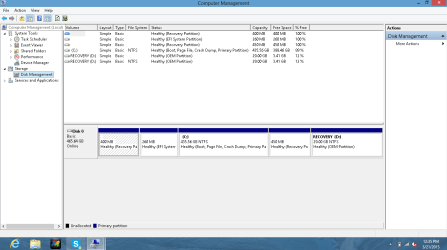
Ok I got a picture of the disk management I've also looked at some videos on youtube which said to disable some servies and change some allocated memory I did both but neither worked but here is the picture none to less
 

Attachments

  • Capture.PNG
    Capture.PNG
    142.6 KB · Views: 4

My Computer

Computer type
Laptop
OS
Microsoft Windows 8 64-bit 9200 Multiprocessor Free
CPU
AMD A6-4455M APU with Radeon(tm) HD Graphics
Motherboard
Hewlett-Packard 193B
Memory
4.00 GB
Graphics Card(s)
AMD Radeon HD 7500G
Sound Card
(1) IDT High Definition Audio CODEC (2) AMD High Definitio
Screen Resolution
0 x 0 x 0 bits (0 colors) @ 0 Hz
Hard Drives
HGST HTS 545050A7E380 SATA Disk Device
I've looked at videos to see other people having problems and I've disabled some services and changed allocated memory but here is my disk management
 

My Computer

Computer type
Laptop
OS
Microsoft Windows 8 64-bit 9200 Multiprocessor Free
CPU
AMD A6-4455M APU with Radeon(tm) HD Graphics
Motherboard
Hewlett-Packard 193B
Memory
4.00 GB
Graphics Card(s)
AMD Radeon HD 7500G
Sound Card
(1) IDT High Definition Audio CODEC (2) AMD High Definitio
Screen Resolution
0 x 0 x 0 bits (0 colors) @ 0 Hz
Hard Drives
HGST HTS 545050A7E380 SATA Disk Device
You cerntianly have enough free space.

Does this problem happen when you are doing anything or just when watching Youtube videos?
When your watching videos how many other websites or programs do you have open?
Are you getting any error codes?
Are you getting any BSOD?

I suggest putting your memory back to default and let Windows 7 manage your memory.
I also recommend not changing Windows 7 Services. Leave them at default.
You are just going to get in trouble changing those things.

We need your system specs. Use this tutorial by Brink to help you.
Please include your security programs.

http://www.sevenforums.com/tutorials/180324-system-info-see-your-system-specs.html

Please don't be doing things you find on line while we are trying to help you.
It just makes things worse.
 

My Computer

Computer type
PC/Desktop
Computer Manufacturer/Model Number
Home made Desktop
OS
Windows 10 Pro. 64/ version 1709 Windows 7 Pro/64
CPU
Intel i7-6800K @ 4.3
Motherboard
ASUS X-99 Deluxe II
Memory
Corsair Platinum 16 gig @2400
Graphics Card(s)
EVGA GTX 1070 OC
Monitor(s) Displays
Asus 27" LED LCD/VE278Q
Screen Resolution
1920-1080 or 1280-720 HDMI
Hard Drives
INTEL SSD 730-240 Gb Sata 3.0/
PSU
EVGA Platium 1200W
Case
Phanteks Luxe Tempered Glass 8 fans/ one radiator
Cooling
XSPC/ Water Cooled CPU
Keyboard
Das 4 Professional
Mouse
Logitech M705/MX Anywhere 2-S
Internet Speed
100 mbits
Antivirus
Microsoft Security Essentials/ Malwarebytes Premium 3.0/ SAS
Browser
I.E. 11 default/Firefox/ ISP Time Warner Cable/Spectrum
Other Info
LG BluRay Burner/
Sound system-KLipsch-THX/
Icy Dock ssd Hot Swap bays.
You cerntianly have enough free space.

Does this problem happen when you are doing anything or just when watching Youtube videos?
When your watching videos how many other websites or programs do you have open?
Are you getting any error codes?
Are you getting any BSOD?

I suggest putting your memory back to default and let Windows 7 manage your memory.
I also recommend not changing Windows 7 Services. Leave them at default.
You are just going to get in trouble changing those things.

We need your system specs. Use this tutorial by Brink to help you.
Please include your security programs.

http://www.sevenforums.com/tutorials/180324-system-info-see-your-system-specs.html

Please don't be doing things you find on line while we are trying to help you.
It just makes things worse.


Hey sorry for trying some stuff I found its just that replies on here take long and I'm desperate for my computer to get back to normal.

Btw I have a windows 8 computer I know this is a windows 7 forums but its one of the only forums I knew and didn't feel like wasting time with others so I apologize in advance.

This happens doing anything I could be on steam, on firefox, or anything it will just not respond and my computer locks up the only time it does not happen is when im playing a full screen game like csgo for instance.

I don't get error codes rather pop ups asking me if I would like to end the process that isn't responding which doesn't work since I cant click end process since im locked up.
also I don't get bsods
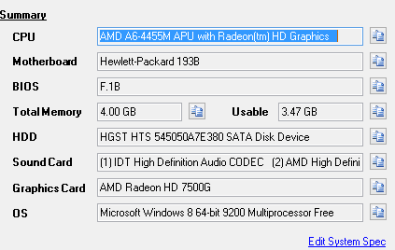
my system specs: in attachment
 

Attachments

  • Capture.PNG
    Capture.PNG
    10.7 KB · Views: 15

My Computer

Computer type
Laptop
OS
Microsoft Windows 8 64-bit 9200 Multiprocessor Free
CPU
AMD A6-4455M APU with Radeon(tm) HD Graphics
Motherboard
Hewlett-Packard 193B
Memory
4.00 GB
Graphics Card(s)
AMD Radeon HD 7500G
Sound Card
(1) IDT High Definition Audio CODEC (2) AMD High Definitio
Screen Resolution
0 x 0 x 0 bits (0 colors) @ 0 Hz
Hard Drives
HGST HTS 545050A7E380 SATA Disk Device
I know very little about W-8 but I'm in the belief that filling in your system specs as per the tutorial I posted works the same in both Windows 7 and 8.

Please read the tutorial again.
Look in the lower left corner of this post and you will se (My System Specs).
Tick on it and you will see one of my systems specs.
We need to see your system specs in the same place on your post.
 

My Computer

Computer type
PC/Desktop
Computer Manufacturer/Model Number
Home made Desktop
OS
Windows 10 Pro. 64/ version 1709 Windows 7 Pro/64
CPU
Intel i7-6800K @ 4.3
Motherboard
ASUS X-99 Deluxe II
Memory
Corsair Platinum 16 gig @2400
Graphics Card(s)
EVGA GTX 1070 OC
Monitor(s) Displays
Asus 27" LED LCD/VE278Q
Screen Resolution
1920-1080 or 1280-720 HDMI
Hard Drives
INTEL SSD 730-240 Gb Sata 3.0/
PSU
EVGA Platium 1200W
Case
Phanteks Luxe Tempered Glass 8 fans/ one radiator
Cooling
XSPC/ Water Cooled CPU
Keyboard
Das 4 Professional
Mouse
Logitech M705/MX Anywhere 2-S
Internet Speed
100 mbits
Antivirus
Microsoft Security Essentials/ Malwarebytes Premium 3.0/ SAS
Browser
I.E. 11 default/Firefox/ ISP Time Warner Cable/Spectrum
Other Info
LG BluRay Burner/
Sound system-KLipsch-THX/
Icy Dock ssd Hot Swap bays.
quick update on things my computer seems to be running ok when i have a game up and firefox next to it, it locks up when im downloading counter strike global offensive on steam but after closing out of it which takes like 4 minutes it goes back to normal? This is good and bad, bad since i need to download csgo haha
 

My Computer

Computer type
Laptop
OS
Microsoft Windows 8 64-bit 9200 Multiprocessor Free
CPU
AMD A6-4455M APU with Radeon(tm) HD Graphics
Motherboard
Hewlett-Packard 193B
Memory
4.00 GB
Graphics Card(s)
AMD Radeon HD 7500G
Sound Card
(1) IDT High Definition Audio CODEC (2) AMD High Definitio
Screen Resolution
0 x 0 x 0 bits (0 colors) @ 0 Hz
Hard Drives
HGST HTS 545050A7E380 SATA Disk Device
Something bad is happening when starting up the labtop it was stuck on the HP loading screen and then it said automatic repair which now led to a black screen idk what to do I'm freaking out
 

My Computer

Computer type
Laptop
OS
Microsoft Windows 8 64-bit 9200 Multiprocessor Free
CPU
AMD A6-4455M APU with Radeon(tm) HD Graphics
Motherboard
Hewlett-Packard 193B
Memory
4.00 GB
Graphics Card(s)
AMD Radeon HD 7500G
Sound Card
(1) IDT High Definition Audio CODEC (2) AMD High Definitio
Screen Resolution
0 x 0 x 0 bits (0 colors) @ 0 Hz
Hard Drives
HGST HTS 545050A7E380 SATA Disk Device
Back
Top