
Solved Computer folder keeps appearing after startup!

I don't get it. Is it the one on the Desktop? :confused:
 

My Computer

Computer type
PC/Desktop
Computer Manufacturer/Model Number
Custom Build
OS
Windows 7 Ultimate x64 Service Pack 1
CPU
AMD Athlon II x4 Propus 2.9 GHz
Motherboard
ASRock N68C-GS FX
Memory
2 x 4GB Corsair XMS 3 DDR3 -1600 CL9
Graphics Card(s)
AMD Radeon HD 5850 1GB GDDR5
Sound Card
On-board 6-Channel HD Audio
Monitor(s) Displays
18' LG Flatron E1942TC-BN on DVI, 18' Chimei 95ND on HDMI
Screen Resolution
1366 x 768 x 2
Hard Drives
1 x 500 GB Seagate
1 x 1 TB Western Digital Caviar Green
1 x 1 TB Hitachi Touro Mobile USB 3
PSU
Seasonic S12II 520W
Case
Generic with Cable Management
Cooling
Deep Cool Gammaxx 200
Keyboard
Dragonwar Desert Eagle
Mouse
Logitech B85
Internet Speed
5Mb/s DL, 0.9Mb/s UL
Antivirus
ESET Nod32
Browser
Google Chrome 64 Bit
Other Info
LG G4 H818P - Rooted with Xposed Framework
Heres a FIX:

Click Start, in the search box, type Regedit.

Navigate To > HKEY_LOCAL_MACHINE\ SOFTWARE\ Microsoft\ Windows NT\ CurrentVersion\ Winlogon

In RHS panel, change value of "Userinit" to : C:\WINDOWS\system32\userinit.exe
 

My Computer

Computer Manufacturer/Model Number
Cooler Master
OS
Windows 7 Home Premium 64 Bit
CPU
Core I7 1155 3.4GHZ
Memory
8GB DDR 1600
Hard Drives
64 GB SSD - OS
1TB - DATA
PSU
340 Watt Corsair
Case
Cooler Master
Cooling
Cooler Master
Also: Do you have Shellfolderfix installed
 

My Computer

Computer Manufacturer/Model Number
Cooler Master
OS
Windows 7 Home Premium 64 Bit
CPU
Core I7 1155 3.4GHZ
Memory
8GB DDR 1600
Hard Drives
64 GB SSD - OS
1TB - DATA
PSU
340 Watt Corsair
Case
Cooler Master
Cooling
Cooler Master
Heres a FIX:

Click Start, in the search box, type Regedit.

Navigate To > HKEY_LOCAL_MACHINE\ SOFTWARE\ Microsoft\ Windows NT\ CurrentVersion\ Winlogon

In RHS panel, change value of "Userinit" to : C:\WINDOWS\system32\userinit.exe
that's what I thought as well. But why happens it on first logon on boot only?
 

My Computer

Computer type
Laptop
Computer Manufacturer/Model Number
ACER ASPIRE 5742G
OS
Microsoft Windows 7 Home Premium 64-bits 7601 Multiprocessor Free Service Pack 1
CPU
Intel(R) Core(TM) i3 CPU M 370 @ 2.40GHz
Motherboard
Acer Aspire 5742G
Memory
4,00 GB
Graphics Card(s)
ATI Mobility Radeon HD 5400 Series
Sound Card
(1) AMD High Definition Audio Device (2) Realtek High Defi
Screen Resolution
1366 x 768 x 32 bits (4294967296 colors) @ 60 Hz
Hard Drives
WDC WD5000BEVT-22ZAT0
Heres a FIX:

Click Start, in the search box, type Regedit.

Navigate To > HKEY_LOCAL_MACHINE\ SOFTWARE\ Microsoft\ Windows NT\ CurrentVersion\ Winlogon

In RHS panel, change value of "Userinit" to : C:\WINDOWS\system32\userinit.exe
that's what I thought as well. But why happens it on first logon on boot only?


No idea. But i've seen this lots of times, And it works perfectly. It is a strange one.
 

My Computer

Computer Manufacturer/Model Number
Cooler Master
OS
Windows 7 Home Premium 64 Bit
CPU
Core I7 1155 3.4GHZ
Memory
8GB DDR 1600
Hard Drives
64 GB SSD - OS
1TB - DATA
PSU
340 Watt Corsair
Case
Cooler Master
Cooling
Cooler Master
Do a clean boot http://www.sevenforums.com/tutorial...ation-conflicts-performing-clean-startup.html

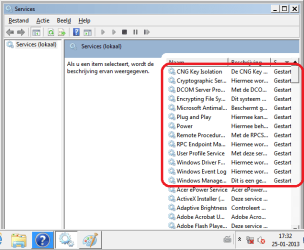
But even restrict the microsoft services that start. Disable them all. Only start these (see screenshot). Order the list by name so you can find them faster. Enable only what is in screenshot. Then reboot. Still problems? Use MSCONFIG

Now boot normally as described in step three of turorial

Note: The services listed are the ones that start in safe mode
 

Attachments

  • Naamloos.png
    Naamloos.png
    17.6 KB · Views: 3

My Computer

Computer type
Laptop
Computer Manufacturer/Model Number
ACER ASPIRE 5742G
OS
Microsoft Windows 7 Home Premium 64-bits 7601 Multiprocessor Free Service Pack 1
CPU
Intel(R) Core(TM) i3 CPU M 370 @ 2.40GHz
Motherboard
Acer Aspire 5742G
Memory
4,00 GB
Graphics Card(s)
ATI Mobility Radeon HD 5400 Series
Sound Card
(1) AMD High Definition Audio Device (2) Realtek High Defi
Screen Resolution
1366 x 768 x 32 bits (4294967296 colors) @ 60 Hz
Hard Drives
WDC WD5000BEVT-22ZAT0
thnx everyone but none of the above fixes worked, had to do a factory recovery thing, my laptop is back to factory defaults, everything is GONEEEEEEE! but that fixed the damn problem, thnx you guys for all the help. I dont think we will ever find out what went wrong!

special thanks to my friend Kaktussoft.
 

My Computer

Computer Manufacturer/Model Number
Lenovo IdeaPad Z580
OS
Windows 7 Home Premium x64
CPU
Intel Core i5 3210M @2.5 upto 3.1
Memory
6GB DDR3 @1600Mhz
Graphics Card(s)
Intel HD 4000 + nVidia GT630M dedicated 2GB DDR3
Monitor(s) Displays
15.6" HD LED
Screen Resolution
1366x768
Hard Drives
500GB @5400rpm
Internet Speed
512 Kbps Broadband
Other Info
Windows 7 Home Premium 64-bit
Check this registry key: HKEY_LOCAL_MACHINE\SOFTWARE\Microsoft\Windows\CurrentVersion\Run

What's in there?
 

My Computer

OS
Win 7
I'll jump in here with an answer to that, winkle, since I have the same problem.

There are three items in there:

(Default)
AdobeAAMUpdater-1.0
Classic Start Menu
 

My Computer

Computer Manufacturer/Model Number
Dell Studio XPS 9000
OS
Windows 7 Professional
CPU
Intel Core i7 920
Motherboard
Dell 0X501H
Memory
8GB DDR3 SDRAM at 1066MHz
Graphics Card(s)
DELL ST2210 on ATI Radeon
Sound Card
Realtek High Definition Audio
Monitor(s) Displays
Dell ST2210 21"
Screen Resolution
1920 x 1080-------------------------------------------------
Hard Drives
Hitachi HDS721010CLA332 ATA Device
SAMSUNG HD103SJ ATA Device
Seagate ST3000DM001-9YN166 ATA Device
I'll jump in here with an answer to that, winkle, since I have the same problem.

There are three items in there:

(Default)
AdobeAAMUpdater-1.0
Classic Start Menu
Post a screenshot of that key please
 

My Computer

Computer type
Laptop
Computer Manufacturer/Model Number
ACER ASPIRE 5742G
OS
Microsoft Windows 7 Home Premium 64-bits 7601 Multiprocessor Free Service Pack 1
CPU
Intel(R) Core(TM) i3 CPU M 370 @ 2.40GHz
Motherboard
Acer Aspire 5742G
Memory
4,00 GB
Graphics Card(s)
ATI Mobility Radeon HD 5400 Series
Sound Card
(1) AMD High Definition Audio Device (2) Realtek High Defi
Screen Resolution
1366 x 768 x 32 bits (4294967296 colors) @ 60 Hz
Hard Drives
WDC WD5000BEVT-22ZAT0
registrykey.jpg
 
Last edited:

My Computer

Computer Manufacturer/Model Number
Dell Studio XPS 9000
OS
Windows 7 Professional
CPU
Intel Core i7 920
Motherboard
Dell 0X501H
Memory
8GB DDR3 SDRAM at 1066MHz
Graphics Card(s)
DELL ST2210 on ATI Radeon
Sound Card
Realtek High Definition Audio
Monitor(s) Displays
Dell ST2210 21"
Screen Resolution
1920 x 1080-------------------------------------------------
Hard Drives
Hitachi HDS721010CLA332 ATA Device
SAMSUNG HD103SJ ATA Device
Seagate ST3000DM001-9YN166 ATA Device

My Computer

Computer Manufacturer/Model Number
Dell Studio XPS 9000
OS
Windows 7 Professional
CPU
Intel Core i7 920
Motherboard
Dell 0X501H
Memory
8GB DDR3 SDRAM at 1066MHz
Graphics Card(s)
DELL ST2210 on ATI Radeon
Sound Card
Realtek High Definition Audio
Monitor(s) Displays
Dell ST2210 21"
Screen Resolution
1920 x 1080-------------------------------------------------
Hard Drives
Hitachi HDS721010CLA332 ATA Device
SAMSUNG HD103SJ ATA Device
Seagate ST3000DM001-9YN166 ATA Device
Run msconfig and disable those autoload programs. At least temporary and reboot. Still same problem?
don't forget to run msconfig again and select "boot normally"
 

My Computer

Computer type
Laptop
Computer Manufacturer/Model Number
ACER ASPIRE 5742G
OS
Microsoft Windows 7 Home Premium 64-bits 7601 Multiprocessor Free Service Pack 1
CPU
Intel(R) Core(TM) i3 CPU M 370 @ 2.40GHz
Motherboard
Acer Aspire 5742G
Memory
4,00 GB
Graphics Card(s)
ATI Mobility Radeon HD 5400 Series
Sound Card
(1) AMD High Definition Audio Device (2) Realtek High Defi
Screen Resolution
1366 x 768 x 32 bits (4294967296 colors) @ 60 Hz
Hard Drives
WDC WD5000BEVT-22ZAT0
No, that didn't help, Kaktus. :confused: Windows Explorer still opened up automatically on boot.
 

My Computer

Computer Manufacturer/Model Number
Dell Studio XPS 9000
OS
Windows 7 Professional
CPU
Intel Core i7 920
Motherboard
Dell 0X501H
Memory
8GB DDR3 SDRAM at 1066MHz
Graphics Card(s)
DELL ST2210 on ATI Radeon
Sound Card
Realtek High Definition Audio
Monitor(s) Displays
Dell ST2210 21"
Screen Resolution
1920 x 1080-------------------------------------------------
Hard Drives
Hitachi HDS721010CLA332 ATA Device
SAMSUNG HD103SJ ATA Device
Seagate ST3000DM001-9YN166 ATA Device
No, that didn't help, Kaktus. :confused: Windows Explorer still opened up automatically on boot.
All user accounts have this problem? Create a fresh new account and test.
Also try http://www.sevenforums.com/tutorial...ation-conflicts-performing-clean-startup.html
don't forget to do step three when finished testing


Click Start, in the search box, type Regedit.

Navigate To > HKEY_LOCAL_MACHINE\SOFTWARE\Microsoft\Windows NT\CurrentVersion\Winlogon

In panel on the right, change value of "Userinit" to : C:\WINDOWS\system32\userinit.exe
Was it already?
 

My Computer

Computer type
Laptop
Computer Manufacturer/Model Number
ACER ASPIRE 5742G
OS
Microsoft Windows 7 Home Premium 64-bits 7601 Multiprocessor Free Service Pack 1
CPU
Intel(R) Core(TM) i3 CPU M 370 @ 2.40GHz
Motherboard
Acer Aspire 5742G
Memory
4,00 GB
Graphics Card(s)
ATI Mobility Radeon HD 5400 Series
Sound Card
(1) AMD High Definition Audio Device (2) Realtek High Defi
Screen Resolution
1366 x 768 x 32 bits (4294967296 colors) @ 60 Hz
Hard Drives
WDC WD5000BEVT-22ZAT0
No, that didn't help, Kaktus. :confused: Windows Explorer still opened up automatically on boot.
Also if booting in "safe mode"?
 

My Computer

Computer type
Laptop
Computer Manufacturer/Model Number
ACER ASPIRE 5742G
OS
Microsoft Windows 7 Home Premium 64-bits 7601 Multiprocessor Free Service Pack 1
CPU
Intel(R) Core(TM) i3 CPU M 370 @ 2.40GHz
Motherboard
Acer Aspire 5742G
Memory
4,00 GB
Graphics Card(s)
ATI Mobility Radeon HD 5400 Series
Sound Card
(1) AMD High Definition Audio Device (2) Realtek High Defi
Screen Resolution
1366 x 768 x 32 bits (4294967296 colors) @ 60 Hz
Hard Drives
WDC WD5000BEVT-22ZAT0

My Computer

Computer type
PC/Desktop
Computer Manufacturer/Model Number
Custom Build
OS
Windows 7 Ultimate x64 Service Pack 1
CPU
AMD Athlon II x4 Propus 2.9 GHz
Motherboard
ASRock N68C-GS FX
Memory
2 x 4GB Corsair XMS 3 DDR3 -1600 CL9
Graphics Card(s)
AMD Radeon HD 5850 1GB GDDR5
Sound Card
On-board 6-Channel HD Audio
Monitor(s) Displays
18' LG Flatron E1942TC-BN on DVI, 18' Chimei 95ND on HDMI
Screen Resolution
1366 x 768 x 2
Hard Drives
1 x 500 GB Seagate
1 x 1 TB Western Digital Caviar Green
1 x 1 TB Hitachi Touro Mobile USB 3
PSU
Seasonic S12II 520W
Case
Generic with Cable Management
Cooling
Deep Cool Gammaxx 200
Keyboard
Dragonwar Desert Eagle
Mouse
Logitech B85
Internet Speed
5Mb/s DL, 0.9Mb/s UL
Antivirus
ESET Nod32
Browser
Google Chrome 64 Bit
Other Info
LG G4 H818P - Rooted with Xposed Framework
Back
Top