
Computer Freezes at BIOS error Screen

Astrid

New member
Local time
10:56 PM
Messages
1
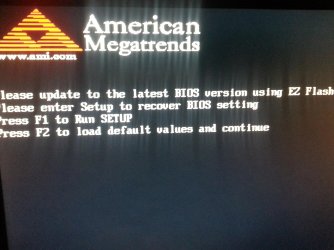
I was playing FFXIV when it started freezing and lagging, which isn't too uncommon in and of itself however, when I tried to restart the game it continued to give me log in errors. Attempting to fix this I decided to restart my computer but when it went to start back up it gave me a no boot device error and then the screen in the picture I attached to this post. I've tried pressing F1 F2 F8 dlt and tab but no matter what I press and when it flashes straight back to this screen. I've had issues before where I was easily able to find multiple threads and answers from other people having the same issue but so far I haven't found anything that resembles the problem I'm having and therefore have no clue as to how to fix it. Please help!
 

Attachments
  • 20140717_031844.jpg
    20140717_031844.jpg
    586.2 KB · Views: 1

My Computer

Computer type
PC/Desktop
Computer Manufacturer/Model Number
custom built
OS
Windows 7 64bit
Try resetting the BIOS.

Power down the computer.
Remove the power cord.
Open the case and remove the CMOS battery.
Press and hold the power button for 10 seconds to drain the capacitors.
Put the CMOS battery back in.
Plug in the power cord.
Power up.

You should get a message about corrupter CMOS, press F1 to continue, F2 to enter Setup.
Press F2.

Set date/time/time zone/boot devices and boot priority.
Save and exit, see if it boots.
 

My Computer

Computer type
PC/Desktop
Computer Manufacturer/Model Number
Lenovo IdeaCenter 450
OS
Windows 10 Pro X64
CPU
Intel Quad Core i7-4770 @ 3.4Ghz
Memory
16.0GB PC3-12800 DDR3 SDRAM 1600 MHz
Graphics Card(s)
Intel Integrated HD Graphics
Sound Card
Realtek HD Audio
Monitor(s) Displays
HP 22" LCD
Screen Resolution
1680 x 1050
Hard Drives
250GB Samsung EVO SATA-3 SSD
2TB Seagate ST2000DM001 SATA-2
1.5TB Seagate ST3150041AS SATA
Keyboard
Dell USB
Mouse
Lenovo USB
Internet Speed
Cable via Road Runner 3MB Upload, 30MB Download
Antivirus
Windows Defender, MBAM Pro, MBAE
Browser
Seamonkey
Other Info
UEFI/GPT
PLDS DVD-RW DH16AERSH
Back
Top