Solved Computer freezing during bootup.

redzero36

New member
Member
Local time
6:14 PM
Messages
62
I can't seem to fully boot into windows because it always freezes with everything I've tried. I installed a new SSD with a clean install into my computer today. After a couple of hours of updating drivers and windows updates it won't boot properly. Passes the bios part and POST every time. When it reaches the "starting windows" screen it always freezes. I tried it with my original HDD and it freezes at the same part. I've tried going to safe mode and it freezes when its loading up the list of drives or other files screen. I've tried doing the system repair at start up, the bar fills up and says "loading files" and freezes there. Tried booting to dvd to do reinstall and freezes the same way the system repair does. Also I can't seem to boot from my usb flash drive on my desktop. When I tried to it would have a black screen with the blinking cursor/underscore.
 

My Computer

Computer Manufacturer/Model Number
Gateway LX6810-01
OS
Windows 7 Ultimate x64 SP1
CPU
Intel(R) Core(TM)2 Quad CPU Q8200 @ 2.33GHz
Motherboard
Gateway FMCP7AM
Memory
8.00 GB
Graphics Card(s)
NVIDIA GeForce GTX 460
Sound Card
Realtek High Definition Audio
Monitor(s) Displays
Samsung SyncMaster B2030, SyncMaster 2033
Screen Resolution
1600 x 900
Hard Drives
NVIDIA STRIPE 596.17G0100
Internet Speed
AT&T 6.8 Mb/s
So booting from win7 install DVD freezes as well on "loading files"?
How many disks are in system... only original HDD and SSD?

It didn't boot succesfully all of a sudden. You didn't open the computer and accidently detached a cable or damaged your memory just before?
 

My Computer

Computer type
Laptop
Computer Manufacturer/Model Number
ACER ASPIRE 5742G
OS
Microsoft Windows 7 Home Premium 64-bits 7601 Multiprocessor Free Service Pack 1
CPU
Intel(R) Core(TM) i3 CPU M 370 @ 2.40GHz
Motherboard
Acer Aspire 5742G
Memory
4,00 GB
Graphics Card(s)
ATI Mobility Radeon HD 5400 Series
Sound Card
(1) AMD High Definition Audio Device (2) Realtek High Defi
Screen Resolution
1366 x 768 x 32 bits (4294967296 colors) @ 60 Hz
Hard Drives
WDC WD5000BEVT-22ZAT0
Try booting from win7 install DVD after detaching all disks from system. What happens then?

If successfully attach only. Afterwards try to boot again.
Attach the second disk as well. Afterwards try to boot again.

Now you know what disk causes the problem.

If boot freezes with no disks atached: attach the disks again.

Post back results
 

My Computer

Computer type
Laptop
Computer Manufacturer/Model Number
ACER ASPIRE 5742G
OS
Microsoft Windows 7 Home Premium 64-bits 7601 Multiprocessor Free Service Pack 1
CPU
Intel(R) Core(TM) i3 CPU M 370 @ 2.40GHz
Motherboard
Acer Aspire 5742G
Memory
4,00 GB
Graphics Card(s)
ATI Mobility Radeon HD 5400 Series
Sound Card
(1) AMD High Definition Audio Device (2) Realtek High Defi
Screen Resolution
1366 x 768 x 32 bits (4294967296 colors) @ 60 Hz
Hard Drives
WDC WD5000BEVT-22ZAT0
I don't think I damaged my RAM because I didn't even touch my motherboard or the RAM and I didn't open my computer or removed any cables after I installed my SSD. It was working fine for a bit. Then after a mandatory restart after the windows updates and the other drivers, it wouldn't boot. I didn't touch anything inside while doing my updates. I tried booting with no HDD/SSD connected and booted from Win 7 install DVD. It was able to pass"Windows is loading files" screen with bar full and when it reaches "starting Windows" it freezes there.

edit:
I decided to check if my RAM was causing the problems so I removed 3 of the 4 RAM sticks. It seems that it was causing the problems. As of right now I have one RAM stick plugged in and was able to successfully boot into windows. I'm currently checking the RAM slots to see if any of them are broken then I'll check the sticks individually. I'm not entirely sure its my RAM because I never touched them when installing my SDD so how would it end up broken or causing my computer not to fully boot.

edit:
Okay I have no clue what the cause is. I don't think its my RAM anymore because they work in another computer. Trade RAM and it still didn't work. Decided to remove every connection besides my monitors and keyboard my SSD and optical drive then all of a sudden it works. What I disconnected was my HDDS, my usb mic and bluetooth dongle. Trying to figure out what the cause was by putting one more thing back at a time
 
Last edited:

My Computer

Computer Manufacturer/Model Number
Gateway LX6810-01
OS
Windows 7 Ultimate x64 SP1
CPU
Intel(R) Core(TM)2 Quad CPU Q8200 @ 2.33GHz
Motherboard
Gateway FMCP7AM
Memory
8.00 GB
Graphics Card(s)
NVIDIA GeForce GTX 460
Sound Card
Realtek High Definition Audio
Monitor(s) Displays
Samsung SyncMaster B2030, SyncMaster 2033
Screen Resolution
1600 x 900
Hard Drives
NVIDIA STRIPE 596.17G0100
Internet Speed
AT&T 6.8 Mb/s
Anyone have an idea of whats going wrong? Whenever I have my HDDs connected and my other usb devices connected, it freezes at "starting windows logo" screen. When I don't have my HDDs and my other usb devices disconnected I can boot fully. Then when I'm at my login screen I just plug in all my devices then it works normally. When I only have my HDDs/ USB devices pluggged in it freezes. I have to have both disconnected before I get to the login screen.
 

My Computer

Computer Manufacturer/Model Number
Gateway LX6810-01
OS
Windows 7 Ultimate x64 SP1
CPU
Intel(R) Core(TM)2 Quad CPU Q8200 @ 2.33GHz
Motherboard
Gateway FMCP7AM
Memory
8.00 GB
Graphics Card(s)
NVIDIA GeForce GTX 460
Sound Card
Realtek High Definition Audio
Monitor(s) Displays
Samsung SyncMaster B2030, SyncMaster 2033
Screen Resolution
1600 x 900
Hard Drives
NVIDIA STRIPE 596.17G0100
Internet Speed
AT&T 6.8 Mb/s
Have you tried swapping the power cables around?

I had a problem with a dodgy power cable/connector on one of my DVD drives, which prevented my computer from booting from the HDD (the symptoms were similar to the ones you describe).

The weird thing is that particular setup had run without any problems for a couple of years and then it suddenly started playing up. :confused:
 

My Computer

Computer type
PC/Desktop
Computer Manufacturer/Model Number
n/a
OS
W7 Ultimate SP1, LM19.2 MATE, W10 Home 1703, W10 Pro 1703 VM, #All 64 bit
CPU
AMD Phenom II x6 1100T, 3.3 GHz
Motherboard
ASUS M4A88T-M/USB3 (AM3)
Memory
12GB DDR3 1333 G-Skill (4GB x 2), G-Skill (2GB x 2)
Graphics Card(s)
NVIDIA GeForce GTX 660
Sound Card
Realtek?
Monitor(s) Displays
Samsung S23B350
Screen Resolution
1920x1080
Hard Drives
WD Green 2TB (SATA), WD Green 3TB (SATA), WD Blue 4TB (SATA), WD Blue 6TB (SATA)
PSU
Cooler Master
Case
Antec GX300 Tower
Cooling
3x Antec TRICOOL 120mm Fans
Mouse
Wired Optical
Internet Speed
DSL
Antivirus
Avast
Browser
Pale Moon (64 bit)
Other Info
2018-12-27 Upgraded HDDs
2015-12-10 Upgraded case, graphics card, storage
2015-08-15 Upgraded motherboard & RAM
2015-07-15 Upgraded LM17.1 to LM17.2
No extra power cables or unused ones in the computer. I did make sure that it was connected all the way and made sure that the others are connected as well. Is there anything I should replace, my computer is about 3-4 years old would the power supply be going out?
 

My Computer

Computer Manufacturer/Model Number
Gateway LX6810-01
OS
Windows 7 Ultimate x64 SP1
CPU
Intel(R) Core(TM)2 Quad CPU Q8200 @ 2.33GHz
Motherboard
Gateway FMCP7AM
Memory
8.00 GB
Graphics Card(s)
NVIDIA GeForce GTX 460
Sound Card
Realtek High Definition Audio
Monitor(s) Displays
Samsung SyncMaster B2030, SyncMaster 2033
Screen Resolution
1600 x 900
Hard Drives
NVIDIA STRIPE 596.17G0100
Internet Speed
AT&T 6.8 Mb/s
I would go back through your computer and check all your connections. I experienced an issue a while back and I swore that I didn't touch anything else, but turned out that I had somehow loosened a cable connection. This is especially possible if you don't have clip locking cables.

If there is damage to your components you most likely won't be able to see it. Be wary of ESD (electrostatic discharge) while you are poking around the internals.

When you install your OS have only the SSD connected during the installation. Install all your updates and drivers with all non-essential externals disconnected. It is possible that there is an update or driver that is causing the problem. This can be a time consuming evolution depending on how much you have to install, but to rule out bad drivers and updates I would install one (or a few) at a time, reboot and check performance. Wash, rinse, repeat until either you recreate the problem or hopefully never experience it. If it is a bad(incompatible) update, installing updates and drivers in small chunks will help you narrow down and identify which one is causing your problems. Once all updates and installs are complete, reboot reconnect and assess.

If this is helpfull, or completely useless to you, let me know either way.

77
 

My Computer

Computer Manufacturer/Model Number
HP Pavilion p6204y
OS
Windows 7 Home Premium 64bit
CPU
Intel *will update* (slipped my mind) (2 core)
Memory
6GB
Hard Drives
Seagate Barrcuda 750Gb
Case
Stock
Seems that you caught on to a possibility... the power supply could be a single point of failure.

What is your power rating? If you have a low wattage power supply you may be trying to use more power than it can put out. The more stuff you plug in the more power you demand from your supply...there comes a time when you reach or exceed that limit. This can be dangerous for your system.

So 2 possibilities in the realm of power:
1) Bad power supply
2) Not enough power for your system and all externals.
 

My Computer

Computer Manufacturer/Model Number
HP Pavilion p6204y
OS
Windows 7 Home Premium 64bit
CPU
Intel *will update* (slipped my mind) (2 core)
Memory
6GB
Hard Drives
Seagate Barrcuda 750Gb
Case
Stock
I'll Double check the cables probably tomorrow when I have the time. I don't think its an ESD problem because I always use a ESD strap attached to the case whenever I touch sensitive parts and then put them in ESD bags but there is not really a way to definitely sure. And the drivers thing does sound like a likely answer but I'm probably gonna ghost my SSD and then the install so that may take a couple hours so I probably won't have results to tell you ydylan77 probably a day after tomorrow. Um so should I install like my windows drivers all at once then go to my other required drivers after that one at a time?
 

My Computer

Computer Manufacturer/Model Number
Gateway LX6810-01
OS
Windows 7 Ultimate x64 SP1
CPU
Intel(R) Core(TM)2 Quad CPU Q8200 @ 2.33GHz
Motherboard
Gateway FMCP7AM
Memory
8.00 GB
Graphics Card(s)
NVIDIA GeForce GTX 460
Sound Card
Realtek High Definition Audio
Monitor(s) Displays
Samsung SyncMaster B2030, SyncMaster 2033
Screen Resolution
1600 x 900
Hard Drives
NVIDIA STRIPE 596.17G0100
Internet Speed
AT&T 6.8 Mb/s
The power supply, if it is bad or overloaded, could very well cause some crazy things to happen on your machine. There are a plethera of possibilities out there i.e. overheating processor, dirt... but don't seem likely. The fact that you even know what an ESD strap is, just stellar. You are not "regular folk with puter problems" lol

If you are going to do a clean install then I would go about it like this:
(If you like videos...there are a metric sh** ton of them out there but this one might help a tiny bit. skip to 15 minutes in to avoid all the extra BS that you won't care about.) Or hit up youtube on your own and find something mo betta.

Newegg TV: How To Build a Computer - Part 3 - Installing Windows & Finishing Touches - YouTube

1. Install OS with the SSD being the only drive connected.
2. Install essential driver updates as needed for:
a. MotherBoard
>Processor
>NIC
>USB
b. Graphics card
2. Run windows update and only select a handfull of updates to apply at a time. If you run into a mountain of updates like i did then there may be over 100 to install. I find it best practice to install them a few at a time and keep them in order. This will help prevent bad things in case some of the updates have dependencies on one another or if there is an update that includes changes to another update.

3. Install driver updates for your other peripherals one at a time and check your system operability after each one. Not all drivers are necessarily compatible with every possible hardware configuration so....its possible they are a root cause, but I guess we will find out.

I recently overcame a similar issue to yours so I know your pain. Luckily I had a spare HDD and a system image from a while back so I just ditched my drive and started fresh(ish). Takes a few hours but not incredibly time consuming, especially since you can walk away during most of the install processes. Good luck, let me know if you run into problems, or more problems I willdo what I can...or perhaps others will weigh in on this.

77
 

My Computer

Computer Manufacturer/Model Number
HP Pavilion p6204y
OS
Windows 7 Home Premium 64bit
CPU
Intel *will update* (slipped my mind) (2 core)
Memory
6GB
Hard Drives
Seagate Barrcuda 750Gb
Case
Stock
Anyone have an idea of whats going wrong? Whenever I have my HDDs connected and my other usb devices connected, it freezes at "starting windows logo" screen. When I don't have my HDDs and my other usb devices disconnected I can boot fully. Then when I'm at my login screen I just plug in all my devices then it works normally. When I only have my HDDs/ USB devices pluggged in it freezes. I have to have both disconnected before I get to the login screen.
You have to connect at lease 1 HDD to be able to login. Win7 HDD has to be connected.

So disconnecting all usb and all other harddisks it works. Connect one by one and test. Which one is the problem? I you find th problem disk... connect all except that one. Works? Try to connect another disk to (maybe faulty) sata slot.
 

My Computer

Computer type
Laptop
Computer Manufacturer/Model Number
ACER ASPIRE 5742G
OS
Microsoft Windows 7 Home Premium 64-bits 7601 Multiprocessor Free Service Pack 1
CPU
Intel(R) Core(TM) i3 CPU M 370 @ 2.40GHz
Motherboard
Acer Aspire 5742G
Memory
4,00 GB
Graphics Card(s)
ATI Mobility Radeon HD 5400 Series
Sound Card
(1) AMD High Definition Audio Device (2) Realtek High Defi
Screen Resolution
1366 x 768 x 32 bits (4294967296 colors) @ 60 Hz
Hard Drives
WDC WD5000BEVT-22ZAT0
Oh could a power supply cause my boot freezing? Because the stock PSU I have is 400w. I looked at a recommend power supply wattage calculator and it says I should have a 500w PSU. I upgraded my graphics card last year so my recommended PSU was 400 calculating my old graphics card but now its 500w. Is that a possibility why computer won't start when I have my HDDs and USBs plugged in?

edit
@Iydylan77
did a clean install again but before I was able to read your posts. Followed what you said about the drivers but didn't know what windows updates to do so I did recommended. took way too long. Then proceeded to installing drivers one at a time this morning. same results.
@ Kaktussoft
Huh I tried what you said and I think I found the problem. When I have 2 or more things plugged into my USB hub my computer freezes. I never noticed since I always removed all HDDs at the same time and USBs at the same time since it was connected to a hub. Which is strange since I've never had this problem before I installed to SSD. When I remove all my USBs on my hub and connect it directly to USB ports then it won't freeze. I can still have my hub plugged in but just have one usb plugged in during boot.

I think my problem is solved. I'll close this in a day or two to make sure that my problem is solved.
 
Last edited:

My Computer

Computer Manufacturer/Model Number
Gateway LX6810-01
OS
Windows 7 Ultimate x64 SP1
CPU
Intel(R) Core(TM)2 Quad CPU Q8200 @ 2.33GHz
Motherboard
Gateway FMCP7AM
Memory
8.00 GB
Graphics Card(s)
NVIDIA GeForce GTX 460
Sound Card
Realtek High Definition Audio
Monitor(s) Displays
Samsung SyncMaster B2030, SyncMaster 2033
Screen Resolution
1600 x 900
Hard Drives
NVIDIA STRIPE 596.17G0100
Internet Speed
AT&T 6.8 Mb/s
I am glad that the community was able to help you out. I know that updates are slow and time consuming. You mentioned that your recommended power supply rating is 500W, I would recommend upgrading when you can. Especially if you intend on attaching more devices or upgrading cards. If you over-stress your PS eventually its just going to crap out.

Not sure if anyone else knows better than I, but is it a possibility that your hub may have a fault? Since when devices are connected to the hub during start up your PC freezes, where all is well when they are have a direct connection to the PC ports. But then again it could point to the Power supply being insufficient, with all your connected devices pulling power simultaneously at initial power on. Start up is when they all demand the most power at the same time. When you connect them after start up power demands from your system have calmed down. Someone call me out if I am way off base here but unless its a faulted device then I think you just might need to get a higher rated PS.
 

My Computer

Computer Manufacturer/Model Number
HP Pavilion p6204y
OS
Windows 7 Home Premium 64bit
CPU
Intel *will update* (slipped my mind) (2 core)
Memory
6GB
Hard Drives
Seagate Barrcuda 750Gb
Case
Stock
thanks ydylan77 and Kaktussoft. I'll definitely upgrade my power supply as soon as possible. I haven't had a problem since, been updating drivers and restarting to check if it freezes but it doesn't. Thanks for the help and advice. This thread is solved. If anything else just pm me.
 

My Computer

Computer Manufacturer/Model Number
Gateway LX6810-01
OS
Windows 7 Ultimate x64 SP1
CPU
Intel(R) Core(TM)2 Quad CPU Q8200 @ 2.33GHz
Motherboard
Gateway FMCP7AM
Memory
8.00 GB
Graphics Card(s)
NVIDIA GeForce GTX 460
Sound Card
Realtek High Definition Audio
Monitor(s) Displays
Samsung SyncMaster B2030, SyncMaster 2033
Screen Resolution
1600 x 900
Hard Drives
NVIDIA STRIPE 596.17G0100
Internet Speed
AT&T 6.8 Mb/s
@ Kaktussoft
Huh I tried what you said and I think I found the problem. When I have 2 or more things plugged into my USB hub my computer freezes. I never noticed since I always removed all HDDs at the same time and USBs at the same time since it was connected to a hub. Which is strange since I've never had this problem before I installed to SSD. When I remove all my USBs on my hub and connect it directly to USB ports then it won't freeze. I can still have my hub plugged in but just have one usb plugged in during boot.

I think my problem is solved. I'll close this in a day or two to make sure that my problem is solved.

2 disks connected to same hub doesn't provide enough power!
 

My Computer

Computer type
Laptop
Computer Manufacturer/Model Number
ACER ASPIRE 5742G
OS
Microsoft Windows 7 Home Premium 64-bits 7601 Multiprocessor Free Service Pack 1
CPU
Intel(R) Core(TM) i3 CPU M 370 @ 2.40GHz
Motherboard
Acer Aspire 5742G
Memory
4,00 GB
Graphics Card(s)
ATI Mobility Radeon HD 5400 Series
Sound Card
(1) AMD High Definition Audio Device (2) Realtek High Defi
Screen Resolution
1366 x 768 x 32 bits (4294967296 colors) @ 60 Hz
Hard Drives
WDC WD5000BEVT-22ZAT0
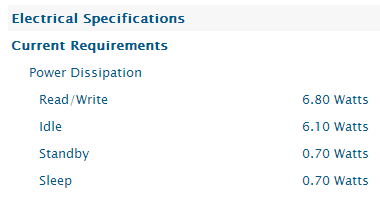
maximum power for most USB ports is limited to ~500mA. If you are using an un-powered hub it is possible to have too much crap connected. Unless you need portable data I prefer to keep my HDs in the case and connect to the PS and SATA. Then if you wanna get fancy you can start playing with RAID.
 

Attachments

  • 1TBwdPower.png
    1TBwdPower.png
    2.3 KB · Views: 0

My Computer

Computer Manufacturer/Model Number
HP Pavilion p6204y
OS
Windows 7 Home Premium 64bit
CPU
Intel *will update* (slipped my mind) (2 core)
Memory
6GB
Hard Drives
Seagate Barrcuda 750Gb
Case
Stock
Back
Top