Solved Computer freezing up during web-browsing and standard use

mesmerrow

New member
Member
Local time
5:39 AM
Messages
65
Hi everyone, This issue of mine have been getting worse for months now (at least from when i noticed it) and it has reached a point where i now have to do something about it and have tried a few things but nothing noticeable have changed, It's simply that my computer have been freezing up in two different ways.

The first one is when i am using Google Chrome where it freezes up for simple actions like opening a new tab or clicking links, The freezing usually only lasts for around 10 seconds but it's getting really annoying having to wait nearly every time you do something on Google Chrome (and yes it's updated to the latest version)

The second issue is when i am browsing around the computer, Like booting up software, deleting, moving, copying, you name it, In many (but not all) cases the mouse cursor turns into a loading circle and i'll have to wait for around 30 second for some minimal task like the above mentioned which becomes annoying really quickly (and my Windows 7 is fully updated as well)

Note: Something i noticed is that none of the above mentioned issues has any noticeable effects on my games when i am running something resource intensive like Warframe, or something less resource hungry like Stardew Valley.

Another thing i noticed is that when my computer starts "loading" voice chats cut off, Meaning i can't hear other people nor can they hear me until my computer is done "loading" around 30 seconds later.

(The computer in question is pre built and was purchased brand new and has been in use since 2016)
Operating System
Windows 7 Home Premium 64-bit SP1
CPU
Intel Core i7 6700 @ 3.40GHz 30 °C
Skylake 14nm Technology
RAM
16,0GB Dual-Channel Unknown @ 1093MHz (15-15-15-36)
Motherboard
ASUSTeK COMPUTER INC. Z170-P (LGA1151) 35 °C
Graphics
S24B350 (1920x1080@60Hz)
4095MB NVIDIA GeForce GTX 970 (ASUStek Computer Inc) 40 °C
Storage
931GB Seagate ST1000DM 003-1SB10C SCSI Disk Device (SATA ) 33 °C
111GB KINGSTON SCSI Disk Device (SATA-2 (SSD)) 30 °C
1862GB Western Digital WD My Passport 0820 USB Device (USB )
Optical Drives
ASUS DRW-24F1MT SCSI CdRom Device
Audio
Realtek High Definition Audio


If there is anything else i am missing or didn't add feel free to ask.

Thanks in advance.
 

My Computer

Computer type
PC/Desktop
Computer Manufacturer/Model Number
Custom
OS
Windows 10 Home 64-bit
CPU
Intel Core i7 6700 - Skylake
Motherboard
ASUSTeK COMPUTER INC. Z170-P
Memory
16,0GB
Graphics Card(s)
4095MB NVIDIA GeForce GTX 970 (ASUStek Computer Inc)
Monitor(s) Displays
S24B350 - Samsung (1 monitor)
Screen Resolution
1920x1080@60Hz
Hard Drives
931GB Seagate ST1000DM003-1SB10C (SATA)
111GB KINGSTON SV300S37A120G (SATA-2 (SSD))
1862GB Western Digital WD My Passport 0820 USB Device (USB (SATA)
Keyboard
Steelseries Apex M800
Mouse
Steelseries Rival 700
Antivirus
BullGuard Internet Security
Browser
Google Chrome // Microsoft Edge
To add a bit more, I have tried to defragment everything a couple of times as well as do a disk cleanup once in a while, I have also tried to do a full virus scanning a few times (Bullguard: Internet Security) but none of it seems to have any noticeable effects.
 

My Computer

Computer type
PC/Desktop
Computer Manufacturer/Model Number
Custom
OS
Windows 10 Home 64-bit
CPU
Intel Core i7 6700 - Skylake
Motherboard
ASUSTeK COMPUTER INC. Z170-P
Memory
16,0GB
Graphics Card(s)
4095MB NVIDIA GeForce GTX 970 (ASUStek Computer Inc)
Monitor(s) Displays
S24B350 - Samsung (1 monitor)
Screen Resolution
1920x1080@60Hz
Hard Drives
931GB Seagate ST1000DM003-1SB10C (SATA)
111GB KINGSTON SV300S37A120G (SATA-2 (SSD))
1862GB Western Digital WD My Passport 0820 USB Device (USB (SATA)
Keyboard
Steelseries Apex M800
Mouse
Steelseries Rival 700
Antivirus
BullGuard Internet Security
Browser
Google Chrome // Microsoft Edge
Schedule a check disk on all drives

Open a CMD window as administrator and type:
chkdsk c: /f
It will say your disk is in use and if you want to schedule to next start = yes
Restart
Pay attention on the results, specially bad blocks, bad clusters, bad sectors etc
 

My Computers

System One System Two

  • Computer type
    PC/Desktop
    Computer Manufacturer/Model Number
    custom build
    OS
    Windows 7 HP 64
    CPU
    i5 6600K - 800MHz to 4200MHz
    Motherboard
    GA-Z170-HD3P
    Memory
    4+4G GSkill DDR4 3000
    Graphics Card(s)
    IG - Intel 530
    Monitor(s) Displays
    Samsung 226BW
    Screen Resolution
    1680x1050
    Hard Drives
    (1) -1 SM951 – 128GB M.2 AHCI PCIe SSD drive for Windows 7 and Lubuntu
    (2) -1 WD SATA 3 - 1T for Data
    (3) -1 WD SATA 3 - 1T for backup
    PSU
    Thermaltake 450W TR2 gold
    Keyboard
    Old and good Chicony mechanical keyboard
    Mouse
    Logitech mX performance - 9 buttons (had to disable some)
    Internet Speed
    500Mb/s
    Browser
    Firefox 64
    Other Info
    TinyWall firewall
  • Computer type
    Laptop
    System Manufacturer/Model Number
    Asus Q550LF
    OS
    Windows 7 Pro
    CPU
    i7-4500U 800MHz to 3.0GHz
    Motherboard
    Asus Q550LF
    Memory
    (4+4)G DDR3 1600
    Graphics Card(s)
    IG intel 4400 + NVIDIA GeForce GT 745M
    Sound Card
    Realtek
    Monitor(s) Displays
    LG Display LP156WF4-SPH1
    Screen Resolution
    1920 x 1080
    Hard Drives
    BX500 120G SSD for Windows and programs +
    1T HDD for data
    Internet Speed
    500 Mb/s
    Browser
    Firefox
    Other Info
    TinyWall firewall
Schedule a check disk on all drives

Open a CMD window as administrator and type:
chkdsk c: /f
It will say your disk is in use and if you want to schedule to next start = yes
Restart
Pay attention on the results, specially bad blocks, bad clusters, bad sectors etc

I think i may have already done that once or twice but not the way you described, I'll give it a try tonight when i go to bed cause if i am correct this will take a few hours?
 

My Computer

Computer type
PC/Desktop
Computer Manufacturer/Model Number
Custom
OS
Windows 10 Home 64-bit
CPU
Intel Core i7 6700 - Skylake
Motherboard
ASUSTeK COMPUTER INC. Z170-P
Memory
16,0GB
Graphics Card(s)
4095MB NVIDIA GeForce GTX 970 (ASUStek Computer Inc)
Monitor(s) Displays
S24B350 - Samsung (1 monitor)
Screen Resolution
1920x1080@60Hz
Hard Drives
931GB Seagate ST1000DM003-1SB10C (SATA)
111GB KINGSTON SV300S37A120G (SATA-2 (SSD))
1862GB Western Digital WD My Passport 0820 USB Device (USB (SATA)
Keyboard
Steelseries Apex M800
Mouse
Steelseries Rival 700
Antivirus
BullGuard Internet Security
Browser
Google Chrome // Microsoft Edge
If there is no disk issues, chkdsk x: /f (fix logical problems) will run in minutes.
chkdsk x: /r inspects all clusters for bad sectors. It can take all night.

Run chkdsk x: /f on all drives first.
 

My Computers

System One System Two

  • Computer type
    PC/Desktop
    Computer Manufacturer/Model Number
    custom build
    OS
    Windows 7 HP 64
    CPU
    i5 6600K - 800MHz to 4200MHz
    Motherboard
    GA-Z170-HD3P
    Memory
    4+4G GSkill DDR4 3000
    Graphics Card(s)
    IG - Intel 530
    Monitor(s) Displays
    Samsung 226BW
    Screen Resolution
    1680x1050
    Hard Drives
    (1) -1 SM951 – 128GB M.2 AHCI PCIe SSD drive for Windows 7 and Lubuntu
    (2) -1 WD SATA 3 - 1T for Data
    (3) -1 WD SATA 3 - 1T for backup
    PSU
    Thermaltake 450W TR2 gold
    Keyboard
    Old and good Chicony mechanical keyboard
    Mouse
    Logitech mX performance - 9 buttons (had to disable some)
    Internet Speed
    500Mb/s
    Browser
    Firefox 64
    Other Info
    TinyWall firewall
  • Computer type
    Laptop
    System Manufacturer/Model Number
    Asus Q550LF
    OS
    Windows 7 Pro
    CPU
    i7-4500U 800MHz to 3.0GHz
    Motherboard
    Asus Q550LF
    Memory
    (4+4)G DDR3 1600
    Graphics Card(s)
    IG intel 4400 + NVIDIA GeForce GT 745M
    Sound Card
    Realtek
    Monitor(s) Displays
    LG Display LP156WF4-SPH1
    Screen Resolution
    1920 x 1080
    Hard Drives
    BX500 120G SSD for Windows and programs +
    1T HDD for data
    Internet Speed
    500 Mb/s
    Browser
    Firefox
    Other Info
    TinyWall firewall
I'll run through all your suggestions tonight, Thanks a ton.
 

My Computer

Computer type
PC/Desktop
Computer Manufacturer/Model Number
Custom
OS
Windows 10 Home 64-bit
CPU
Intel Core i7 6700 - Skylake
Motherboard
ASUSTeK COMPUTER INC. Z170-P
Memory
16,0GB
Graphics Card(s)
4095MB NVIDIA GeForce GTX 970 (ASUStek Computer Inc)
Monitor(s) Displays
S24B350 - Samsung (1 monitor)
Screen Resolution
1920x1080@60Hz
Hard Drives
931GB Seagate ST1000DM003-1SB10C (SATA)
111GB KINGSTON SV300S37A120G (SATA-2 (SSD))
1862GB Western Digital WD My Passport 0820 USB Device (USB (SATA)
Keyboard
Steelseries Apex M800
Mouse
Steelseries Rival 700
Antivirus
BullGuard Internet Security
Browser
Google Chrome // Microsoft Edge
If there is no disk issues, chkdsk x: /f (fix logical problems) will run in minutes.
chkdsk x: /r inspects all clusters for bad sectors. It can take all night.

Run chkdsk x: /f on all drives first.

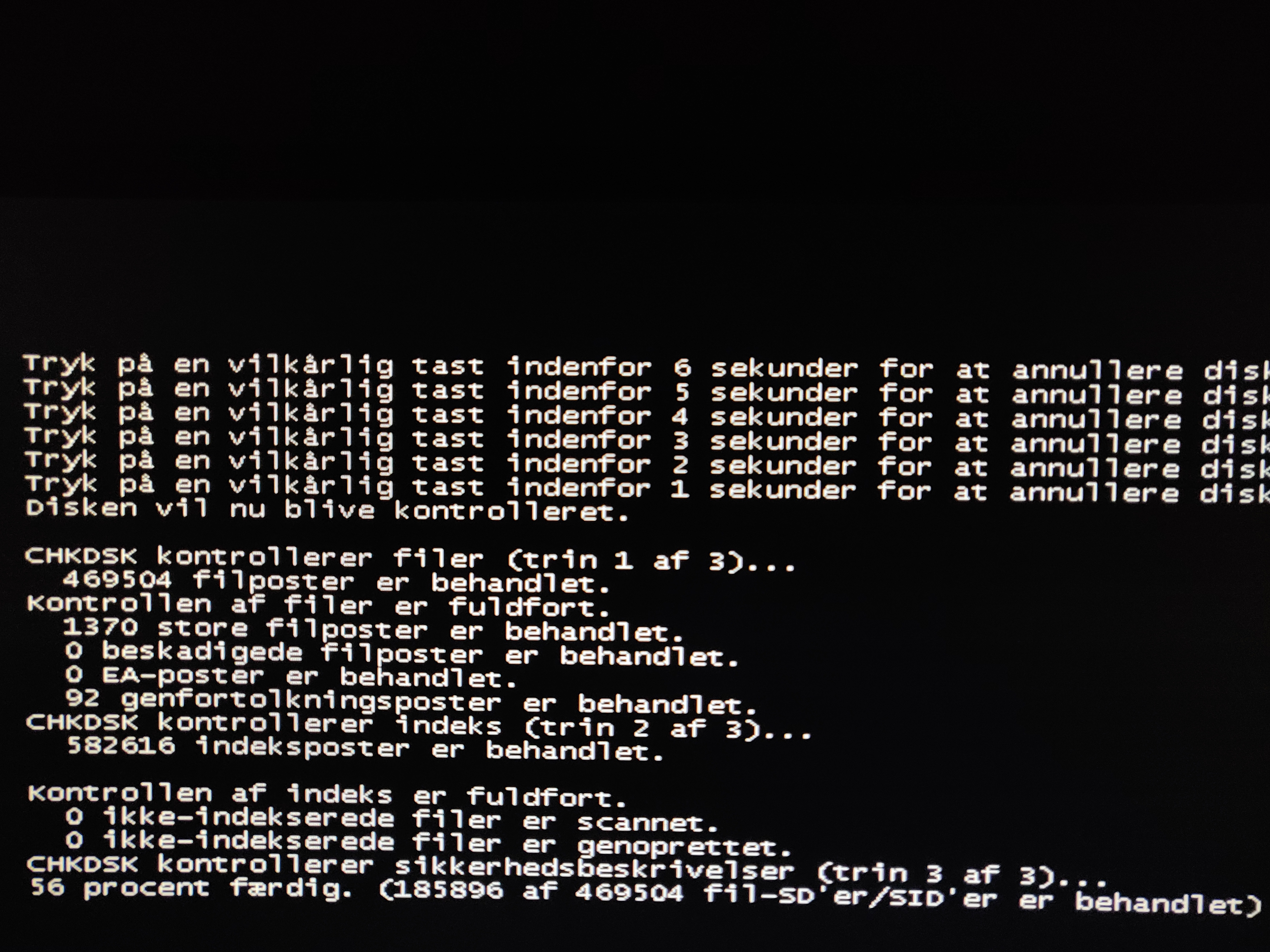
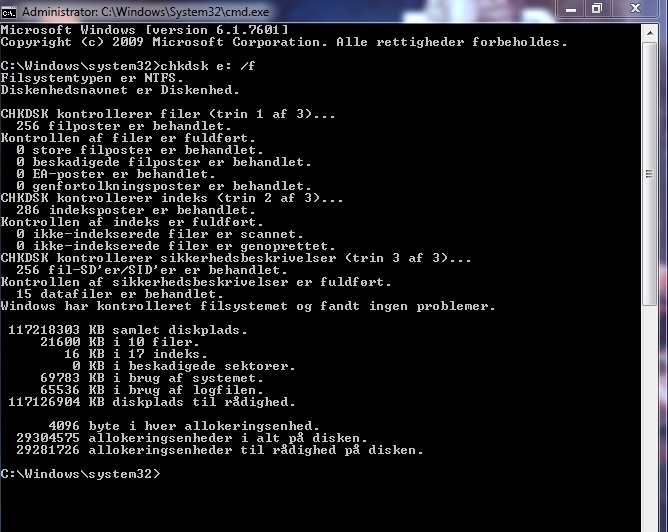
Alright i ran chkdsk x: /f on both my primary disk (C) and my empty disk (E)
I ignored my usb plugged in external hard drive (G)

I followed the process from start to finish and i didn't notice anything unusual (feel free to correct me)
Nor did it change how my computer is running.

Disk (C)
smT7FU8.jpg


Disk (E)
ijVzcei.jpg
 

My Computer

Computer type
PC/Desktop
Computer Manufacturer/Model Number
Custom
OS
Windows 10 Home 64-bit
CPU
Intel Core i7 6700 - Skylake
Motherboard
ASUSTeK COMPUTER INC. Z170-P
Memory
16,0GB
Graphics Card(s)
4095MB NVIDIA GeForce GTX 970 (ASUStek Computer Inc)
Monitor(s) Displays
S24B350 - Samsung (1 monitor)
Screen Resolution
1920x1080@60Hz
Hard Drives
931GB Seagate ST1000DM003-1SB10C (SATA)
111GB KINGSTON SV300S37A120G (SATA-2 (SSD))
1862GB Western Digital WD My Passport 0820 USB Device (USB (SATA)
Keyboard
Steelseries Apex M800
Mouse
Steelseries Rival 700
Antivirus
BullGuard Internet Security
Browser
Google Chrome // Microsoft Edge
It's in Denmark

Did it find and correct problems
or
Did not find problems?
 

My Computers

System One System Two

  • Computer type
    PC/Desktop
    Computer Manufacturer/Model Number
    custom build
    OS
    Windows 7 HP 64
    CPU
    i5 6600K - 800MHz to 4200MHz
    Motherboard
    GA-Z170-HD3P
    Memory
    4+4G GSkill DDR4 3000
    Graphics Card(s)
    IG - Intel 530
    Monitor(s) Displays
    Samsung 226BW
    Screen Resolution
    1680x1050
    Hard Drives
    (1) -1 SM951 – 128GB M.2 AHCI PCIe SSD drive for Windows 7 and Lubuntu
    (2) -1 WD SATA 3 - 1T for Data
    (3) -1 WD SATA 3 - 1T for backup
    PSU
    Thermaltake 450W TR2 gold
    Keyboard
    Old and good Chicony mechanical keyboard
    Mouse
    Logitech mX performance - 9 buttons (had to disable some)
    Internet Speed
    500Mb/s
    Browser
    Firefox 64
    Other Info
    TinyWall firewall
  • Computer type
    Laptop
    System Manufacturer/Model Number
    Asus Q550LF
    OS
    Windows 7 Pro
    CPU
    i7-4500U 800MHz to 3.0GHz
    Motherboard
    Asus Q550LF
    Memory
    (4+4)G DDR3 1600
    Graphics Card(s)
    IG intel 4400 + NVIDIA GeForce GT 745M
    Sound Card
    Realtek
    Monitor(s) Displays
    LG Display LP156WF4-SPH1
    Screen Resolution
    1920 x 1080
    Hard Drives
    BX500 120G SSD for Windows and programs +
    1T HDD for data
    Internet Speed
    500 Mb/s
    Browser
    Firefox
    Other Info
    TinyWall firewall
I just added the screenshot and picture for good measure.

But no it didn't find any issues at all.
 

My Computer

Computer type
PC/Desktop
Computer Manufacturer/Model Number
Custom
OS
Windows 10 Home 64-bit
CPU
Intel Core i7 6700 - Skylake
Motherboard
ASUSTeK COMPUTER INC. Z170-P
Memory
16,0GB
Graphics Card(s)
4095MB NVIDIA GeForce GTX 970 (ASUStek Computer Inc)
Monitor(s) Displays
S24B350 - Samsung (1 monitor)
Screen Resolution
1920x1080@60Hz
Hard Drives
931GB Seagate ST1000DM003-1SB10C (SATA)
111GB KINGSTON SV300S37A120G (SATA-2 (SSD))
1862GB Western Digital WD My Passport 0820 USB Device (USB (SATA)
Keyboard
Steelseries Apex M800
Mouse
Steelseries Rival 700
Antivirus
BullGuard Internet Security
Browser
Google Chrome // Microsoft Edge
Open a CMD window as administrator and type:
sfc /scannow

If it finds issues and correct, reboot and run again
 

My Computers

System One System Two

  • Computer type
    PC/Desktop
    Computer Manufacturer/Model Number
    custom build
    OS
    Windows 7 HP 64
    CPU
    i5 6600K - 800MHz to 4200MHz
    Motherboard
    GA-Z170-HD3P
    Memory
    4+4G GSkill DDR4 3000
    Graphics Card(s)
    IG - Intel 530
    Monitor(s) Displays
    Samsung 226BW
    Screen Resolution
    1680x1050
    Hard Drives
    (1) -1 SM951 – 128GB M.2 AHCI PCIe SSD drive for Windows 7 and Lubuntu
    (2) -1 WD SATA 3 - 1T for Data
    (3) -1 WD SATA 3 - 1T for backup
    PSU
    Thermaltake 450W TR2 gold
    Keyboard
    Old and good Chicony mechanical keyboard
    Mouse
    Logitech mX performance - 9 buttons (had to disable some)
    Internet Speed
    500Mb/s
    Browser
    Firefox 64
    Other Info
    TinyWall firewall
  • Computer type
    Laptop
    System Manufacturer/Model Number
    Asus Q550LF
    OS
    Windows 7 Pro
    CPU
    i7-4500U 800MHz to 3.0GHz
    Motherboard
    Asus Q550LF
    Memory
    (4+4)G DDR3 1600
    Graphics Card(s)
    IG intel 4400 + NVIDIA GeForce GT 745M
    Sound Card
    Realtek
    Monitor(s) Displays
    LG Display LP156WF4-SPH1
    Screen Resolution
    1920 x 1080
    Hard Drives
    BX500 120G SSD for Windows and programs +
    1T HDD for data
    Internet Speed
    500 Mb/s
    Browser
    Firefox
    Other Info
    TinyWall firewall
Just finished running the sfc /scannow and it found no issues or errors of any kind.
 

My Computer

Computer type
PC/Desktop
Computer Manufacturer/Model Number
Custom
OS
Windows 10 Home 64-bit
CPU
Intel Core i7 6700 - Skylake
Motherboard
ASUSTeK COMPUTER INC. Z170-P
Memory
16,0GB
Graphics Card(s)
4095MB NVIDIA GeForce GTX 970 (ASUStek Computer Inc)
Monitor(s) Displays
S24B350 - Samsung (1 monitor)
Screen Resolution
1920x1080@60Hz
Hard Drives
931GB Seagate ST1000DM003-1SB10C (SATA)
111GB KINGSTON SV300S37A120G (SATA-2 (SSD))
1862GB Western Digital WD My Passport 0820 USB Device (USB (SATA)
Keyboard
Steelseries Apex M800
Mouse
Steelseries Rival 700
Antivirus
BullGuard Internet Security
Browser
Google Chrome // Microsoft Edge

My Computers

System One System Two

  • Computer type
    PC/Desktop
    Computer Manufacturer/Model Number
    custom build
    OS
    Windows 7 HP 64
    CPU
    i5 6600K - 800MHz to 4200MHz
    Motherboard
    GA-Z170-HD3P
    Memory
    4+4G GSkill DDR4 3000
    Graphics Card(s)
    IG - Intel 530
    Monitor(s) Displays
    Samsung 226BW
    Screen Resolution
    1680x1050
    Hard Drives
    (1) -1 SM951 – 128GB M.2 AHCI PCIe SSD drive for Windows 7 and Lubuntu
    (2) -1 WD SATA 3 - 1T for Data
    (3) -1 WD SATA 3 - 1T for backup
    PSU
    Thermaltake 450W TR2 gold
    Keyboard
    Old and good Chicony mechanical keyboard
    Mouse
    Logitech mX performance - 9 buttons (had to disable some)
    Internet Speed
    500Mb/s
    Browser
    Firefox 64
    Other Info
    TinyWall firewall
  • Computer type
    Laptop
    System Manufacturer/Model Number
    Asus Q550LF
    OS
    Windows 7 Pro
    CPU
    i7-4500U 800MHz to 3.0GHz
    Motherboard
    Asus Q550LF
    Memory
    (4+4)G DDR3 1600
    Graphics Card(s)
    IG intel 4400 + NVIDIA GeForce GT 745M
    Sound Card
    Realtek
    Monitor(s) Displays
    LG Display LP156WF4-SPH1
    Screen Resolution
    1920 x 1080
    Hard Drives
    BX500 120G SSD for Windows and programs +
    1T HDD for data
    Internet Speed
    500 Mb/s
    Browser
    Firefox
    Other Info
    TinyWall firewall
Alright i have set Windows Update to never search for updates (the option at the bottom) as well as download and run UpdatePack7R2 and I have downloaded and renamed kb_spy.cmd.txt to KB_Spy.cmd however i have no idea how to run the txt file, What i did was copy paste all it's content into cmd (ran as administrator)
 

My Computer

Computer type
PC/Desktop
Computer Manufacturer/Model Number
Custom
OS
Windows 10 Home 64-bit
CPU
Intel Core i7 6700 - Skylake
Motherboard
ASUSTeK COMPUTER INC. Z170-P
Memory
16,0GB
Graphics Card(s)
4095MB NVIDIA GeForce GTX 970 (ASUStek Computer Inc)
Monitor(s) Displays
S24B350 - Samsung (1 monitor)
Screen Resolution
1920x1080@60Hz
Hard Drives
931GB Seagate ST1000DM003-1SB10C (SATA)
111GB KINGSTON SV300S37A120G (SATA-2 (SSD))
1862GB Western Digital WD My Passport 0820 USB Device (USB (SATA)
Keyboard
Steelseries Apex M800
Mouse
Steelseries Rival 700
Antivirus
BullGuard Internet Security
Browser
Google Chrome // Microsoft Edge
Alright i have set Windows Update to never search for updates (the option at the bottom) as well as download and run UpdatePack7R2 and I have downloaded and renamed kb_spy.cmd.txt to KB_Spy.cmd however i have no idea how to run the txt file, What i did was copy paste all it's content into cmd (ran as administrator)

Once you renamed kb_spy.cmd.txt to KB_Spy.cmd just double click KB_Spy.cmd.
 

My Computers

System One System Two

  • Computer type
    PC/Desktop
    Computer Manufacturer/Model Number
    custom build
    OS
    Windows 7 HP 64
    CPU
    i5 6600K - 800MHz to 4200MHz
    Motherboard
    GA-Z170-HD3P
    Memory
    4+4G GSkill DDR4 3000
    Graphics Card(s)
    IG - Intel 530
    Monitor(s) Displays
    Samsung 226BW
    Screen Resolution
    1680x1050
    Hard Drives
    (1) -1 SM951 – 128GB M.2 AHCI PCIe SSD drive for Windows 7 and Lubuntu
    (2) -1 WD SATA 3 - 1T for Data
    (3) -1 WD SATA 3 - 1T for backup
    PSU
    Thermaltake 450W TR2 gold
    Keyboard
    Old and good Chicony mechanical keyboard
    Mouse
    Logitech mX performance - 9 buttons (had to disable some)
    Internet Speed
    500Mb/s
    Browser
    Firefox 64
    Other Info
    TinyWall firewall
  • Computer type
    Laptop
    System Manufacturer/Model Number
    Asus Q550LF
    OS
    Windows 7 Pro
    CPU
    i7-4500U 800MHz to 3.0GHz
    Motherboard
    Asus Q550LF
    Memory
    (4+4)G DDR3 1600
    Graphics Card(s)
    IG intel 4400 + NVIDIA GeForce GT 745M
    Sound Card
    Realtek
    Monitor(s) Displays
    LG Display LP156WF4-SPH1
    Screen Resolution
    1920 x 1080
    Hard Drives
    BX500 120G SSD for Windows and programs +
    1T HDD for data
    Internet Speed
    500 Mb/s
    Browser
    Firefox
    Other Info
    TinyWall firewall
I can see it's already renamed when downloaded but clicking it only opens the txt file normally.
 

My Computer

Computer type
PC/Desktop
Computer Manufacturer/Model Number
Custom
OS
Windows 10 Home 64-bit
CPU
Intel Core i7 6700 - Skylake
Motherboard
ASUSTeK COMPUTER INC. Z170-P
Memory
16,0GB
Graphics Card(s)
4095MB NVIDIA GeForce GTX 970 (ASUStek Computer Inc)
Monitor(s) Displays
S24B350 - Samsung (1 monitor)
Screen Resolution
1920x1080@60Hz
Hard Drives
931GB Seagate ST1000DM003-1SB10C (SATA)
111GB KINGSTON SV300S37A120G (SATA-2 (SSD))
1862GB Western Digital WD My Passport 0820 USB Device (USB (SATA)
Keyboard
Steelseries Apex M800
Mouse
Steelseries Rival 700
Antivirus
BullGuard Internet Security
Browser
Google Chrome // Microsoft Edge
You have one of the most dangerous Windows setting. Windows default hide known extensions. You can run a virus thinking it is another file type.

You haven't renamed kb_spy.cmd.txt to KB_Spy.cmd.

Go to Control Panel\All Control Panel Items\Folder Options and on the View tab un mark Hide Extensions for known types.
Back to explorer you will see that file is still kb_spy.cmd.txt
 

My Computers

System One System Two

  • Computer type
    PC/Desktop
    Computer Manufacturer/Model Number
    custom build
    OS
    Windows 7 HP 64
    CPU
    i5 6600K - 800MHz to 4200MHz
    Motherboard
    GA-Z170-HD3P
    Memory
    4+4G GSkill DDR4 3000
    Graphics Card(s)
    IG - Intel 530
    Monitor(s) Displays
    Samsung 226BW
    Screen Resolution
    1680x1050
    Hard Drives
    (1) -1 SM951 – 128GB M.2 AHCI PCIe SSD drive for Windows 7 and Lubuntu
    (2) -1 WD SATA 3 - 1T for Data
    (3) -1 WD SATA 3 - 1T for backup
    PSU
    Thermaltake 450W TR2 gold
    Keyboard
    Old and good Chicony mechanical keyboard
    Mouse
    Logitech mX performance - 9 buttons (had to disable some)
    Internet Speed
    500Mb/s
    Browser
    Firefox 64
    Other Info
    TinyWall firewall
  • Computer type
    Laptop
    System Manufacturer/Model Number
    Asus Q550LF
    OS
    Windows 7 Pro
    CPU
    i7-4500U 800MHz to 3.0GHz
    Motherboard
    Asus Q550LF
    Memory
    (4+4)G DDR3 1600
    Graphics Card(s)
    IG intel 4400 + NVIDIA GeForce GT 745M
    Sound Card
    Realtek
    Monitor(s) Displays
    LG Display LP156WF4-SPH1
    Screen Resolution
    1920 x 1080
    Hard Drives
    BX500 120G SSD for Windows and programs +
    1T HDD for data
    Internet Speed
    500 Mb/s
    Browser
    Firefox
    Other Info
    TinyWall firewall
You have one of the most dangerous Windows setting. Windows default hide known extensions. You can run a virus thinking it is another file type.

You haven't renamed kb_spy.cmd.txt to KB_Spy.cmd.

Go to Control Panel\All Control Panel Items\Folder Options and on the View tab un mark Hide Extensions for known types.
Back to explorer you will see that file is still kb_spy.cmd.txt

Hi again sorry for the delay a family member passed away.

I un-marked the box under Folder options and the txt file was suddenly able to be run like you stated, I ran it and it disappeared after a short while (I guess that was all?)

I also don't understand what you meant by:"You have one of the most dangerous Windows setting."
You specifically stated earlier:"Set WU to never check (there is no more MS Win 7 updates anyway)"
 

My Computer

Computer type
PC/Desktop
Computer Manufacturer/Model Number
Custom
OS
Windows 10 Home 64-bit
CPU
Intel Core i7 6700 - Skylake
Motherboard
ASUSTeK COMPUTER INC. Z170-P
Memory
16,0GB
Graphics Card(s)
4095MB NVIDIA GeForce GTX 970 (ASUStek Computer Inc)
Monitor(s) Displays
S24B350 - Samsung (1 monitor)
Screen Resolution
1920x1080@60Hz
Hard Drives
931GB Seagate ST1000DM003-1SB10C (SATA)
111GB KINGSTON SV300S37A120G (SATA-2 (SSD))
1862GB Western Digital WD My Passport 0820 USB Device (USB (SATA)
Keyboard
Steelseries Apex M800
Mouse
Steelseries Rival 700
Antivirus
BullGuard Internet Security
Browser
Google Chrome // Microsoft Edge
The dangerous setting is to hide known extensions. You can run a virus thinking it is another file type.
 

My Computers

System One System Two

  • Computer type
    PC/Desktop
    Computer Manufacturer/Model Number
    custom build
    OS
    Windows 7 HP 64
    CPU
    i5 6600K - 800MHz to 4200MHz
    Motherboard
    GA-Z170-HD3P
    Memory
    4+4G GSkill DDR4 3000
    Graphics Card(s)
    IG - Intel 530
    Monitor(s) Displays
    Samsung 226BW
    Screen Resolution
    1680x1050
    Hard Drives
    (1) -1 SM951 – 128GB M.2 AHCI PCIe SSD drive for Windows 7 and Lubuntu
    (2) -1 WD SATA 3 - 1T for Data
    (3) -1 WD SATA 3 - 1T for backup
    PSU
    Thermaltake 450W TR2 gold
    Keyboard
    Old and good Chicony mechanical keyboard
    Mouse
    Logitech mX performance - 9 buttons (had to disable some)
    Internet Speed
    500Mb/s
    Browser
    Firefox 64
    Other Info
    TinyWall firewall
  • Computer type
    Laptop
    System Manufacturer/Model Number
    Asus Q550LF
    OS
    Windows 7 Pro
    CPU
    i7-4500U 800MHz to 3.0GHz
    Motherboard
    Asus Q550LF
    Memory
    (4+4)G DDR3 1600
    Graphics Card(s)
    IG intel 4400 + NVIDIA GeForce GT 745M
    Sound Card
    Realtek
    Monitor(s) Displays
    LG Display LP156WF4-SPH1
    Screen Resolution
    1920 x 1080
    Hard Drives
    BX500 120G SSD for Windows and programs +
    1T HDD for data
    Internet Speed
    500 Mb/s
    Browser
    Firefox
    Other Info
    TinyWall firewall
The dangerous setting is to hide known extensions. You can run a virus thinking it is another file type.

I see, Was not aware of that, Thanks for the information, I'll run a full virus scan later today.

Edit:I ran a full scan and it found nothing.
 
Last edited:

My Computer

Computer type
PC/Desktop
Computer Manufacturer/Model Number
Custom
OS
Windows 10 Home 64-bit
CPU
Intel Core i7 6700 - Skylake
Motherboard
ASUSTeK COMPUTER INC. Z170-P
Memory
16,0GB
Graphics Card(s)
4095MB NVIDIA GeForce GTX 970 (ASUStek Computer Inc)
Monitor(s) Displays
S24B350 - Samsung (1 monitor)
Screen Resolution
1920x1080@60Hz
Hard Drives
931GB Seagate ST1000DM003-1SB10C (SATA)
111GB KINGSTON SV300S37A120G (SATA-2 (SSD))
1862GB Western Digital WD My Passport 0820 USB Device (USB (SATA)
Keyboard
Steelseries Apex M800
Mouse
Steelseries Rival 700
Antivirus
BullGuard Internet Security
Browser
Google Chrome // Microsoft Edge
931GB Seagate ST1000DM 003-1SB10C SCSI Disk Device (SATA ) 33 °C -- is this a hybrid drive?
111GB KINGSTON SCSI Disk Device (SATA-2 (SSD)) 30 °C -- is this the drive that contains your OS? How much free byte space? Earlier, you mentioned "defragment" -- which drive was defragged?
I'm old school, just fishing for anything out of the ordinary. :)
 

My Computer

Computer type
PC/Desktop
Computer Manufacturer/Model Number
Antec desktop; Acer Aspire laptops
OS
Windows 7 Professional 64-bit
CPU
Desktop i5; Acers i5 & i7
Memory
desktop 16GB; 1 Acer 8GB & 1 Acer 16GB
Hard Drives
1TB split into 2 equal partitions [OS and data] usable by RJS
Internet Speed
AT&T DSL
Browser
FF, GChrome, msIE
Other Info
Windows 7 Firewall, Emsisoft AM/AV, MSE [scan-only], SpywareBlaster, Ruiware/BillP combine
Back
Top