Computer freezing while gaming

Please post a screenshot of http://www.sevenforums.com/tutorial...nt-post-screen-capture-image.html#post2261610

Unless the GPU is correctly and firmly seated and secured, it could be the problem.

I'd at least get a SMART reading from your HD by installing CrystalDiskInfo - Software - Crystal Dew World. It would be better to get Seatools to run a Long Scan to know with absolute certainty if it's the problem.

Did you complete all of the http://www.sevenforums.com/tutorials/220165-troubleshooting-steps-windows-7-a.html.
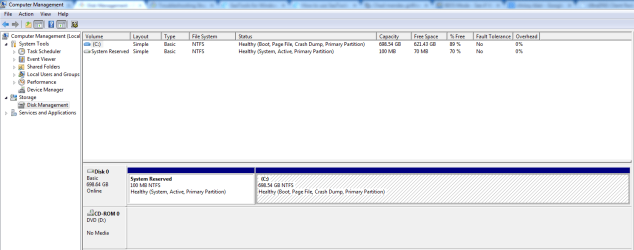
 
Here is the disk management screenshot:
Diskmngmt.PNG

The freezing issue has been occuring isnce before I broke the motherboars GPU latch, so I'm thinking that isn't the issue. The 2 screws seem to be holding it in alright as far as I can tell. But you never know, The thing is I really don't want to buy a new motherboard if that isn't the problem.

I actually downloaded SeaTools for windows from this link:
SeaTools for Windows | Seagate

The link in the tutorial seems to be out of date:
http://www.seagate.com/support/exte...ard-drives/wireless-plus/seatools-win-master/

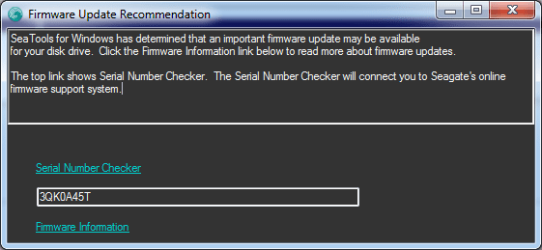
Okay so anyway I just installed and opened SeaTools and I got this message:
seagtaeFirmwareupdate.png

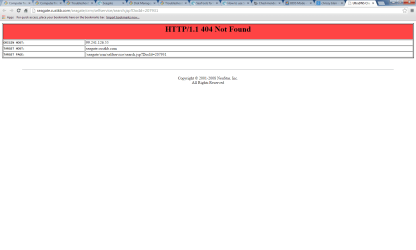
And when I follow the link I get a page not found:
notfoundSeagate.png

So I'm not sure where to go far here. I guess I will start running a scan.

For the troubleshooting steps I believe I've done everything except the Scanf since I already did the last 7 or so steps before coming on here.

Update: I realized I actually missed step 16 in the troubleshooting guide as well.

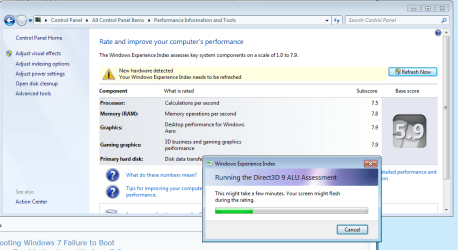
I just followed it and I got a message saying new hardware detected. so I clicked refresh now
Here is a screenshot:
performanceLog.png

I'm gonna go ahead and run the Seagate Basic Hard drive test and post the results. Thanks guys.
 

My Computer

Computer type
PC/Desktop
Computer Manufacturer/Model Number
custom build
OS
Windows 7 Professional 64 bit
CPU
Intel i5-2500k 3.30 GHz (4 CPUs)
Motherboard
Gigabyte Z68X-UD3H-B3
Memory
8GB DDR3
Graphics Card(s)
Gigabyte GTX 770
Hard Drives
Seagate 750GB 5400RPM
Antivirus
Avast
Browser
Chrome
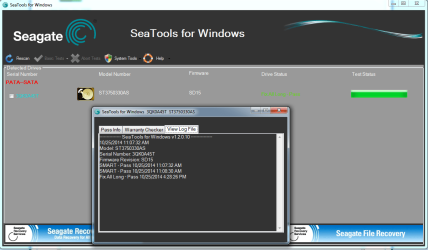
Okay so I ran the SMART test which took liked 2 seconds and my hard drive passed.
SmartPass.png

Now I'm wondering should I be running a fix all next with Seagate tools? Here is a screen of the description:
SeagateFixall.png

Update: So I went back and clicked the Serial Number checker Link and It redirects me to a page where I can update my HDD firmware. I did some research and found this thread:
http://superuser.com/questions/4084...the-firmware-on-the-infamous-seagate-7200-11s

Seems like my harddrive has known issues in general and in particular with firmware updates
People in the thread recommended not upgrading the firmware.
Should I go ahead with this? Also do I have to do anything special or do I just run the .exe?
 

My Computer

Computer type
PC/Desktop
Computer Manufacturer/Model Number
custom build
OS
Windows 7 Professional 64 bit
CPU
Intel i5-2500k 3.30 GHz (4 CPUs)
Motherboard
Gigabyte Z68X-UD3H-B3
Memory
8GB DDR3
Graphics Card(s)
Gigabyte GTX 770
Hard Drives
Seagate 750GB 5400RPM
Antivirus
Avast
Browser
Chrome
Try burning another CD using Windows Image Burner since the bootable test is more reliable without the OS running.

Either way I'd run the Long Test. Back up your files.
 
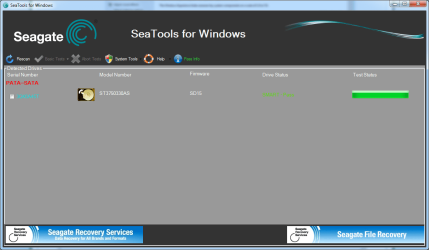
So I ran the Fix All long test with SeaTools and my hard drive passed. I also did a Check disk earlier so it is seeming like my Hard Drive probably isn't the issue. screenshot:
seagateScanresult.png

I'll try burning another CD as you suggest Greg, as well I will finish the last few troubleshooting steps (Scanf, etc.) and post results.

Thanks.
 

My Computer

Computer type
PC/Desktop
Computer Manufacturer/Model Number
custom build
OS
Windows 7 Professional 64 bit
CPU
Intel i5-2500k 3.30 GHz (4 CPUs)
Motherboard
Gigabyte Z68X-UD3H-B3
Memory
8GB DDR3
Graphics Card(s)
Gigabyte GTX 770
Hard Drives
Seagate 750GB 5400RPM
Antivirus
Avast
Browser
Chrome
Just a quick update for anyone still interested. I ran the SFC /SCANNOW Command and it came back without errors. I also burned SeaGate hardware diagnostics on another CD, as Greg suggested, but I had the same result. Anyway, both SeaTools and ChckDisk scans came back without error so I'm thinking my harddrive is okay.

I haven't experienced any freezes since creating this thread so I'm hoping this issue has been resolved with all of your help. Although, I've probably only gamed for 5-6 hours max so we will see. If I get another freeze I'm going to post the minidump on here and hopefully you guys will be able to give me a hand deciphering it.

Sorry for the delay - been really busy lately. Thanks again for the help everyone.
 

My Computer

Computer type
PC/Desktop
Computer Manufacturer/Model Number
custom build
OS
Windows 7 Professional 64 bit
CPU
Intel i5-2500k 3.30 GHz (4 CPUs)
Motherboard
Gigabyte Z68X-UD3H-B3
Memory
8GB DDR3
Graphics Card(s)
Gigabyte GTX 770
Hard Drives
Seagate 750GB 5400RPM
Antivirus
Avast
Browser
Chrome
Did you also disinfect first from Troubleshooting Tutorial?

Then run SFC again
 
Darren mate have you thought of using a two pack resin adhesive to hold that latch in because screws sound rather primitive and in my mind likely to be possible causes of shorts. You will need to set up some form of pressure to hold it down while the adhesive sets but if you use the five minute stuff it is no big deal. I don't know what it is called where you are but out here it is called "Araldite".
If you want you could Google that and see what I am referring to and then find a simisar product where you are.
The adhesive as you know will be non conductive:p
 

My Computer

Computer type
PC/Desktop
Computer Manufacturer/Model Number
Own build (new) Desk1 / Asus ROG Win 7 / Desk2 1st build
OS
Desk1 7 Home Prem / Desk2 10 Pro / Main lap Asus ROG 10 Pro 2 laptop Toshiba 7 Pro Asus P2520 7 & 10
CPU
Desk1 i5 3750K / Laptop i7 GTX 860M / Desk2 i5 2500
Motherboard
Desk1 Asus P877-V / Desk2 Gigabyte H67 UD3H / Laptop ?
Memory
Desk1 8GB (1866) / Desk2 16GB (1333) / Laptop 8Gb DDR3
Graphics Card(s)
Desk 1& 2NVidia GTX 650 & Laptops on board Intel
Sound Card
Desk 1 & 2 -XONAR DG Realtek High Def audio Laptop
Monitor(s) Displays
Desk 1 Benq HD 2450 / Desk2 Philips 24" / Laptop 17.5"
Screen Resolution
1920x1080 D1 & D2 & Laptop 1
Hard Drives
Desk1 Samsung 120GB 830 SSD
Asus ROG 256GB 850 Pro SSD
Desk2 Samsung 840 256 SSD
Toshiba 120GB EVO
PSU
Desk 1 Corsair HX 1050/ Laptop ? / Desk 2 Corsair HX 650
Case
Desk 1 Cooler HAF XM ? Toshiba laptop / Desk2 Coolermaster
Cooling
Fans on all Desk1 -2 Desk2 - all Coolermasters 5 Laptop ?
Keyboard
Desk 1 MS Sidewinder X6 Desk 2 MS Sidewinder X 4
Mouse
Desk 1&2 - Gigabyte MS 900 gamer - laptop - Logitec wireless
Internet Speed
ADSL2+
Other Info
One other Desktop (tester) and spare Toshba laptop both with SSD's
Running Kaspersky 2016 ISS on all machines config'd identically
Logitec audio stereo systems on each machine (x3)
Canon MG5250MFC
Router/modem TP-Link running WPA2SK
greg - I did run MalwareBytes first to disinfect if that is what you are referring to

ICit2lol - Thanks for the advice, much appreciated. I didn't actually look into that yet, but it seems like a good idea for sure. Also by screws I meant the screws that go into the case - I didn't put screws into the motherboard or anything lol. I actually did a bunch of research online right after I broke the latch, and the general opinion seemed to be that everything should be fine as long as you don't move the Computer around too much. I had my friend who is good with computers come and check it out as well (I'm paranoid, I know) and he seemed to think the screws held it in pretty solidly and that it was fine. He said he would just leave it as is if it was his computer so I felt pretty good about that. Also I had the freezing issues long before I broke the latch so I don't think it is related at all.

I'm going to try to get some gaming in tonight and I'll post the minidump if anything goes wrong. Thanks again.
 
Last edited:

My Computer

Computer type
PC/Desktop
Computer Manufacturer/Model Number
custom build
OS
Windows 7 Professional 64 bit
CPU
Intel i5-2500k 3.30 GHz (4 CPUs)
Motherboard
Gigabyte Z68X-UD3H-B3
Memory
8GB DDR3
Graphics Card(s)
Gigabyte GTX 770
Hard Drives
Seagate 750GB 5400RPM
Antivirus
Avast
Browser
Chrome
No worries then Darren but it (the adhesive) is an option if you want it. I was thinking (rather stupidly) that you meant screws into the board and in hindsight and from what I have had to do with boards it seemed at the time not really a practicable idea:o but I thought maybe you had managed it!! LOL!
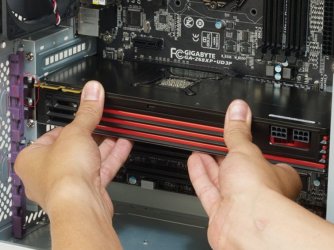
However I am left wondering how the board fixation screws would hold that latch in place and my only thought is that holds the latch by holding the board in the correct plane (alignment / flat) and for me being a bit OCD it would not be enough for me.:geek:
 

My Computer

Computer type
PC/Desktop
Computer Manufacturer/Model Number
Own build (new) Desk1 / Asus ROG Win 7 / Desk2 1st build
OS
Desk1 7 Home Prem / Desk2 10 Pro / Main lap Asus ROG 10 Pro 2 laptop Toshiba 7 Pro Asus P2520 7 & 10
CPU
Desk1 i5 3750K / Laptop i7 GTX 860M / Desk2 i5 2500
Motherboard
Desk1 Asus P877-V / Desk2 Gigabyte H67 UD3H / Laptop ?
Memory
Desk1 8GB (1866) / Desk2 16GB (1333) / Laptop 8Gb DDR3
Graphics Card(s)
Desk 1& 2NVidia GTX 650 & Laptops on board Intel
Sound Card
Desk 1 & 2 -XONAR DG Realtek High Def audio Laptop
Monitor(s) Displays
Desk 1 Benq HD 2450 / Desk2 Philips 24" / Laptop 17.5"
Screen Resolution
1920x1080 D1 & D2 & Laptop 1
Hard Drives
Desk1 Samsung 120GB 830 SSD
Asus ROG 256GB 850 Pro SSD
Desk2 Samsung 840 256 SSD
Toshiba 120GB EVO
PSU
Desk 1 Corsair HX 1050/ Laptop ? / Desk 2 Corsair HX 650
Case
Desk 1 Cooler HAF XM ? Toshiba laptop / Desk2 Coolermaster
Cooling
Fans on all Desk1 -2 Desk2 - all Coolermasters 5 Laptop ?
Keyboard
Desk 1 MS Sidewinder X6 Desk 2 MS Sidewinder X 4
Mouse
Desk 1&2 - Gigabyte MS 900 gamer - laptop - Logitec wireless
Internet Speed
ADSL2+
Other Info
One other Desktop (tester) and spare Toshba laptop both with SSD's
Running Kaspersky 2016 ISS on all machines config'd identically
Logitec audio stereo systems on each machine (x3)
Canon MG5250MFC
Router/modem TP-Link running WPA2SK
Haha I was wondering if you were thinking I screwed into the board or something. I'm a bit OCD like you and I was debating fixing it at first. But after reading up online and getting my friend to look at it - the consensus seemed to be to just leave it and it would be fine. Apparently, most older motherboards didn't even have a GPU latch and the screws into the case were enough to hold it. I am debating getting a a new motherboard and case soon anyways as mine are getting a bit old (motherboard just over 3 years and case is around 7 years). I was hoping to determine my problem before getting new parts though. I'm starting to think that the freezes I've gotten are just in relation to a bug in the game I'm playing - because I played last night again for around 2 hours without a problem.

Just to make sure we are on the same page I added a picture of what I'm talking about since I'm bad at explaining (this is not my computer):

gpu.jpg
The area I circled in red is the screws I'm referring to that are holding my GPU in place
 

My Computer

Computer type
PC/Desktop
Computer Manufacturer/Model Number
custom build
OS
Windows 7 Professional 64 bit
CPU
Intel i5-2500k 3.30 GHz (4 CPUs)
Motherboard
Gigabyte Z68X-UD3H-B3
Memory
8GB DDR3
Graphics Card(s)
Gigabyte GTX 770
Hard Drives
Seagate 750GB 5400RPM
Antivirus
Avast
Browser
Chrome
Back
Top