
Computer Hiccup help plza

Renzokucant

New member
Member
Local time
7:04 PM
Messages
80
Location
Tampa
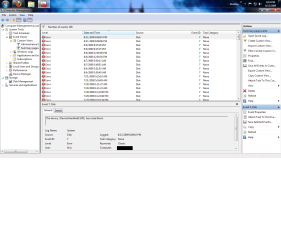
Hi all, my computer just restarted out of no where, and had to do a disc check upon the restart, it was a long process and hasn't happened to me yet with this computer. I took a pic of the event log i'll post it in a second i was just wondering if anyone could tell me what this possibly means, or what could be a cause of it? I'm running win7RC built computer HDradeon 4850 3 Hard Drives, 120(used in old HP) 40(Used in old compaq) and a 5GB of space on that 40 that was split into a new drive D:
 

Attachments
  • error.png
    error.png
    61.6 KB · Views: 99

My Computer

OS
Windows 7 x64
CPU
AMD Phenom II X4 955 Black Edition Deneb 3.2GHz Socket AM3 1
Motherboard
ASUS M4A79XTD EVO AM3 AMD 790X ATX AMD
Memory
12Gb of G.SKILL Ripjaws Series 240-Pin DDR3 SDRAM DDR3 1600
Graphics Card(s)
Crossfired 2 SAPPHIRE Vapor-X 100314VXSR Radeon HD 6870 1GB
Monitor(s) Displays
SONY 55" LED 3D HDTV
Screen Resolution
1920x1080
Hard Drives
1TB Western Digital 7200 RPM
750GB Western Digital 5400 RPM
PSU
850w Modular
Case
Cooler Master HAF 932 Advanced
Cooling
ZALMAN CNPS9900MAX-R 135mm Long life bearing CPU Cooler Red
Mouse
Cyborg R.A.T 7
Possibly a bad driver? Sorry Man i don't really know...
 

My Computer

Computer Manufacturer/Model Number
Gateway MT3708
OS
Windows 7 RTM
CPU
Intel dual core @ 1.73Ghz
Memory
4 Gb
Graphics Card(s)
Ati Radeon Xpress 200m
Monitor(s) Displays
External: Mitsubishi Diamond Pro 920
Hard Drives
120GB
You said, your HDD's are older, how much older. It sounds as thought your "C" drive had a hiccup. If there were no bad sectors found when the computer did its check on restart you may not have any further problems, however, you should run a good defrag and check to see if there are any bad sectors. Also, is there a possibility that the drives are too full, and your page files aren't working properly. See if you can find a good HDD test program to determine what the problem may have been. The drive being old as you stated may just be about to keel over, hopefully that is not the case. :)
 

My Computer

Computer Manufacturer/Model Number
HP Pavilion a4302f
OS
Win 7 Pro x64, VM Win XP, Win7 Pro Sandbox, Kubuntu 11
CPU
AMD Athlon(tm) II X4 640 @ 3.0 Gbz
Memory
12GB 1066MHz DDR3 SDRAM - 2x4GB, 2x2GB
Graphics Card(s)
ATI Radeon HD 4350 HD Graphics/Audio with 512MB
Sound Card
Realtek High Definition Audio
Monitor(s) Displays
1. Dell 23" SP2307, 2. Mitsublishi 40" HDTV, Hannspree 25"
Screen Resolution
1. 2048x1152, 2. 1920-1080, 3. 1920x1200
Hard Drives
Int: 1 120 Gig SSD i
1 - 2.5" 500 USB External HDD
1 -1 Tb USB External HDD
Case
Mid Tower
Cooling
Standard Fans - 5 fans (very quiet)
Keyboard
Microsoft Wireless 2000
Mouse
Microsoft Wireless Mouse 5000
Internet Speed
10 Mbit (realistically 500 Kbit - 1.2 Mbit)
Other Info
Speakers - Bose Desktop (Excellent Sound)
1 external CD|DVD\Blue-ray Recorders/Players (Sony)
Hi all, my computer just restarted out of no where, and had to do a disc check upon the restart, it was a long process and hasn't happened to me yet with this computer. I took a pic of the event log i'll post it in a second i was just wondering if anyone could tell me what this possibly means, or what could be a cause of it? I'm running win7RC built computer HDradeon 4850 3 Hard Drives, 120(used in old HP) 40(Used in old compaq) and a 5GB of space on that 40 that was split into a new drive D:

Almost certainly the read-head of your disk came across a range of damaged sectors.
This is the beginning of the end. Your disk is dying!

I advise to asap backup everything to an external drive, and buy a new drive for your system.

good luck.

Greetz
 

My Computer

OS
Win7 Build 7600 x86
CPU
Pentium II 300MHz
Motherboard
Asus
Memory
32mb EDO RAM
Graphics Card(s)
Diamond Viper
Sound Card
Soundblaster 16
Monitor(s) Displays
14" AOC CRT 16K color
Screen Resolution
800x600
Hard Drives
300mb Quantum fireball
PSU
110 Watts
Cooling
Passive
Keyboard
Trust Ergonomic
Mouse
Generic
Internet Speed
256K u 128K d
You said, your HDD's are older, how much older. It sounds as thought your "C" drive had a hiccup. If there were no bad sectors found when the computer did its check on restart you may not have any further problems, however, you should run a good defrag and check to see if there are any bad sectors. Also, is there a possibility that the drives are too full, and your page files aren't working properly. See if you can find a good HDD test program to determine what the problem may have been The drive being old as you stated may just be about to keel over, hopefully that is not the case. :)

that sheds a little light, these drives are older, 2001 for the 40 and 2004 for the 120, but you said they may be too full, that actually makes sense because i just downloaded a TV show's full episodes which was 17 gigs, and i tried downloading it from 2 places to see which results were quicker, so one finished at 17 gigs the other i stopped at 8% but it still reserved 17G on my C: which is now in the red with only 6G left of space, i should probably remove the video files that i never finished that are takin up all my space? could that be a solution?
 

My Computer

OS
Windows 7 x64
CPU
AMD Phenom II X4 955 Black Edition Deneb 3.2GHz Socket AM3 1
Motherboard
ASUS M4A79XTD EVO AM3 AMD 790X ATX AMD
Memory
12Gb of G.SKILL Ripjaws Series 240-Pin DDR3 SDRAM DDR3 1600
Graphics Card(s)
Crossfired 2 SAPPHIRE Vapor-X 100314VXSR Radeon HD 6870 1GB
Monitor(s) Displays
SONY 55" LED 3D HDTV
Screen Resolution
1920x1080
Hard Drives
1TB Western Digital 7200 RPM
750GB Western Digital 5400 RPM
PSU
850w Modular
Case
Cooler Master HAF 932 Advanced
Cooling
ZALMAN CNPS9900MAX-R 135mm Long life bearing CPU Cooler Red
Mouse
Cyborg R.A.T 7
that sheds a little light, these drives are older, 2001 for the 40 and 2004 for the 120, but you said they may be too full, that actually makes sense because i just downloaded a TV show's full episodes which was 17 gigs, and i tried downloading it from 2 places to see which results were quicker, so one finished at 17 gigs the other i stopped at 8% but it still reserved 17G on my C: which is now in the red with only 6G left of space, i should probably remove the video files that i never finished that are takin up all my space? could that be a solution?

Still 6gb left is not a problem.

What just happened is when you downloaded that big file the disk was writing to certain sectors for the first time since a maybe long while.

among the sectors are damaged ones for sure.

Like I said. ASAP backup precious data and buy new disk.

People tend to wait until it's too late, but believe me, your drives days are almost over.

I recommend not to keep the pc on. Only put it on once to backup every thing.
Every boot might be the last.

Good luck
 

My Computer

OS
Win7 Build 7600 x86
CPU
Pentium II 300MHz
Motherboard
Asus
Memory
32mb EDO RAM
Graphics Card(s)
Diamond Viper
Sound Card
Soundblaster 16
Monitor(s) Displays
14" AOC CRT 16K color
Screen Resolution
800x600
Hard Drives
300mb Quantum fireball
PSU
110 Watts
Cooling
Passive
Keyboard
Trust Ergonomic
Mouse
Generic
Internet Speed
256K u 128K d
Still 6gb left is not a problem.

What just happened is when you downloaded that big file the disk was writing to certain sectors for the first time since a maybe long while.

among the sectors are damaged ones for sure.

Like I said. ASAP backup precious data and buy new disk.

People tend to wait until it's too late, but believe me, your drives days are almost over.

I recommend not to keep the pc on. Only put it on once to backup every thing.
Every boot might be the last.

Good luck

when you back up stuff, what do you back it up to? i never understood the process and ive never done it before.
 

My Computer

OS
Windows 7 x64
CPU
AMD Phenom II X4 955 Black Edition Deneb 3.2GHz Socket AM3 1
Motherboard
ASUS M4A79XTD EVO AM3 AMD 790X ATX AMD
Memory
12Gb of G.SKILL Ripjaws Series 240-Pin DDR3 SDRAM DDR3 1600
Graphics Card(s)
Crossfired 2 SAPPHIRE Vapor-X 100314VXSR Radeon HD 6870 1GB
Monitor(s) Displays
SONY 55" LED 3D HDTV
Screen Resolution
1920x1080
Hard Drives
1TB Western Digital 7200 RPM
750GB Western Digital 5400 RPM
PSU
850w Modular
Case
Cooler Master HAF 932 Advanced
Cooling
ZALMAN CNPS9900MAX-R 135mm Long life bearing CPU Cooler Red
Mouse
Cyborg R.A.T 7
when you back up stuff, what do you back it up to? i never understood the process and ive never done it before.

Best thing it to borrow an external drive from a friend, if you don't have one.

Download Acronis true Image home 2009 by clicking this link:
http://www.acronis.com/homecomputing/download/link/?TrueImage2009_d_en.exe

Install it.

Read the manual that it installs in the startmenu.

Make a full backups of all your seperate partitions to the external disk.
That's 3 full backups in your case.

In the program you'll find an option to make a recovery disk on cd.

Make such a disk.

After you bought a new disk and installed it into your computer.,
start your computer with the disk in the drive.

Acronis will start from boot.

chose to restore the backup that contains the Win7 partition that's on external disk.

About 10 minutes later. you'll have Win7 running again.

Now you can restore the other two backups too.

You might need to enlarge your last two partitions, because the disk you buy will probably be much bigger than what you have now.

to enlarge partitions you can download the free trial of Acronis disk director from Acronis site.


I do strongly recommend to ask an experienced friend to help you with these procedures, since it is not an easy thing to do, and things can go horribly wrong.

good luck
 

My Computer

OS
Win7 Build 7600 x86
CPU
Pentium II 300MHz
Motherboard
Asus
Memory
32mb EDO RAM
Graphics Card(s)
Diamond Viper
Sound Card
Soundblaster 16
Monitor(s) Displays
14" AOC CRT 16K color
Screen Resolution
800x600
Hard Drives
300mb Quantum fireball
PSU
110 Watts
Cooling
Passive
Keyboard
Trust Ergonomic
Mouse
Generic
Internet Speed
256K u 128K d
thanks
 

My Computer

OS
Windows 7 x64
CPU
AMD Phenom II X4 955 Black Edition Deneb 3.2GHz Socket AM3 1
Motherboard
ASUS M4A79XTD EVO AM3 AMD 790X ATX AMD
Memory
12Gb of G.SKILL Ripjaws Series 240-Pin DDR3 SDRAM DDR3 1600
Graphics Card(s)
Crossfired 2 SAPPHIRE Vapor-X 100314VXSR Radeon HD 6870 1GB
Monitor(s) Displays
SONY 55" LED 3D HDTV
Screen Resolution
1920x1080
Hard Drives
1TB Western Digital 7200 RPM
750GB Western Digital 5400 RPM
PSU
850w Modular
Case
Cooler Master HAF 932 Advanced
Cooling
ZALMAN CNPS9900MAX-R 135mm Long life bearing CPU Cooler Red
Mouse
Cyborg R.A.T 7
Back
Top