Solved Computer is not booting at all.

Swifty

New member
Power User
Local time
6:23 PM
Messages
390
Location
Sioux Lookout, Ontario
Hey everyone I am back again with another problem as usual!

I just moved back to my home town and I had sent my parts through the airport with me. Probably the mistake I made. I had not used anti static bags but I used bubble wrap to try and protect the parts. I had to purchase a new computer case, I had just got it today and have put everything inside the new case. Now the computer will not boot, I have properly connected everything and have double checked the cords, I can hear the power in the power supply just a low humming noise, as usual. But the only problem with the motherboard the green LED light is not lighting up while looking through the side panel so I am wondering if the motherboard is shot.

My motherboard is made from Foxconn. My computer was working before the move. Ill have to test my power supply with the paper clip trick but any advice would be appreciated thank you!
 

My Computer My Computer

At a glance

Windows 7 x64 ProfessionalIntel i5-4690kCorsair Vengeance Pro Series 16GB DDR3 1866mhzR9 390 8GB
Computer type
PC/Desktop
Computer Manufacturer/Model Number
Custom
OS
Windows 7 x64 Professional
CPU
Intel i5-4690k
Motherboard
MSI Z97 Gaming 5
Memory
Corsair Vengeance Pro Series 16GB DDR3 1866mhz
Graphics Card(s)
R9 390 8GB
Monitor(s) Displays
24" Acer 3D monitor
Hard Drives
2TB Seagate HDD
120GB Adata SSD
PSU
750 watt
Case
Zalmann Z9
Cooling
Fan
Keyboard
Razer Deathstalker
Mouse
Anker Gaming Mouse
Internet Speed
20MB/S
Antivirus
AVG
Browser
Google Chrome
That green LED tells you the motherboard is getting stand by power. The fact that it does not light means you are not getting power to the motherboard.

Check the 24 pin main connector from the power supply to the motherboard. Be sure it has fully engaged and the clip has snapped in.

If still no power then check the power supply. The paper clip test is good to see if it will run. Also check to be sure the voltage switch is set properly for your region of the world (115 or 220v).

If you can get a hold of a multimeter you could test for the correct voltages from the supply.

Also, check you motherboard manual and look for the locations on the board that have jumpers. It is possible in a move that one of the jumper blocks could fall off. If the block on the CLearCMOS/CLRTC was missing the board may not light up.

Also, recheck the location of the standoffs for your motherboard in the manual. A standoff in the wrong location could cause a short and that might explain the problem.
 

My Computer My Computer

At a glance

Windows 7 64 Bit Home Premium SP1i7-3820GSkill F3-14900CL9Q - 16GBEVGA GeForce GTX660 - Driver 352.86
Computer type
PC/Desktop
Computer Manufacturer/Model Number
Home Built - Jan 2013
OS
Windows 7 64 Bit Home Premium SP1
CPU
i7-3820
Motherboard
Asus P9X79-PRO - Bios 4608
Memory
GSkill F3-14900CL9Q - 16GB
Graphics Card(s)
EVGA GeForce GTX660 - Driver 352.86
Sound Card
On board Realtek ALC898
Monitor(s) Displays
Acer S271HL
Screen Resolution
1920 x 1080
Hard Drives
#1- Samsung 840 Pro Series
#2- Western Digital WD1002FAEX Sata3 Black
#3- Western Digital WD1002FAEX Sata3 Black
PSU
Corsair CMPSU-850TX-V2 - 850 watt (by Seasonic)
Case
Corsair Obsidian 550D
Cooling
Standard 3 120mm case fans, Cooler Master Hyper 212 EVO
Keyboard
MS KC-0405
Mouse
Intellimouse 5-button
Internet Speed
56 Mbits/Sec (on a good day)
Antivirus
Avast & Malwarebytes
Browser
Firefox
Other Info
Asus DVD - DRW-24B1ST 24X
2012-07-11201214.jpg


Those happen to be the fellows your talking about? Now if those were removed would that prevent the board from booting, or just allowing the board to light up?
 

My Computer My Computer

At a glance

Windows 7 x64 ProfessionalIntel i5-4690kCorsair Vengeance Pro Series 16GB DDR3 1866mhzR9 390 8GB
Computer type
PC/Desktop
Computer Manufacturer/Model Number
Custom
OS
Windows 7 x64 Professional
CPU
Intel i5-4690k
Motherboard
MSI Z97 Gaming 5
Memory
Corsair Vengeance Pro Series 16GB DDR3 1866mhz
Graphics Card(s)
R9 390 8GB
Monitor(s) Displays
24" Acer 3D monitor
Hard Drives
2TB Seagate HDD
120GB Adata SSD
PSU
750 watt
Case
Zalmann Z9
Cooling
Fan
Keyboard
Razer Deathstalker
Mouse
Anker Gaming Mouse
Internet Speed
20MB/S
Antivirus
AVG
Browser
Google Chrome
Sorry for the double post, but I have an update, unplugged everything, checked the stand offs they are in the right positions, tried the paper clip test, powers a small fan, but that's not much v's, I tried just putting the 24 pins in for power and the light doesn't show on the motherboard, after putting the jumper blocks back on.

I am uncertain if the power supply is shot or the motherboard...
 

My Computer My Computer

At a glance

Windows 7 x64 ProfessionalIntel i5-4690kCorsair Vengeance Pro Series 16GB DDR3 1866mhzR9 390 8GB
Computer type
PC/Desktop
Computer Manufacturer/Model Number
Custom
OS
Windows 7 x64 Professional
CPU
Intel i5-4690k
Motherboard
MSI Z97 Gaming 5
Memory
Corsair Vengeance Pro Series 16GB DDR3 1866mhz
Graphics Card(s)
R9 390 8GB
Monitor(s) Displays
24" Acer 3D monitor
Hard Drives
2TB Seagate HDD
120GB Adata SSD
PSU
750 watt
Case
Zalmann Z9
Cooling
Fan
Keyboard
Razer Deathstalker
Mouse
Anker Gaming Mouse
Internet Speed
20MB/S
Antivirus
AVG
Browser
Google Chrome
2012-07-11201214.jpg


Those happen to be the fellows your talking about? Now if those were removed would that prevent the board from booting, or just allowing the board to light up?

Yes. Are those just extras, or did they come off the board?

Missing blocks would certainly keep the board from booting. Whether that would stop it from being powered I do not know. I have never experimented with that.
 

My Computer My Computer

At a glance

Windows 7 64 Bit Home Premium SP1i7-3820GSkill F3-14900CL9Q - 16GBEVGA GeForce GTX660 - Driver 352.86
Computer type
PC/Desktop
Computer Manufacturer/Model Number
Home Built - Jan 2013
OS
Windows 7 64 Bit Home Premium SP1
CPU
i7-3820
Motherboard
Asus P9X79-PRO - Bios 4608
Memory
GSkill F3-14900CL9Q - 16GB
Graphics Card(s)
EVGA GeForce GTX660 - Driver 352.86
Sound Card
On board Realtek ALC898
Monitor(s) Displays
Acer S271HL
Screen Resolution
1920 x 1080
Hard Drives
#1- Samsung 840 Pro Series
#2- Western Digital WD1002FAEX Sata3 Black
#3- Western Digital WD1002FAEX Sata3 Black
PSU
Corsair CMPSU-850TX-V2 - 850 watt (by Seasonic)
Case
Corsair Obsidian 550D
Cooling
Standard 3 120mm case fans, Cooler Master Hyper 212 EVO
Keyboard
MS KC-0405
Mouse
Intellimouse 5-button
Internet Speed
56 Mbits/Sec (on a good day)
Antivirus
Avast & Malwarebytes
Browser
Firefox
Other Info
Asus DVD - DRW-24B1ST 24X
Sorry for the double post, but I have an update, unplugged everything, checked the stand offs they are in the right positions, tried the paper clip test, powers a small fan, but that's not much v's, I tried just putting the 24 pins in for power and the light doesn't show on the motherboard, after putting the jumper blocks back on.

I am uncertain if the power supply is shot or the motherboard...

The power supply is much easier to test than the motherboard. If you have or can borrow a multimeter you can check to see if you are getting the spec'd voltage from the 3 important 'rails': 3.3v, 5v, and most importantly, 12v.

If you have a computer repair shop near you you could bring in the PS and get them to test it. Or, borrow a similarly sized supply from someone to test with.
 

My Computer My Computer

At a glance

Windows 7 64 Bit Home Premium SP1i7-3820GSkill F3-14900CL9Q - 16GBEVGA GeForce GTX660 - Driver 352.86
Computer type
PC/Desktop
Computer Manufacturer/Model Number
Home Built - Jan 2013
OS
Windows 7 64 Bit Home Premium SP1
CPU
i7-3820
Motherboard
Asus P9X79-PRO - Bios 4608
Memory
GSkill F3-14900CL9Q - 16GB
Graphics Card(s)
EVGA GeForce GTX660 - Driver 352.86
Sound Card
On board Realtek ALC898
Monitor(s) Displays
Acer S271HL
Screen Resolution
1920 x 1080
Hard Drives
#1- Samsung 840 Pro Series
#2- Western Digital WD1002FAEX Sata3 Black
#3- Western Digital WD1002FAEX Sata3 Black
PSU
Corsair CMPSU-850TX-V2 - 850 watt (by Seasonic)
Case
Corsair Obsidian 550D
Cooling
Standard 3 120mm case fans, Cooler Master Hyper 212 EVO
Keyboard
MS KC-0405
Mouse
Intellimouse 5-button
Internet Speed
56 Mbits/Sec (on a good day)
Antivirus
Avast & Malwarebytes
Browser
Firefox
Other Info
Asus DVD - DRW-24B1ST 24X
  • Like
Reactions: Dom
I have tested the power supply on an older motherboard, the board lights up, I have tried another power supply on my new motherboard and the board still does not power up, so I am guessing I have a dead motherboard, I had put those jumpers back on in the proper manner but still nothing.
 

My Computer My Computer

At a glance

Windows 7 x64 ProfessionalIntel i5-4690kCorsair Vengeance Pro Series 16GB DDR3 1866mhzR9 390 8GB
Computer type
PC/Desktop
Computer Manufacturer/Model Number
Custom
OS
Windows 7 x64 Professional
CPU
Intel i5-4690k
Motherboard
MSI Z97 Gaming 5
Memory
Corsair Vengeance Pro Series 16GB DDR3 1866mhz
Graphics Card(s)
R9 390 8GB
Monitor(s) Displays
24" Acer 3D monitor
Hard Drives
2TB Seagate HDD
120GB Adata SSD
PSU
750 watt
Case
Zalmann Z9
Cooling
Fan
Keyboard
Razer Deathstalker
Mouse
Anker Gaming Mouse
Internet Speed
20MB/S
Antivirus
AVG
Browser
Google Chrome
That is certainly what it seems. Sorry to hear that.

Just be sure you have checked all the connections, fan headers, the CPU and heatsink installation, RAM, even the 3v battery. Everything connected to the motherboard. Check that those jumpers are on the correct pins.

Did you remove the CPU and heatsink to ship the motherboard?
 

My Computer My Computer

At a glance

Windows 7 64 Bit Home Premium SP1i7-3820GSkill F3-14900CL9Q - 16GBEVGA GeForce GTX660 - Driver 352.86
Computer type
PC/Desktop
Computer Manufacturer/Model Number
Home Built - Jan 2013
OS
Windows 7 64 Bit Home Premium SP1
CPU
i7-3820
Motherboard
Asus P9X79-PRO - Bios 4608
Memory
GSkill F3-14900CL9Q - 16GB
Graphics Card(s)
EVGA GeForce GTX660 - Driver 352.86
Sound Card
On board Realtek ALC898
Monitor(s) Displays
Acer S271HL
Screen Resolution
1920 x 1080
Hard Drives
#1- Samsung 840 Pro Series
#2- Western Digital WD1002FAEX Sata3 Black
#3- Western Digital WD1002FAEX Sata3 Black
PSU
Corsair CMPSU-850TX-V2 - 850 watt (by Seasonic)
Case
Corsair Obsidian 550D
Cooling
Standard 3 120mm case fans, Cooler Master Hyper 212 EVO
Keyboard
MS KC-0405
Mouse
Intellimouse 5-button
Internet Speed
56 Mbits/Sec (on a good day)
Antivirus
Avast & Malwarebytes
Browser
Firefox
Other Info
Asus DVD - DRW-24B1ST 24X
I didnt ship it, packed it in my suitcase during my flight and no I left it on,
 

My Computer My Computer

At a glance

Windows 7 x64 ProfessionalIntel i5-4690kCorsair Vengeance Pro Series 16GB DDR3 1866mhzR9 390 8GB
Computer type
PC/Desktop
Computer Manufacturer/Model Number
Custom
OS
Windows 7 x64 Professional
CPU
Intel i5-4690k
Motherboard
MSI Z97 Gaming 5
Memory
Corsair Vengeance Pro Series 16GB DDR3 1866mhz
Graphics Card(s)
R9 390 8GB
Monitor(s) Displays
24" Acer 3D monitor
Hard Drives
2TB Seagate HDD
120GB Adata SSD
PSU
750 watt
Case
Zalmann Z9
Cooling
Fan
Keyboard
Razer Deathstalker
Mouse
Anker Gaming Mouse
Internet Speed
20MB/S
Antivirus
AVG
Browser
Google Chrome
Just got a new motherboard installed it, still no power to the board I am a little frustrated now... I have tried the breadboard method for both motherboards which are foxconn z68as and neither get the led light with two different power supplies but my really old gateway board gets led from both power supplies...
 
Last edited:

My Computer My Computer

At a glance

Windows 7 x64 ProfessionalIntel i5-4690kCorsair Vengeance Pro Series 16GB DDR3 1866mhzR9 390 8GB
Computer type
PC/Desktop
Computer Manufacturer/Model Number
Custom
OS
Windows 7 x64 Professional
CPU
Intel i5-4690k
Motherboard
MSI Z97 Gaming 5
Memory
Corsair Vengeance Pro Series 16GB DDR3 1866mhz
Graphics Card(s)
R9 390 8GB
Monitor(s) Displays
24" Acer 3D monitor
Hard Drives
2TB Seagate HDD
120GB Adata SSD
PSU
750 watt
Case
Zalmann Z9
Cooling
Fan
Keyboard
Razer Deathstalker
Mouse
Anker Gaming Mouse
Internet Speed
20MB/S
Antivirus
AVG
Browser
Google Chrome
There is something missing here. Something overlooked.

I assume you installed the old processor in the new board. So it can't be that the processor has unseated. Did you visually inspect the pins on the processor?

I'm going to suggest my standard no boot diagnostic. Give this a try and start with the motherboard out of the case. You are trying to see if you can get the board to light up without anything connected.

****
New System Failure Diagnostic

Basic diagnostic procedure is to uninstall the entire build and start over. Some people do this out of the case by placing the motherboard on an anti-static surface. This eliminates the possibility that there is a short circuit between the motherboard and the case through the connection posts (stand-offs). A standoff in the wrong location or a sloppy job will cause a short.

The Test (power off, power cord unplugged):

  • Disconnect everything externally connected except the mouse and keyboard (printers, USB devices, etc). If you are not using a wired mouse and keyboard see if you can borrow one. The wireless device is just another component you have to deal with.
  • Disconnect the power and data cables from all the drives inside the computer (Hard drives, DVD/CD drives, etc).
  • Remove all the cards installed in the expansion slots (PCI/PCI-e) including the video card. (Be careful handling them and place them on a non conductive surface while testing).
  • Remove all the RAM sticks (same rules as above).
Now connect the power cord and turn the PC on.

  • The motherboard should start beeping. You should get a beep code that tells you there is no memory. This is good, it means the processor is functioning and the motherboard is good so far.
  • Now add one stick of memory in Slot A1 and power on. More beeping: "no video card" beep code. This is good.
  • Then add the video card and connect it to the monitor. You should get no beeping and you should see the BIOS start screens, ending with the message that there is no boot device.
  • If you get no video then switch the one memory stick installed for another one and test.
  • If you do get video then start adding components back, one at a time, until the system fails to boot. The last component you added is then the problem component.
****


I would try this without a CPU to start. The board should do nothing - no beeps - but you just want to see if it gets power. Try both boards and both power supplies.

It is a weird one.
 

My Computer My Computer

At a glance

Windows 7 64 Bit Home Premium SP1i7-3820GSkill F3-14900CL9Q - 16GBEVGA GeForce GTX660 - Driver 352.86
Computer type
PC/Desktop
Computer Manufacturer/Model Number
Home Built - Jan 2013
OS
Windows 7 64 Bit Home Premium SP1
CPU
i7-3820
Motherboard
Asus P9X79-PRO - Bios 4608
Memory
GSkill F3-14900CL9Q - 16GB
Graphics Card(s)
EVGA GeForce GTX660 - Driver 352.86
Sound Card
On board Realtek ALC898
Monitor(s) Displays
Acer S271HL
Screen Resolution
1920 x 1080
Hard Drives
#1- Samsung 840 Pro Series
#2- Western Digital WD1002FAEX Sata3 Black
#3- Western Digital WD1002FAEX Sata3 Black
PSU
Corsair CMPSU-850TX-V2 - 850 watt (by Seasonic)
Case
Corsair Obsidian 550D
Cooling
Standard 3 120mm case fans, Cooler Master Hyper 212 EVO
Keyboard
MS KC-0405
Mouse
Intellimouse 5-button
Internet Speed
56 Mbits/Sec (on a good day)
Antivirus
Avast & Malwarebytes
Browser
Firefox
Other Info
Asus DVD - DRW-24B1ST 24X
Sorry I am using a i5 2500 on the newer board, there are two boards that are exactly the same they are the foxconn z68as, those two will not show the led with neither my 300 watt or 600 watt psu. But my older motherboard which is a gateway board about 6 years old with a pentium D will power with the 300 and 600 watt psu. I will try the above and post my updates I just hope the board is not doa, can the board light up without the cpu installed? Also this started with a new case I bought the zalman z9 .
 
Last edited:

My Computer My Computer

At a glance

Windows 7 x64 ProfessionalIntel i5-4690kCorsair Vengeance Pro Series 16GB DDR3 1866mhzR9 390 8GB
Computer type
PC/Desktop
Computer Manufacturer/Model Number
Custom
OS
Windows 7 x64 Professional
CPU
Intel i5-4690k
Motherboard
MSI Z97 Gaming 5
Memory
Corsair Vengeance Pro Series 16GB DDR3 1866mhz
Graphics Card(s)
R9 390 8GB
Monitor(s) Displays
24" Acer 3D monitor
Hard Drives
2TB Seagate HDD
120GB Adata SSD
PSU
750 watt
Case
Zalmann Z9
Cooling
Fan
Keyboard
Razer Deathstalker
Mouse
Anker Gaming Mouse
Internet Speed
20MB/S
Antivirus
AVG
Browser
Google Chrome
Tried the testing above with everything above, no beeping or any kind of life from the board besides the sound of power in the psu..
 

My Computer My Computer

At a glance

Windows 7 x64 ProfessionalIntel i5-4690kCorsair Vengeance Pro Series 16GB DDR3 1866mhzR9 390 8GB
Computer type
PC/Desktop
Computer Manufacturer/Model Number
Custom
OS
Windows 7 x64 Professional
CPU
Intel i5-4690k
Motherboard
MSI Z97 Gaming 5
Memory
Corsair Vengeance Pro Series 16GB DDR3 1866mhz
Graphics Card(s)
R9 390 8GB
Monitor(s) Displays
24" Acer 3D monitor
Hard Drives
2TB Seagate HDD
120GB Adata SSD
PSU
750 watt
Case
Zalmann Z9
Cooling
Fan
Keyboard
Razer Deathstalker
Mouse
Anker Gaming Mouse
Internet Speed
20MB/S
Antivirus
AVG
Browser
Google Chrome
There remains the possibility that you have 2 bad power supplies or 2 bad motherboards, even though I find that to be highly improbable. But my beliefs do not change the fact that it is still possible.

The issue seems to be confined to those 2 components now. I would carefully inspect all of the wiring - look for broken/bent pins or anything out of the ordinary.

I don't know if the motherboard would show power at the LED without a CPU or not. I have never tried that, and until now it never occurred to me that it might be necessary to know. And I don't know if a failed processor would affect the power reading to the board (but I doubt it).

As I said before, there is something odd here. Something missing or overlooked.
 

My Computer My Computer

At a glance

Windows 7 64 Bit Home Premium SP1i7-3820GSkill F3-14900CL9Q - 16GBEVGA GeForce GTX660 - Driver 352.86
Computer type
PC/Desktop
Computer Manufacturer/Model Number
Home Built - Jan 2013
OS
Windows 7 64 Bit Home Premium SP1
CPU
i7-3820
Motherboard
Asus P9X79-PRO - Bios 4608
Memory
GSkill F3-14900CL9Q - 16GB
Graphics Card(s)
EVGA GeForce GTX660 - Driver 352.86
Sound Card
On board Realtek ALC898
Monitor(s) Displays
Acer S271HL
Screen Resolution
1920 x 1080
Hard Drives
#1- Samsung 840 Pro Series
#2- Western Digital WD1002FAEX Sata3 Black
#3- Western Digital WD1002FAEX Sata3 Black
PSU
Corsair CMPSU-850TX-V2 - 850 watt (by Seasonic)
Case
Corsair Obsidian 550D
Cooling
Standard 3 120mm case fans, Cooler Master Hyper 212 EVO
Keyboard
MS KC-0405
Mouse
Intellimouse 5-button
Internet Speed
56 Mbits/Sec (on a good day)
Antivirus
Avast & Malwarebytes
Browser
Firefox
Other Info
Asus DVD - DRW-24B1ST 24X
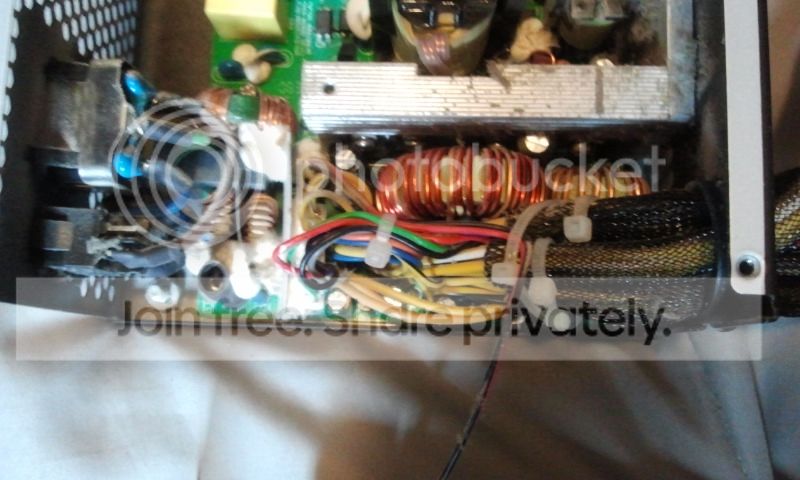
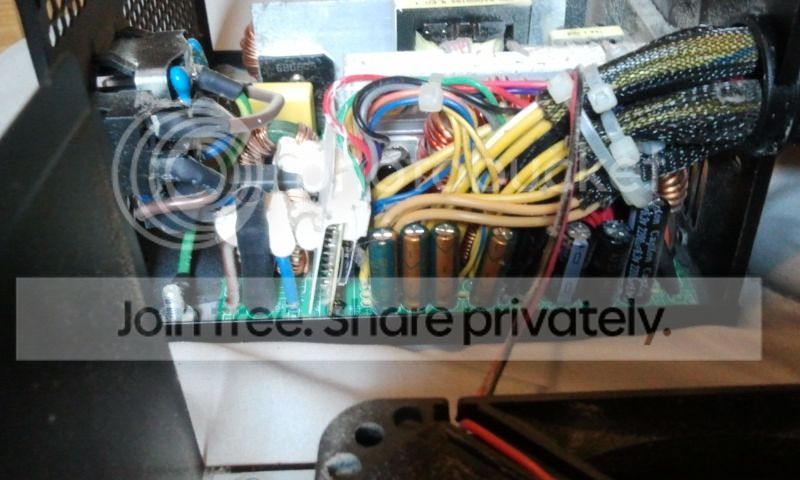
May I make a suggestion here fellas Swifty can you take apart the two PSU's and take a look - easy to see bulging caps and or burnt boards or even dry joints on the out wiring!

Have an interest here as I have just shipped machine to my brother in the UK and I packed it with bubble wrap to stop the tall cooler from sideways G forces.:confused:
 
Last edited:

My Computer My Computer

At a glance

Desk1 7 Home Prem / Desk2 10 Pro / Main lap A...Desk1 i5 3750K / Laptop i7 GTX 860M / Desk2 i...Desk1 8GB (1866) / Desk2 16GB (1333) / Laptop...Desk 1& 2NVidia GTX 650 & Laptops on board Intel
Computer type
PC/Desktop
Computer Manufacturer/Model Number
Own build (new) Desk1 / Asus ROG Win 7 / Desk2 1st build
OS
Desk1 7 Home Prem / Desk2 10 Pro / Main lap Asus ROG 10 Pro 2 laptop Toshiba 7 Pro Asus P2520 7 & 10
CPU
Desk1 i5 3750K / Laptop i7 GTX 860M / Desk2 i5 2500
Motherboard
Desk1 Asus P877-V / Desk2 Gigabyte H67 UD3H / Laptop ?
Memory
Desk1 8GB (1866) / Desk2 16GB (1333) / Laptop 8Gb DDR3
Graphics Card(s)
Desk 1& 2NVidia GTX 650 & Laptops on board Intel
Sound Card
Desk 1 & 2 -XONAR DG Realtek High Def audio Laptop
Monitor(s) Displays
Desk 1 Benq HD 2450 / Desk2 Philips 24" / Laptop 17.5"
Screen Resolution
1920x1080 D1 & D2 & Laptop 1
Hard Drives
Desk1 Samsung 120GB 830 SSD
Asus ROG 256GB 850 Pro SSD
Desk2 Samsung 840 256 SSD
Toshiba 120GB EVO
PSU
Desk 1 Corsair HX 1050/ Laptop ? / Desk 2 Corsair HX 650
Case
Desk 1 Cooler HAF XM ? Toshiba laptop / Desk2 Coolermaster
Cooling
Fans on all Desk1 -2 Desk2 - all Coolermasters 5 Laptop ?
Keyboard
Desk 1 MS Sidewinder X6 Desk 2 MS Sidewinder X 4
Mouse
Desk 1&2 - Gigabyte MS 900 gamer - laptop - Logitec wireless
Internet Speed
ADSL2+
Other Info
One other Desktop (tester) and spare Toshba laptop both with SSD's
Running Kaspersky 2016 ISS on all machines config'd identically
Logitec audio stereo systems on each machine (x3)
Canon MG5250MFC
Router/modem TP-Link running WPA2SK
2012-07-20084851.jpg


2012-07-20084902.jpg


2012-07-20084914.jpg


Here are 3 pictures of the power supply I have been using for my build the power supply has been used for about 4 or 5 years maybe its just that time to get a new one, I am uncertain what I am looking for so I posted these 3 pictures, the weird white stuff I have never seen before. Must be some type of adhesive?

It is very possible that it could either be the power supplies or the Motherboards, all I can do for the motherboard is an RMA with Foxconn.
 

My Computer My Computer

At a glance

Windows 7 x64 ProfessionalIntel i5-4690kCorsair Vengeance Pro Series 16GB DDR3 1866mhzR9 390 8GB
Computer type
PC/Desktop
Computer Manufacturer/Model Number
Custom
OS
Windows 7 x64 Professional
CPU
Intel i5-4690k
Motherboard
MSI Z97 Gaming 5
Memory
Corsair Vengeance Pro Series 16GB DDR3 1866mhz
Graphics Card(s)
R9 390 8GB
Monitor(s) Displays
24" Acer 3D monitor
Hard Drives
2TB Seagate HDD
120GB Adata SSD
PSU
750 watt
Case
Zalmann Z9
Cooling
Fan
Keyboard
Razer Deathstalker
Mouse
Anker Gaming Mouse
Internet Speed
20MB/S
Antivirus
AVG
Browser
Google Chrome
Hiyya Swifty sorry for late reply mate that looks like adhesive to me and it seems fairly dust free - unless you have given it a bit of a clean out of course.

Hard to see if there are ant "dry" joints - that is easy to see if you move them out coming ones and look at where they are attached / soldered to the board you will see definite movement if they are dry.. In that case it's only a matter of retouching the joint with an iron and some good solder - many different brands and qualities. I use the silver solder to be sure.

But having said that PSU's a re reasonable priced and would solve that problem full stop. Personally I like the Corsairs and Seasonics.

One thing I did think of was that I once did a machine like you have done and I couldn't get it to boot and was at it for hours trying all sorts of voltage tests and such when I found I had very stupidly forgotten to replug in the four pin lead - is that one in?
 

My Computer My Computer

At a glance

Desk1 7 Home Prem / Desk2 10 Pro / Main lap A...Desk1 i5 3750K / Laptop i7 GTX 860M / Desk2 i...Desk1 8GB (1866) / Desk2 16GB (1333) / Laptop...Desk 1& 2NVidia GTX 650 & Laptops on board Intel
Computer type
PC/Desktop
Computer Manufacturer/Model Number
Own build (new) Desk1 / Asus ROG Win 7 / Desk2 1st build
OS
Desk1 7 Home Prem / Desk2 10 Pro / Main lap Asus ROG 10 Pro 2 laptop Toshiba 7 Pro Asus P2520 7 & 10
CPU
Desk1 i5 3750K / Laptop i7 GTX 860M / Desk2 i5 2500
Motherboard
Desk1 Asus P877-V / Desk2 Gigabyte H67 UD3H / Laptop ?
Memory
Desk1 8GB (1866) / Desk2 16GB (1333) / Laptop 8Gb DDR3
Graphics Card(s)
Desk 1& 2NVidia GTX 650 & Laptops on board Intel
Sound Card
Desk 1 & 2 -XONAR DG Realtek High Def audio Laptop
Monitor(s) Displays
Desk 1 Benq HD 2450 / Desk2 Philips 24" / Laptop 17.5"
Screen Resolution
1920x1080 D1 & D2 & Laptop 1
Hard Drives
Desk1 Samsung 120GB 830 SSD
Asus ROG 256GB 850 Pro SSD
Desk2 Samsung 840 256 SSD
Toshiba 120GB EVO
PSU
Desk 1 Corsair HX 1050/ Laptop ? / Desk 2 Corsair HX 650
Case
Desk 1 Cooler HAF XM ? Toshiba laptop / Desk2 Coolermaster
Cooling
Fans on all Desk1 -2 Desk2 - all Coolermasters 5 Laptop ?
Keyboard
Desk 1 MS Sidewinder X6 Desk 2 MS Sidewinder X 4
Mouse
Desk 1&2 - Gigabyte MS 900 gamer - laptop - Logitec wireless
Internet Speed
ADSL2+
Other Info
One other Desktop (tester) and spare Toshba laptop both with SSD's
Running Kaspersky 2016 ISS on all machines config'd identically
Logitec audio stereo systems on each machine (x3)
Canon MG5250MFC
Router/modem TP-Link running WPA2SK
Thanks sorry for not replying so quickly, the 4 pin is plugged in, it just seems nothing gives power to the motherboard so what I am going to do is buy a new power supply and see if that is the solve I need if not I will be looking at another motherboard brand probably asus.

I'll keep you guys updated!
 

My Computer My Computer

At a glance

Windows 7 x64 ProfessionalIntel i5-4690kCorsair Vengeance Pro Series 16GB DDR3 1866mhzR9 390 8GB
Computer type
PC/Desktop
Computer Manufacturer/Model Number
Custom
OS
Windows 7 x64 Professional
CPU
Intel i5-4690k
Motherboard
MSI Z97 Gaming 5
Memory
Corsair Vengeance Pro Series 16GB DDR3 1866mhz
Graphics Card(s)
R9 390 8GB
Monitor(s) Displays
24" Acer 3D monitor
Hard Drives
2TB Seagate HDD
120GB Adata SSD
PSU
750 watt
Case
Zalmann Z9
Cooling
Fan
Keyboard
Razer Deathstalker
Mouse
Anker Gaming Mouse
Internet Speed
20MB/S
Antivirus
AVG
Browser
Google Chrome
Ok Swifty good luck mate oh Corsairs are a nice unit mate have had no trouble with mine and are not expensive.:)
 

My Computer My Computer

At a glance

Desk1 7 Home Prem / Desk2 10 Pro / Main lap A...Desk1 i5 3750K / Laptop i7 GTX 860M / Desk2 i...Desk1 8GB (1866) / Desk2 16GB (1333) / Laptop...Desk 1& 2NVidia GTX 650 & Laptops on board Intel
Computer type
PC/Desktop
Computer Manufacturer/Model Number
Own build (new) Desk1 / Asus ROG Win 7 / Desk2 1st build
OS
Desk1 7 Home Prem / Desk2 10 Pro / Main lap Asus ROG 10 Pro 2 laptop Toshiba 7 Pro Asus P2520 7 & 10
CPU
Desk1 i5 3750K / Laptop i7 GTX 860M / Desk2 i5 2500
Motherboard
Desk1 Asus P877-V / Desk2 Gigabyte H67 UD3H / Laptop ?
Memory
Desk1 8GB (1866) / Desk2 16GB (1333) / Laptop 8Gb DDR3
Graphics Card(s)
Desk 1& 2NVidia GTX 650 & Laptops on board Intel
Sound Card
Desk 1 & 2 -XONAR DG Realtek High Def audio Laptop
Monitor(s) Displays
Desk 1 Benq HD 2450 / Desk2 Philips 24" / Laptop 17.5"
Screen Resolution
1920x1080 D1 & D2 & Laptop 1
Hard Drives
Desk1 Samsung 120GB 830 SSD
Asus ROG 256GB 850 Pro SSD
Desk2 Samsung 840 256 SSD
Toshiba 120GB EVO
PSU
Desk 1 Corsair HX 1050/ Laptop ? / Desk 2 Corsair HX 650
Case
Desk 1 Cooler HAF XM ? Toshiba laptop / Desk2 Coolermaster
Cooling
Fans on all Desk1 -2 Desk2 - all Coolermasters 5 Laptop ?
Keyboard
Desk 1 MS Sidewinder X6 Desk 2 MS Sidewinder X 4
Mouse
Desk 1&2 - Gigabyte MS 900 gamer - laptop - Logitec wireless
Internet Speed
ADSL2+
Other Info
One other Desktop (tester) and spare Toshba laptop both with SSD's
Running Kaspersky 2016 ISS on all machines config'd identically
Logitec audio stereo systems on each machine (x3)
Canon MG5250MFC
Router/modem TP-Link running WPA2SK
So I had purchased a new power supply a 750watt XFX brand. It still is not giving me the green light on the motherboard. So I guess I have narrowed it down to it either being the motherboard, or a dead processor. Still uncertain if the board would post a green power light without the processor being in its slot.
 

My Computer My Computer

At a glance

Windows 7 x64 ProfessionalIntel i5-4690kCorsair Vengeance Pro Series 16GB DDR3 1866mhzR9 390 8GB
Computer type
PC/Desktop
Computer Manufacturer/Model Number
Custom
OS
Windows 7 x64 Professional
CPU
Intel i5-4690k
Motherboard
MSI Z97 Gaming 5
Memory
Corsair Vengeance Pro Series 16GB DDR3 1866mhz
Graphics Card(s)
R9 390 8GB
Monitor(s) Displays
24" Acer 3D monitor
Hard Drives
2TB Seagate HDD
120GB Adata SSD
PSU
750 watt
Case
Zalmann Z9
Cooling
Fan
Keyboard
Razer Deathstalker
Mouse
Anker Gaming Mouse
Internet Speed
20MB/S
Antivirus
AVG
Browser
Google Chrome
Back
Top