Computer is stuttering...

jstrand

New member
Local time
5:27 PM
Messages
6
I've been poking my head around in forums and websites for this issue already and i can't seem to pin-point the problem yet :confused:
I recently built my own computer and it worked just fine for awhile. But now it seems to have some issue because, at seemingly random times when the computer is running, it begins to stutter and slow way down. Any help at all with this issue would be awesome... Thanks in advance.

Resetting the computer seems to be a very temporary fix and sometimes it boots but and begins to stutter right away. I've checked the system start up programs and eliminated a lot of unnecessary programs because i thought it might just be the cpu getting bogged down when everything was booting up but to no avail. I've scanned for viruses, I've tried to go back to restore points to see if it was some software or updates i may have installed and it screwed up, but still nothing... it's just getting flustrating :mad: *sigh* Anyways, any help would be amazing...

Current System Specs:

Asus M4A79T Deluxe Mobo
AMD Phenom II 955 @ 3.6Ghz (OC'd)
6G triple channel OCZ DDR3
GeForce GTS 250 1G GDDR3
Sound Blaster X-Fi sound card
1TB Hitachi 7200RPM
64G G.Skill Falcon SSD (w/ Windows 7 OS on it)
CoolerMaster 932 HAF Case
CoolerMaster 900W power supply
CoolerMaster Aquagate MAX water cooling
 

My Computer

Computer Manufacturer/Model Number
Custom
OS
Windows 7
CPU
AMD Phenom II 955 @ 3.6Ghz
Motherboard
Asus M4A79 Deluxe
Memory
6G OCZ triple Channel DDR3
Graphics Card(s)
Geforce GTS 250 1G GDDR3
Sound Card
Sound Blasters X-Fi Gamer
Monitor(s) Displays
24" Asus VW246H
Screen Resolution
1980x1020
Hard Drives
64GB G.SKILL Falcon SSD
1TB Hitachi 7200RPM
1TB External (Buffalo)
320GB External (Buffalo)
PSU
900W CoolerMaster
Case
CoolerMaster HAF 932
Cooling
CoolerMaster Aquagate MAX
Keyboard
Microsoft Natural Ergonomic Keyboard 4000
Mouse
Logitech USB mouse
Hi jstrand, welcome to the forums.

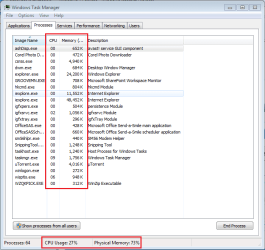
If you have a look in Task Manager (right-click Taskbar) when it starts slowing down you may be able to tell what apps are causing this issue. A screenshot like the 1 below would be handy too.
Capture.PNG


Jeff
 

My Computer

Computer Manufacturer/Model Number
Compaq Desktop
OS
Windows 7 Ultimate x64
CPU
AMD Sempron Dual Core
Memory
3GB
Graphics Card(s)
NVIDIA GeForce 6150SE nForce 430
Screen Resolution
1024x768
Hard Drives
150GB Sata
It just started to stutter again... >.>


My Computer

Computer Manufacturer/Model Number
Custom
OS
Windows 7
CPU
AMD Phenom II 955 @ 3.6Ghz
Motherboard
Asus M4A79 Deluxe
Memory
6G OCZ triple Channel DDR3
Graphics Card(s)
Geforce GTS 250 1G GDDR3
Sound Card
Sound Blasters X-Fi Gamer
Monitor(s) Displays
24" Asus VW246H
Screen Resolution
1980x1020
Hard Drives
64GB G.SKILL Falcon SSD
1TB Hitachi 7200RPM
1TB External (Buffalo)
320GB External (Buffalo)
PSU
900W CoolerMaster
Case
CoolerMaster HAF 932
Cooling
CoolerMaster Aquagate MAX
Keyboard
Microsoft Natural Ergonomic Keyboard 4000
Mouse
Logitech USB mouse
There's nothing there that would explain the slowdown, what build are your running? 7100 x64 is available from Microsoft or the newest is 7232 x64 available on Mininova.
 

My Computer

Computer Manufacturer/Model Number
Compaq Desktop
OS
Windows 7 Ultimate x64
CPU
AMD Sempron Dual Core
Memory
3GB
Graphics Card(s)
NVIDIA GeForce 6150SE nForce 430
Screen Resolution
1024x768
Hard Drives
150GB Sata
says i've got 7057 build in the corner right now which isn't even the RC is it O.o
 

My Computer

Computer Manufacturer/Model Number
Custom
OS
Windows 7
CPU
AMD Phenom II 955 @ 3.6Ghz
Motherboard
Asus M4A79 Deluxe
Memory
6G OCZ triple Channel DDR3
Graphics Card(s)
Geforce GTS 250 1G GDDR3
Sound Card
Sound Blasters X-Fi Gamer
Monitor(s) Displays
24" Asus VW246H
Screen Resolution
1980x1020
Hard Drives
64GB G.SKILL Falcon SSD
1TB Hitachi 7200RPM
1TB External (Buffalo)
320GB External (Buffalo)
PSU
900W CoolerMaster
Case
CoolerMaster HAF 932
Cooling
CoolerMaster Aquagate MAX
Keyboard
Microsoft Natural Ergonomic Keyboard 4000
Mouse
Logitech USB mouse
GET THE RC ( http://www.microsoft.com/windows/windows-7/download.aspx ) ASAP then only complain... hehe... then... once installed RC>go here: Global Provider of Innovative Graphics, Processors and Media Solutions | AMD >Under Download Drivers>Choose 'Motherboard/Chipset for Category>Choose 7 64-bit/32-bit for OS>Choose HD 3200 for graphics>View Results> Download the 9.6 version.... Install it> Now go Welcome to NVIDIA - World Leader in Visual Computing Technologies > Download Drivers> Put your details there>Search>Download>Install... Hope now it will never shutter....
PS: Whether is shutters or NOT when the RC is installed>JUST FOLLOW MY instructions...
 

My Computer

Computer Manufacturer/Model Number
Custom
OS
Windows 7 32-bit; no 64 coz its a P4 478
CPU
Pentium 4 3.00 GHZ HT Socket 478 :(
Motherboard
MSI PM8M-V
Memory
1 GB Kingston DDR-400
Graphics Card(s)
HIS X1650 PRO AGP :(
Sound Card
Intergrated Realtek AC'97
Monitor(s) Displays
17" CRT :(
Screen Resolution
Native: 1027*768 MAX: 1280*1024 :(
Hard Drives
80 GB Maxtor
500 GB Seagate (7200.11)(T.T its now RMA)
What would downloading ATI Graphics drivers do with a Nvidia Geforce card??? o.o
 

My Computer

Computer Manufacturer/Model Number
Custom
OS
Windows 7
CPU
AMD Phenom II 955 @ 3.6Ghz
Motherboard
Asus M4A79 Deluxe
Memory
6G OCZ triple Channel DDR3
Graphics Card(s)
Geforce GTS 250 1G GDDR3
Sound Card
Sound Blasters X-Fi Gamer
Monitor(s) Displays
24" Asus VW246H
Screen Resolution
1980x1020
Hard Drives
64GB G.SKILL Falcon SSD
1TB Hitachi 7200RPM
1TB External (Buffalo)
320GB External (Buffalo)
PSU
900W CoolerMaster
Case
CoolerMaster HAF 932
Cooling
CoolerMaster Aquagate MAX
Keyboard
Microsoft Natural Ergonomic Keyboard 4000
Mouse
Logitech USB mouse
Stuttering PC

It just started to stutter again... >.>


Hey and welcome. I think all of the other replies probably have more help for you but I have one thing that might tell you what is causing the stuttering. Its an app called process lasso. It monitors all the running processes and if something starts acting strange (using too many cpu cycles, spawning another thread,etc) it notifies you and logs it. Process lasso is bitsum technologies and is free for 30 days. Just snipped what it look like. I tmight give you info.

Ken
 
Last edited:

My Computer

Computer Manufacturer/Model Number
HP Pavillion dv-7 1005 Tx
OS
Win 8 Release candidate 8400
CPU
[email protected]
Memory
4 gigs
Graphics Card(s)
Nvidia 9600M
Sound Card
HD built-in
Monitor(s) Displays
17" Wxga
Screen Resolution
1440x900
Cooling
none
Internet Speed
45Mb down 5Mb up
Throwing this out there just in case. I had the same issue on my Server 2008 x64 install, every few minutes the system would start lagging, then go back to normal. I traced it to my SATA swappable drive rack. I had a drive in the rack but the key was off (so no power getting to the drive) but Windows apparently knew something was there, removed the tray from the rack and the problem went away.
 

My Computer

Computer Manufacturer/Model Number
HP nc6400
OS
Windows 7 x64 7077
CPU
Intel Core 2 Duo T5600 1.83Ghz
Memory
4GB
Graphics Card(s)
Intel 945
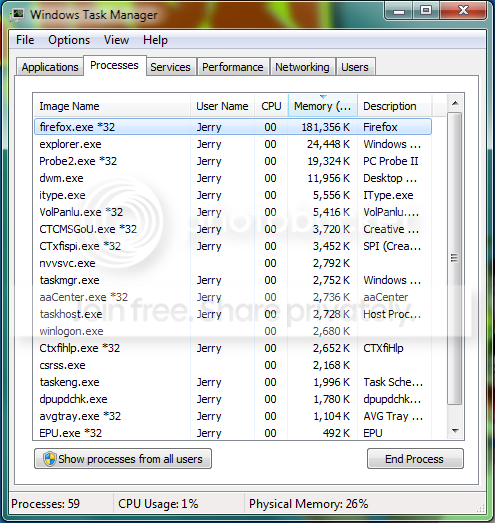
TO OP: YOU ARE USING AN AMD CHIPSET + NVIDIA GRAPHIC CARD... SO YOU HAVE TO INSTALL BOTH DRIVERS.... Do you get me now? BTW, each time you post a screenshot, I see your firefox eating lotsa RAM... Next time when it shutters kill firefox and see whether it stops shuttering..

BUT like i said earlier, just download the RC and install it when your free, and read my previous post what to do after that..
 

My Computer

Computer Manufacturer/Model Number
Custom
OS
Windows 7 32-bit; no 64 coz its a P4 478
CPU
Pentium 4 3.00 GHZ HT Socket 478 :(
Motherboard
MSI PM8M-V
Memory
1 GB Kingston DDR-400
Graphics Card(s)
HIS X1650 PRO AGP :(
Sound Card
Intergrated Realtek AC'97
Monitor(s) Displays
17" CRT :(
Screen Resolution
Native: 1027*768 MAX: 1280*1024 :(
Hard Drives
80 GB Maxtor
500 GB Seagate (7200.11)(T.T its now RMA)
Back
Top