
Computer Keeps Losing Access To Internet

NewW7User

Member
One of my computers lost access to Internet - no program could get to it (Internet was accessable on another computer). I got a new PCI card and my friend put it into a different slot. That worked for about a month and then it too failed - nothing could access Internet. Since then, I've been using Ethernet adapters (Trendnet , Excellon). Each works for about one to three weeks and then also fails. I'm starting to think there is something inherently wrong in the computer - something that went bad and causes after a while the PCI card and adapters to fail.

Unless I can figure this out it seems I'm going to have to buy a new computer to have Internet access . I'll welcome any idea anyone has that could point to the problem and save me from buying a new computer and having to use Win 10.

Computer is Dell XPS 8300
 

My Computers

System One System Two

  • Computer type
    PC/Desktop
    Computer Manufacturer/Model Number
    Dell XPS 8300
    OS
    W7 Pro 64
    Memory
    8G
    Sound Card
    RealTek High Definition Audio
    Monitor(s) Displays
    Asus
    Hard Drives
    WD Elements, Samsung Story Station, Samsung EVO 860 / 870
    Mouse
    Logitech M310
    Antivirus
    Avast, Malwarebytes, SUPERAntiSpyware
    Browser
    Firefox, Avast Secure Browser
  • Computer type
    Laptop
    System Manufacturer/Model Number
    HP
    OS
    Win10
    Keyboard
    external
    Mouse
    wireless
    Browser
    Firefox, Avast
    Antivirus
    Avast / Malwarebytes / Superantispyware
Start the computer in safe mode WITH networking. Same issue?


To start the computer with networking, keep pressing F8 on bootup. You can do it via MSCONFIG as well, but I like this method...
 

My Computer

Computer type
PC/Desktop
OS
Windows 7 Ultimate x64
When it fails is the card still in the device manager? when its failed from cmd prompt type

ipconfig /all
tracert 194.119.131.66
post results
 

My Computer

Computer type
PC/Desktop
OS
win 8 32 bit
F22 Simpilot;

Wow! Starting in Safe Mode WITH networking I DO get out to Internet. And it CAN also now see the other computer again, though the other computer can't see this computer. What does this mean and how do I fix this?

samuria;

Yes - it is still in Device Manger when it fails. I uploaded the tracert results.
 

Attachments

  • Tracert 4-27-23.jpg
    Tracert 4-27-23.jpg
    62.4 KB · Views: 0
Last edited:

My Computers

System One System Two

  • Computer type
    PC/Desktop
    Computer Manufacturer/Model Number
    Dell XPS 8300
    OS
    W7 Pro 64
    Memory
    8G
    Sound Card
    RealTek High Definition Audio
    Monitor(s) Displays
    Asus
    Hard Drives
    WD Elements, Samsung Story Station, Samsung EVO 860 / 870
    Mouse
    Logitech M310
    Antivirus
    Avast, Malwarebytes, SUPERAntiSpyware
    Browser
    Firefox, Avast Secure Browser
  • Computer type
    Laptop
    System Manufacturer/Model Number
    HP
    OS
    Win10
    Keyboard
    external
    Mouse
    wireless
    Browser
    Firefox, Avast
    Antivirus
    Avast / Malwarebytes / Superantispyware
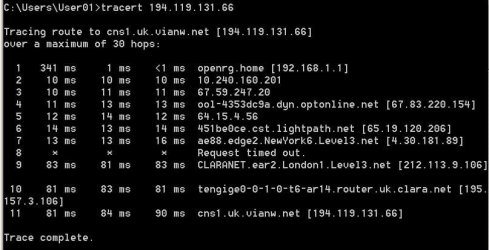
So the trace shows your getting out ok it take both pc to be on together for a while for them to see each other but you should be able to connect via ip ie \\192.168.5.1\sharename
 

My Computer

Computer type
PC/Desktop
OS
win 8 32 bit
Suddenly today that computer is accessing Internet without Safe mode today. I didn't change anything except having it turned off about 15 hours after the test and trace I did above. Can anyone suggest what is going on - why did it work in Safe mode and why is it working now?
 

My Computers

System One System Two

  • Computer type
    PC/Desktop
    Computer Manufacturer/Model Number
    Dell XPS 8300
    OS
    W7 Pro 64
    Memory
    8G
    Sound Card
    RealTek High Definition Audio
    Monitor(s) Displays
    Asus
    Hard Drives
    WD Elements, Samsung Story Station, Samsung EVO 860 / 870
    Mouse
    Logitech M310
    Antivirus
    Avast, Malwarebytes, SUPERAntiSpyware
    Browser
    Firefox, Avast Secure Browser
  • Computer type
    Laptop
    System Manufacturer/Model Number
    HP
    OS
    Win10
    Keyboard
    external
    Mouse
    wireless
    Browser
    Firefox, Avast
    Antivirus
    Avast / Malwarebytes / Superantispyware
When I had you run Safe Mode WITH Networking, that eliminates most drivers and loaded programs except those needed for network connectivity. So this tells me you have a driver or a software interfering with your Internet/networking. Could be a firewall or an anti-virus or anything else. This is now where you go into MSCONFIG and disable three or less startup items at a time and reboot until the problem is gone permanently to know for sure what it was and can fix it. Same for certain services that you may suspect being the culprit. But not just any service, one's that were added to Windows. So it takes some knowledge...

If the other computer can't see this computer, it sounds like that computer has issues of its own. Could be NetBIOS or something similar to this computer like anti-virus or a firewall or if you set the firewall for public or private, etc. Could be a lot of things. Without being there at the computer's I have no idea.
 

My Computer

Computer type
PC/Desktop
OS
Windows 7 Ultimate x64
Thanks for the direction. I'll try to follow it with the startup items - I suspect this will probably take some time until I can figure out for sure what it is. Regarding the services, I don't think I can do anything with that. As you wrote, it would take some knowledge which I don't have.
 

My Computers

System One System Two

  • Computer type
    PC/Desktop
    Computer Manufacturer/Model Number
    Dell XPS 8300
    OS
    W7 Pro 64
    Memory
    8G
    Sound Card
    RealTek High Definition Audio
    Monitor(s) Displays
    Asus
    Hard Drives
    WD Elements, Samsung Story Station, Samsung EVO 860 / 870
    Mouse
    Logitech M310
    Antivirus
    Avast, Malwarebytes, SUPERAntiSpyware
    Browser
    Firefox, Avast Secure Browser
  • Computer type
    Laptop
    System Manufacturer/Model Number
    HP
    OS
    Win10
    Keyboard
    external
    Mouse
    wireless
    Browser
    Firefox, Avast
    Antivirus
    Avast / Malwarebytes / Superantispyware
Back
Top