Solved Computer Keeps on Dropping off Home Network

eljusticiero67

New member
Local time
8:44 PM
Messages
11
Hello,

I am trying to network 3 computers. A Win7, Vista and a Mac. Fun stuff.

I know this is Win7 forum, but I thought I'd ask. The Vista machine keeps on dropping off the network. I am able to access it for a few hours at a time, but then it drops off randomly. Here are some observations:

-When I try to access a mapped drive it says: "The Local Device Name is Already in Use"
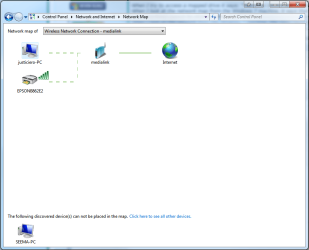
-When I look at the network map from the Win7 machine, it says that the "discovered device (Vista machine) cannot be placed on the map"
-When I look at the network from the Win7 machine, the Vista machine is listed, but says the path is not found.
-I have no problem connecting to the internet from the Vista machine.
-I cannot view the network map from the Vista machine-- it says "cannot start mapping on the adapter"

I am trying to figure out how to ping the thing. But I am not sure how to do that.... other than that, Im stumped! Any help would be greatly appreciated!!
 

My Computer My Computer

OS
WIn7 Ultimate 64

My Computer My Computer

Computer type
PC/Desktop
Computer Manufacturer/Model Number
Custom Asus Build
OS
Microsoft Windows 8.1 Pro 64-bit
CPU
Intel(R) Core(TM) i3-4130 CPU @ 3.40GHz
Motherboard
B85M-E
Memory
8.00 GB
Graphics Card(s)
None
Sound Card
Realtek High Definition Audio
Monitor(s) Displays
Asus 23.6" Monitor
Screen Resolution
1920 x 1080 x 32 bits (4294967296 colors) @ 60 Hz
Hard Drives
INTEL SSDSC2BW180A4
Samsung SSD 840 PRO Series
PSU
Seasonic S12II-380Bronze
Case
Lian Li
Cooling
Fan, Passive
Keyboard
Logitech K120
Mouse
Microsoft Touch Mouse
Internet Speed
4ms Ping, 19.0 Mbps Download, 19.0 Mbps Upload
Antivirus
Eset Endpoint
Browser
Internet Explorer, Chrome
Hello,

I am trying to network 3 computers. A Win7, Vista and a Mac. Fun stuff.

I know this is Win7 forum, but I thought I'd ask. The Vista machine keeps on dropping off the network. I am able to access it for a few hours at a time, but then it drops off randomly. Here are some observations:

-When I try to access a mapped drive it says: "The Local Device Name is Already in Use"
-When I look at the network map from the Win7 machine, it says that the "discovered device (Vista machine) cannot be placed on the map"
-When I look at the network from the Win7 machine, the Vista machine is listed, but says the path is not found.
-I have no problem connecting to the internet from the Vista machine.
-I cannot view the network map from the Vista machine-- it says "cannot start mapping on the adapter"

I am trying to figure out how to ping the thing. But I am not sure how to do that.... other than that, Im stumped! Any help would be greatly appreciated!!

If you can post screen shots of the ipconfig/all from the Vista machine and the network map from the Windows 7 machine it would be very helpful.
 

My Computer My Computer

Computer type
PC/Desktop
Computer Manufacturer/Model Number
Home built
OS
Windows 7 Ult, Windows 8.1 Pro,
CPU
Q9650-4.275GHz, E8600 4.5GHz, E6750-3.8GHz
Motherboard
Evga 780i FTW
Memory
G.Skill PC2 9600 1200Mhz 5 5 5 15 2T
Graphics Card(s)
GTX480
Sound Card
Asus Xonar D2
Monitor(s) Displays
HannsG
Screen Resolution
1680X1050
Hard Drives
GSkill Phoenix Pro 120GB SSD
PSU
ThermalTake Toughpower 1000Watt modular
Case
ThermalTake XaserV
Cooling
Xigmatek S1283
Keyboard
Logitech G15
Mouse
Logitech G9
Internet Speed
T1
thanks. ive attached the screenshot of the network map from Win7 machine and below is the ipconfig/all command from the Vista machine.

C:\>ipconfig/all

Windows IP Configuration

Host Name . . . . . . . . . . . . : Seema-PC
Primary Dns Suffix . . . . . . . :
Node Type . . . . . . . . . . . . : Broadcast
IP Routing Enabled. . . . . . . . : No
WINS Proxy Enabled. . . . . . . . : No

Ethernet adapter Local Area Connection* 14:

Media State . . . . . . . . . . . : Media disconnected
Connection-specific DNS Suffix . :
Description . . . . . . . . . . . : Juniper Network Connect Virtual Adapter
Physical Address. . . . . . . . . : 00-FF-D0-25-5F-06
DHCP Enabled. . . . . . . . . . . : Yes
Autoconfiguration Enabled . . . . : Yes

Wireless LAN adapter Wireless Network Connection:

Connection-specific DNS Suffix . :
Description . . . . . . . . . . . : Dell Wireless 1510 Wireless-N WLAN Mini-C
ard
Physical Address. . . . . . . . . : 00-24-2B-A9-8D-47
DHCP Enabled. . . . . . . . . . . : Yes
Autoconfiguration Enabled . . . . : Yes
Link-local IPv6 Address . . . . . : fe80::ed25:a27f:f80d:79ab%12(Preferred)
IPv4 Address. . . . . . . . . . . : 192.168.0.101(Preferred)
Subnet Mask . . . . . . . . . . . : 255.255.255.0
Lease Obtained. . . . . . . . . . : Friday, April 20, 2012 4:22:35 PM
Lease Expires . . . . . . . . . . : Saturday, April 21, 2012 4:22:35 PM
Default Gateway . . . . . . . . . : 192.168.0.1
DHCP Server . . . . . . . . . . . : 192.168.0.1
DHCPv6 IAID . . . . . . . . . . . : 201335851
DHCPv6 Client DUID. . . . . . . . : 00-01-00-01-11-46-94-D8-00-22-19-E6-1B-20

DNS Servers . . . . . . . . . . . : 75.75.75.75
75.75.76.76
NetBIOS over Tcpip. . . . . . . . : Enabled

Ethernet adapter Local Area Connection:

Media State . . . . . . . . . . . : Media disconnected
Connection-specific DNS Suffix . : hsd1.ca.comcast.net.
Description . . . . . . . . . . . : Broadcom NetLink (TM) Gigabit Ethernet
Physical Address. . . . . . . . . : 00-22-19-E6-1B-20
DHCP Enabled. . . . . . . . . . . : Yes
Autoconfiguration Enabled . . . . : Yes

Tunnel adapter Local Area Connection* 6:

Media State . . . . . . . . . . . : Media disconnected
Connection-specific DNS Suffix . :
Description . . . . . . . . . . . : isatap.{AA43B589-BB26-45A7-BF64-D4319E0E6
17F}
Physical Address. . . . . . . . . : 00-00-00-00-00-00-00-E0
DHCP Enabled. . . . . . . . . . . : No
Autoconfiguration Enabled . . . . : Yes

Tunnel adapter Local Area Connection* 7:

Media State . . . . . . . . . . . : Media disconnected
Connection-specific DNS Suffix . :
Description . . . . . . . . . . . : Teredo Tunneling Pseudo-Interface
Physical Address. . . . . . . . . : 02-00-54-55-4E-01
DHCP Enabled. . . . . . . . . . . : No
Autoconfiguration Enabled . . . . : Yes

Tunnel adapter Local Area Connection* 11:

Media State . . . . . . . . . . . : Media disconnected
Connection-specific DNS Suffix . :
Description . . . . . . . . . . . : isatap.{AA43B589-BB26-45A7-BF64-D4319E0E6
17F}
Physical Address. . . . . . . . . : 00-00-00-00-00-00-00-E0
DHCP Enabled. . . . . . . . . . . : No
Autoconfiguration Enabled . . . . : Yes

Tunnel adapter Local Area Connection* 13:

Media State . . . . . . . . . . . : Media disconnected
Connection-specific DNS Suffix . :
Description . . . . . . . . . . . : isatap.hsd1.ca.comcast.net.
Physical Address. . . . . . . . . : 00-00-00-00-00-00-00-E0
DHCP Enabled. . . . . . . . . . . : No
Autoconfiguration Enabled . . . . : Yes

Tunnel adapter Local Area Connection* 14:

Media State . . . . . . . . . . . : Media disconnected
Connection-specific DNS Suffix . :
Description . . . . . . . . . . . : isatap.{AA015911-51E8-4B34-B549-C21751D5C
3EB}
Physical Address. . . . . . . . . : 00-00-00-00-00-00-00-E0
DHCP Enabled. . . . . . . . . . . : No
Autoconfiguration Enabled . . . . : Yes

Tunnel adapter Local Area Connection* 16:

Media State . . . . . . . . . . . : Media disconnected
Connection-specific DNS Suffix . :
Description . . . . . . . . . . . : 6TO4 Adapter
Physical Address. . . . . . . . . : 00-00-00-00-00-00-00-E0
DHCP Enabled. . . . . . . . . . . : No
Autoconfiguration Enabled . . . . : Yes

C:\>
 

Attachments

  • screenshot.png
    screenshot.png
    32.5 KB · Views: 39

My Computer My Computer

OS
WIn7 Ultimate 64
so i pinged 192.168.0.101 (i think thats the address for my vista machine, right?) and there was no response. :(
 

My Computer My Computer

OS
WIn7 Ultimate 64
so i pinged 192.168.0.101 (i think thats the address for my vista machine, right?) and there was no response. :(

Yep ok you have the 6 to 4 tunnel adaptor problem, nothing new really but it usually indicates that you should update your network driver.

In order to get this working again those extra 6 to4 adaptors need to be removed.

Click on the file below and save, right click and unzip then run the file and reboot the system. This file is made to remove all the extra 6 to4 tunnel adaptors so you don't need to do it manually.

After running the tunnel remover and rebooting, run the next file below that one which will reset your IP and everything else. Your system will reboot itself automatically.

After that your system may connect to the internet again but you should look for an updated version of the network driver for your Vista machine. :)

It might also help to remove the DNS entries from your IPv4 properties windows and add the DNS server addresses to your router's set up page for the DNS settings instead, you can get to your routers set up page by typing 192.168.0.1 into your browsers URL.

This will make your default gateway show up where it says DNS servers which means you are getting the DNS through the router instead.
 

Attachments

Last edited:

My Computer My Computer

Computer type
PC/Desktop
Computer Manufacturer/Model Number
Home built
OS
Windows 7 Ult, Windows 8.1 Pro,
CPU
Q9650-4.275GHz, E8600 4.5GHz, E6750-3.8GHz
Motherboard
Evga 780i FTW
Memory
G.Skill PC2 9600 1200Mhz 5 5 5 15 2T
Graphics Card(s)
GTX480
Sound Card
Asus Xonar D2
Monitor(s) Displays
HannsG
Screen Resolution
1680X1050
Hard Drives
GSkill Phoenix Pro 120GB SSD
PSU
ThermalTake Toughpower 1000Watt modular
Case
ThermalTake XaserV
Cooling
Xigmatek S1283
Keyboard
Logitech G15
Mouse
Logitech G9
Internet Speed
T1
thank you very much! i implemented these solutions and so far so good. the computer hasn't dropped off the network as of yet. i am going to continue to monitor it over the next couple days, and hopefully this will be the solution!
 

My Computer My Computer

OS
WIn7 Ultimate 64
thank you very much! i implemented these solutions and so far so good. the computer hasn't dropped off the network as of yet. i am going to continue to monitor it over the next couple days, and hopefully this will be the solution!

Yes give a few days to make sure.

The tunnel adaptor problem is common, using a different network driver can help fix the problem for good if you can find one.

As I mentioned earlier, replacing the network driver with a more updated version should keep this problem from reoccurring again.
 
Last edited:

My Computer My Computer

Computer type
PC/Desktop
Computer Manufacturer/Model Number
Home built
OS
Windows 7 Ult, Windows 8.1 Pro,
CPU
Q9650-4.275GHz, E8600 4.5GHz, E6750-3.8GHz
Motherboard
Evga 780i FTW
Memory
G.Skill PC2 9600 1200Mhz 5 5 5 15 2T
Graphics Card(s)
GTX480
Sound Card
Asus Xonar D2
Monitor(s) Displays
HannsG
Screen Resolution
1680X1050
Hard Drives
GSkill Phoenix Pro 120GB SSD
PSU
ThermalTake Toughpower 1000Watt modular
Case
ThermalTake XaserV
Cooling
Xigmatek S1283
Keyboard
Logitech G15
Mouse
Logitech G9
Internet Speed
T1
hi chev65. thanks again for your help. it seems that this was indeed the problem. I have had no problems with maintaining a connection to the network.... until last night! last night the computer dropped off the network again, and I looked to see if the 6-to-4 adapter was there, and sure enough it had reappeared. I actually tried to install a new network driver but the automatic driver update did not find a more updated version. So i think this network driver is probably the root of this problem in the end.

So I consider the problem solved, pending a new network driver! I can't keep deleting this 6-to-4 adapter every couple days!
 

My Computer My Computer

OS
WIn7 Ultimate 64
hi chev65. thanks again for your help. it seems that this was indeed the problem. I have had no problems with maintaining a connection to the network.... until last night! last night the computer dropped off the network again, and I looked to see if the 6-to-4 adapter was there, and sure enough it had reappeared. I actually tried to install a new network driver but the automatic driver update did not find a more updated version. So i think this network driver is probably the root of this problem in the end.

So I consider the problem solved, pending a new network driver! I can't keep deleting this 6-to-4 adapter every couple days!

It's ok to have the 6 to 4 adaptor there, it's part of the network. The problems start when you get too many of them which seems to be caused from the network driver doing strange stuff.

You should try going to the manufacture's web site for the driver, you haven't listed any system specs so I can't find one for you. :)
 

My Computer My Computer

Computer type
PC/Desktop
Computer Manufacturer/Model Number
Home built
OS
Windows 7 Ult, Windows 8.1 Pro,
CPU
Q9650-4.275GHz, E8600 4.5GHz, E6750-3.8GHz
Motherboard
Evga 780i FTW
Memory
G.Skill PC2 9600 1200Mhz 5 5 5 15 2T
Graphics Card(s)
GTX480
Sound Card
Asus Xonar D2
Monitor(s) Displays
HannsG
Screen Resolution
1680X1050
Hard Drives
GSkill Phoenix Pro 120GB SSD
PSU
ThermalTake Toughpower 1000Watt modular
Case
ThermalTake XaserV
Cooling
Xigmatek S1283
Keyboard
Logitech G15
Mouse
Logitech G9
Internet Speed
T1
Back
Top