Computer keeps shutting down upon start up and safe mode

gakkuriaqua

New member
Local time
6:22 AM
Messages
4
Location
USA
My computer keeps shutting down upon start up. I've had this problem before but last time it was merely fixed by cleaning the fan. But this time the fan is clean and I really don't know what's wrong. I've tried going into safe mode to run a registry cleaner but my computer shut down before it even got to 50% scanned. I've also tried going into command prompt with sfc /scannow but again my computer didn't last till the end. Is there anything else I can do that can fix my problem?
-Aqua
 

My Computer My Computer

Computer type
PC/Desktop
Computer Manufacturer/Model Number
Asus EeeTop Touch Screen
OS
Windows 7 Home premium 32bit
CPU
Intel(R) Core(TM) 2 Duo Cpu T6600 @ 2.20GHz
Antivirus
AVG
Browser
chrome
Other Info
about 7 years old
RAM is 4.00 GB
The problem appears to be the computer, and not the OS. If I were to make a guess I would say that your system is over heating thus shutting down before any damage can be done.

If you could update your your Systems Specs (need more info) to include the CPU, Ram, number of drives, age of the computer, these specs would allow other members to get an idea of what your problem could be, thus giving you some good suggestions as to what you can do. . .Thanks for any info. . .Good luck.

BTW, Welcome to the Seven Forums.". . .:thumbsup:
 

My Computer My Computer

Computer Manufacturer/Model Number
HP Pavilion a4302f
OS
Win 7 Pro x64, VM Win XP, Win7 Pro Sandbox, Kubuntu 11
CPU
AMD Athlon(tm) II X4 640 @ 3.0 Gbz
Memory
12GB 1066MHz DDR3 SDRAM - 2x4GB, 2x2GB
Graphics Card(s)
ATI Radeon HD 4350 HD Graphics/Audio with 512MB
Sound Card
Realtek High Definition Audio
Monitor(s) Displays
1. Dell 23" SP2307, 2. Mitsublishi 40" HDTV, Hannspree 25"
Screen Resolution
1. 2048x1152, 2. 1920-1080, 3. 1920x1200
Hard Drives
Int: 1 120 Gig SSD i
1 - 2.5" 500 USB External HDD
1 -1 Tb USB External HDD
Case
Mid Tower
Cooling
Standard Fans - 5 fans (very quiet)
Keyboard
Microsoft Wireless 2000
Mouse
Microsoft Wireless Mouse 5000
Internet Speed
10 Mbit (realistically 500 Kbit - 1.2 Mbit)
Other Info
Speakers - Bose Desktop (Excellent Sound)
1 external CD|DVD\Blue-ray Recorders/Players (Sony)
Thank you for your welcome! Also I don't think its an overheating problem as I left it alone overnight and this afternoon. The same problem of it shutting down still happened. Also I've updated my information as much as possible before my computer shut down on me. Thanks for any help given!
 

My Computer My Computer

Computer type
PC/Desktop
Computer Manufacturer/Model Number
Asus EeeTop Touch Screen
OS
Windows 7 Home premium 32bit
CPU
Intel(R) Core(TM) 2 Duo Cpu T6600 @ 2.20GHz
Antivirus
AVG
Browser
chrome
Other Info
about 7 years old
RAM is 4.00 GB
You may need to (or get someone else to):

  • Clean your heat sinks.
  • Remove the old heat sink compound and then apply new heat sink compound (between the CPU and its heat sink).
 

My Computer My Computer

Computer type
PC/Desktop
Computer Manufacturer/Model Number
n/a
OS
W7 Ultimate SP1, LM19.2 MATE, W10 Home 1703, W10 Pro 1703 VM, #All 64 bit
CPU
AMD Phenom II x6 1100T, 3.3 GHz
Motherboard
ASUS M4A88T-M/USB3 (AM3)
Memory
12GB DDR3 1333 G-Skill (4GB x 2), G-Skill (2GB x 2)
Graphics Card(s)
NVIDIA GeForce GTX 660
Sound Card
Realtek?
Monitor(s) Displays
Samsung S23B350
Screen Resolution
1920x1080
Hard Drives
WD Green 2TB (SATA), WD Green 3TB (SATA), WD Blue 4TB (SATA), WD Blue 6TB (SATA)
PSU
Cooler Master
Case
Antec GX300 Tower
Cooling
3x Antec TRICOOL 120mm Fans
Mouse
Wired Optical
Internet Speed
DSL
Antivirus
Avast
Browser
Pale Moon (64 bit)
Other Info
2018-12-27 Upgraded HDDs
2015-12-10 Upgraded case, graphics card, storage
2015-08-15 Upgraded motherboard & RAM
2015-07-15 Upgraded LM17.1 to LM17.2
1471185_10201475942552829_2135496686_n.jpg


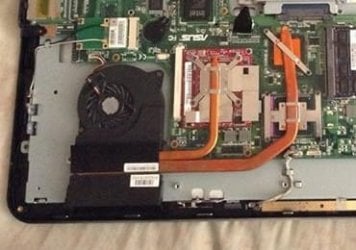
Uhm, sorry for the very late reply. But this is what the inside of my computer looks like and there is nothing covering the CPU so I'm unsure what to change or remove > <;
 

My Computer My Computer

Computer type
PC/Desktop
Computer Manufacturer/Model Number
Asus EeeTop Touch Screen
OS
Windows 7 Home premium 32bit
CPU
Intel(R) Core(TM) 2 Duo Cpu T6600 @ 2.20GHz
Antivirus
AVG
Browser
chrome
Other Info
about 7 years old
RAM is 4.00 GB
Uhm, sorry for the very late reply. But this is what the inside of my computer looks like and there is nothing covering the CPU so I'm unsure what to change or remove > <;

Your machine looks clean.
Cooling.jpg
It looks like there are 3 chips (probably: CPU, GPU, Northbridge) connected to 2 heat conducting tubes.
The heat conducting tubes go to a fan enclosure.
There is a heat sink/radiator arrangement hidden under the plastic cover.
The fan should force air over it to keep it cool.

I have never disassembled/examined that type of setup (I've only used desktops).
I wouldn't disassemble it. :eek:

You may need to take your machine to a repair centre.
 

My Computer My Computer

Computer type
PC/Desktop
Computer Manufacturer/Model Number
n/a
OS
W7 Ultimate SP1, LM19.2 MATE, W10 Home 1703, W10 Pro 1703 VM, #All 64 bit
CPU
AMD Phenom II x6 1100T, 3.3 GHz
Motherboard
ASUS M4A88T-M/USB3 (AM3)
Memory
12GB DDR3 1333 G-Skill (4GB x 2), G-Skill (2GB x 2)
Graphics Card(s)
NVIDIA GeForce GTX 660
Sound Card
Realtek?
Monitor(s) Displays
Samsung S23B350
Screen Resolution
1920x1080
Hard Drives
WD Green 2TB (SATA), WD Green 3TB (SATA), WD Blue 4TB (SATA), WD Blue 6TB (SATA)
PSU
Cooler Master
Case
Antec GX300 Tower
Cooling
3x Antec TRICOOL 120mm Fans
Mouse
Wired Optical
Internet Speed
DSL
Antivirus
Avast
Browser
Pale Moon (64 bit)
Other Info
2018-12-27 Upgraded HDDs
2015-12-10 Upgraded case, graphics card, storage
2015-08-15 Upgraded motherboard & RAM
2015-07-15 Upgraded LM17.1 to LM17.2
Back
Top