
Computer locks up during certain games, event viewer included

Yes, see the Logging Start button? Hopefully it will save a log if it locks up. The other alternative is to hook up a digital volt meter as has been described.
yeah hopefully. um im also getting a warning before i do the test something about Asus EC (embedded controller) that could cause high load/latency and may affect system stability?
 

My Computer My Computer

At a glance

windows 7 Ultimate Service pack 1 x64intel i5 2500k8gb RamSapphire AMD 6950 2gb
Computer type
PC/Desktop
OS
windows 7 Ultimate Service pack 1 x64
CPU
intel i5 2500k
Motherboard
Asus p8z68-v motherboard
Memory
8gb Ram
Graphics Card(s)
Sapphire AMD 6950 2gb
Screen Resolution
1920x1080
Hard Drives
2x samsung hd103SJ
1x ST2000DL003-9VT166
PSU
Silverstone silver 850watt power supply (ST85F-P)
Case
silverstone raven RV02-E
Keyboard
microsoft side winder x4
Mouse
Razer death adder v2
yeah hopefully. um im also getting a warning before i do the test something about Asus EC (embedded controller) that could cause high load/latency and may affect system stability?
That's odd, I have the Gen3 version of the motherboard you have and I don't have that warning nor do I have a setting in BIOS for it. HWinfo isn't a test pre se but a monitoring program.

I fooled with the logging feature and I think it will work even with a freeze or BSOD. The log starts right away, you need only to select where the log will be saved, I chose Desktop, if HWinfo quits running the log is saved at that point. It's in a CSV (comma separated value) format so needs Excel or compatible program to open it.
 

My Computer My Computer

At a glance

Windows 7 Ultimate X64 SP1Intel i5-2550K, Differing ~4.4-4.8GHz No buil...16GB G.Skill Sniper 1866MHz @ 2133MHz 2x8GBASUS GTX650TIB-DC2OC-2GD5, (650TI Boost)
Computer type
PC/Desktop
Computer Manufacturer/Model Number
Home Built Desktop By DataTech
OS
Windows 7 Ultimate X64 SP1
CPU
Intel i5-2550K, Differing ~4.4-4.8GHz No built in GPU
Motherboard
ASUS P8Z68-V PRO/GEN3
Memory
16GB G.Skill Sniper 1866MHz @ 2133MHz 2x8GB
Graphics Card(s)
ASUS GTX650TIB-DC2OC-2GD5, (650TI Boost)
Sound Card
Onboard Realtek 5-1
Monitor(s) Displays
Samsung P2570HD
Screen Resolution
1920x1080
Hard Drives
Samsung 840 Pro 256GB SSD for OS, 500GB Seagate Constellation (Enterprise drive) for Data
PSU
Corsair HX650W
Case
Inwin Dragon Rider
Cooling
Hyper 212 EVO w/two Noctua fans, push-pull, @1300 RPM
Keyboard
E-Z Eyes, bright yellow keys with large characters
Mouse
steelseries SENSEI Laser Pro Gaming
Internet Speed
48-51Mbs Mbs down, 11 Mbs up Xfinity Cable
Antivirus
Norton Internet Security 2013
Browser
IE 10, Opera, Pale Moon if needed
Other Info
4 case fans, LG BluRay-RE, ASUS DVD-RW, Mr. Fusion power supply, 1.21 gigawatts.
yeah hopefully. um im also getting a warning before i do the test something about Asus EC (embedded controller) that could cause high load/latency and may affect system stability?
That's odd, I have the Gen3 version of the motherboard you have and I don't have that warning nor do I have a setting in BIOS for it. HWinfo isn't a test pre se but a monitoring program.

I fooled with the logging feature and I think it will work even with a freeze or BSOD. The log starts right away, you need only to select where the log will be saved, I chose Desktop, if HWinfo quits running the log is saved at that point. It's in a CSV (comma separated value) format so needs Excel or compatible program to open it.

Hmm im beginning the test now, this is also getting ridiculous, i have to reinstall everytime i use it once or it freezes on some intel management engine
 

My Computer My Computer

At a glance

windows 7 Ultimate Service pack 1 x64intel i5 2500k8gb RamSapphire AMD 6950 2gb
Computer type
PC/Desktop
OS
windows 7 Ultimate Service pack 1 x64
CPU
intel i5 2500k
Motherboard
Asus p8z68-v motherboard
Memory
8gb Ram
Graphics Card(s)
Sapphire AMD 6950 2gb
Screen Resolution
1920x1080
Hard Drives
2x samsung hd103SJ
1x ST2000DL003-9VT166
PSU
Silverstone silver 850watt power supply (ST85F-P)
Case
silverstone raven RV02-E
Keyboard
microsoft side winder x4
Mouse
Razer death adder v2
Where are you getting the Intel software? Uninstall or don't install it.
 

My Computer My Computer

At a glance

windows 7 Ultimate Service pack 1 x64intel i5 2500k8gb RamSapphire AMD 6950 2gb
Computer type
PC/Desktop
OS
windows 7 Ultimate Service pack 1 x64
CPU
intel i5 2500k
Motherboard
Asus p8z68-v motherboard
Memory
8gb Ram
Graphics Card(s)
Sapphire AMD 6950 2gb
Screen Resolution
1920x1080
Hard Drives
2x samsung hd103SJ
1x ST2000DL003-9VT166
PSU
Silverstone silver 850watt power supply (ST85F-P)
Case
silverstone raven RV02-E
Keyboard
microsoft side winder x4
Mouse
Razer death adder v2
yeah hopefully. um im also getting a warning before i do the test something about Asus EC (embedded controller) that could cause high load/latency and may affect system stability?
That's odd, I have the Gen3 version of the motherboard you have and I don't have that warning nor do I have a setting in BIOS for it. HWinfo isn't a test pre se but a monitoring program.

I fooled with the logging feature and I think it will work even with a freeze or BSOD. The log starts right away, you need only to select where the log will be saved, I chose Desktop, if HWinfo quits running the log is saved at that point. It's in a CSV (comma separated value) format so needs Excel or compatible program to open it.
First test nothing happened, 48 minutes with furmark on and hwinfo logging and no lockup occured. Now running prime 95 and furmark together with hwinfo logging
 

My Computer My Computer

At a glance

windows 7 Ultimate Service pack 1 x64intel i5 2500k8gb RamSapphire AMD 6950 2gb
Computer type
PC/Desktop
OS
windows 7 Ultimate Service pack 1 x64
CPU
intel i5 2500k
Motherboard
Asus p8z68-v motherboard
Memory
8gb Ram
Graphics Card(s)
Sapphire AMD 6950 2gb
Screen Resolution
1920x1080
Hard Drives
2x samsung hd103SJ
1x ST2000DL003-9VT166
PSU
Silverstone silver 850watt power supply (ST85F-P)
Case
silverstone raven RV02-E
Keyboard
microsoft side winder x4
Mouse
Razer death adder v2
Ok i have the test results but i had to rename them to .txt, just rename it to .csv when you take a look at it
 

Attachments

My Computer My Computer

At a glance

windows 7 Ultimate Service pack 1 x64intel i5 2500k8gb RamSapphire AMD 6950 2gb
Computer type
PC/Desktop
OS
windows 7 Ultimate Service pack 1 x64
CPU
intel i5 2500k
Motherboard
Asus p8z68-v motherboard
Memory
8gb Ram
Graphics Card(s)
Sapphire AMD 6950 2gb
Screen Resolution
1920x1080
Hard Drives
2x samsung hd103SJ
1x ST2000DL003-9VT166
PSU
Silverstone silver 850watt power supply (ST85F-P)
Case
silverstone raven RV02-E
Keyboard
microsoft side winder x4
Mouse
Razer death adder v2
The log was so you could have a look at the volts during stressing the machine.

Good new is the PSU remained stabled during whatever time the logging took, maybe hour and 15?, I don't understand their time stamps.
The 12V only varied .096V so I think the PSU can be ruled out as a cause of issues.
 

My Computer My Computer

At a glance

Windows 7 Ultimate X64 SP1Intel i5-2550K, Differing ~4.4-4.8GHz No buil...16GB G.Skill Sniper 1866MHz @ 2133MHz 2x8GBASUS GTX650TIB-DC2OC-2GD5, (650TI Boost)
Computer type
PC/Desktop
Computer Manufacturer/Model Number
Home Built Desktop By DataTech
OS
Windows 7 Ultimate X64 SP1
CPU
Intel i5-2550K, Differing ~4.4-4.8GHz No built in GPU
Motherboard
ASUS P8Z68-V PRO/GEN3
Memory
16GB G.Skill Sniper 1866MHz @ 2133MHz 2x8GB
Graphics Card(s)
ASUS GTX650TIB-DC2OC-2GD5, (650TI Boost)
Sound Card
Onboard Realtek 5-1
Monitor(s) Displays
Samsung P2570HD
Screen Resolution
1920x1080
Hard Drives
Samsung 840 Pro 256GB SSD for OS, 500GB Seagate Constellation (Enterprise drive) for Data
PSU
Corsair HX650W
Case
Inwin Dragon Rider
Cooling
Hyper 212 EVO w/two Noctua fans, push-pull, @1300 RPM
Keyboard
E-Z Eyes, bright yellow keys with large characters
Mouse
steelseries SENSEI Laser Pro Gaming
Internet Speed
48-51Mbs Mbs down, 11 Mbs up Xfinity Cable
Antivirus
Norton Internet Security 2013
Browser
IE 10, Opera, Pale Moon if needed
Other Info
4 case fans, LG BluRay-RE, ASUS DVD-RW, Mr. Fusion power supply, 1.21 gigawatts.
The log was so you could have a look at the volts during stressing the machine.

Good new is the PSU remained stabled during whatever time the logging took, maybe hour and 15?, I don't understand their time stamps.
The 12V only varied .096V so I think the PSU can be ruled out as a cause of issues.

Thats kinda problematic then... if the problem is the motherboard or the videocard i don't think i will have the money to replace either of them... At least the power supply is on warranty and if thats not the cause...
 

My Computer My Computer

At a glance

windows 7 Ultimate Service pack 1 x64intel i5 2500k8gb RamSapphire AMD 6950 2gb
Computer type
PC/Desktop
OS
windows 7 Ultimate Service pack 1 x64
CPU
intel i5 2500k
Motherboard
Asus p8z68-v motherboard
Memory
8gb Ram
Graphics Card(s)
Sapphire AMD 6950 2gb
Screen Resolution
1920x1080
Hard Drives
2x samsung hd103SJ
1x ST2000DL003-9VT166
PSU
Silverstone silver 850watt power supply (ST85F-P)
Case
silverstone raven RV02-E
Keyboard
microsoft side winder x4
Mouse
Razer death adder v2
I just read through the whole thread and noticed a couple of things.

Your snip of Prime showed it has run for 6 minutes, 8 hours or longer is the way to test with it, run Prime only. The temps should be OK, they are in that short run.

SATA cables are SATA cables, they all perform the same, the SATA 6GBs have a metal latch which is the only difference. Of course cables companies will say different to sell $25 cables.

The "not quite a beep" you hear, that may well be a hard drive, are the games installed on one? I didn't see where you'd run a hard disk check, I would recommend it one test per drive, the SSD doesn't need checked since it came late to the party.

Hard drive(s)test(s):
Pick one for your HDD brand or use Seatools.
7 Free Hard Drive Testing Software Tools

You said you did a memory test, was it the one below? It also needs to run a minimum of 8 passes, the tests vary a bit with each pass.

RAM (memory) test:
This will require memtest on a bootable CD or USB stick.
RAM - Test with Memtest86+

Problem are sometimes very hard to pin down so many tests are needed at times and some may take hours.​


This is the preferred, best way to upload an image or a file to a post. Press the Windows logo key :orb: and PrntScrn at the same time, this will capture the active window to use in Paint or your preferred graphics editor.
http://www.sevenforums.com/tutorials/9733-screenshots-files-upload-post-seven-forums.html#post93869
You may also upload a photo or image you already have as you would a file, without using the Snipping tool.
 

My Computer My Computer

At a glance

Windows 7 Ultimate X64 SP1Intel i5-2550K, Differing ~4.4-4.8GHz No buil...16GB G.Skill Sniper 1866MHz @ 2133MHz 2x8GBASUS GTX650TIB-DC2OC-2GD5, (650TI Boost)
Computer type
PC/Desktop
Computer Manufacturer/Model Number
Home Built Desktop By DataTech
OS
Windows 7 Ultimate X64 SP1
CPU
Intel i5-2550K, Differing ~4.4-4.8GHz No built in GPU
Motherboard
ASUS P8Z68-V PRO/GEN3
Memory
16GB G.Skill Sniper 1866MHz @ 2133MHz 2x8GB
Graphics Card(s)
ASUS GTX650TIB-DC2OC-2GD5, (650TI Boost)
Sound Card
Onboard Realtek 5-1
Monitor(s) Displays
Samsung P2570HD
Screen Resolution
1920x1080
Hard Drives
Samsung 840 Pro 256GB SSD for OS, 500GB Seagate Constellation (Enterprise drive) for Data
PSU
Corsair HX650W
Case
Inwin Dragon Rider
Cooling
Hyper 212 EVO w/two Noctua fans, push-pull, @1300 RPM
Keyboard
E-Z Eyes, bright yellow keys with large characters
Mouse
steelseries SENSEI Laser Pro Gaming
Internet Speed
48-51Mbs Mbs down, 11 Mbs up Xfinity Cable
Antivirus
Norton Internet Security 2013
Browser
IE 10, Opera, Pale Moon if needed
Other Info
4 case fans, LG BluRay-RE, ASUS DVD-RW, Mr. Fusion power supply, 1.21 gigawatts.
I just read through the whole thread and noticed a couple of things.

Your snip of Prime showed it has run for 6 minutes, 8 hours or longer is the way to test with it, run Prime only. The temps should be OK, they are in that short run.

SATA cables are SATA cables, they all perform the same, the SATA 6GBs have a metal latch which is the only difference. Of course cables companies will say different to sell $25 cables.

The "not quite a beep" you hear, that may well be a hard drive, are the games installed on one? I didn't see where you'd run a hard disk check, I would recommend it one test per drive, the SSD doesn't need checked since it came late to the party.

Hard drive(s)test(s):
Pick one for your HDD brand or use Seatools.
7 Free Hard Drive Testing Software Tools

You said you did a memory test, was it the one below? It also needs to run a minimum of 8 passes, the tests vary a bit with each pass.

RAM (memory) test:
This will require memtest on a bootable CD or USB stick.
RAM - Test with Memtest86+

Problem are sometimes very hard to pin down so many tests are needed at times and some may take hours.​


This is the preferred, best way to upload an image or a file to a post. Press the Windows logo key :orb: and PrntScrn at the same time, this will capture the active window to use in Paint or your preferred graphics editor.

http://www.sevenforums.com/tutorials/9733-screenshots-files-upload-post-seven-forums.html#post93869
You may also upload a photo or image you already have as you would a file, without using the Snipping tool.

the captures of prime were to get an average temperature while cpu was under max stress so thats why they are so short.
Yes i also ran the memory test but i only let it reach 100% once and i think that was 30 minutes, i guess i could leave it on overnight to give it a proper test.
Also when i run fur benchmark or prime 95 on their own the computer doesnt lock up, when i try to stress test both at the same time, the computer locks up within 30 minutes.
Im running 3 hard drives at the moment. 1 with the OS and some programs like xilisoft, etc. 1 with my downloads and 1 with games. 2 are samsung and 1 is seagate.
and yeah im using paint, im just cropping the main window of the screenshot, the rest that is cut it is mainly my taskbar, etc.

My friend is letting me borrow his old 680 however he doesnt have the fan for the video card anymore since he replaced it with water cooling, however he replaced his 680 with 780s (also with watercooling) Is it possible to attach a 780 nvidia fan onto a 680?

Got another problem here, the computer is starting to slow down considerably now.
 
Last edited:

My Computer My Computer

At a glance

windows 7 Ultimate Service pack 1 x64intel i5 2500k8gb RamSapphire AMD 6950 2gb
Computer type
PC/Desktop
OS
windows 7 Ultimate Service pack 1 x64
CPU
intel i5 2500k
Motherboard
Asus p8z68-v motherboard
Memory
8gb Ram
Graphics Card(s)
Sapphire AMD 6950 2gb
Screen Resolution
1920x1080
Hard Drives
2x samsung hd103SJ
1x ST2000DL003-9VT166
PSU
Silverstone silver 850watt power supply (ST85F-P)
Case
silverstone raven RV02-E
Keyboard
microsoft side winder x4
Mouse
Razer death adder v2
the captures of prime were to get an average temperature while cpu was under max stress so thats why they are so short.
Yes i also ran the memory test but i only let it reach 100% once and i think that was 30 minutes, i guess i could leave it on overnight to give it a proper test.
Also when i run fur benchmark or prime 95 on their own the computer doesnt lock up, when i try to stress test both at the same time, the computer locks up within 30 minutes.
Im running 3 hard drives at the moment. 1 with the OS and some programs like xilisoft, etc. 1 with my downloads and 1 with games. 2 are samsung and 1 is seagate.
and yeah im using paint, im just cropping the main window of the screenshot, the rest that is cut it is mainly my taskbar, etc.

My friend is letting me borrow his old 680 however he doesnt have the fan for the video card anymore since he replaced it with water cooling, however he replaced his 680 with 780s (also with watercooling) Is it possible to attach a 780 nvidia fan onto a 680?
Some RAM errors show only after 4-6 passes, so yes let it run overnight or while you are gone. Prime mostly is for CPU stressing, so I think you won't need to run it anymore.

Did you notice any artifacts with Furmark? this would be screen tearing, lines in the image, or anything not normal other than the furry donut and background.

I can't say about the fan working from one to another, it could be. The fan assembly has the cooler and is in contact with the GPU chip, much like a CPU cooler base is. If they are interchangeable you will need to clean the mating surfaces, GPU and cooler base, and apply new thermal paste, such as Arctic Silver 5.

There are many companies that make GPU cards and they all have different cooling fans.
 

My Computer My Computer

At a glance

Windows 7 Ultimate X64 SP1Intel i5-2550K, Differing ~4.4-4.8GHz No buil...16GB G.Skill Sniper 1866MHz @ 2133MHz 2x8GBASUS GTX650TIB-DC2OC-2GD5, (650TI Boost)
Computer type
PC/Desktop
Computer Manufacturer/Model Number
Home Built Desktop By DataTech
OS
Windows 7 Ultimate X64 SP1
CPU
Intel i5-2550K, Differing ~4.4-4.8GHz No built in GPU
Motherboard
ASUS P8Z68-V PRO/GEN3
Memory
16GB G.Skill Sniper 1866MHz @ 2133MHz 2x8GB
Graphics Card(s)
ASUS GTX650TIB-DC2OC-2GD5, (650TI Boost)
Sound Card
Onboard Realtek 5-1
Monitor(s) Displays
Samsung P2570HD
Screen Resolution
1920x1080
Hard Drives
Samsung 840 Pro 256GB SSD for OS, 500GB Seagate Constellation (Enterprise drive) for Data
PSU
Corsair HX650W
Case
Inwin Dragon Rider
Cooling
Hyper 212 EVO w/two Noctua fans, push-pull, @1300 RPM
Keyboard
E-Z Eyes, bright yellow keys with large characters
Mouse
steelseries SENSEI Laser Pro Gaming
Internet Speed
48-51Mbs Mbs down, 11 Mbs up Xfinity Cable
Antivirus
Norton Internet Security 2013
Browser
IE 10, Opera, Pale Moon if needed
Other Info
4 case fans, LG BluRay-RE, ASUS DVD-RW, Mr. Fusion power supply, 1.21 gigawatts.
the captures of prime were to get an average temperature while cpu was under max stress so thats why they are so short.
Yes i also ran the memory test but i only let it reach 100% once and i think that was 30 minutes, i guess i could leave it on overnight to give it a proper test.
Also when i run fur benchmark or prime 95 on their own the computer doesnt lock up, when i try to stress test both at the same time, the computer locks up within 30 minutes.
Im running 3 hard drives at the moment. 1 with the OS and some programs like xilisoft, etc. 1 with my downloads and 1 with games. 2 are samsung and 1 is seagate.
and yeah im using paint, im just cropping the main window of the screenshot, the rest that is cut it is mainly my taskbar, etc.

My friend is letting me borrow his old 680 however he doesnt have the fan for the video card anymore since he replaced it with water cooling, however he replaced his 680 with 780s (also with watercooling) Is it possible to attach a 780 nvidia fan onto a 680?
Some RAM errors show only after 4-6 passes, so yes let it run overnight or while you are gone. Prime mostly is for CPU stressing, so I think you won't need to run it anymore.

Did you notice any artifacts with Furmark? this would be screen tearing, lines in the image, or anything not normal other than the furry donut and background.

I can't say about the fan working from one to another, it could be. The fan assembly has the cooler and is in contact with the GPU chip, much like a CPU cooler base is. If they are interchangeable you will need to clean the mating surfaces, GPU and cooler base, and apply new thermal paste, such as Arctic Silver 5.

There are many companies that make GPU cards and they all have different cooling fans.

I think the problem is starting to lean towards the motherboard. A couple of days ago my computer started acting extremely sluggish, and now whenever i even boot up a program or something it sounds like the hard drive is just waking up (like when the computer turns on) im still gonna run the RAM test later but im starting to think its a motherboard issue and i can't seem to find my model in stores anymore
 

My Computer My Computer

At a glance

windows 7 Ultimate Service pack 1 x64intel i5 2500k8gb RamSapphire AMD 6950 2gb
Computer type
PC/Desktop
OS
windows 7 Ultimate Service pack 1 x64
CPU
intel i5 2500k
Motherboard
Asus p8z68-v motherboard
Memory
8gb Ram
Graphics Card(s)
Sapphire AMD 6950 2gb
Screen Resolution
1920x1080
Hard Drives
2x samsung hd103SJ
1x ST2000DL003-9VT166
PSU
Silverstone silver 850watt power supply (ST85F-P)
Case
silverstone raven RV02-E
Keyboard
microsoft side winder x4
Mouse
Razer death adder v2
Also do the drive testing, I'm not sure it's the board at this point.

Check in Device Manager to see if you have 2 (or more) Audio Devices listed. If so disable one and test for freezing/lockups. Then reenable it and disable the second one and re-test.

Here's a quick utility that checks the drive SMART status, CrystalDiskInfo, Download the Portable Edition (zip). Post a snip of the result when you run it, it will work with one disk at one time, run it on the drive that is "beeping" and seems to be waking.
Download Center - Crystal Dew World
 

My Computer My Computer

At a glance

Windows 7 Ultimate X64 SP1Intel i5-2550K, Differing ~4.4-4.8GHz No buil...16GB G.Skill Sniper 1866MHz @ 2133MHz 2x8GBASUS GTX650TIB-DC2OC-2GD5, (650TI Boost)
Computer type
PC/Desktop
Computer Manufacturer/Model Number
Home Built Desktop By DataTech
OS
Windows 7 Ultimate X64 SP1
CPU
Intel i5-2550K, Differing ~4.4-4.8GHz No built in GPU
Motherboard
ASUS P8Z68-V PRO/GEN3
Memory
16GB G.Skill Sniper 1866MHz @ 2133MHz 2x8GB
Graphics Card(s)
ASUS GTX650TIB-DC2OC-2GD5, (650TI Boost)
Sound Card
Onboard Realtek 5-1
Monitor(s) Displays
Samsung P2570HD
Screen Resolution
1920x1080
Hard Drives
Samsung 840 Pro 256GB SSD for OS, 500GB Seagate Constellation (Enterprise drive) for Data
PSU
Corsair HX650W
Case
Inwin Dragon Rider
Cooling
Hyper 212 EVO w/two Noctua fans, push-pull, @1300 RPM
Keyboard
E-Z Eyes, bright yellow keys with large characters
Mouse
steelseries SENSEI Laser Pro Gaming
Internet Speed
48-51Mbs Mbs down, 11 Mbs up Xfinity Cable
Antivirus
Norton Internet Security 2013
Browser
IE 10, Opera, Pale Moon if needed
Other Info
4 case fans, LG BluRay-RE, ASUS DVD-RW, Mr. Fusion power supply, 1.21 gigawatts.
Also do the drive testing, I'm not sure it's the board at this point.

Check in Device Manager to see if you have 2 (or more) Audio Devices listed. If so disable one and test for freezing/lockups. Then reenable it and disable the second one and re-test.

Here's a quick utility that checks the drive SMART status, CrystalDiskInfo, Download the Portable Edition (zip). Post a snip of the result when you run it, it will work with one disk at one time, run it on the drive that is "beeping" and seems to be waking.
Download Center - Crystal Dew World
I have no idea which one is beeping. But why couldn't it be the power? i mean if the power is slowing down then trying to compensate for it
 
Last edited:

My Computer My Computer

At a glance

windows 7 Ultimate Service pack 1 x64intel i5 2500k8gb RamSapphire AMD 6950 2gb
Computer type
PC/Desktop
OS
windows 7 Ultimate Service pack 1 x64
CPU
intel i5 2500k
Motherboard
Asus p8z68-v motherboard
Memory
8gb Ram
Graphics Card(s)
Sapphire AMD 6950 2gb
Screen Resolution
1920x1080
Hard Drives
2x samsung hd103SJ
1x ST2000DL003-9VT166
PSU
Silverstone silver 850watt power supply (ST85F-P)
Case
silverstone raven RV02-E
Keyboard
microsoft side winder x4
Mouse
Razer death adder v2
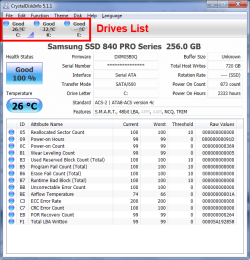
Check all the drives to pin point it, that could cause the freezing, etc. Crystal will display a list of drives installed, just click the drive to check it.

CDI.png
 

My Computer My Computer

At a glance

Windows 7 Ultimate X64 SP1Intel i5-2550K, Differing ~4.4-4.8GHz No buil...16GB G.Skill Sniper 1866MHz @ 2133MHz 2x8GBASUS GTX650TIB-DC2OC-2GD5, (650TI Boost)
Computer type
PC/Desktop
Computer Manufacturer/Model Number
Home Built Desktop By DataTech
OS
Windows 7 Ultimate X64 SP1
CPU
Intel i5-2550K, Differing ~4.4-4.8GHz No built in GPU
Motherboard
ASUS P8Z68-V PRO/GEN3
Memory
16GB G.Skill Sniper 1866MHz @ 2133MHz 2x8GB
Graphics Card(s)
ASUS GTX650TIB-DC2OC-2GD5, (650TI Boost)
Sound Card
Onboard Realtek 5-1
Monitor(s) Displays
Samsung P2570HD
Screen Resolution
1920x1080
Hard Drives
Samsung 840 Pro 256GB SSD for OS, 500GB Seagate Constellation (Enterprise drive) for Data
PSU
Corsair HX650W
Case
Inwin Dragon Rider
Cooling
Hyper 212 EVO w/two Noctua fans, push-pull, @1300 RPM
Keyboard
E-Z Eyes, bright yellow keys with large characters
Mouse
steelseries SENSEI Laser Pro Gaming
Internet Speed
48-51Mbs Mbs down, 11 Mbs up Xfinity Cable
Antivirus
Norton Internet Security 2013
Browser
IE 10, Opera, Pale Moon if needed
Other Info
4 case fans, LG BluRay-RE, ASUS DVD-RW, Mr. Fusion power supply, 1.21 gigawatts.
Check all the drives to pin point it, that could cause the freezing, etc. Crystal will display a list of drives installed, just click the drive to check it.

View attachment 304977
Right well until a few hours i can't check it how long you gonna be up? whats the time where you are?
 

My Computer My Computer

At a glance

windows 7 Ultimate Service pack 1 x64intel i5 2500k8gb RamSapphire AMD 6950 2gb
Computer type
PC/Desktop
OS
windows 7 Ultimate Service pack 1 x64
CPU
intel i5 2500k
Motherboard
Asus p8z68-v motherboard
Memory
8gb Ram
Graphics Card(s)
Sapphire AMD 6950 2gb
Screen Resolution
1920x1080
Hard Drives
2x samsung hd103SJ
1x ST2000DL003-9VT166
PSU
Silverstone silver 850watt power supply (ST85F-P)
Case
silverstone raven RV02-E
Keyboard
microsoft side winder x4
Mouse
Razer death adder v2
I'm in the US ET zone, 16 hours behind you. Each person's local time is shown in the user tile above the flags.
 

My Computer My Computer

At a glance

Windows 7 Ultimate X64 SP1Intel i5-2550K, Differing ~4.4-4.8GHz No buil...16GB G.Skill Sniper 1866MHz @ 2133MHz 2x8GBASUS GTX650TIB-DC2OC-2GD5, (650TI Boost)
Computer type
PC/Desktop
Computer Manufacturer/Model Number
Home Built Desktop By DataTech
OS
Windows 7 Ultimate X64 SP1
CPU
Intel i5-2550K, Differing ~4.4-4.8GHz No built in GPU
Motherboard
ASUS P8Z68-V PRO/GEN3
Memory
16GB G.Skill Sniper 1866MHz @ 2133MHz 2x8GB
Graphics Card(s)
ASUS GTX650TIB-DC2OC-2GD5, (650TI Boost)
Sound Card
Onboard Realtek 5-1
Monitor(s) Displays
Samsung P2570HD
Screen Resolution
1920x1080
Hard Drives
Samsung 840 Pro 256GB SSD for OS, 500GB Seagate Constellation (Enterprise drive) for Data
PSU
Corsair HX650W
Case
Inwin Dragon Rider
Cooling
Hyper 212 EVO w/two Noctua fans, push-pull, @1300 RPM
Keyboard
E-Z Eyes, bright yellow keys with large characters
Mouse
steelseries SENSEI Laser Pro Gaming
Internet Speed
48-51Mbs Mbs down, 11 Mbs up Xfinity Cable
Antivirus
Norton Internet Security 2013
Browser
IE 10, Opera, Pale Moon if needed
Other Info
4 case fans, LG BluRay-RE, ASUS DVD-RW, Mr. Fusion power supply, 1.21 gigawatts.
I'm in the US ET zone, 16 hours behind you. Each person's local time is shown in the user tile above the flags.
Currently 10PM here, ill let you know on the test tomorrow, tonight will be the RAM test before i take in the power supply. I got good news though, i just found out my video card is also under warranty and i got my motherboard from the same place so hopefully all still there under warranty, this would also include RAM
 

My Computer My Computer

At a glance

windows 7 Ultimate Service pack 1 x64intel i5 2500k8gb RamSapphire AMD 6950 2gb
Computer type
PC/Desktop
OS
windows 7 Ultimate Service pack 1 x64
CPU
intel i5 2500k
Motherboard
Asus p8z68-v motherboard
Memory
8gb Ram
Graphics Card(s)
Sapphire AMD 6950 2gb
Screen Resolution
1920x1080
Hard Drives
2x samsung hd103SJ
1x ST2000DL003-9VT166
PSU
Silverstone silver 850watt power supply (ST85F-P)
Case
silverstone raven RV02-E
Keyboard
microsoft side winder x4
Mouse
Razer death adder v2
Ok, I'm here every day. Be sure to try the audio device check I mentioned above, Check in Device Manager to see if you have 2 (or more) Audio Devices listed. If so disable one and test for freezing/lockups. Then reenable it and disable the second one and re-test.
 

My Computer My Computer

At a glance

Windows 7 Ultimate X64 SP1Intel i5-2550K, Differing ~4.4-4.8GHz No buil...16GB G.Skill Sniper 1866MHz @ 2133MHz 2x8GBASUS GTX650TIB-DC2OC-2GD5, (650TI Boost)
Computer type
PC/Desktop
Computer Manufacturer/Model Number
Home Built Desktop By DataTech
OS
Windows 7 Ultimate X64 SP1
CPU
Intel i5-2550K, Differing ~4.4-4.8GHz No built in GPU
Motherboard
ASUS P8Z68-V PRO/GEN3
Memory
16GB G.Skill Sniper 1866MHz @ 2133MHz 2x8GB
Graphics Card(s)
ASUS GTX650TIB-DC2OC-2GD5, (650TI Boost)
Sound Card
Onboard Realtek 5-1
Monitor(s) Displays
Samsung P2570HD
Screen Resolution
1920x1080
Hard Drives
Samsung 840 Pro 256GB SSD for OS, 500GB Seagate Constellation (Enterprise drive) for Data
PSU
Corsair HX650W
Case
Inwin Dragon Rider
Cooling
Hyper 212 EVO w/two Noctua fans, push-pull, @1300 RPM
Keyboard
E-Z Eyes, bright yellow keys with large characters
Mouse
steelseries SENSEI Laser Pro Gaming
Internet Speed
48-51Mbs Mbs down, 11 Mbs up Xfinity Cable
Antivirus
Norton Internet Security 2013
Browser
IE 10, Opera, Pale Moon if needed
Other Info
4 case fans, LG BluRay-RE, ASUS DVD-RW, Mr. Fusion power supply, 1.21 gigawatts.
Back
Top