Computer Output to TV via Composite Video

nialso

New member
Local time
2:19 AM
Messages
7
Location
Indiana
Hello. I am trying to connect my computer to my TV, so that the output (not just Media Center) is displayed on it. I have composite video jacks on both (HP Multimedia PC, Sony Trinitron tube TV). I am not sure how to tell Windows 7 to output to both my monitor and TV. Thank you for your help.
 

My Computer My Computer

Computer Manufacturer/Model Number
HP Pavilion Elite m9515y (Alt.)
OS
Windows 7 Home Premium x64 (Upgrade)
CPU
AMD Phenom 9850 Quad-Core 2.5 GHz (95W)
Motherboard
AMD 780G
Memory
8 GB 800 MHz DDR2 SDRAM
Graphics Card(s)
ATI Radeon HD 4650 1 GB DDR2
Sound Card
Realtek ALC 888S
Monitor(s) Displays
HP 2009m 20" HD Widescreen LCD
Screen Resolution
1600 x 900 x 60 Hz 32-bit
Hard Drives
Seagate Barracuda 7200.12 ST31000528AS 1 TB (SATA 3 GB/s)
HP HD5000S Personal Media Drive 500 GB (USB 2.0; 480 MB/s)
PSU
350W
Case
HP Mid-sized Tower
Cooling
Stock w/AMD Cool'n'Quiet 2.0
Keyboard
HP Multimedia
Mouse
Logitech Optical Wheel SBF-96
Internet Speed
Broadband; 20 Mbit/s (D/L), 2 Mbit/s (U/L)
Other Info
Blu-ray/SuperMulti DVD Burner w/LightScribe
PCI Express x1 TV Tuner
Realtek Cable Modem
Belkin G Wireless Router
HP Deskjet F4280 All-in-One Printer
HP Officejet 6110 All-in-One Printer
Insignia NS-3006 2.1 Speaker System w/Subwoofer
Umm, I understand your post to mean that Media Centre is being displayed on your TV instead of say an extended or duplicated desktop. If this is wrong please correct me.

Have you tried going to System Preferences and searching for Displays; click on the appropriate link (sorry I can't be more specific currently away running Ubuntu on my NetBook) From there click Detect or Identify Displays (I can't remember which off the top of my head) and then got o the drop down menu near the bottom of the page asking you whether you would like to mirror or extend your desktop.

I hope this helps and I'm sorry for my vagueness but I hope you can work it out ;)

Oli
 

My Computer My Computer

Computer Manufacturer/Model Number
Apple MacBook 5,1
OS
Windows 7 Profesional x86, Mac OS X 10.6 Snow Leopard
CPU
Intel Core 2 Duo 2.4Ghz
Memory
4GB DDR3
Graphics Card(s)
Nvidia 9400m
Monitor(s) Displays
13.3" Internal + 22" DVI + 21.5" USB
Screen Resolution
1280x800 + 1920x1080 + 1920x1080
Hard Drives
Internal SATA 2.5" 500GB (395GB Mac HFS+, 105GB Windows NTFS)
2.48TB RAID consisting of 5 disks (HFS+)
Case
Aluminium Unibody
Keyboard
Apple Late 2009 Wireless Keyboard (US)
Mouse
Apple Magic Mouse
Internet Speed
6.33Mb/s up. 0.36Mb/s down.
Other Info
Harman Kardon Soundsticks II Speakers
Hi.

When you plug the cable in to the TV, does 7 recognise an external display has been connected?
 

My Computer My Computer

Computer Manufacturer/Model Number
Sony Vaio FZ21Z
OS
Windows 7 Ultimate x64 ®™
CPU
Intel Core 2 Duo (2.2 GHz)
Motherboard
Sony (Intel Chipset)
Memory
2x 2GB Corsair (667 MHz)
Graphics Card(s)
NVIDIA 8600M GS (256MB)
Sound Card
Sigmatel
Monitor(s) Displays
15.4" TFT X-Black
Screen Resolution
1280x800
Hard Drives
Western Digital 300GB Scorpio Black (7200rpm)
Mouse
Logitech Anywhere MX
Internet Speed
Sky 5MB
Hi there
Does your computer (or the Video Card) actually have a composite output -- sometimes Macrovision copy protection will disable the video output when you play a DVD on the computer.

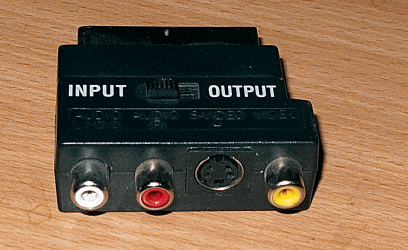
The easiest way is to use a SCART adapter - then you know that the TV settings will be correct.

Pic enc of a scart adapter.

It also has s-video -- which is higher quality - if your video card can output that then you are much better off.

Note your TV AV settings will need to be set to RGB or Composite. DO NOT USE THE COMPONENT setting on your TV.

For HD output you'll need an HDMI cable -- but you'll need a really modern video card for that.

For dual monitor display on your PC just press something like Function key 5 -- your manual will tell you which one to use.

Cheers
jimbo
 

Attachments

  • scart.png
    scart.png
    483.8 KB · Views: 350

My Computer My Computer

Computer type
PC/Desktop
Computer Manufacturer/Model Number
Custom built, several laptops HP/ASUS
OS
Linux CENTOS 7 / various Windows OS'es and servers
CPU
Intel i7 Intel i5
Memory
8GB, 16GB
Graphics Card(s)
On Motherboard
Sound Card
Realtek HD audio
Monitor(s) Displays
Apple Cinema display, Samsung LCD
Screen Resolution
1920 X 1080
Hard Drives
4 X 1TB SATA
Mouse
Toshiba wireless laser
Internet Speed
> 20MB up
Back
Top