
Computer programs suddenly freezing(urgent)

BreanneS

New member
Local time
10:14 AM
Messages
35
Computer programs suddenly freezing/bad hard drive?(urgent)

I managed to back up some of the data that I want to keep safe, but I think I may have just gotten a virus. I'm not sure from where. Just now installed malwarebytes and it's doing a scan. Things then started to lock up for no reason at all and become unusable.

I first noticed something was wrong when I tried to open an Illustrator cs6 file and it would load to an extent but then would lock up when it was supposed to have been loaded. Same with Photoshop. I did have adobe updater running in the background which didn't fully update and froze as well.

Then out of no where I had a tab open directed to search.frontier.com
But my default search is still set to google. If i type directly in the address bar to search i get directed to frontier.
Edit: It doesn't always redirect me. Sometimes it directs to google and sometimes to frontier.

Currently Malwarebytes appears to be frozen
I can't move the window at all or minimize it.
Hopefully it will unfreeze.

Edit: It continued to lock up so I restarted it. It doesn't just freeze during a scan but also when its on the scan now page.

Can anyone help me get to the bottom of this quickly.

I can still get to task manager and close a program if it stops responding.
 
Last edited:

My Computer

Computer type
Laptop
Computer Manufacturer/Model Number
Dell INSPIRION N7110
OS
Windows 7 Home Premium 64bit
CPU
Intel Core i7-2670QM CPU@ 2.20GHz 2.20GHz
Memory
6.00GB
Graphics Card(s)
Intel HD Graphics 3000
Antivirus
Trend Micro Titanium Internet Security
Boot to "Safe Mode" to run your MBAM scan. Run CCleaner or similar first to get rid of temp etc files.
 

My Computer

Computer type
PC/Desktop
OS
Win7 Pro x64
At shutdown the computer said it was configuring windows. At 30% it shut down. When I turned it on to get to safe mode it said it failed to configure windows update and that it was reverting the changes. After a few minutes it shut down to restart. I tried again to get to safe mode but I got the same error.

It stayed like that for at least 15 minutes then booted to safe mode. Im currently running Malwarebytes. I'll let you know if anything comes up. I can access all my programs fine in safe mode.

Edit: It came back clean. Restarted and adobe apps open(still more unresponsive than normal). I'm attempting a system restore now from the 13th.
 
Last edited:

My Computer

Computer type
Laptop
Computer Manufacturer/Model Number
Dell INSPIRION N7110
OS
Windows 7 Home Premium 64bit
CPU
Intel Core i7-2670QM CPU@ 2.20GHz 2.20GHz
Memory
6.00GB
Graphics Card(s)
Intel HD Graphics 3000
Antivirus
Trend Micro Titanium Internet Security
I think there may be something wrong with the hard drive. System restore caused it to get a black screen with white cursor and no loading before it would normally load the login screen.

I did get system repair to work and get the desktop back but I wanted to check the hard drive. I tried running check disk in command prompt but it wasnt able to do a scan. I tried to get it to schedule a scan but it didn't do anything. I decided to try safe mode but it got stuck at loading before I could try and schedule a scan.

I'm leaving the laptop off briefly and see if I can get into safe mode again.
I have no way of backing everything up currently. The external hard drive I have isn't ntfs and needs to stay that way, I have no flash drive over 100gb and I can't locate any CDs.

Edit: upon starting again trying to get into safe mode itd still stop at a point. If I put my head up close to where the hard drive is I could hear a soft high pitched sound?

I decided to just let it restart without safe mode. I guess it did schedule check disk because it did start to run...not sure if that's why it wouldnt load into safe mode.
Hopefully it'll resolve any issues found.
 

My Computer

Computer type
Laptop
Computer Manufacturer/Model Number
Dell INSPIRION N7110
OS
Windows 7 Home Premium 64bit
CPU
Intel Core i7-2670QM CPU@ 2.20GHz 2.20GHz
Memory
6.00GB
Graphics Card(s)
Intel HD Graphics 3000
Antivirus
Trend Micro Titanium Internet Security
I'm attempting a system restore again. Check disk did discover some bad clusters but fixed them. The computer is still pretty slow and not very responsive.
 

My Computer

Computer type
Laptop
Computer Manufacturer/Model Number
Dell INSPIRION N7110
OS
Windows 7 Home Premium 64bit
CPU
Intel Core i7-2670QM CPU@ 2.20GHz 2.20GHz
Memory
6.00GB
Graphics Card(s)
Intel HD Graphics 3000
Antivirus
Trend Micro Titanium Internet Security
next step
from an elevated command mode
sfc /scannow (note the space).

Roy
 

My Computer

Computer type
PC/Desktop
Computer Manufacturer/Model Number
medionl/Aspire 6930G/acer x55a
OS
W7 home premium 32bit/W7HP 64bit/w10 tp insider ring
CPU
E5300 dual core
Motherboard
medion MS7366
Memory
3gb
Graphics Card(s)
Nvidia Geforce 7100 Nforce 630i
Monitor(s) Displays
avixc
Internet Speed
n (isp resticted to 72)
Antivirus
mse/pands
Browser
palemoon
Other Info
Belkin Fd7050 n USB using Railink RT2870 drivers, more upto date
The computer was really unresponsive so I attempted system restore again(the 13th before all this happened) and it once again left me with a blank screen and cursor. It looked like it was loading but kept me at that screen. I tried safe mode but with the same result. I'm attempting startup repair once again to hopefully get to a somewhat functional desktop. I saw nothing suspicious in the task manager so I'm not sure what's causing the slow down.

Could it possibly be bad ram? I've never replaced them. The hard drive hasn't made any really suspicious sounds of failure.

EDIT: this time startup repair has failed?

Problem event name: StartupRepairOffline
Problem Signature 01: 6.1.7600.16385
Problem Signature 02: 6.1.7600.16385
Problem Signature 03: unknown
Problem Signature 04: 500
Problem Signature 05: AutoFailover
Problem Signature 06: 1
Problem Signature 07: NoRootCause
OS Version: 6.1.7601.2.1.0.256.1
Locale ID: 1033

Oh under diagnosis and repair details:

Number of repair attempts=1
Session details
___________________
SystemDisk=\Device\Harddisk0
Windows directory=C:\Windows
AutoChk Run=0
Number of root causes=1

Test performed:
Name: System disk test
Result:Completed successfully. Error code=0x0
Time taken= 0ms

Name: Disk failure diagnosis
Result: Completed successfully. Error code=0x0
Time taken= 171ms

Name: Disk metadata test
Result: Completed successfully. Error code= 0x0
Time taken= 47ms

Name: Target OS test
Result: Completed successfully. Error code 0x0
Time taken= 234ms

Name: Volume content check
Result completed successfully. Error code= 0x0
Time taken= 593ms

Name: Boot manager diagnosis
Result: Completed successfully. Error code= 0x0
Time taken= 0ms

Name: System boot log diagnosis
Result: Completed successfully. Error code= 0x0
Time taken= 0ms

Name: Event log diagnosis
Result: Completed successfully. Error code= 0x0
Time taken= 0ms

Name: Internal state check
Result: Completed successfully. Error code= 0x0
Time taken= 16ms

Name: Boot status test
Result: Completed successfully. Error code = 0x0
Time taken= 0ms

Name: Setup state check
Result: Completed successfully. Error code= 0x0
Time taken= 592ms

Name: Registry hives test
Result: completed successfully. Error code= 0x0
Time taken=5351ms

Name: Windows boot log diagnosis
Result: completed successfully. Error code= 0x0
Time taken= 0ms

Name: Bugcheck analysis
Result: completed successfully. Error code= 0x0
Time taken= 1217ms

Name: Access control test
result:completed successfully. Error code = 0x0
Time taken= 11653ms

Name: File system test
Result: completed successfully. Error code = 0x0
Time taken= 0ms

Name: Software installation log diagnosis
Result: completed successfully. Error code= 0x0
Time taken= 0ms

Name: Fallback diagnosis
result: completed successfully. Error code = 0x0
Time taken= 0ms

Root cause found:
____________________________
Unspecified changes to system configuration might have caused the problem.
Repair action: System restore
Result: failed. Error code= 0x01f
Time taken= 602273ms

Repair action: System files integrity check and repair
Result: Failed. Error code=0x2
Time taken=163629ms


Can anyone make sense of this? Its asking if I want to send the info to microsoft
 
Last edited:

My Computer

Computer type
Laptop
Computer Manufacturer/Model Number
Dell INSPIRION N7110
OS
Windows 7 Home Premium 64bit
CPU
Intel Core i7-2670QM CPU@ 2.20GHz 2.20GHz
Memory
6.00GB
Graphics Card(s)
Intel HD Graphics 3000
Antivirus
Trend Micro Titanium Internet Security
I managed to get into the desktop fine after restarting this time. I ran sfc scan

The scan ran until 24% then said Windows Resource Protection found corrupt files but was unable to fix them.
Here's the CBS log.
I tried to locate the corrupt files with sfcdetails but it doesn't list the files there. Even then, I don't have access to a clean copy of the files if I did find them.
 

Attachments

Last edited:

My Computer

Computer type
Laptop
Computer Manufacturer/Model Number
Dell INSPIRION N7110
OS
Windows 7 Home Premium 64bit
CPU
Intel Core i7-2670QM CPU@ 2.20GHz 2.20GHz
Memory
6.00GB
Graphics Card(s)
Intel HD Graphics 3000
Antivirus
Trend Micro Titanium Internet Security
This concerns me:
Then out of no where I had a tab open directed to search.frontier.com
Search.frontier.com is a known browser hijack, and the fact that MalwareBytes is stalling on you may suggest an infiltration.

Please download this with another computer (i.e. not your infected one) and put the program on a flash drive:

https://www.microsoft.com/security/scanner/en-us/default.aspx

Then boot your computer into safe mode, plug in the flash drive and run the program. It may take a few minutes to complete its work, but hopefully it will clear out any viruses, or at least identify them.

Another thing that is troublesome is the bad sectors on your hard drive. It may be that you will continue to have bad sectors as the drive fails. Since this is a laptop, a drive failure is likely, and a replacement drive may be necessary. I would back up all of your important data as quickly as you can, assuming that the drive is going to fail. A bad hard drive can cause all of the things you are experiencing, except for the browser hijack.
 

My Computer

Computer type
PC/Desktop
Computer Manufacturer/Model Number
Mellon Labs (custom build)
OS
Win 7 Pro x64/Win 10 Pro x64 dual boot
CPU
AMD FX 8350 Vishera @ 4200
Motherboard
ASUS M5A97 R2.0
Memory
16 GB Mushkin Blackline DDR3-2400 @ 1866 (9-10-10-10-31)
Graphics Card(s)
XFX Radeon R9 280 Double D Black Edition
Sound Card
Realtek HD Audio on MB. Sounds great.
Monitor(s) Displays
Acer 24", Acer 22"
Screen Resolution
3840 x 1080
Hard Drives
1 x Mushkin Chronos 120 GB SSD (Win 10)
1 x Samsung 850 EVO 250 GB SSD (Win 7)
1 x WD 1TB SATA Blue
1 x WD 1TB SATA Green
PSU
Corsair TX-750
Case
CoolerMaster HAF 912+
Cooling
Coolermaster Seidon 240M Liquid AIO. 6 case fans
Keyboard
Logitech G710+
Mouse
Logitech G500s
Internet Speed
Much better since I got fiber, but still way overpriced.
Antivirus
MSE, Malware Bytes for scanning
Browser
Firefox
Other Info
Corsair VOID USB headphones.

A Mellon Labs X-1 - LCD Smartie driven system status display.

Brought to you by the letter E
I'm currently running the quick scan. I'll probably run the full scan as well to be safe.

Could it be possible that a virus may had done the damage? I'd prefer to replace the hard drive as a last resort.
I find it suspicious Malwarebytes found nothing in safe mode with the full scan including no rootkits.

Edit: Of course quick scan discovered nothing. Doing a full scan now.

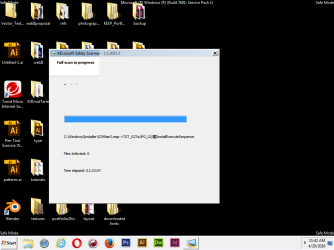
Full scan gave no viruses detected. Also another thing when I was running the scan and went into task manager briefly and closed it, the window looked like this. Also I couldn't move the window either. Then after a minute or so it went back to displaying normally..the lag in the computer is still a bit evident in safe mode it seems. Actually, I just tried and moved the browser window around and the icons on my desktop briefly disappear and then reappear..

Is there a software I could possibly run to check for hardware failures?
 

Attachments

  • Captureglitch.PNG
    Captureglitch.PNG
    115.5 KB · Views: 0
Last edited:

My Computer

Computer type
Laptop
Computer Manufacturer/Model Number
Dell INSPIRION N7110
OS
Windows 7 Home Premium 64bit
CPU
Intel Core i7-2670QM CPU@ 2.20GHz 2.20GHz
Memory
6.00GB
Graphics Card(s)
Intel HD Graphics 3000
Antivirus
Trend Micro Titanium Internet Security
Hi Breanne,
Cbs is showing some odd entries,
For the restore option error, please run this hotfix from here.

https://www.google.co.uk/url?sa=t&r...628582&usg=AFQjCNEp2nVeBZOT2AWfb2drmQgFWRvX5g


It was also trying to D/L entries for multiple language packs, and as you only have Home only 1 language is available to you, if you have others please remove them. (if you have were did you get them from?)

Can you also reset your internet options, follow these directions

1. Launch Internet Explorer. Click "Tools" from the menu bar, then select "Internet Options." The "Internet Options" window will appear.
2. Click the "Advanced" tab, then select the "Reset" button on the bottom of the window. All of the Internet Explorer settings, including the ActiveX controls, will be reset.
3. Click the "Security" tab, then the "Custom Level" button. The Security Settings dialog window will open. Scroll down the list of options and click the check boxes next to "Enable" under "Run ActiveX Controls and Plug-Ins" and "Script ActiveX controls marked safe for scripting." Click "OK," then restart Internet Explorer for the settings to take effect.


and finally can you run/post results this
http://go.microsoft.com/fwlink/?LinkID=52012

Roy
 

My Computer

Computer type
PC/Desktop
Computer Manufacturer/Model Number
medionl/Aspire 6930G/acer x55a
OS
W7 home premium 32bit/W7HP 64bit/w10 tp insider ring
CPU
E5300 dual core
Motherboard
medion MS7366
Memory
3gb
Graphics Card(s)
Nvidia Geforce 7100 Nforce 630i
Monitor(s) Displays
avixc
Internet Speed
n (isp resticted to 72)
Antivirus
mse/pands
Browser
palemoon
Other Info
Belkin Fd7050 n USB using Railink RT2870 drivers, more upto date
I'm waiting for the hotfix to be emailed to me. I'm not sure why it was trying to install other language packs. I tried to find if I had any others by typing in uninstall display language in the search bar, nothing came up.
Actually..I was on Mozilla when I got directed to search.frontier.com
 

My Computer

Computer type
Laptop
Computer Manufacturer/Model Number
Dell INSPIRION N7110
OS
Windows 7 Home Premium 64bit
CPU
Intel Core i7-2670QM CPU@ 2.20GHz 2.20GHz
Memory
6.00GB
Graphics Card(s)
Intel HD Graphics 3000
Antivirus
Trend Micro Titanium Internet Security
the hotfix is the big blue box on the page i referred you to,
Its a direct download,
Hmmm i changed the link within about 30 sec try the new link again please.

Roy
 

My Computer

Computer type
PC/Desktop
Computer Manufacturer/Model Number
medionl/Aspire 6930G/acer x55a
OS
W7 home premium 32bit/W7HP 64bit/w10 tp insider ring
CPU
E5300 dual core
Motherboard
medion MS7366
Memory
3gb
Graphics Card(s)
Nvidia Geforce 7100 Nforce 630i
Monitor(s) Displays
avixc
Internet Speed
n (isp resticted to 72)
Antivirus
mse/pands
Browser
palemoon
Other Info
Belkin Fd7050 n USB using Railink RT2870 drivers, more upto date
It just arrived in my email. I'll get back to you after I apply the hotfix and run the scan you linked.

Edit: I just opened the exe up and did the self extracting but where are the files located? I told it to unzip on C:\

In the meantime I ran the diagnostic.

Diagnostic Report (1.9.0027.0):
-----------------------------------------
Windows Validation Data-->

Validation Code: 0
Cached Online Validation Code: N/A, hr = 0x8007043c
Windows Product Key: *****-*****-QCPVQ-KHRB8-RMV82
Windows Product Key Hash: +Rj3N34NLM2JqoBO/OzgzTZXgbY=
Windows Product ID: 00359-OEM-8992687-00095
Windows Product ID Type: 2
Windows License Type: OEM SLP
Windows OS version: 6.1.7601.2.00010300.1.0.003
ID: {273F4F46-5927-4D73-9B29-3236C9EF6A31}(3)
Is Admin: Yes
TestCab: 0x0
LegitcheckControl ActiveX: N/A, hr = 0x80070002
Signed By: N/A, hr = 0x80070002
Product Name: Windows 7 Home Premium
Architecture: 0x00000009
Build lab: 7601.win7sp1_ldr.160317-0600
TTS Error:
Validation Diagnostic:
Resolution Status: N/A

Vista WgaER Data-->
ThreatID(s): N/A, hr = 0x80070002
Version: N/A, hr = 0x80070002

Windows XP Notifications Data-->
Cached Result: N/A, hr = 0x80070002
File Exists: No
Version: N/A, hr = 0x80070002
WgaTray.exe Signed By: N/A, hr = 0x80070002
WgaLogon.dll Signed By: N/A, hr = 0x80070002

OGA Notifications Data-->
Cached Result: N/A, hr = 0x80070002
Version: N/A, hr = 0x80070002
OGAExec.exe Signed By: N/A, hr = 0x80070002
OGAAddin.dll Signed By: N/A, hr = 0x80070002

OGA Data-->
Office Status: 109 N/A
OGA Version: N/A, 0x80070002
Signed By: N/A, hr = 0x80070002
Office Diagnostics: 025D1FF3-364-80041010_025D1FF3-229-80041010_025D1FF3-230-1_025D1FF3-517-80040154_025D1FF3-237-80040154_025D1FF3-238-2_025D1FF3-244-80070002_025D1FF3-258-3

Browser Data-->
Proxy settings: N/A
User Agent: Mozilla/4.0 (compatible; MSIE 8.0; Win32)
Default Browser: C:\Program Files (x86)\Mozilla Firefox\firefox.exe
Download signed ActiveX controls: Prompt
Download unsigned ActiveX controls: Disabled
Run ActiveX controls and plug-ins: Allowed
Initialize and script ActiveX controls not marked as safe: Disabled
Allow scripting of Internet Explorer Webbrowser control: Disabled
Active scripting: Allowed
Script ActiveX controls marked as safe for scripting: Allowed

File Scan Data-->

Other data-->
Office Details: <GenuineResults><MachineData><UGUID>{273F4F46-5927-4D73-9B29-3236C9EF6A31}</UGUID><Version>1.9.0027.0</Version><OS>6.1.7601.2.00010300.1.0.003</OS><Architecture>x64</Architecture><PKey>*****-*****-*****-*****-RMV82</PKey><PID>00359-OEM-8992687-00095</PID><PIDType>2</PIDType><SID>S-1-5-21-3630137704-695610793-1240958120</SID><SYSTEM><Manufacturer>Dell Inc. </Manufacturer><Model>Dell System Inspiron N7110</Model></SYSTEM><BIOS><Manufacturer>Dell Inc. </Manufacturer><Version>A13</Version><SMBIOSVersion major="2" minor="6"/><Date>20120905000000.000000+000</Date></BIOS><HWID>778C3207018400FE</HWID><UserLCID>0409</UserLCID><SystemLCID>0409</SystemLCID><TimeZone>Central Standard Time(GMT-06:00)</TimeZone><iJoin>0</iJoin><SBID><stat>3</stat><msppid></msppid><name></name><model></model></SBID><OEM><OEMID>DELL </OEMID><OEMTableID>QA09 </OEMTableID></OEM><GANotification/></MachineData><Software><Office><Result>109</Result><Products/><Applications/></Office></Software></GenuineResults>

Spsys.log Content: 0x80070002

Licensing Data-->
On a computer running Microsoft Windows non-core edition, run 'slui.exe 0x2a 0x8007043C' to display the error text.
Error: 0x8007043C

Windows Activation Technologies-->
HrOffline: 0x00000000
HrOnline: 0x00000000
HealthStatus: 0x0000000000000000
Event Time Stamp: 2:8:2016 18:08
ActiveX: Registered, Version: 7.1.7600.16395
Admin Service: Not Registered - 0x8007043c
HealthStatus Bitmask Output:


HWID Data-->
HWID Hash Current: LAAAAAEAAQABAAEAAAAAAAAAAwABAAEAonb6CGo0AF8U7KibphJ22tB1LnM=

OEM Activation 1.0 Data-->
N/A

OEM Activation 2.0 Data-->
BIOS valid for OA 2.0: yes
Windows marker version: 0x20001
OEMID and OEMTableID Consistent: yes
BIOS Information:
ACPI Table Name OEMID Value OEMTableID Value
APIC DELL QA09
FACP DELL QA09
HPET DELL QA09
BOOT
MCFG DELL QA09
SLIC DELL QA09
SSDT DELL PtidDevc
ASF! DELL QA09
SSDT DELL PtidDevc
SSDT DELL PtidDevc
UEFI DELL QA09
UEFI DELL QA09
UEFI DELL QA09
 
Last edited:

My Computer

Computer type
Laptop
Computer Manufacturer/Model Number
Dell INSPIRION N7110
OS
Windows 7 Home Premium 64bit
CPU
Intel Core i7-2670QM CPU@ 2.20GHz 2.20GHz
Memory
6.00GB
Graphics Card(s)
Intel HD Graphics 3000
Antivirus
Trend Micro Titanium Internet Security
Hm still can't find the files.
 

My Computer

Computer type
Laptop
Computer Manufacturer/Model Number
Dell INSPIRION N7110
OS
Windows 7 Home Premium 64bit
CPU
Intel Core i7-2670QM CPU@ 2.20GHz 2.20GHz
Memory
6.00GB
Graphics Card(s)
Intel HD Graphics 3000
Antivirus
Trend Micro Titanium Internet Security
Hi Breanne,
can you run Kb971033,
rerun the diagnostics and hopfully this error has gone
Admin Service: Not Registered - 0x8007043c

Is W7 on your internal hard drive or your SSD?.

Did you reset your internet option?

Roy
 

My Computer

Computer type
PC/Desktop
Computer Manufacturer/Model Number
medionl/Aspire 6930G/acer x55a
OS
W7 home premium 32bit/W7HP 64bit/w10 tp insider ring
CPU
E5300 dual core
Motherboard
medion MS7366
Memory
3gb
Graphics Card(s)
Nvidia Geforce 7100 Nforce 630i
Monitor(s) Displays
avixc
Internet Speed
n (isp resticted to 72)
Antivirus
mse/pands
Browser
palemoon
Other Info
Belkin Fd7050 n USB using Railink RT2870 drivers, more upto date
Back
Top