
Computer Reboots Randomly While Playing Minecraft

Endergreen117

New member
Local time
3:15 PM
Messages
4
Hello all you wonderful people! For the last year, give or take, I have been experiencing this problem, and just now have I pushed myself to take it to the internet. After starting Minecraft, it runs fine for ~15 minutes and reboots, without giving any warning or prior notice of the reboot. After I login again, Windows returns a "Windows has recovered from an unexpected shutdown" dialogue and directs me to the following files that "help describe the problem", the contents of which are below:

"C:\Windows\Minidump\101814-14414-01.dmp" and
"C:\Users\Endergreen117\AppData\Local\Temp\WER-40201-0.sysdata.xml"

Here are the contents of said files:

"C:\Windows\Minidump\101814-14414-01.dmp"
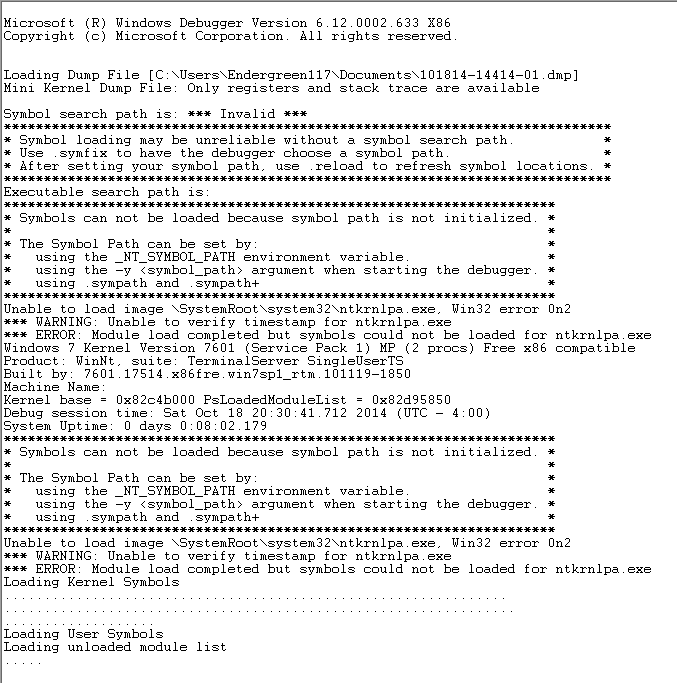
N6fVS8s.png


"C:\Users\Endergreen117\AppData\Local\Temp\WER-40201-0.sysdata.xml"

* attached as "document.txt"

Here's a screenie of the dialogue I was talking about:

TMZYUxx.png


If you need any more information let me know.
 

Attachments

Last edited:

My Computer

Computer type
PC/Desktop
Computer Manufacturer/Model Number
Custom Build (Via Bulldog Computers)
OS
Windows 7 Ultimate x86
CPU
AMD Athlon II X2 260 Processer
Motherboard
MSI MS-7309
Memory
2 GB
Graphics Card(s)
NVIDIA GeForce 210
Hard Drives
Western Digital Caviar WD3200AAJB-00J3A0
Antivirus
None
Browser
Google Chrome

My Computer

Computer type
PC/Desktop
Computer Manufacturer/Model Number
Own build (new) Desk1 / Asus ROG Win 7 / Desk2 1st build
OS
Desk1 7 Home Prem / Desk2 10 Pro / Main lap Asus ROG 10 Pro 2 laptop Toshiba 7 Pro Asus P2520 7 & 10
CPU
Desk1 i5 3750K / Laptop i7 GTX 860M / Desk2 i5 2500
Motherboard
Desk1 Asus P877-V / Desk2 Gigabyte H67 UD3H / Laptop ?
Memory
Desk1 8GB (1866) / Desk2 16GB (1333) / Laptop 8Gb DDR3
Graphics Card(s)
Desk 1& 2NVidia GTX 650 & Laptops on board Intel
Sound Card
Desk 1 & 2 -XONAR DG Realtek High Def audio Laptop
Monitor(s) Displays
Desk 1 Benq HD 2450 / Desk2 Philips 24" / Laptop 17.5"
Screen Resolution
1920x1080 D1 & D2 & Laptop 1
Hard Drives
Desk1 Samsung 120GB 830 SSD
Asus ROG 256GB 850 Pro SSD
Desk2 Samsung 840 256 SSD
Toshiba 120GB EVO
PSU
Desk 1 Corsair HX 1050/ Laptop ? / Desk 2 Corsair HX 650
Case
Desk 1 Cooler HAF XM ? Toshiba laptop / Desk2 Coolermaster
Cooling
Fans on all Desk1 -2 Desk2 - all Coolermasters 5 Laptop ?
Keyboard
Desk 1 MS Sidewinder X6 Desk 2 MS Sidewinder X 4
Mouse
Desk 1&2 - Gigabyte MS 900 gamer - laptop - Logitec wireless
Internet Speed
ADSL2+
Other Info
One other Desktop (tester) and spare Toshba laptop both with SSD's
Running Kaspersky 2016 ISS on all machines config'd identically
Logitec audio stereo systems on each machine (x3)
Canon MG5250MFC
Router/modem TP-Link running WPA2SK
The symbol path is invalid so the output from WinDBG makes no sense at all.

Follow this :

1. Download the DM Log Collector application to your desktop by clicking the link below

DM Log Collector.exe

2. Run it by double-clicking the icon on your desktop, and follow the prompts.
3. Locate the .ZIP file that is created on your desktop, and upload it here in your next reply.

picture.php
 

My Computer

Computer type
PC/Desktop
Computer Manufacturer/Model Number
Golden Mk. I.4
OS
Windows 10 Pro x64 ; Xubuntu x64
CPU
Intel i7 860 @ 2.80 GHz O/C'ed to 4.0GHz
Motherboard
Gigabyte P55A-UD3R Rev.1. Award BIOS F13
Memory
16GB Corsair Vengance DDR3 @ 661 MHz Dual Channel (9-9-9-24)
Graphics Card(s)
EVGA NVidia GTX 560 1024MB
Sound Card
Realtek Integrated
Monitor(s) Displays
Dual Samsung SyncMaster 2494HS
Screen Resolution
1920*1080 and 1920*1080
Hard Drives
1*Samsung 840 EVO 120GB SSD;
1*OCZ Vertex 2 60GB SSD;
2*Samsung F3 SpinPoint 1TB in RAID0;
1*Samsung F1 SpinPoint 1TB;
2*Western Digital 1TB External USB 3.0
1*Western Digital 500GB External USB 3.0
1*Seagate 500GB External USB 2.0
PSU
Thermaltake ToughPower QFan 750W
Case
Thermaltake Element S VK60001W2Z
Cooling
Corsair H60 Water Cooling, 2*230mm and 2*80mm case fans
Keyboard
Logitech G110
Mouse
Logitech MX518
Thanks for the tip Golden I was just assuming the OP could just send the files.
 

My Computer

Computer type
PC/Desktop
Computer Manufacturer/Model Number
Own build (new) Desk1 / Asus ROG Win 7 / Desk2 1st build
OS
Desk1 7 Home Prem / Desk2 10 Pro / Main lap Asus ROG 10 Pro 2 laptop Toshiba 7 Pro Asus P2520 7 & 10
CPU
Desk1 i5 3750K / Laptop i7 GTX 860M / Desk2 i5 2500
Motherboard
Desk1 Asus P877-V / Desk2 Gigabyte H67 UD3H / Laptop ?
Memory
Desk1 8GB (1866) / Desk2 16GB (1333) / Laptop 8Gb DDR3
Graphics Card(s)
Desk 1& 2NVidia GTX 650 & Laptops on board Intel
Sound Card
Desk 1 & 2 -XONAR DG Realtek High Def audio Laptop
Monitor(s) Displays
Desk 1 Benq HD 2450 / Desk2 Philips 24" / Laptop 17.5"
Screen Resolution
1920x1080 D1 & D2 & Laptop 1
Hard Drives
Desk1 Samsung 120GB 830 SSD
Asus ROG 256GB 850 Pro SSD
Desk2 Samsung 840 256 SSD
Toshiba 120GB EVO
PSU
Desk 1 Corsair HX 1050/ Laptop ? / Desk 2 Corsair HX 650
Case
Desk 1 Cooler HAF XM ? Toshiba laptop / Desk2 Coolermaster
Cooling
Fans on all Desk1 -2 Desk2 - all Coolermasters 5 Laptop ?
Keyboard
Desk 1 MS Sidewinder X6 Desk 2 MS Sidewinder X 4
Mouse
Desk 1&2 - Gigabyte MS 900 gamer - laptop - Logitec wireless
Internet Speed
ADSL2+
Other Info
One other Desktop (tester) and spare Toshba laptop both with SSD's
Running Kaspersky 2016 ISS on all machines config'd identically
Logitec audio stereo systems on each machine (x3)
Canon MG5250MFC
Router/modem TP-Link running WPA2SK
Alright, so I've attached DM Log Collector's ZIP and I've also attached the my specs, as returned by Speccy, but it doesn't look like speccy has information on my PSU, so give me a little bit and I'll check it out.
 

Attachments

My Computer

Computer type
PC/Desktop
Computer Manufacturer/Model Number
Custom Build (Via Bulldog Computers)
OS
Windows 7 Ultimate x86
CPU
AMD Athlon II X2 260 Processer
Motherboard
MSI MS-7309
Memory
2 GB
Graphics Card(s)
NVIDIA GeForce 210
Hard Drives
Western Digital Caviar WD3200AAJB-00J3A0
Antivirus
None
Browser
Google Chrome
Alright, so after taking a peek at my PSU, I am led to believe that this is almost definitely the problem. I have a 300w ATX PSU that I used to replace my old (and mo longer functioning) 400w PSU. However, I currently do not have access to another PSU right now, so I'd like to rule out all other possibilities first.

Edit: After about a month of it originally starting, there was a pause in this happening (as much as it had been) and recently, this started happening again shortly after adding a second monitor to my system. could this second monitor be to strenuous on my graphics card?
 

My Computer

Computer type
PC/Desktop
Computer Manufacturer/Model Number
Custom Build (Via Bulldog Computers)
OS
Windows 7 Ultimate x86
CPU
AMD Athlon II X2 260 Processer
Motherboard
MSI MS-7309
Memory
2 GB
Graphics Card(s)
NVIDIA GeForce 210
Hard Drives
Western Digital Caviar WD3200AAJB-00J3A0
Antivirus
None
Browser
Google Chrome
So, I removed my second monitor, rebooted my PC and the temp displayed be Speccy for my Graphics Card was 150 degrees Fahrenheit. I started up Minecraft and played for about an hour with no problems, and my GC temp rose to about 225 degrees Fahrenheit and capped there. I then stopped playing for about 15 minutes and the temperature fell to about 168 degrees Fahrenheit. During this whole process my computer did not shutdown or reboot. This has led me to believe that the cause for the random reboots was that the second monitor was drawing too much from my graphics card.
 

My Computer

Computer type
PC/Desktop
Computer Manufacturer/Model Number
Custom Build (Via Bulldog Computers)
OS
Windows 7 Ultimate x86
CPU
AMD Athlon II X2 260 Processer
Motherboard
MSI MS-7309
Memory
2 GB
Graphics Card(s)
NVIDIA GeForce 210
Hard Drives
Western Digital Caviar WD3200AAJB-00J3A0
Antivirus
None
Browser
Google Chrome
Classic 0x116 video display driver error. That GT210 is a little on the low end....do you only expereince this issue when running MIneCraft?
 

My Computer

Computer type
PC/Desktop
Computer Manufacturer/Model Number
Golden Mk. I.4
OS
Windows 10 Pro x64 ; Xubuntu x64
CPU
Intel i7 860 @ 2.80 GHz O/C'ed to 4.0GHz
Motherboard
Gigabyte P55A-UD3R Rev.1. Award BIOS F13
Memory
16GB Corsair Vengance DDR3 @ 661 MHz Dual Channel (9-9-9-24)
Graphics Card(s)
EVGA NVidia GTX 560 1024MB
Sound Card
Realtek Integrated
Monitor(s) Displays
Dual Samsung SyncMaster 2494HS
Screen Resolution
1920*1080 and 1920*1080
Hard Drives
1*Samsung 840 EVO 120GB SSD;
1*OCZ Vertex 2 60GB SSD;
2*Samsung F3 SpinPoint 1TB in RAID0;
1*Samsung F1 SpinPoint 1TB;
2*Western Digital 1TB External USB 3.0
1*Western Digital 500GB External USB 3.0
1*Seagate 500GB External USB 2.0
PSU
Thermaltake ToughPower QFan 750W
Case
Thermaltake Element S VK60001W2Z
Cooling
Corsair H60 Water Cooling, 2*230mm and 2*80mm case fans
Keyboard
Logitech G110
Mouse
Logitech MX518
Alright, so after taking a peek at my PSU, I am led to believe that this is almost definitely the problem. I have a 300w ATX PSU that I used to replace my old (and mo longer functioning) 400w PSU. However, I currently do not have access to another PSU right now, so I'd like to rule out all other possibilities first.

Edit: After about a month of it originally starting, there was a pause in this happening (as much as it had been) and recently, this started happening again shortly after adding a second monitor to my system. could this second monitor be to strenuous on my graphics card?
Try this

UsingHW Info PSU

Download HW Info and pick the right bit version -
HWiNFO, HWiNFO32/64 -Download -(copyand paste this site into the search bar) If you donot need the runninginformation in the smaller right hand panel close it. Inthe left hand windowclick on the + for the individual device groupings and theywill open out tothe various components.

Go on opening out further until you get to the device itself. click on it anditwill highlight. In the right hand window there will be a verydetaileddescription of that device as in brand, speeds model number etc etcThese arevery detailed and are just what is needed for searching for driversetc.

To getthe PSU volts you need to select the Sensor button circled in yellow inthe picfor PSU testing do the same and scroll down the readout as in my pic towhereit has Nuvoton = yours might be a different section name / title. Postback apic of that please.

If you want a more definitive test see this
http://www.sevenforums.com/tutorials/301799-psu-test-dc-output-voltage.html
butleaseonly use a digital multimeter and not an analogue as they injecttypically 9vinto a circuit to test and into a 3.3v or 5v rail - not a good idea!!see thepartial pic of the correct sort of meter in that tutorial. details ifyou scrolldown that listing.

Now a good reference article is this
Voltage Rails - Power Supply 101: AReference Of Specifications it will explain in detail what thevoltages are and functions of the PSU/


Attachments

  • HW Info PSU VOLTS DSEKTOP.PNG
    HW Info PSU VOLTS DSEKTOP.PNG
    173.8 KB · Views: 1

My Computer

Computer type
PC/Desktop
Computer Manufacturer/Model Number
Own build (new) Desk1 / Asus ROG Win 7 / Desk2 1st build
OS
Desk1 7 Home Prem / Desk2 10 Pro / Main lap Asus ROG 10 Pro 2 laptop Toshiba 7 Pro Asus P2520 7 & 10
CPU
Desk1 i5 3750K / Laptop i7 GTX 860M / Desk2 i5 2500
Motherboard
Desk1 Asus P877-V / Desk2 Gigabyte H67 UD3H / Laptop ?
Memory
Desk1 8GB (1866) / Desk2 16GB (1333) / Laptop 8Gb DDR3
Graphics Card(s)
Desk 1& 2NVidia GTX 650 & Laptops on board Intel
Sound Card
Desk 1 & 2 -XONAR DG Realtek High Def audio Laptop
Monitor(s) Displays
Desk 1 Benq HD 2450 / Desk2 Philips 24" / Laptop 17.5"
Screen Resolution
1920x1080 D1 & D2 & Laptop 1
Hard Drives
Desk1 Samsung 120GB 830 SSD
Asus ROG 256GB 850 Pro SSD
Desk2 Samsung 840 256 SSD
Toshiba 120GB EVO
PSU
Desk 1 Corsair HX 1050/ Laptop ? / Desk 2 Corsair HX 650
Case
Desk 1 Cooler HAF XM ? Toshiba laptop / Desk2 Coolermaster
Cooling
Fans on all Desk1 -2 Desk2 - all Coolermasters 5 Laptop ?
Keyboard
Desk 1 MS Sidewinder X6 Desk 2 MS Sidewinder X 4
Mouse
Desk 1&2 - Gigabyte MS 900 gamer - laptop - Logitec wireless
Internet Speed
ADSL2+
Other Info
One other Desktop (tester) and spare Toshba laptop both with SSD's
Running Kaspersky 2016 ISS on all machines config'd identically
Logitec audio stereo systems on each machine (x3)
Canon MG5250MFC
Router/modem TP-Link running WPA2SK
Back
Top