Computer restarts on shutdown

brotherjoseph

New member
Local time
7:59 AM
Messages
10
Hello, my computer restarts a few seconds after I power it off... I would really appreciate some insight as to how to stop this. I have attached the sf_diagnostic_tool_output.zip file.

Specs:
Windows 7 Home Premium x64
Intel Core i7 920
Gigabyte EX58-UD3R Motherboard
2 x 30GB OCZ Vertex SSD's in raid 0
3 x 2GB CORSAIR XMS3 DD3 1600

Thanks
 

Attachments

Last edited:

My Computer

OS
Windows 7 Home Premium x64
CPU
Intel Core i7 920
Motherboard
Gigabyte EX58-UD3R
Memory
3 x 2GB CORSAIR XMS3 DD3 1600
Hard Drives
2 x 30GB OCZ Vertex SSD, Raid 0
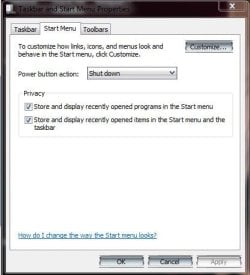
If you click on the Start Button: Right Click the Shut Down button: Select Properties: In the Power button action: Shutdown
 

Attachments

  • Capture.JPG
    Capture.JPG
    30.9 KB · Views: 251

My Computer

Computer type
PC/Desktop
Computer Manufacturer/Model Number
Custom
OS
Windows 7 Ultimate x64
CPU
AMD A10-7850 Quad Core 3.7 GHz
Motherboard
MSI MS-7900
Memory
16 GB
Graphics Card(s)
MSI Radeon R7 250 OC Crossfired with A10 AMD Radeon R7
Monitor(s) Displays
Samsung SyncMaster XL2370HD, ViewSonic VA1912wb
Screen Resolution
1920*1080, 1440*900
Hard Drives
128 GB SSD
512 GB SSD
500 GB HDD
PSU
Corsair CX500
Case
Rosewill THOR V2 BLACK
Keyboard
Logitech G15
Mouse
CMSTORM MS2K
Internet Speed
ATT U-Verse
Antivirus
Microsoft Security Essentials, MalwareBytes
Browser
Firefox (lastest stable) with NoScript
Other Info
Just a humdrum little system.
Welcome to the Forum.

Go to search type the words event viewer and then check the event viewer for errors at the time of the problem. Keep us posted
 

My Computer

Computer type
PC/Desktop
Computer Manufacturer/Model Number
Dell XPS 420
OS
Windows 10, Home Clean Install
CPU
Intel Core2 processsor Q8200(2.33Ghz 1333FSB) Quad Core Tech
Motherboard
Dell
Memory
6 gb
Graphics Card(s)
ATI Radeon 256MB HD3650
Sound Card
Intergrated 7.1 Channel Audio
Monitor(s) Displays
Dell SP2009W 20"
Hard Drives
640 GB Serial ATA Hard drive
Cooling
Fan
Keyboard
Dell USB Keyboard
Mouse
Dell Premium Optical USB
Internet Speed
DSL 2.85
richc46, there are no errors or warnings listed in the viewer near the shutdown/restart glitch time. The only thing that shows up as an information level event was "WLAN AutoConfig service has successfully started". I don't think this is the cause because I then set that service to manual start and the issue remains (also there is no wireless hardware on this machine). I also used the device manager to turn off the networking card's ability to wake the computer, as well as a few other devices, with no luck.

Loki, thanks for the suggestion but that is definitely not the problem.
 

My Computer

OS
Windows 7 Home Premium x64
CPU
Intel Core i7 920
Motherboard
Gigabyte EX58-UD3R
Memory
3 x 2GB CORSAIR XMS3 DD3 1600
Hard Drives
2 x 30GB OCZ Vertex SSD, Raid 0

My Computer

Computer type
PC/Desktop
Computer Manufacturer/Model Number
Dell XPS 420
OS
Windows 10, Home Clean Install
CPU
Intel Core2 processsor Q8200(2.33Ghz 1333FSB) Quad Core Tech
Motherboard
Dell
Memory
6 gb
Graphics Card(s)
ATI Radeon 256MB HD3650
Sound Card
Intergrated 7.1 Channel Audio
Monitor(s) Displays
Dell SP2009W 20"
Hard Drives
640 GB Serial ATA Hard drive
Cooling
Fan
Keyboard
Dell USB Keyboard
Mouse
Dell Premium Optical USB
Internet Speed
DSL 2.85
It has to be a Stop error (AKA Blue Sceen of Death) during shutdown. Try disabling automatic restart by following:

1. Right clicking Computer, then selecting properties.
2. Going to the advance tab and then click Settings under Startup and Recovery (third option)
3. Uncheck Automatically Restart

Shutdown again. Post results. Thanks.
 

My Computer

Computer Manufacturer/Model Number
Asus G73SW-XN2
OS
Windows 2000 5.0 Build 2195
CPU
Intel Core i7-2630QM@2GHz(2.9GHz Turbo Boost) [Sandy Bridge]
Motherboard
Asus G73SW (Intel HM65 Chipset)
Memory
Kingston DDR3 1333 16GB (4GBx4)
Graphics Card(s)
nVidia GTX 460m 1.5GB
Sound Card
EAX Advanced HD 5.0, THX TruStudio
Monitor(s) Displays
17.3 in. primary & 23 in. secondary
Screen Resolution
1920x1080
Hard Drives
Seagate Momentus XT (SATA II) 500 GB @ 7200 RPM
Hitachi (SATA II) 500GB @ 7200 RPM

Non Raid because ASUS was crappy to choose an HM65 Chipset
Keyboard
Built-in 102-Key Backlit Keyboard
Other Info
It's a Laptop.
I have run a virus scan and the malware tool with nothing detected. I tried changing the registry value for PowerdownAfterShutdown to 1 with no luck. Also, disabled restart on recovery in system settings, no result.

Here is how the issue first started, taken from my previous thread that withered into obscurity: http://www.sevenforums.com/crashes-debugging/75480-computer-restarts-few-seconds-after-shutdown.html
Disabling sleep, hybrid sleep and hibernation has resulted in the computer restarting a few seconds after Shutdown. Previously, sleep worked correctly until the computer was revived, at which time there would be black screen, fans full blast and no POST. Hold power button to power off, then powering on would resume from sleep as normal. If hibernation was allowed, the computer would not properly detect my raid0 boot drive and another hard restart was required.
Thank to any/all for the help
 

My Computer

OS
Windows 7 Home Premium x64
CPU
Intel Core i7 920
Motherboard
Gigabyte EX58-UD3R
Memory
3 x 2GB CORSAIR XMS3 DD3 1600
Hard Drives
2 x 30GB OCZ Vertex SSD, Raid 0
Wait, disabled sleep and hibernation?

Try enabling those again (leave hybrid disabled) and just use shutdown and see what happens.

~Lordbob
 

My Computer

Computer Manufacturer/Model Number
Hera
OS
Windows 7 Ultimate x64, Mint 9
CPU
Intel i5-2500k
Motherboard
ASUS P8P67 Pro
Memory
2x 4Gb Corsair VENGEANCE DDR3-1600
Graphics Card(s)
NVidia GeForce N260GTX Twin Frozr
Sound Card
Realtek HD OnBoard Audio
Monitor(s) Displays
ASUS 24" Monitor
Screen Resolution
1920x1080
Hard Drives
G.SKILL Phoenix Series 60GB SATA II MLC Internal Solid State Drive (SSD)
SAMSUNG Spinpoint F3R 1TB 7200 RPM 32MB Cache SATA II
PSU
Cooler Master Real Power Pro 750W
Case
Cooler Master Haf 932
Cooling
Fans
Keyboard
Razer Tarantula
Mouse
Razer Lachesis
Internet Speed
not fast enough
I reset the sleep settings to defaults and tried sleep and shutdown with both hybrid sleep enabled and disabled. Same result: sleep works until wake, where there is a black screen, fans and no post. Shutdown still results in restart within a few seconds.

When hybrid sleep is enabled, the hard restart restores the os session, when it's disabled it's treated like a system crash, as expected for this situation.

I have a suspicion this behavior is related to the ssd raid configuration, powered by the intel x58 express chip, though I am not sure why.. it is the only deviation to an otherwise standard build.
 

My Computer

OS
Windows 7 Home Premium x64
CPU
Intel Core i7 920
Motherboard
Gigabyte EX58-UD3R
Memory
3 x 2GB CORSAIR XMS3 DD3 1600
Hard Drives
2 x 30GB OCZ Vertex SSD, Raid 0
I reset the sleep settings to defaults and tried sleep and shutdown with both hybrid sleep enabled and disabled. Same result: sleep works until wake, where there is a black screen, fans and no post. Shutdown still results in restart within a few seconds.

When hybrid sleep is enabled, the hard restart restores the os session, when it's disabled it's treated like a system crash, as expected for this situation.

I have a suspicion this behavior is related to the ssd raid configuration, powered by the intel x58 express chip, though I am not sure why.. it is the only deviation to an otherwise standard build.
You may have to try disabling that, etc to see if it can work.

~Lordbob
 

My Computer

Computer Manufacturer/Model Number
Hera
OS
Windows 7 Ultimate x64, Mint 9
CPU
Intel i5-2500k
Motherboard
ASUS P8P67 Pro
Memory
2x 4Gb Corsair VENGEANCE DDR3-1600
Graphics Card(s)
NVidia GeForce N260GTX Twin Frozr
Sound Card
Realtek HD OnBoard Audio
Monitor(s) Displays
ASUS 24" Monitor
Screen Resolution
1920x1080
Hard Drives
G.SKILL Phoenix Series 60GB SATA II MLC Internal Solid State Drive (SSD)
SAMSUNG Spinpoint F3R 1TB 7200 RPM 32MB Cache SATA II
PSU
Cooler Master Real Power Pro 750W
Case
Cooler Master Haf 932
Cooling
Fans
Keyboard
Razer Tarantula
Mouse
Razer Lachesis
Internet Speed
not fast enough
Hi, exact same problem here. Any solutions so far? With WinXP 32 everything was fine. System is 100% clean. Problems started right after installing Windows 7.

OS Win7 x64 Ultimate
CPU Intel Q6600 @ 2.4ghz
Motherboard GigaByte GA-EP35C-DS3R (BIOS rev. 4)
Memory 2x OCZ DIMM 4 GB DDR2-800 Kit (2x4GB kit, 8GB)
Graphics Card(s) ATI Radeon HD 3870X2
Sound Card Creative X-Fi Player Monitor(s)
Displays 3x Samsung SyncMaster 913N @ Matrox Tripplehead2Go + 40" Samsung UE40C6000
Screen Resolution 3840x1024 + 1920x1080
Hard Drives 1x 120GB SSD OCZ Vertex 2 (Systemdisk) @ Mainboard, 2x 200GB IDE @ PCI-IDE Interface (Siliconimage 0680), 2x 500GB Seagate SATA @ Mainboard
PSU Chieftec CFT-500A
Case Chieftec Mesh
Cooling Thermalright Ultra-120 eXtreme + Scythe SFlex 1200rpm
 

My Computer

OS
Win7 x64 Ultimate
CPU
Intel Q6600 @ 2.4ghz
Motherboard
GigaByte GA-EP35C-DS3R (BIOS rev. 4)
Memory
2x OCZ DIMM 4 GB DDR2-800 Kit (2x4GB kit, 8GB)
Graphics Card(s)
ATI Radeon HD 3870X2
Sound Card
Creative X-Fi Player
Monitor(s) Displays
3x Samsung SyncMaster 913N @ Matrox Tripplehead2Go
Hard Drives
1x 120GB SSD OCZ Vertex 2 (Systemdisk) @ Mainboard
2x 200GB IDE @ PCI-IDE Interface (Siliconimage 0680)
2x 500GB Seagate SATA @ Mainboard
PSU
Chieftec CFT-500A
Case
Chieftec Mesh
Cooling
Thermalright Ultra-120 eXtreme + Scythe SFlex 1200rpm
I also have the same problem. Brand new system. I do notice that the three of us have OCZ SSD, GigaByte mobo and win 7 64bit....
Has there been any resolution?

OS Windows 7 x64 Pro
CPU Intel i5 2500k @ 3.3ghz
Motherboard GIGABYTE GA-P67A-UD4-B3
Memory G.SKILL Ripjaws Series 8GB (2 x 4GB) 240-Pin DDR3 SDRAM DDR3 1600
Graphics Card MSI N460GTX CYCLONE 1GD5/OC GeForce GTX 460 (Fermi) 1GB
Hard Drive OCZ Vertex 2 OCZSSD2-2VTXE60G 2.5" 60GB SATA II
PSU SeaSonic X750 Gold
Case Rosewill ARMOR Gaming ATX Mid Tower
Cooling COOLER MASTER Hyper 212 Plus
 

My Computer

OS
Windows 7 Professional 64-bit
Resolved!

Yes, I saw someone with the same problem report it was a motherboard defect. I sent my motherboard back to Gigabyte for repair and now it is fixed. They didn't report what the problem was or how it was fixed, but I got the same motherboard back, though much cleaned up; it's possible they replaced some ICs.

I am now running the same configuration with no issues:
Windows 7 Home Premium x64
Intel Core i7 920
Gigabyte EX58-UD3R Motherboard
2 x 30GB OCZ Vertex SSD's in raid 0
3 x 2GB CORSAIR XMS3 DD3 1600
 

My Computer

OS
Windows 7 Home Premium x64
CPU
Intel Core i7 920
Motherboard
Gigabyte EX58-UD3R
Memory
3 x 2GB CORSAIR XMS3 DD3 1600
Hard Drives
2 x 30GB OCZ Vertex SSD, Raid 0
I had this problem and it wasn't computer related! While many are prone to delve into the inner workings of their computers, the problem sometimes lies outside.


My Sleep function used to work perfectly but then suddenly failed to put the computer to sleep. It did go into sleep mode but within a second it would wake and continue. After checking through all the computer options, everything seemed to be in order, so I began to wonder what else I'd done just prior to the problem occurring. The only thing electrical that had been done within the last hour was to plug in a mains adaptor for an electric fence. This shouldn't affect the computer, however, switching off this adapter allowed the computer to work normally, and the sleep function worked exactly as before.


The problem seemed to be transients (or spikes) induced into the house wiring. Lots of things do this, particularly things with large electric motors in them or inductive loads e.g. Fridges, freezers, washing machines, power tools, vacuum cleaners and especially fluorescent lamps and lighting.


Solution: If you do find your computer awaking at odd times, (and the network card has the Magic" packet disabled), check to see what is switching on or off at that moment. Maybe someone switched a fluorescent light on (or off), or the washing machine just started… If the problem is such transients, there are two easy solutions.

One is to buy a mains filter - many of the more specialised extension leads have them built in but they do cost money. The other solution is to take your power from another power point ideally much further away from whatever device is causing the problem.
 

My Computer

OS
vista
computer restarts after shutdown

I had this problem, Dell laptop. I have System mechanic professional premium, so I called them and turned my computer over to them remotely to fix the problem. They called me back about a hour and a half later and said that they could not help me that I had a hardware problem. So I turned the laptop upside down and there is a cover that looks to be about 5" x 5" square held in place with one screw. I removed this cover and it looks like this is where the RAM is located, so I just pressed on them a little and kind of wiggled them to be sure that they were seated good and then blew it out and replaced cover, turned it over and started up the computer then clicked on the internet to be sure it was working. Then clicked off internet and shut down computer in normal mode and it did not restart on its on. It has been a couple of days now is still doing fine. Just thought I would mention this as it worked for me.
 

My Computer

Computer type
Laptop
Computer Manufacturer/Model Number
Dell
OS
windows7 home premium 64 bit
CPU
intel core i5.2430m cpu @2.40 GHz
Memory
600 GB
Back
Top