Computer Says Internet Access But Cannot Surf the Internet.

Tony Noel

New member
Local time
2:36 PM
Messages
6
Location
California
Hello,

I run windows 7 ultimate, and it seems like my wifi is acting up.

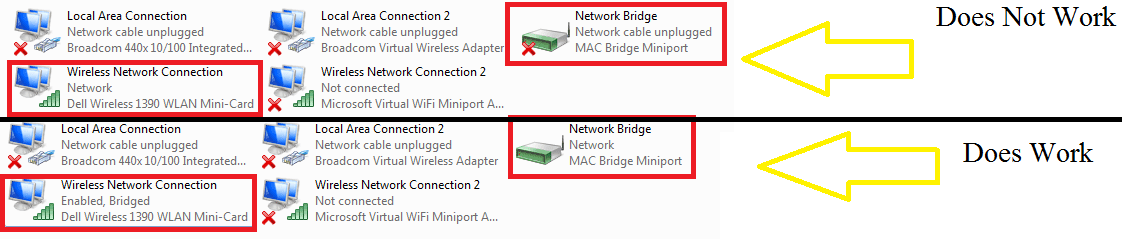
I can access the internet fine when i have a network bridge enabled ( used for xbox 360, but I have a wifi adapter for it now) but when i unbridge the connection it says that I am connected to the internet via wifi card, however I cannot surf the web.
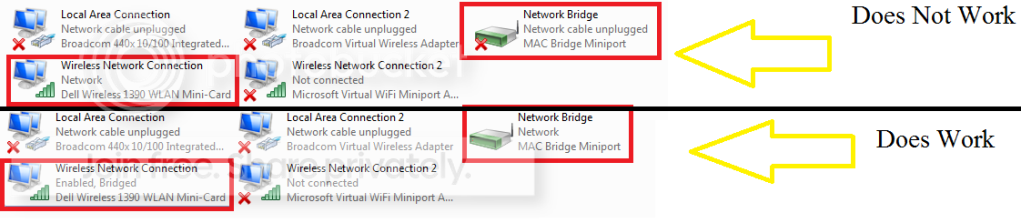
Comparison.png


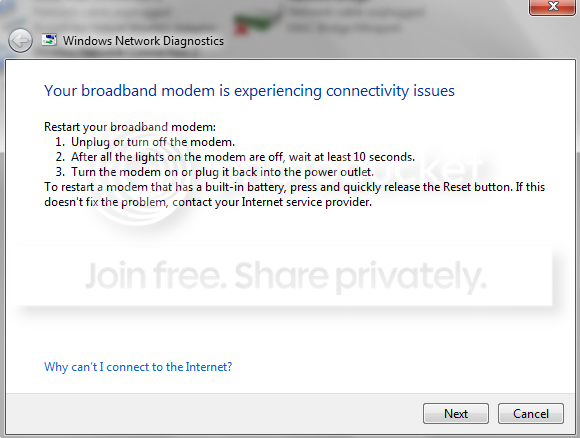
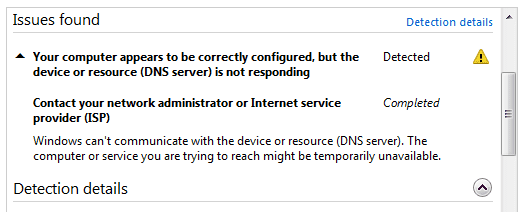
When I go to diagnose the problem on my Wireless Network Connection, I get 2 problems, each appearing different times when I diagnose.

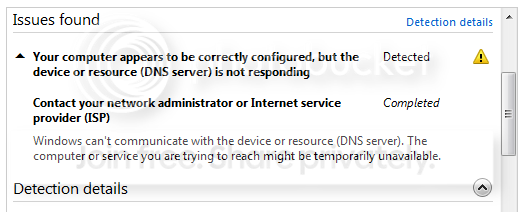
Problem.png


IssuesFound.png

And this problem
Problem2.png


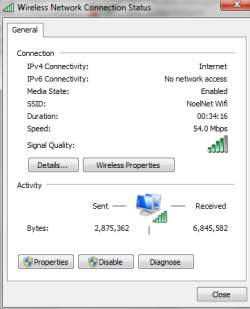
And also for more info, when I view the properties of my wireless adapter it shows the following:
WirelessNetworkConnectionStatus.png

(Note the IPv6 Connectivity Status!)


I really need to figure this out!
I use a Wrt150N Router with the lastest firmware upgrade and a Macbook Pro Computer (wireless), Windows Vista (wireless) & Xp (wired) run fine with it.
Also I can run a wired connection with the computer fine. So I really don't know what the problem is.

Thanks in advance,

Tony N.
 

Attachments
  • Comparison.png
    Comparison.png
    19.1 KB · Views: 12
  • Issues Found.png
    Issues Found.png
    6.2 KB · Views: 8
  • Problem #2.png
    Problem #2.png
    15.9 KB · Views: 8
  • Problem.png
    Problem.png
    18.4 KB · Views: 4
  • Wireless Network Connection Status.png
    Wireless Network Connection Status.png
    11.1 KB · Views: 4

My Computer My Computer

At a glance

Windows 7 Ultimate
Computer Manufacturer/Model Number
Dell Inspiron 1501
OS
Windows 7 Ultimate
Hello,

I run windows 7 ultimate, and it seems like my wifi is acting up.

I can access the internet fine when i have a network bridge enabled ( used for xbox 360, but I have a wifi adapter for it now) but when i unbridge the connection it says that I am connected to the internet via wifi card, however I cannot surf the web.

Comparison.png


When I go to diagnose the problem on my Wireless Network Connection, I get 2 problems, each appearing different times when I diagnose.

Problem.png


IssuesFound.png

And this problem
Problem2.png


And also for more info, when I view the properties of my wireless adapter it shows the following:
WirelessNetworkConnectionStatus.png

(Note the IPv6 Connectivity Status!)


I really need to figure this out!
I use a Wrt150N Router with the lastest firmware upgrade and a Macbook Pro Computer (wireless), Windows Vista (wireless) & Xp (wired) run fine with it.
Also I can run a wired connection with the computer fine. So I really don't know what the problem is.

Thanks in advance,

Tony N.


I am also connecting via bridge. In order to bridge something you have to have 2 diff networks connected (see my snip). There should be the wifi>bridge>something else (in my case wired)

Are all the networks shared? The errors seem to point to DNS. can you type cmd in search>right click and run as admin>IPconfig /all and upload a snip of the output

Ken
 
Last edited:

My Computer My Computer

At a glance

Win 8 Release candidate 8400[email protected]4 gigsNvidia 9600M
Computer Manufacturer/Model Number
HP Pavillion dv-7 1005 Tx
OS
Win 8 Release candidate 8400
CPU
[email protected]
Memory
4 gigs
Graphics Card(s)
Nvidia 9600M
Sound Card
HD built-in
Monitor(s) Displays
17" Wxga
Screen Resolution
1440x900
Cooling
none
Internet Speed
45Mb down 5Mb up
Hello,

I run windows 7 ultimate, and it seems like my wifi is acting up.

I can access the internet fine when i have a network bridge enabled ( used for xbox 360, but I have a wifi adapter for it now) but when i unbridge the connection it says that I am connected to the internet via wifi card, however I cannot surf the web.

Comparison.png


When I go to diagnose the problem on my Wireless Network Connection, I get 2 problems, each appearing different times when I diagnose.

Problem.png


IssuesFound.png

And this problem
Problem2.png


And also for more info, when I view the properties of my wireless adapter it shows the following:
WirelessNetworkConnectionStatus.png

(Note the IPv6 Connectivity Status!)


I really need to figure this out!
I use a Wrt150N Router with the lastest firmware upgrade and a Macbook Pro Computer (wireless), Windows Vista (wireless) & Xp (wired) run fine with it.
Also I can run a wired connection with the computer fine. So I really don't know what the problem is.

Thanks in advance,

Tony N.


I am also connecting via bridge. In order to bridge something you have to have 2 diff networks connected (see my snip). There should be the wifi>bridge>something else (in my case wired)

Are all the networks shared? The errors seem to point to DNS. can you type cmd in search>right click and run as admin>IPconfig /all and upload a snip of the output

Ken

Ken
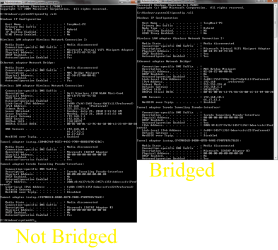
I looked and all that said to be bridged was the Wireless Network Connection (strange?).

I added a picture of the ipconfig /all for both bridged and unbridged (shaded out part of my IP address ;) )

What do you mean are the networks shared?
 

Attachments

  • Bridge versus Unbridged.png
    Bridge versus Unbridged.png
    40.1 KB · Views: 63

My Computer My Computer

At a glance

Windows 7 Ultimate
Computer Manufacturer/Model Number
Dell Inspiron 1501
OS
Windows 7 Ultimate
Really? No one has and ideas or anything at all?!
 

My Computer My Computer

At a glance

Windows 7 Ultimate
Computer Manufacturer/Model Number
Dell Inspiron 1501
OS
Windows 7 Ultimate
The default gateway for your DNS should be the same as your router which is using 192.168.1.1. But instead it's trying to use 192.168.10.1 as the default gateway for your DNS servers. This is a little strange as most systems use the same default gateway for the DNS.

Try manually changing the default gateway for the DNS to 192.168.1.1 ...

You can also try using a different DNS server instead of the 66.17.63.1, maybe try using googles public DNS servers, 8.8.8.8 or 8.8.4.4 . Save your old ISP DNS addresses.

http://code.google.com/speed/public-dns/docs/using.html

Also the IPv6 connection status always says "media disconnected" for everyone. It's only used on the internal network for Homegroups so it's not typically connected to the internet.
 

My Computer My Computer

At a glance

Windows 7 Ult, Windows 8.1 Pro,Q9650-4.275GHz, E8600 4.5GHz, E6750-3.8GHzG.Skill PC2 9600 1200Mhz 5 5 5 15 2TGTX480
Computer type
PC/Desktop
Computer Manufacturer/Model Number
Home built
OS
Windows 7 Ult, Windows 8.1 Pro,
CPU
Q9650-4.275GHz, E8600 4.5GHz, E6750-3.8GHz
Motherboard
Evga 780i FTW
Memory
G.Skill PC2 9600 1200Mhz 5 5 5 15 2T
Graphics Card(s)
GTX480
Sound Card
Asus Xonar D2
Monitor(s) Displays
HannsG
Screen Resolution
1680X1050
Hard Drives
GSkill Phoenix Pro 120GB SSD
PSU
ThermalTake Toughpower 1000Watt modular
Case
ThermalTake XaserV
Cooling
Xigmatek S1283
Keyboard
Logitech G15
Mouse
Logitech G9
Internet Speed
T1
The default gateway for your DNS should be the same as your router which is using 192.168.1.1. But instead it's trying to use 192.168.10.1 as the default gateway for your DNS servers. This is a little strange as most systems use the same default gateway for the DNS.

Try manually changing the default gateway for the DNS to 192.168.1.1 ...

You can also try using a different DNS server instead of the 66.17.63.1, maybe try using googles public DNS servers, 8.8.8.8 or 8.8.4.4 . Save your old ISP DNS addresses.

Using Google Public DNS

Also the IPv6 connection status always says "media disconnected" for everyone. It's only used on the internal network for Homegroups so it's not typically connected to the internet.

How do I change the default gateway for the DNS?
Second, if I change it will I be able to connect to other routers in different places, ie: starbucks, work, other houses?
 

My Computer My Computer

At a glance

Windows 7 Ultimate
Computer Manufacturer/Model Number
Dell Inspiron 1501
OS
Windows 7 Ultimate
Hi... Tony... I was wondering if you ever figured out your problem... I too have Win 7 running on my Laptop... I Got a new router a couple weeks ago... and it was all running fine up till a few days ago... My PC says it is connected and has Internet Access, However, I cannot surf the web... it seems like my torrent client continues uploading, but as far as internet connectivity, thats all I get... funny enough, a couple days ago... it was working again... for like a day... I don't understand this at all...
When I run Diagnostis in IE, I get the same error as you also... either that one or a message saying... that I can't communicate with device... My buddy's laptop connected with out a problem...
 

My Computer My Computer

At a glance

Win 72 gb RAM
Computer Manufacturer/Model Number
Toshiba Satellite
OS
Win 7
Memory
2 gb RAM
Hard Drives
Internal 260gb; external Seagate FreeAgent 500gb
Back
Top