Computer unaware of DVD/CD-ROM drive

jmdraft

New member
Local time
5:55 PM
Messages
31
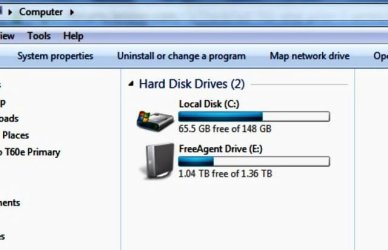
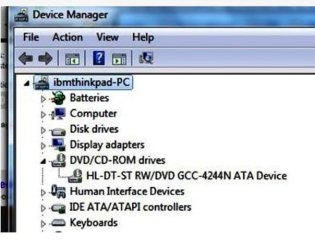
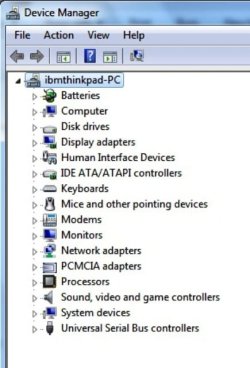
Disk drive used to work and now it’s gone.
I can’t even find any evidence of its existence in the computer.
How can I get to computer to detect it?
And then, how to make it work?
 

Attachments

  • DM + drive.jpg
    DM + drive.jpg
    33 KB · Views: 10
  • DM - drive.jpg
    DM - drive.jpg
    35.6 KB · Views: 10
  • No Disk Drive.jpg
    No Disk Drive.jpg
    25.9 KB · Views: 10

My Computer My Computer

At a glance

windows 7
OS
windows 7
Is it still listed in the BIOS?
 

My Computer My Computer

At a glance

Windows 7 Professional 64bitIntel i7-5960X64GB Corsair Dominator 2400MHz3 EVGA GTX980's
Computer type
PC/Desktop
Computer Manufacturer/Model Number
custom build
OS
Windows 7 Professional 64bit
CPU
Intel i7-5960X
Motherboard
EVGA X99 Classified
Memory
64GB Corsair Dominator 2400MHz
Graphics Card(s)
3 EVGA GTX980's
Sound Card
on board
Monitor(s) Displays
3 Dell E2715H 27"
Screen Resolution
1920x1080 (5760x1080)
Hard Drives
Samsung 950 Pro 1TB M.2 SSD,
Western Digital Black 2TB HDD's x5
Western Digital Black 1TB HDD's x3

PSU
Corsair AX1200i
Case
Corsair 750D
Cooling
Corsair H110i GT
Keyboard
Corsair K70
Mouse
Corsair M45
Internet Speed
250 down/10 up
Antivirus
Microsoft Security Essentials
Browser
IE 11, Google Chrome
I don’t know how to check BIOs.
 

My Computer My Computer

At a glance

windows 7
OS
windows 7
When the computer restarts you should see an option to press F2 or Delete to enter system setup. You need to fill in your system specs and we can be of better help.
 

My Computer My Computer

At a glance

Windows 7 Professional 64bitIntel i7-5960X64GB Corsair Dominator 2400MHz3 EVGA GTX980's
Computer type
PC/Desktop
Computer Manufacturer/Model Number
custom build
OS
Windows 7 Professional 64bit
CPU
Intel i7-5960X
Motherboard
EVGA X99 Classified
Memory
64GB Corsair Dominator 2400MHz
Graphics Card(s)
3 EVGA GTX980's
Sound Card
on board
Monitor(s) Displays
3 Dell E2715H 27"
Screen Resolution
1920x1080 (5760x1080)
Hard Drives
Samsung 950 Pro 1TB M.2 SSD,
Western Digital Black 2TB HDD's x5
Western Digital Black 1TB HDD's x3
PSU
Corsair AX1200i
Case
Corsair 750D
Cooling
Corsair H110i GT
Keyboard
Corsair K70
Mouse
Corsair M45
Internet Speed
250 down/10 up
Antivirus
Microsoft Security Essentials
Browser
IE 11, Google Chrome
Find BIOS is grayed out.
 

Attachments

  • No BIOS.jpg
    No BIOS.jpg
    20.4 KB · Views: 8

My Computer My Computer

At a glance

windows 7
OS
windows 7
You need to go to your PC manufacturers website and find out how to enter the BIOS.

Did you try pressing F2 right after your computer turns on? You can't enter the BIOS when Windows is running.
 

My Computer My Computer

At a glance

Windows 7 Professional 64bitIntel i7-5960X64GB Corsair Dominator 2400MHz3 EVGA GTX980's
Computer type
PC/Desktop
Computer Manufacturer/Model Number
custom build
OS
Windows 7 Professional 64bit
CPU
Intel i7-5960X
Motherboard
EVGA X99 Classified
Memory
64GB Corsair Dominator 2400MHz
Graphics Card(s)
3 EVGA GTX980's
Sound Card
on board
Monitor(s) Displays
3 Dell E2715H 27"
Screen Resolution
1920x1080 (5760x1080)
Hard Drives
Samsung 950 Pro 1TB M.2 SSD,
Western Digital Black 2TB HDD's x5
Western Digital Black 1TB HDD's x3
PSU
Corsair AX1200i
Case
Corsair 750D
Cooling
Corsair H110i GT
Keyboard
Corsair K70
Mouse
Corsair M45
Internet Speed
250 down/10 up
Antivirus
Microsoft Security Essentials
Browser
IE 11, Google Chrome
I’ll try later and get back. Have to start cooking Christmas dinner now. Thanks and have a good one.
 

My Computer My Computer

At a glance

windows 7
OS
windows 7
Back
Top