Computer will not hibernate - screen will just go to sleep

Melissa

New member
Power User
Local time
6:04 AM
Messages
394
Dear Forum,

I am looking at decreasing the power that my lap top is consuming.

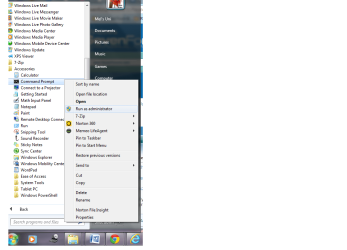
I have googled and seen that you can go into the Administrator command prompt and type powercfg h-on or something to that affect.

I am having issues with going into command prompt and adjusting this - I just typed the above and pressed enter. Nothing changed.

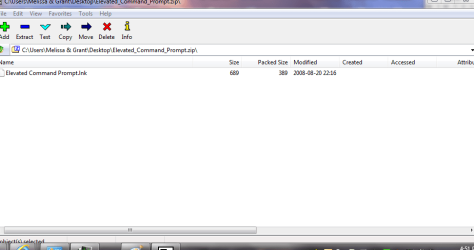
In having trouble in getting in command prompt - I downloaded the following: http://www.sevenforums.com/tutorials/3718-elevated-command-prompt-shortcut.html

I just want my computer after a period of the screen going to sleep to go into hibernation. Then when I come back - it will go into hibernation and gain a screen that informs me that my computer is locked.

I do not know why my computer has had this change.

Windows 7 32 bit Home Premium.

Thanks again
 

Attachments
  • plan - current.PNG
    plan - current.PNG
    53.6 KB · Views: 3
  • Elevated_Command_Prompt - pic.PNG
    Elevated_Command_Prompt - pic.PNG
    16.5 KB · Views: 3
  • hibernate - 1.png
    hibernate - 1.png
    45.7 KB · Views: 3

My Computer My Computer

At a glance

Windows 7 Home Premium 64bitWindows 7 Service Pack 1 x86 NTFS4 GB
Computer type
Laptop
Computer Manufacturer/Model Number
Sony VAIO / E Series VPCEB46FG
OS
Windows 7 Home Premium 64bit
CPU
Windows 7 Service Pack 1 x86 NTFS
Motherboard
AMD E-350 Processor
Memory
4 GB
Hard Drives
500GB
Other Info
1.6GHz
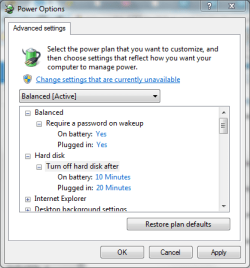
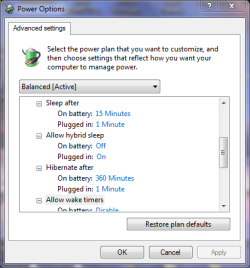
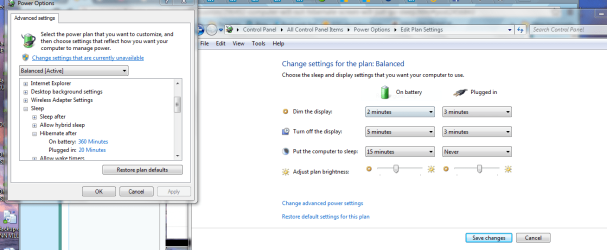
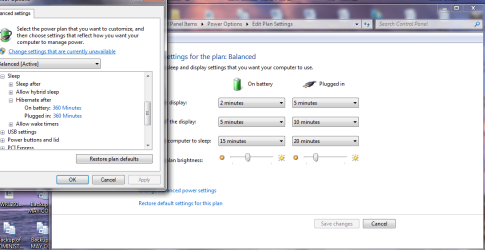
In your screen print it shows to hibernate after 360 minutes (6 hours).
Change those values to something like 30 minutes and see if that works.
Maybe you didn't wait 6 hours?

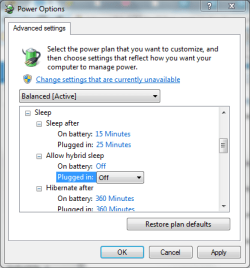
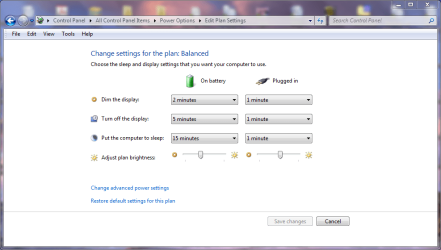
Your laptop should go to sleep after 15 or 20 minutes with your settings in the screen print.
 

My Computer My Computer

At a glance

Multi-Boot W7_Pro_x64 W8.1_Pro_x64 W10_Pro_x6...AMD Athlon II x4 6206GB GSkill DDR2 800AMD 4670 GPU + AMD 4200 IGP
Computer type
PC/Desktop
Computer Manufacturer/Model Number
home built
OS
Multi-Boot W7_Pro_x64 W8.1_Pro_x64 W10_Pro_x64 +Linux_VMs +Chromium_VM
CPU
AMD Athlon II x4 620
Motherboard
Gigabyte GA-MA785G-UD3H
Memory
6GB GSkill DDR2 800
Graphics Card(s)
AMD 4670 GPU + AMD 4200 IGP
Sound Card
on board Realtek ALC889A
Monitor(s) Displays
RCA 40" LCD TV, Insignia 32" LCD TV, HP 15" LCD monitor
Screen Resolution
1680 x 1050
Hard Drives
OCZ Vertex 3 120GB,
Samsung F3 1TB (3),
Several others - WD, Seagate, Hitachi, ...
PSU
Corsair 500 W
Case
Rosewill mid tower
Cooling
CM 90mm rifle
Keyboard
Gyration wireless, Logitech wireless, Dell USB wired
Mouse
Gyration wireless, Logitech wireless, V7 USB wired
Internet Speed
Spectrum - 100Mbps D / 10Mbps U
Antivirus
Avast, MBAM3, EMET, WinPatrol
Browser
Pale Moon, Firefox, IE
Other Info
2 multi-boot PC's
Mainly HTPC/Office/Gen purpose (no gaming).
Trendnet USB KVM.
LG DVD burner/Blue Ray Player.
Tray system for removable SATA backup drives.

Not currently OCd, under-volted.
I use Hybrid sleep, rarely re-boot or shutdown.

Hauppauge HD-PVR, Avermedia PCIe TV Tuner, Hauppauge PCI TV Tuner.
Thank you for looking at my screen snips.

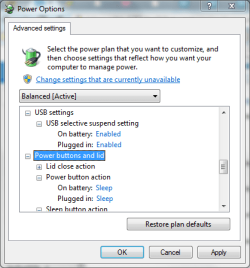
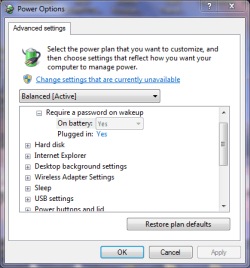
I was having issues in trying to get into command prompt. I will just go to the menu and accessories menu to go to administrator.

I also have taken your advise, as I have left it overnight and the new settings 360 mintes (six hours) and the lap top has not never gone into hibernation.

I thought that I would receive some type of professional assistance - I have been advised to go into the command prompt - but that does not even work.

Thanks again.
 

Attachments

  • POWER ONE.PNG
    POWER ONE.PNG
    16 KB · Views: 7
  • POWER TWO.PNG
    POWER TWO.PNG
    16.3 KB · Views: 7
  • POWER THREE.PNG
    POWER THREE.PNG
    16.1 KB · Views: 7
  • POWER FOUR.PNG
    POWER FOUR.PNG
    16.8 KB · Views: 7

My Computer My Computer

At a glance

Windows 7 Home Premium 64bitWindows 7 Service Pack 1 x86 NTFS4 GB
Computer type
Laptop
Computer Manufacturer/Model Number
Sony VAIO / E Series VPCEB46FG
OS
Windows 7 Home Premium 64bit
CPU
Windows 7 Service Pack 1 x86 NTFS
Motherboard
AMD E-350 Processor
Memory
4 GB
Hard Drives
500GB
Other Info
1.6GHz
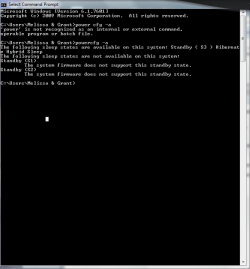
The powercfg command really doesn't give much feedback.
Without "Run as administrator" you should get an error message saying you don't have permission.
With "Run as administrator" there is no error message, but no useful feedback.

To more quickly/easily test this, set your Plugged In Hibernate time to 1 minute.
See if the laptop hibernates after 1 minute.
 

My Computer My Computer

At a glance

Multi-Boot W7_Pro_x64 W8.1_Pro_x64 W10_Pro_x6...AMD Athlon II x4 6206GB GSkill DDR2 800AMD 4670 GPU + AMD 4200 IGP
Computer type
PC/Desktop
Computer Manufacturer/Model Number
home built
OS
Multi-Boot W7_Pro_x64 W8.1_Pro_x64 W10_Pro_x64 +Linux_VMs +Chromium_VM
CPU
AMD Athlon II x4 620
Motherboard
Gigabyte GA-MA785G-UD3H
Memory
6GB GSkill DDR2 800
Graphics Card(s)
AMD 4670 GPU + AMD 4200 IGP
Sound Card
on board Realtek ALC889A
Monitor(s) Displays
RCA 40" LCD TV, Insignia 32" LCD TV, HP 15" LCD monitor
Screen Resolution
1680 x 1050
Hard Drives
OCZ Vertex 3 120GB,
Samsung F3 1TB (3),
Several others - WD, Seagate, Hitachi, ...
PSU
Corsair 500 W
Case
Rosewill mid tower
Cooling
CM 90mm rifle
Keyboard
Gyration wireless, Logitech wireless, Dell USB wired
Mouse
Gyration wireless, Logitech wireless, V7 USB wired
Internet Speed
Spectrum - 100Mbps D / 10Mbps U
Antivirus
Avast, MBAM3, EMET, WinPatrol
Browser
Pale Moon, Firefox, IE
Other Info
2 multi-boot PC's
Mainly HTPC/Office/Gen purpose (no gaming).
Trendnet USB KVM.
LG DVD burner/Blue Ray Player.
Tray system for removable SATA backup drives.

Not currently OCd, under-volted.
I use Hybrid sleep, rarely re-boot or shutdown.

Hauppauge HD-PVR, Avermedia PCIe TV Tuner, Hauppauge PCI TV Tuner.
Thank you for your reply.

I have tried your test and the only result was for the display to dim completely.

I have set my external hard drive to go to sleep after three minutes.

I am quite confused on what I should do - for example - restore to default.

I am not sure regarding - advanced settings in regards to the power settings

I am just after a quick fix so that the lap top can hibernate (flash orange) and then have the behaviour to wake up.

I am so sorry that I did not try the above first. I have been patient up until recently.
 

Attachments

  • advanced one minute.PNG
    advanced one minute.PNG
    18.1 KB · Views: 8
  • advanced one minute - a.PNG
    advanced one minute - a.PNG
    16.9 KB · Views: 8
  • settings - one minute.PNG
    settings - one minute.PNG
    41.6 KB · Views: 2

My Computer My Computer

At a glance

Windows 7 Home Premium 64bitWindows 7 Service Pack 1 x86 NTFS4 GB
Computer type
Laptop
Computer Manufacturer/Model Number
Sony VAIO / E Series VPCEB46FG
OS
Windows 7 Home Premium 64bit
CPU
Windows 7 Service Pack 1 x86 NTFS
Motherboard
AMD E-350 Processor
Memory
4 GB
Hard Drives
500GB
Other Info
1.6GHz
You have sleep after set to 1 minute and hibernate set to 1 minute.
Can you set sleep to never, and leave hibernate set to 1 minute.

Sleep issues can be caused by a video driver.
Can you update your video driver?
 

My Computer My Computer

At a glance

Multi-Boot W7_Pro_x64 W8.1_Pro_x64 W10_Pro_x6...AMD Athlon II x4 6206GB GSkill DDR2 800AMD 4670 GPU + AMD 4200 IGP
Computer type
PC/Desktop
Computer Manufacturer/Model Number
home built
OS
Multi-Boot W7_Pro_x64 W8.1_Pro_x64 W10_Pro_x64 +Linux_VMs +Chromium_VM
CPU
AMD Athlon II x4 620
Motherboard
Gigabyte GA-MA785G-UD3H
Memory
6GB GSkill DDR2 800
Graphics Card(s)
AMD 4670 GPU + AMD 4200 IGP
Sound Card
on board Realtek ALC889A
Monitor(s) Displays
RCA 40" LCD TV, Insignia 32" LCD TV, HP 15" LCD monitor
Screen Resolution
1680 x 1050
Hard Drives
OCZ Vertex 3 120GB,
Samsung F3 1TB (3),
Several others - WD, Seagate, Hitachi, ...
PSU
Corsair 500 W
Case
Rosewill mid tower
Cooling
CM 90mm rifle
Keyboard
Gyration wireless, Logitech wireless, Dell USB wired
Mouse
Gyration wireless, Logitech wireless, V7 USB wired
Internet Speed
Spectrum - 100Mbps D / 10Mbps U
Antivirus
Avast, MBAM3, EMET, WinPatrol
Browser
Pale Moon, Firefox, IE
Other Info
2 multi-boot PC's
Mainly HTPC/Office/Gen purpose (no gaming).
Trendnet USB KVM.
LG DVD burner/Blue Ray Player.
Tray system for removable SATA backup drives.

Not currently OCd, under-volted.
I use Hybrid sleep, rarely re-boot or shutdown.

Hauppauge HD-PVR, Avermedia PCIe TV Tuner, Hauppauge PCI TV Tuner.
I am sorry - I am new to computers.

How do you change the video driver - see it's status etc. When I am not confident in doing something that may cause any issues with my computer.

I guess I will just leave it as it is. As far as I know, the video driver is up to date.

I am sorry to take up your time. Thanks for pointing out the difference in the times that I entered.
 

Attachments

  • big power.PNG
    big power.PNG
    56.6 KB · Views: 0

My Computer My Computer

At a glance

Windows 7 Home Premium 64bitWindows 7 Service Pack 1 x86 NTFS4 GB
Computer type
Laptop
Computer Manufacturer/Model Number
Sony VAIO / E Series VPCEB46FG
OS
Windows 7 Home Premium 64bit
CPU
Windows 7 Service Pack 1 x86 NTFS
Motherboard
AMD E-350 Processor
Memory
4 GB
Hard Drives
500GB
Other Info
1.6GHz
Hi Melissa,
Sleep and Hibernate problems can be very difficult to solve.
Do you have a Tech friend that can help you with this?
Below is a tutorial for troubleshooting Sleep mode problems.
You can look through it to get an idea what is involved for troubleshooting this.
Power Options and Sleep Mode Problems
 

My Computer My Computer

At a glance

Multi-Boot W7_Pro_x64 W8.1_Pro_x64 W10_Pro_x6...AMD Athlon II x4 6206GB GSkill DDR2 800AMD 4670 GPU + AMD 4200 IGP
Computer type
PC/Desktop
Computer Manufacturer/Model Number
home built
OS
Multi-Boot W7_Pro_x64 W8.1_Pro_x64 W10_Pro_x64 +Linux_VMs +Chromium_VM
CPU
AMD Athlon II x4 620
Motherboard
Gigabyte GA-MA785G-UD3H
Memory
6GB GSkill DDR2 800
Graphics Card(s)
AMD 4670 GPU + AMD 4200 IGP
Sound Card
on board Realtek ALC889A
Monitor(s) Displays
RCA 40" LCD TV, Insignia 32" LCD TV, HP 15" LCD monitor
Screen Resolution
1680 x 1050
Hard Drives
OCZ Vertex 3 120GB,
Samsung F3 1TB (3),
Several others - WD, Seagate, Hitachi, ...
PSU
Corsair 500 W
Case
Rosewill mid tower
Cooling
CM 90mm rifle
Keyboard
Gyration wireless, Logitech wireless, Dell USB wired
Mouse
Gyration wireless, Logitech wireless, V7 USB wired
Internet Speed
Spectrum - 100Mbps D / 10Mbps U
Antivirus
Avast, MBAM3, EMET, WinPatrol
Browser
Pale Moon, Firefox, IE
Other Info
2 multi-boot PC's
Mainly HTPC/Office/Gen purpose (no gaming).
Trendnet USB KVM.
LG DVD burner/Blue Ray Player.
Tray system for removable SATA backup drives.

Not currently OCd, under-volted.
I use Hybrid sleep, rarely re-boot or shutdown.

Hauppauge HD-PVR, Avermedia PCIe TV Tuner, Hauppauge PCI TV Tuner.
I totally agree.
Being remote - and not able to know what the user has actually done and go into all the directories, of which I am not confident of going into. I will just make do with what I have.
I do not to alter anything.
This is what I have so far.

Thanks again. I will do a clean install or pay a professional if I can not transfer the issue.

I ave just put the settings to default.
 

Attachments

  • start up.PNG
    start up.PNG
    18.7 KB · Views: 8
  • hibernate - disk clean up.PNG
    hibernate - disk clean up.PNG
    15.2 KB · Views: 7
  • power hibrnate - elevated.PNG
    power hibrnate - elevated.PNG
    9.9 KB · Views: 8
  • Diagnostic Report.doc
    Diagnostic Report.doc
    339.5 KB · Views: 1
  • video.txt
    video.txt
    631 bytes · Views: 1
  • snip.PNG
    snip.PNG
    12.6 KB · Views: 1
Last edited:

My Computer My Computer

At a glance

Windows 7 Home Premium 64bitWindows 7 Service Pack 1 x86 NTFS4 GB
Computer type
Laptop
Computer Manufacturer/Model Number
Sony VAIO / E Series VPCEB46FG
OS
Windows 7 Home Premium 64bit
CPU
Windows 7 Service Pack 1 x86 NTFS
Motherboard
AMD E-350 Processor
Memory
4 GB
Hard Drives
500GB
Other Info
1.6GHz
Power Options

I just waited until I had the next lot of Windows Update and then my settings started working.

I guess the good old turn off and on theory works sometimes.

I am never going to mess with the registry or CMD

Occasionally I have it not hibernating, but it is not remaining on constantly and going to locked state as I wanted.

I mainly think it is because of the external hard drive that I have connected constantly.
 

Attachments

  • power options.PNG
    power options.PNG
    74.8 KB · Views: 1
Last edited:

My Computer My Computer

At a glance

Windows 7 Home Premium 64bitWindows 7 Service Pack 1 x86 NTFS4 GB
Computer type
Laptop
Computer Manufacturer/Model Number
Sony VAIO / E Series VPCEB46FG
OS
Windows 7 Home Premium 64bit
CPU
Windows 7 Service Pack 1 x86 NTFS
Motherboard
AMD E-350 Processor
Memory
4 GB
Hard Drives
500GB
Other Info
1.6GHz
Back
Top